Note that this method does not work with Microsoft Outlook 2010 pre-SP1. See the Outlook 2010 section below for one solution when using Outlook 2010 SP1 (v 14.0.6023.1000 or higher).
It's very easy to accidentally close Outlook by clicking on the X in the upper right-hand corner, instead of the minimum button. There are several ways you can prevent this.
Note: If you have Outlook 2003 or above, its possible to set it to minimize to the tray (notification area). Many users don't realize they enabled this option and think Outlook closed when they minimized it. Look for the Outlook icon in the notification area to verify Outlook is not running minimized.
Unsent method
- Open a new message - enter "Keep Outlook Open" as the subject. Don't enter an address in the To field!
- Save the message to Drafts.
- Drag it from Drafts to the Outbox.
- When you exit Outlook, you'll have the chance to cancel closing Outlook.
In Outlook 2000 Corp, you'll need a POP3 account in the profile for this method to work. (It can use fake server names.)
Outlook 2010
The "Unsent Method" mentioned above does not work in Outlook 2010. In fact, in Outlook 2010 RTM (the released version), there is no unsent message warning, even for "real" messages in the Outbox. SP1 restores the warning but it only works if messages are send-able, meaning the Unsent Method above is still useless.
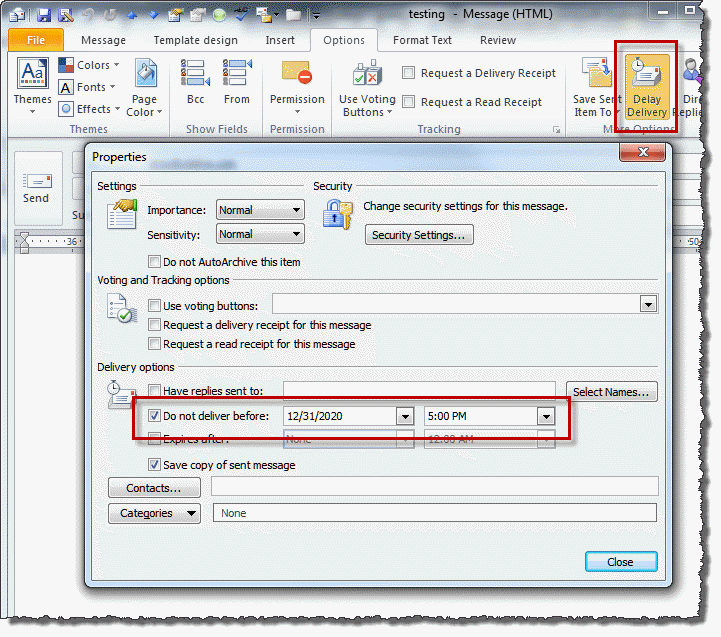
However, you can set Outlook to delay delivery of a message to force the warning and prevent accidental closing. Choose a date in the future in the "Do not deliver before" date field.
Please note, this only works in cached mode. Delayed messages are stored on Exchange server in classic online mode.
To use this method:
- Open a new message
- Enter your own address in the To field
- Enter "Keep Outlook Open" as the subject
- Switch to the Options tab
- Click the Delay Delivery button and enter a future date (a year or so should be fine.)
Tools
OLKeeper reliably prevents users from closing their Outlook and thus possibly missing reminders or e-mails. When you click the X button to close Outlook, OLKeeper asks you what to do: minimize, close or cancel. You will never again miss an important appointment or e-mail just because Outlook was accidentally closed or waste your time with unnecessary, long waits during Outlook restarts. Supports Outlook 2016, 2013, 2010, 2007 (32bit, 64bit) |

Therese Jones says
Hi Diane I accidently request closing of my outlook account. how can I undo this?
Mike says
Hi Diane,
This doesn't seem to be working for me. Running Outlook 2013 on Win7.
I created the subject line only email, then dragged (had to right click drag it) it to outbox where it currently sits. When I hit the x, she closes on me w/ no delay.
Can you help?
Diane Poremsky says
you need to create a message and set a deferred delivery date well into the future - the old drafts method won't work with the newer versions of Outlook.
Administrador Gral says
Sending an email with a delayed sending date worked for me. Thanks.
the Q says
have you considered this option??
https://keepoutlook.sourceforge.net/
Will says
Hi Diane, I normally keep a lot of emails minimized while Outlook 2010 is openned, to review those emails later. By accident, I closed the Outlook, so all the minimized message were closed too... when I reopen Outlook, how can I get the minimized message back? is there a way to reopen those minimized message? By the way, they were not draft, just regular mode view emails... Thank you and God Bless you!
Diane Poremsky says
Outlook doesn't remember the open messages - you'd need to use a macro to remember the open list. It would be fairly complicated/busy because it would have to constantly update. Better would be to use one of the methods to stop you from accidentally closing Outlook.
Jim says
Bless you Diane. The "Hide when minimized" was the issue that was frustrating me. When I unchecked it, I found I had 8 instances of Outlook running, because I would launch it, thinking I was restoring.
Lalitha says
Thanks for the post.... really helpful...
John Livingston says
I have a simpler answer: Don't run Outlook 2007 in full screen mode. Drag the right side of the Outlook window until the Close box goes off the screen. If I can't see it, I can't click it.
Diane Poremsky says
"If I can't see it, I can't click it."
Good point. :)
Ken says
At least once a week I will unintentionally close Outlook, usually after checking calendar, sometimes wrong "X" when closing a message.
The "delayed send" option didn't seem to work, but minimizing an unsent "Do you really want to close Outlook?" message to self allows me to cancel.
Diane Poremsky says
What version of Outlook do you use?
Sunil Joshi says
Thanks Diane, it is working
Aydin says
I don't want to seem like a thread hijacker but since it's related, I'd like to ask if anyone knows of a way to exit Outlook (2010) so that any open email/message windows are restored when you start Outlook.
I'm asking as I usually have 2-3 dozen emails open (work in progress) and it's a real pain to flag each one to followup before exiting, and then opening each one on start.
Diane Poremsky says
Outlook doesn't support it. You'd need to use a script to write all the message id's to a file on close then use a second script to read all the message ids on startup. I don't have any code samples that do this unfortunately.
chris says
Why is there no real option to cancel? This drives me crazy.
Diane Poremsky says
Only Microsoft knows and they aren't saying...
Jeff says
2010 has a task bar, and right clicking has different menu, "Hide when minimized" not there.
When i minimize, outlook closes, it is not hidden. Also within the task bar, you can roll your mouse over an icon for a "preview" again with the outlook icon nothing. Any suggestions?
Diane Poremsky says
What version of Windows do you use? Do other applications preview when you roll the mouse over them?
Anoop says
Hi. you can do it easily in Outook 2007 by selecting the "Hide when minimised" option in the system tray Outlook icon
Alan says
GENUIS....Thanks....I'm always closing outlook and getting into trouble at work.
Amanda says
When I try minimize the Outlook window, outlook closes and I have to re-open. If I 'x' out to cloise it closes.
Any suggestions?
-Annoyed
Diane Poremsky says
Is it closing or minimizing to the tray? Right click on the Outlook icon in the tray and see if Hide when minimized is selected.
winston says
that"s great!!!!!!!!!!
but us older folk are still trying to puzzle out how to open it.
Diane Poremsky says
What happens when you try to open it? I know of two issues - a corrupt navigation pane and compatibility mode.
Nate says
This method does not work in version 14.0.6112.5000 (32-bit)
Account is connected via Exchange Server.
Diane Poremsky says
It only works in cached mode - if you use classic online, Exchange hold s the message until its delivery date.