Standalone users of Microsoft Outlook can password-protect the Personal Folders .pst file used to store all messages and other items.
I was wondering if there is some way that I can configure a password required to open Microsoft Outlook program. The thing is my computer can be accessed by a lot of people in my absence and I want to protect my emails to be read by another person than me.
Yes, it's possible to password-protect your Outlook data file. However, once Outlook is open, anyone with access to your computer can view the contents of your pst file. For this reason, you should secure your computer: when you step away, press Windows key + L to lock it. (And don't share your password!) Each user should have their own Windows user account.
You can password protect a pst, but don't count on the password doing much to protect your data from anyone who has access to your computer.
- If you check the Save this password in your password list box, you won't have to enter a password every time you use the PST file, but anyone walking up to your computer while you're logged on will also be able to use it.
- PST file passwords are very easy to crack, making them less than secure.
- If you use an Exchange Server mailbox security is tied to your Windows login.
Create a Windows 7 user account | Change Windows 7 Account Password
Create and configure user accounts in Windows XP | Change Windows XP Account Password
Note that pst passwords are not very secure as the password is easily removed (password recovery tools are listed in the Tools section at the end of this article.)
Many users ask for a method to password protect individual folders. Outlook does not offer a way to password protect just one folder in the *.pst file. It's all folders or nothing and you need to enter the password to open Outlook. However, the addins listed next will add this capability.
Password Protect Folder Tools
Tools
Use LockOutlook to lock Outlook or specific folders so others can't view your mailbox. Lock Outlook manually as needed or configure it to lock Outlook automatically. Works with Outlook 2002-2013, 32- and 64-bit supported. (Site is in German.) |
To password protect your Outlook *.pst file
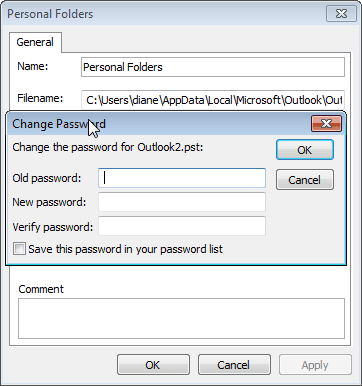 To set a password on an Outlook pst file:
- Go to the top level of your folder, where Outlook Today is found. The folder name may include "Outlook Today" or your email account name.
- Right click on it and choose Properties (Data File Properties in Outlook 2010)
- Click the Advanced button
- Click Change Password
- Leave the Old Password field blank and enter a New Password and verify password.
Leave the Save this password in your password list box unchecked. This prevents the password from being cached (otherwise, anyone can open the data file on this computer). You will need to type it each time you run Outlook.
If you are changing an existing password, type both the old and new passwords in the respective fields. When you open Outlook, you'll be asked for the password. This will prevent someone from opening Outlook and viewing your email. If Outlook is open, anyone using your computer can access your email - to protect it, you either need to close Outlook or lock the desktop when you walk away by pressing the Windows+L key.
Use a password you will remember. See Tools and More Information below for assistance with lost PST passwords.
See Bug in Outlook PST password protection for an explanation of how Outlook saves the password.
Password Protect Data File Tutorial
Password Removal and Recovery Tools
Tools in the Spotlight
PstPassword can recover the PST passwords used on all versions of Outlook, both unicode and ANSI format. Recovers "ghost" passwords that show up after moving a pst file. You don't need to have Outlook installed to use this utility, you only need the original PST file that you locked with a password. Freeware. Version 1.10 |

Tools
Atomic PST Password Recovery restores MS Outlook .pst file password instantly, let you see email messages, contacts and calendar stored in your Personal Folders again. | |
Kernel for Outlook PST Password Recovery is a free tool to recover forgotten password from Outlook PST files. Software takes Outlook PST file as input and does not require Outlook to be installed and configured. It supports password recovery from PST files created in MS Outlook 2010/2007/2003/XP/2000/97. | |
Mail PassView allows you to view and recover lost e-mail account passwords and other account information for Outlook and other mail clients. Freeware. Version 1.43 | |
Outlook Password allows you to recover Outlook PST files' passwords. These PST (Personal Storage) files may be part of your MS Outlook Profile or just independent files - whatever the case, Outlook Password will recover your password. Outlook Password also recovers e-mail account passwords and server settings saved in MS Outlook records. All Outlook versions are supported: 97 - 2016. Windows 10 Compatible. | |
Protected Storage PassView is a small utility that reveals the passwords stored on your computer. The passwords are revealed by reading the information from the Protected Storage. Works with Windows 95/98/ME, Windows NT, Windows 2000 or Windows XP. It does not work with Vista. Version 1.63 | |
Recovers forgotten or lost passwords for mail accounts and also passwords for LDAP services that the Microsoft Outlook mail client uses in its work. Recovers passwords for password-protected Microsoft Outlook data files (files with the *.pst extension). | |
With Stellar Outlook Manager you can back-up your important emails, compact large PST file, identify and remove duplicate emails, get back lost password, repair corrupt PST files and even split large PST files. All these functions can be managed conveniently in just a few clicks through a central console. | |
Professional Outlook password recovery software that easily recovers Outlook password and enables you to unlock your password-protected PST files. The software supports password recovery for MS Outlook 2013, 2010, 2007, 2003, 2002, and 2000. Works well on Windows 10, 8, 7, Vista, Server 2003, XP, and 2000. |
More Information
Remove a Password From a *.PST File
Bug in Outlook PST password protection explains how Outlook saves the password.
For Exchange server mailboxes, see Securing Outlook with Exchange mailboxes

Shiva says
Hi All Actually i want to keep password for the New email which was available in outlook
Diane Poremsky says
I'm not sure I understand. Do you want to save the email password (so it doesn't need to be entered every time)? There is a tickbox to save it on the password dialog.
ed alamares says
Thanks a lot.
CMP says
Sorry, but this solution doesn't work in my Outlook 2007 at all.
Diane Poremsky says
You couldn't password protect your pst file? What happened when you tried?
Ed Jones says
I'd installed Outlook 2007 on a new laptop and couldn't get past the password prompt, either my memory bad or windows 7 did something to the pst file when i brought it in - anyhow the kernel download sorted in 3 minutes after 3 days of frustration - never sure about links to executable files but this article is excellent
thank you
Diane Poremsky says
It's possible that you added a password years ago and told Outlook to remember it. Since you never needed to use the password, it was easily forgotten.
Deepak says
Hi
I had forgot the password. so how can i reset the password.
Please help me with the issue if any budy help me so i can be very thankful
Regards
Venkat