This is a particularly important technique if you are creating meetings in someone else's calendar. As the organizer of the meeting, you don't need to receive a meeting request for your own calendar.
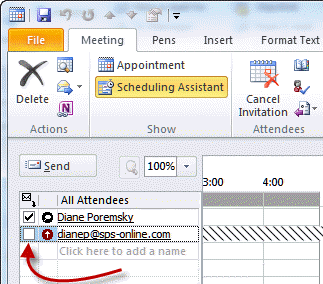
In the Scheduling Assistant page ( Attendee Availability tab in older versions) of a meeting request, everyone's name appears on the list of All Attendees. To the left of each name is an envelope icon. Click that icon, and you'll see two choices -- "Send meeting to this attendee" and "Don't send meeting to this attendee." The default is "Send meeting." So, if you don't want to receive the meeting request in your own mailbox, choose "Don't send meeting."
Note that you cannot remove the check from the Organizers name.

tiah27 says
Hi ! When we uncheck that option, the other attendees still see the name of the person in the meeting request.
this happens only since outlook 2010. before, the name was hidden when uncheck.
do you know why ?
Diane Poremsky says
No, I'm not aware of any reasons why that would happen. I wasn't aware it would hide the names from others - the usual way to hide attendees is to make them a resource (and put something in the location field).