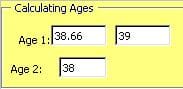
 You can add a custom field to a Microsoft Outlook contact and use the following formula to calculate the age. This code for an Outlook formula field on a Contact item or in a Contacts folder gives you the "real age" for everyone except those fortunate few born on Feb. 29 in a leap year:
IIf([Birthday]<>"None",DateDiff("yyyy",[Birthday],Date())-IIf(DateDiff("d", CDate(Month([Birthday]) & "/" & Day([Birthday]) & "/" & Year(Date())),Date())<0,1,0),"")DateDiff by itself is inadequate, because it will round up if the birthday has not yet occurred during the current year.
A simpler formula, (Now() - [Birthday] ) /365 also rounds the closest whole age: less than 6 months until the next birthday and it reports the age at the next birthday, not the current age.
Updated formula for international date format
Jezz brought it to my attention that Sue's formula is US-centric. It works correctly with mm/dd/yy formatted dates but not when the user is using dd/mm/yy format. There are two ways to fix this: switch the order of the month and date in this section: CDate(Month([Birthday]) & "/" & Day([Birthday]) or use a different formula.
My new formula counts the number of days between the birthday date and now, divides by 365.25 (to account for leap years) and displays the resulting integer. Because it uses serial dates in the calculation, the short date format won't affect the calculation.
IIf([Birthday]<>"None", Int(DateDiff("d", DateSerial(Year([Birthday]), Month([Birthday]), Day([Birthday])), DateSerial(Year(Now()), Month(Now()), Day(now())))/365.25),"")This screenshot displays the results of Sue's formula in the Age column, the results from my new formula in the Age2 column. The Date format in Region settings uses dd/mm/yy format.
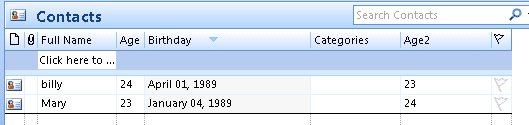
For the example shown in the screenshot, I created a custom formula field in the folder and added the formula to it.
How to create a custom field tutorial
Age template
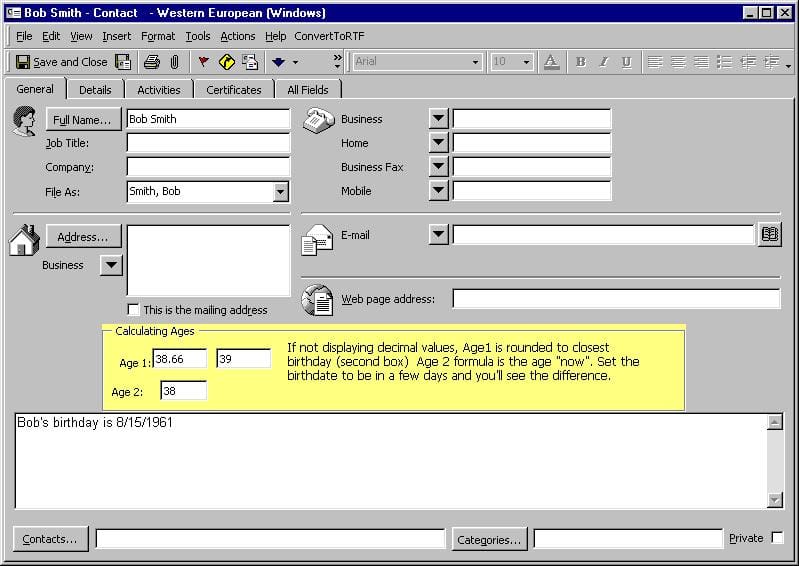
Template showing the Contacts age - because this custom form has a custom field, it either needs to be published or opened using the Choose Form dialog in Outlook 2010 and 2007. Also, the custom fields cannot be added to the "front" page in Outlook 2003 and up. If you edit the first page, the "pretty" contact card reverts to the old contact card look in older versions of Outlook. This sample contact and formula works in all versions of Microsoft Outlook.
See How to create a custom appointment form that displays a person's current age in Microsoft Outlook calendar for a way to add the current age to the subject line of a birthday event.
To apply a custom form to existing contacts, you need to change the message class. You can do this with DocMessageClass, a free utility used to change forms used on Outlook items.

Merlin2001 says
Hi Diane,
thanks for this great look into Outlook's formulas for contact fields!
I was just wondering, at least in Office 2013 you can greatly simplify the formula for the international format to the following form:
IIf([Birthday]="None","",Int(DateDiff("d",[Birthday],Date())/365.25))Since [Birthday] is already a Date, there is no need to de- and reconstruct it in the formula.
(Also a hint for international readers: You will have to replace [Birthday] with your local variant, for example [Geburtstag] in German - just select the appropriate field for your from the dropdown)
Hope this helps! :)
Marcus
Kenneth says
Hi thanks for this - not sure if what i need is possible to do. I would like to create a user defined field called DOB and use it to keep track of certain contacts birthdays. I tried changing Brithday with DOB -yet the formula is not working - i presumed because DOB is a user defined field.
The reason why i don't want to use standard Birthday for certain contacts, is becuase i do not want these contact birthdays to show in my gmail calendar since i sync outlook contacts with gmail.
Is there a solution for this?
Diane Poremsky says
what type of field is your DOB field? i created it as a date/time field and changed birthday to DOB:
IIf([DOB]<>"None",DateDiff("yyyy",[DOB],Date())-IIf(DateDiff("d",CDate(Month([DOB]) & "/" & Day([DOB]) & "/" & Year(Date())),Date())<0,1,0),"")
if it's not a date field, you would need to convert it to dates first. If it's a standard date format (if excel can detect it's a date, it's a standard format), such as 1/1/2015, you can use DateValue([DOB])
BTW, you'd replace each instance of [birthday] in the formula with datevalue[dob]
Kenneth Vassallo says
Hi i did as you said yet it is telling me - two operands exist with no operator in between.
Diane Poremsky says
That means you have and extra minus sign or a syntax error in it.
Nick Nosker says
How about a Length of Tenure showing Years, Months and Days assuming you have a Start Date category setup?
Diane Poremsky says
As long as you have a field ofr it, you would replace [birthday] with the one used for the Start date. If the start date is a date field, it's a simple replacement. If it's a text field, you need to convert it to a date using datevalue: DateValue([startdate]) use that in place of each instance of [birthday]
Phillip Hurst says
Is there a way to implement this on a BCM 2013 contact form? On the form I tried Cuctomize/Form Layout > Add Fields > New, but there is no "formula" option for "Data type". Thanks!
Diane Poremsky says
No, you are limited in the types of fields you can add to a BCM form.
Mark Ogilvie says
Is there a way to generate an MS Outlook report showing clients who will turn 65 or older in the coming month? Goal is to contact them before their birthday. Then once contacted, we wouldn't want to contact them again the following year. Thanks!
Diane Poremsky says
Assuming you have their birthyear, yes. You could either do it in Outlook or Copy/Export contacts to excel and do the calculations there.
In Outlook, you can create a filtered view - use the Advanced tab: Birthday on or before 1/1/1949 and 12/31/1949
Kathy says
Do you have a formula to calculate the number of years for the anniversary field please
Diane Poremsky says
You can convert the birthday formula -just replace birthday with Anniversary in it.
Handsumguy Bo says
To calculate the age of an Outlook contact:
Diane after reading your thoughts and instructions all these years, it's great to hear your voice. I have followed your video and the written instructions; however, after I paste in the formula, when I hit OK, it stops there with the message "unknown field" and I am unable to continue. I am using Outlook 2007 is that the problem or is it something else.
Diane Poremsky says
I see wordpress messed up the code (again) - & quot ; should be double quotes. Ampersand and less than and greater than are also messed up. I'll fix the formulas.