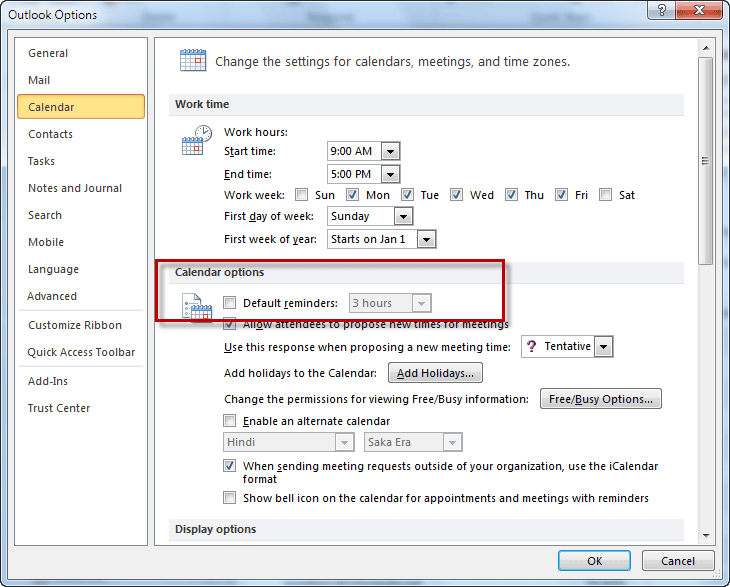
In Outlook 2010 and newer, go to File, Options, Calendar. The Reminders setting is near the top of the dialog. Clear the checkbox to disable reminders on new items.
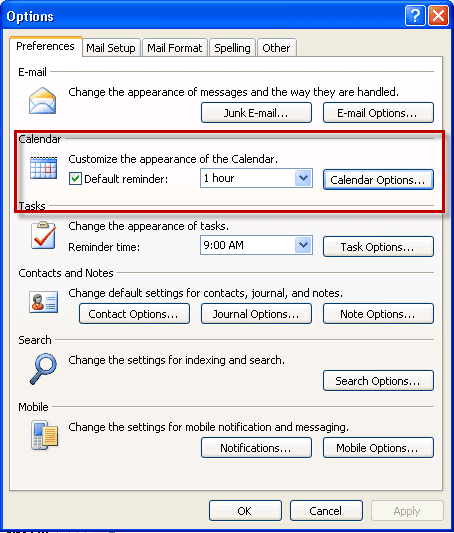
In Outlook 2007 and earlier, choose Tools | Options. On the Preferences tab, clear the Default reminder box.
Meeting Reminders are set for the recipient bug affects meetings sent to Exchange server mailboxes: All day events without reminders are set to use the default appointment reminder, which many people leave at 15 minutes, which can cause issues when synced with smartphones (the reminders for all day events go off at 11:45 pm).

blake says
Hi Diane -
First off, huge thanks, your posts have been a massive help. I'm importing a csv into Outlook calendar and I cannot get the reminder to import correctly - I want it to set to 2 weeks. I've tried many combination of Reminder On/Off set to Yes with Reminder Date (2 weeks prior to Event Date) with and w/o Reminder Time. I've tried '2 weeks' in the Reminder On/Off column. Best I can get is the default 15 minute reminder which I then manually bulk adjusted.
What am I doing wrong?
Pete says
Thank you very much! Even microsoft support didn't know how to change the default reminder!
tom thompson says
what a fantastc and handy option
Allison says
I am sending meeting invites to employee's but as being in construction they are only using outlook on their phones. Some are getting reminders and some are not even though I sent the invite with a reminder. Am I doing some thing wrong or is it required on their end to change a setting some where?
Thanks!
Diane Poremsky says
It could be their phone setting - generally speaking, reminders set in invitations may be overwritten by the default settings on the phone. What phones do they use?
This Guy says
If importing a CSV file to Outlook 2016 365 Calendar, this box must be unchecked for it to properly set the reminder time and reminder date you request.
Meredith Lind says
Diane - are you saying that if my colleagues follow the directions above and clear the checkbox to disable reminders on new items, then when they receive a new meeting notice they WON'T have a reminder? I did test that with my colleague - we both had the box unchecked. When I set up the meeting notice, it DID default with no reminder, but when I sent that to my colleague, she accepted and went to her calendar to open the meeting notice and there WAS a 15 minute reminder. We are on Outlook 2007... any other thoughts?
Diane Poremsky says
That is how it's supposed to work... but there is a bug in some versions of Exchange where the reminder is added anyway. See https://www.slipstick.com/exchange/meeting-reminders-are-set-for-the-recipient/
Meredith Lind says
The issues that Matthew and Jennifer talk about - I am experiencing it. I use Outlook for work and I have unchecked the 'default reminder' under tools so that there is no default reminder. When I start a new meeting, it is correct: no default reminder. However, when I send the meeting notice to a colleague, there IS a default reminder. Both myself and that colleague have turned off the default reminder under tools... how can i get this so that the reminder isn't there??? Very frustrating.
Diane Poremsky says
Your copy shouldn't have a reminder, but the recipient's outlook is setting a reminder based on their default settings. There was a bug where outlook set a reminder even if the default was for no reminder. That bug was fixed as far as i know but some older builds of outlook might be affected.
Sue Goltyakova says
I don't know if it's too late to add a comment here, but I have the opposite problem - I've set the default reminder to 15 minutes, but it only adds the reminder to appointments that I create myself. Any appointment from someone else has no reminder and I've missed several important calls! This has never happened in the past.
juliafischerla says
Sue - I have this problem as well. Did you ever get an answer?
Jennifer says
Having the same issue as Matthew. Outlook is ignoring the check box and continues to add a 15 minute reminder to new appointments. The drop down box should have the option of NONE.
Diane Poremsky says
Are you using Exchange server? There is a bug that adds a reminder to meetings but it was fixed by an update to the exchange server.
Jon H says
Diane,
It is clear that MS limited the ability to set my own defaults for appointments in outlook 2013. why is this, to better serve corporate customers, reduce syncing problems? Any ideas? it is really disappointing that they took away the option to set up my appointment defaults as if they know how everyone likes to work. All the more reason to switch to apple or open source.
Diane Poremsky says
What defaults cant you set? The settings are the same for Outlook 2010 and 2013.
Matthew says
Thank you for this advice. I wonder if you can help with a problem my secretary and I are facing. She and I have unchecked default reminders in File/Options/Calendar (Office 2010), but when she sends a meeting request out to me it adds a 15 minute default reminder. She has full editor rights on my account, so when she simply adds an appointment to my calendar this does not happen. It is something to do with meeting requests only where the factory default seems to kick back in.
Matthew