When you print a series of months from Outlook 2007, you may not get the result you expected (or had with older versions of Outlook).
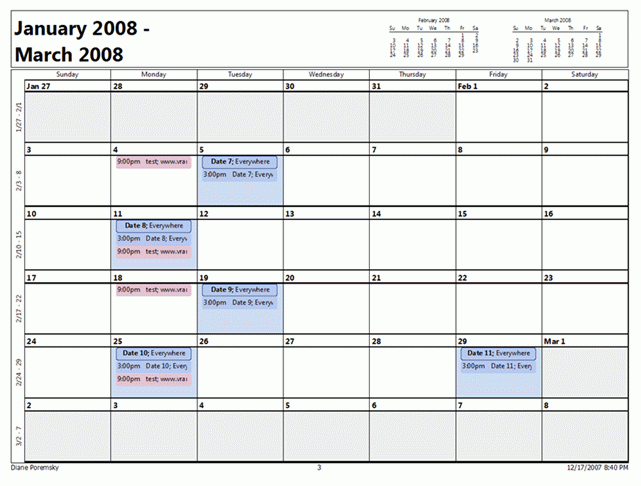 When you start with a month that extends over 6 calendar weeks (such as Dec 2007), each month in the printout will contain 6 weeks. Along with having a week or more of the previous and next months on the page, the calendar name will be in "last month - next month" format.
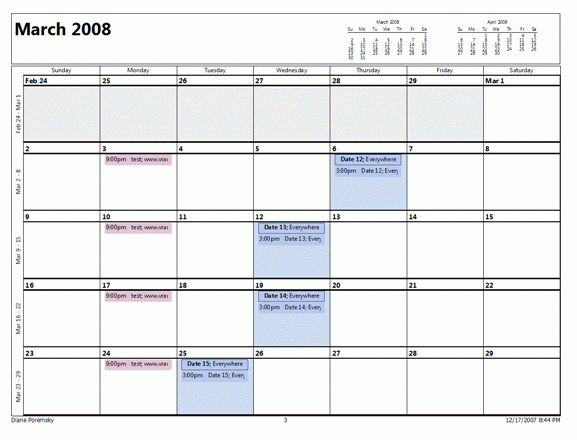 If you begin the series with a month that spans just 5 calendar weeks, all months will span 5 weeks, including those which span 6 weeks. The 6th week is not printed at all.
Although this same "bug" affects live calendars, I believe it's feature of the live calendar. This feature allows you to select 2 - 6 weeks in the navigation calendar and scroll. It's a bug on printed calendars because the result is not what you expect - when you print a series of months with one month per page, you expect the full month on the page.
To view this effect on live calendars, go to a month in Outlook 2007 that spans 6 calendar weeks (and ends before Friday of the last week) - ie, Dec 2007 or March 2008. Then select one of the days of the next month that are in the view. Next, press the next month arrows at the top of the page. Outlook maintains a 6 week display as it scrolls through the months. To do this with 5 weeks, go to a month with 5 weeks and select one of the first days of the next month, then scroll.
The solution? Until Microsoft releases an update to fix this, you'll need to print longer months separately. There are printing add-ins and templates which may meet you needs better.
Calendar Printing Tools for Outlook
Calendar Printing Assistant for Microsoft Office Outlook 2007 prints the Monthly overview calendar in a 5 week format, and the days in the 6th week into the 5th row. All other calendars use 5 or 6 weeks as needed.

Chandra Shinde says
I cannot print the daily and weekly styles in outlook 2007, nor I can preview them. I have tried the "CalendarPrintAssistant" without success. only monthly preview works.
Marty Black says
With my older (XP) version of Outlook I could print a monthly calendar WITHOUT the appointment times....but it would list the actual appointments. With the Windows 2007 version (just installed by my IT dept) the monthly calenders just lists all the times....that's absolutely WORTHLESS to me. HELP!!!
Diane Poremsky says
I recommend trying the Word template - linked in the calendar printing tools. It should be able to print the layout you want. I can't remember exactly how it printed in outlook 2002 - I know there have been a number of changes to the print layout, most for the worst.
Diane Poremsky says
Also, to get rid of the end time, right click on the calendar grid and choose Other settings - deselect the option to Show end times. This will remove them from the printed calendar too.
Gordon says
Unable to print a monthly calendar with details. Rather I get only lines indicating that an appointment is booked. Totally usless for any purpose whatsoever.
Read the instructions to click Folder List on the View menu. However, when I click on View there is no option to select and click on the Folder List.
Another example of Microsoft letting the users do the debugging???????
Anna Nesbitt says
Downloaded calendarprintassistant and re-installed it a few times, does not activate.
Diane Poremsky says
Is it listed on the Start menu, in the folder with the office applications, in the office tools folder ? If you use Windows 7 or Vista, try typing calendar in the Start menu search field - does the Calendar Printing assistant come up?