Several users noticed the Delete button was missing when a message was selected in the Inbox:
I recently switched email accounts and the Delete button is disabled and some of my messages are missing. The Delete key on the keyboard will delete messages, only the Delete button in the Home ribbon and the right-click menu for selected e-mail(s) is disabled.
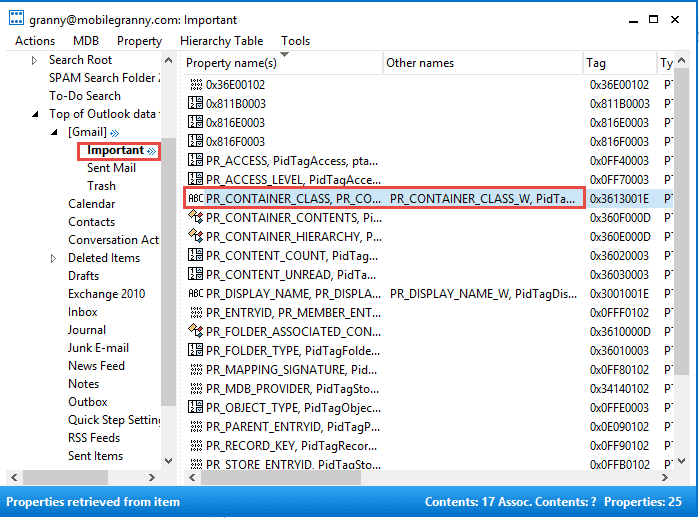
This is the result of exporting an IMAP data file to a pst file or opening IMAP pst files in Outlook. The folders retain certain IMAP features, one of which is the Delete button doesn't work as expected. (In IMAP, it purges.) To fix it, you need to edit the Inbox folder using MFCMAPI and change the PR_CONTAINER_CLASS to IPF.Note.
- Get MFCMAPI . If you have 64 bit office, you need 64 bit MFCMAPI.
- Open MFCMAPI, go to Session, Logon
- Select your profile
- Double-click on the affected data store.
- Expand Root - Mailbox
- Expand Top of Information Store or IPM_Subtree
- Select Inbox
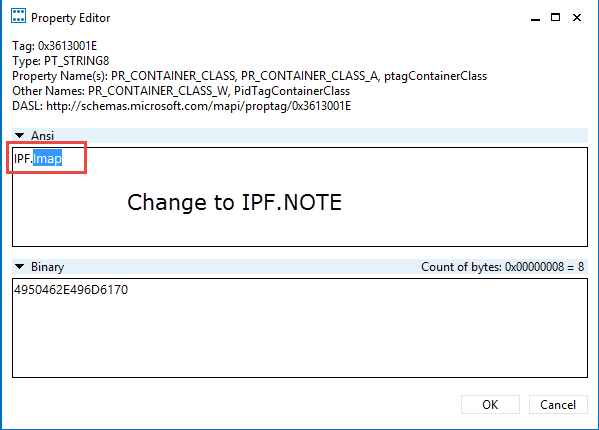
- Look for PR_CONTAINER_CLASS in the right pane, double-click on it.

- Change IPF.IMAP to IPF.Note then click OK to close the dialog.

- Repeat for each folder that was exported from an IMAP data file.
- When you are finished, close the MFCMAPI window, click Session, Logoff on the last MFCMAPI window.
Video Tutorial
Use VBScript to change the selected folder
To use, copy and paste into Notepad then save with the .vbs extension. Select the folder you need to change then double click to run it the VBS.
PropName = "http://schemas.microsoft.com/mapi/proptag/0x3613001E"
Value = "IPF.NOTE"

Set oOutlook = CreateObject("Outlook.Application")
Set oFolder = oOutlook.ActiveExplorer.CurrentFolder
Set oPA = oFolder.PropertyAccessor

FolderType = oPA.GetProperty(PropName)

'MsgBox (FolderType)

If FolderType = "IPF.Imap" Then
   oPA.SetProperty PropName, Value
End If

Tim Revis says
Hi, Diane. I installed Outlook on a new machine and added my IMAP (Google) account. I have 2-3 folders I can't delete or rename. I'm using MFCMAPI but do not have "Top of Outlook Data File" and see all my folders (including the ones I want to delete), but do not have a property called "PR_CONTAINER_CLASS..." listed at all. I have CONTAINER_CONTENTS and CONTAINER_HIERARCHY. I do not see where to change the property value you described from from IPF.MAPI to IPF.NOTE. Can you help, please!?
Owen Clark says
Great article really helped me. Thank you!
Shannon Connor says
Thank you! This worked beautifully.
Ed Connolly says
Once my 72 year old brain got the starting point this was such a helpful process and with an amazing outcome of a fix...thanks so much.
Ed
PS with this outcome, could it be that I have mail on a server somewhere instead of my computer...... One of the strange things I noticed when I installed Office on my new computer was a sudden influx of very old mail as it transitioned from the older computer on POP3 to IMAP
Thanks again
malaka says
Thank You so Much!
Waldemar Kowalik says
This is absolutely amazing. I spent a few evening looking for it. Great. Thank You. God Bless You
Mark says
This was amazing. Worked like a charm. Your instructions were PERFECT. I spent hours searching for a cure to this issue and it only took me 30 minutes to fix. AMAZING. I cannot thank you enough.
J Brown says
These instructions worked perfectly! Thank you.
Mark says
Thanks for posting this. My Delete button was grayed out. It wasn't always like that, but after following your instruction my delete button works again!
Tim says
Many thanks for the very helpful article; I successfully restore the delete button to use. Tim
Theodorus says
Thank you! Thank you! Thank you! After moving/combining thousands of emails from Gmail IMAP to POP3, I started moving emails from the POP3 inbox to folders marked as IMAP and they were 'disappearing'. I thought they were lost forever. I changed the view and it worked, but this permanently and properly fixed all of those subfolders, so that I can use any view I want.
Lisa Richardson says
That was a legend fix - thank you!
papa says
wrong, i never exported anything
Pete Dennen says
I followed the instructions and changed all affected folders from "IMAP" to "Note". However, when I re-opened Outlook 2013, affected folders still showed "IMAP". I thought I had the problem fixed. So frustrated :(
kevin eaton says
it all seems fine. i had 9 mailboxes, and all bar 1 were exported from o2k13, the other being 2k7, all downloaded from gmail via imap. some of them had the property, and had it wrong, and others just didnt have it. i fixed the ones that were wrong with your script, and couldnt do anything with the other ones so i imported them. it seems to all be fine so far....
kevin says
hi diane, firstly thanks for your work above, it has helped me out previously with imap to exchange migrations. however, i have a weird issue. i have 9 mailboxes with thousands of folders from gmail. ive connected via imap, and exported to a pst.for each account. i was then going to use your script to change the PR_CONTAINER_CLASS attribute prior to importing to exchange, but i thought id check one pst file first with mfcmapi manually. the property PR_CONTAINER_CLASS does not exist at all in any of the folders. im in the middle of the migration and the customer is getting a bit twitchy - any chance you can tell me what i should do? the mailbox in question im looking at with mfc mapi was connected to gmail via outlook 2007. is it because of 2007 that this has occurred? thanks in advance for your help.
Diane Poremsky says
Is the exported mail visible? Are the views on the folders the IMAP views? If the exported mail does not have the IMAP views, you don't need to change anything. To the best of my recollection, Outlook 2007 generally exported IMAP correctly.
kevin eaton says
hi diane, thanks for your reply. yes, its all visible and doesnt appear to have any issues. thats great but it also worries me as the pr_container class property is missing. im guessing if the property doesnt exist then maybe outlook decides its a mail folder by default?
Diane Poremsky says
When you create a new pst, the inbox, sent, deleted probably won't have it but everything else should. At least that is how it is in Outlook 2013 - I haven't checked exported pst files or pst files from older versions of outlook. I have some older pst around here somewhere, I'll check them - I know the container class problem is most common with newer versions of outlook so it's possible it's due to a change in the data file structure used with imap.
As long as the pst works correctly in Outlook, I wouldn't worry about it but would do a test import and see if it imports ok. (I fully expect it will.)
Robert A. ober says
Thanks so much, moved a client back to pop3 as OL handles IMAP so poorly and after using your fix the Delete is back.
K says
I have a user experiencing an inability to use the delete or tab key inside outlook 2013. It's an exchange 2012 server and it just started. She has had no issues prior. Running Outlook 2013 through terminal services with server 2012. Over a hundred other users, no one else is having the issue. Any idea.
Diane Poremsky says
I'm assuming that there are no updates waiting to be installed since this is a terminal services situation, because waiting updates can cause issues in Outlook. If the problem just started within the last couple of days or weeks, it could be updated - system restore should fix it, if the problem is related to recent updates and is limited to her workstation.
Sergio says
Worked fine on Outlook 2007. I was using Imap, then switched to Pop3 .
Tanks Diane!
Daniel Michael says
Downloaded 64 bit version, installed and started it. No errors.
1st: didn't know which account to double click on, so I tried doing both.
The instructions above are not accurate with Outlook 2013.
So I improvised as best as I could.
Next, couldn't find the "PR_CONTAINER_CLASS " anywhere in either of them..
Fail.
Diane Poremsky says
What type of email account are you using? The instructions vary slightly depending on the account type.
If you need to fix the folder type due to exporting an imap account, i have a macro that will do the hard part for you - you just need to select the parent folder and run it.
https://www.slipstick.com/developer/code-samples/change-outlook-folder-type-export/
Chris Morris says
What if the folder has a null (empty value). I have 1,400 mailboxes that I'll have to check to see if all the mail folders have the IPF.note value. In checking 6 of them I see folders that don't have this value. What can I do except using the mfcmapi manually to change each one? Thanks.
Diane Poremsky says
Are the null folder type ones mail folders?
I have a macro that can change imap folders to ipf.note - https://www.slipstick.com/developer/code-samples/change-outlook-folder-type-export/ - but it needs to be run on each account/profile. I'm not sure if it's suitable for conversion to vbscript - if so, adding it to a logon script would work.