• Outlook User
  • New Outlook app
  • Outlook.com
  • Outlook Mac
  • Outlook & iCloud
  • Developer
  • Microsoft 365 Admin
    • Common Problems
    • Microsoft 365
    • Outlook BCM
    • Utilities & Addins

To calculate the age of an Outlook contact

Slipstick Systems

› Outlook › People › To calculate the age of an Outlook contact

Last reviewed on February 11, 2018     15 Comments

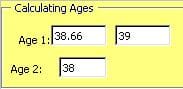
Fields showing a persons ageYou can add a custom field to a Microsoft Outlook contact and use the following formula to calculate the age. This code for an Outlook formula field on a Contact item or in a Contacts folder gives you the "real age" for everyone except those fortunate few born on Feb. 29 in a leap year:

IIf([Birthday]<>"None",DateDiff("yyyy",[Birthday],Date())-IIf(DateDiff("d", CDate(Month([Birthday]) & "/" & Day([Birthday]) & "/" & Year(Date())),Date())<0,1,0),"")

DateDiff by itself is inadequate, because it will round up if the birthday has not yet occurred during the current year.

A simpler formula, (Now() - [Birthday] ) /365 also rounds the closest whole age: less than 6 months until the next birthday and it reports the age at the next birthday, not the current age.

Updated formula for international date format

Jezz brought it to my attention that Sue's formula is US-centric. It works correctly with mm/dd/yy formatted dates but not when the user is using dd/mm/yy format. There are two ways to fix this: switch the order of the month and date in this section: CDate(Month([Birthday]) & "/" & Day([Birthday]) or use a different formula.

My new formula counts the number of days between the birthday date and now, divides by 365.25 (to account for leap years) and displays the resulting integer. Because it uses serial dates in the calculation, the short date format won't affect the calculation.

IIf([Birthday]<>"None", Int(DateDiff("d", DateSerial(Year([Birthday]), Month([Birthday]), Day([Birthday])), DateSerial(Year(Now()), Month(Now()), Day(now())))/365.25),"")

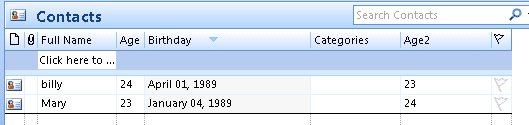
This screenshot displays the results of Sue's formula in the Age column, the results from my new formula in the Age2 column. The Date format in Region settings uses dd/mm/yy format.
Age formula samples

For the example shown in the screenshot, I created a custom formula field in the folder and added the formula to it.

How to create a custom field tutorial

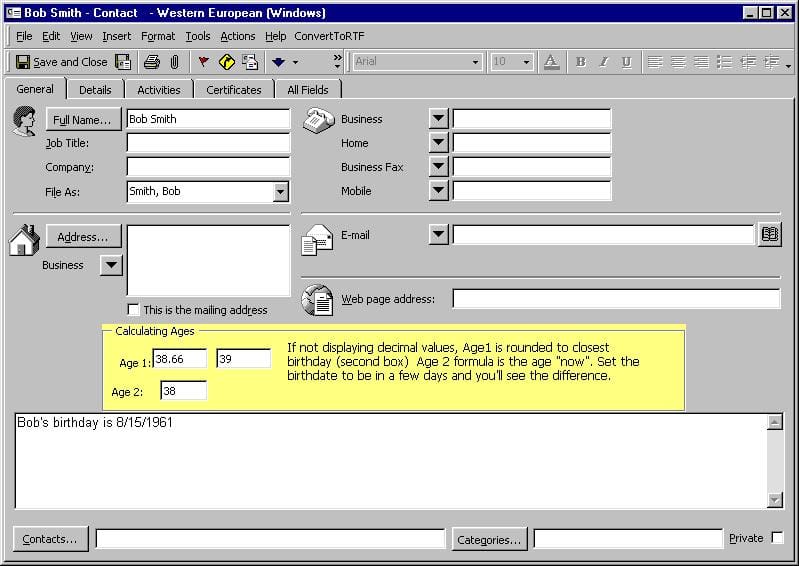
Age template

Template showing the Contacts age - because this custom form has a custom field, it either needs to be published or opened using the Choose Form dialog in Outlook 2010 and 2007. Also, the custom fields cannot be added to the "front" page in Outlook 2003 and up. If you edit the first page, the "pretty" contact card reverts to the old contact card look in older versions of Outlook. This sample contact and formula works in all versions of Microsoft Outlook.
Custom age form

See How to create a custom appointment form that displays a person's current age in Microsoft Outlook calendar for a way to add the current age to the subject line of a birthday event.

To apply a custom form to existing contacts, you need to change the message class. You can do this with DocMessageClass, a free utility used to change forms used on Outlook items.


More Information

  • To Show Birthdays for a Particular Month
  • Create a custom view to list upcoming birthdays (Outlook-Tips)
  • Microsoft Outlook Contacts Issues
  • How to create a custom appointment form that displays a person's current age in Microsoft Outlook calendar
To calculate the age of an Outlook contact was last modified: February 11th, 2018 by Diane Poremsky

Related Posts:

  • Calculate Days Overdue and Days to Complete Tasks
  • Add the Age to a Birthday on Outlook's Calendar
  • Custom fields
    Display a person's age in the subject of a custom form
  • Create a deferred Birthday message for an Outlook Contact

About Diane Poremsky

A Microsoft Outlook Most Valuable Professional (MVP) since 1999, Diane is the author of several books, including Outlook 2013 Absolute Beginners Book. She also created video training CDs and online training classes for Microsoft Outlook. You can find her helping people online in Outlook Forums as well as in the Microsoft Answers and TechNet forums.

Subscribe
Notify of
15 Comments
newest
oldest most voted
Inline Feedbacks
View all comments

Merlin2001
March 6, 2018 5:09 pm

Hi Diane,

thanks for this great look into Outlook's formulas for contact fields!

I was just wondering, at least in Office 2013 you can greatly simplify the formula for the international format to the following form:

IIf([Birthday]="None","",Int(DateDiff("d",[Birthday],Date())/365.25))

Since [Birthday] is already a Date, there is no need to de- and reconstruct it in the formula.
(Also a hint for international readers: You will have to replace [Birthday] with your local variant, for example [Geburtstag] in German - just select the appropriate field for your from the dropdown)

Hope this helps! :)
Marcus

1
0
Reply
Kenneth
October 23, 2015 8:55 am

Hi thanks for this - not sure if what i need is possible to do. I would like to create a user defined field called DOB and use it to keep track of certain contacts birthdays. I tried changing Brithday with DOB -yet the formula is not working - i presumed because DOB is a user defined field.

The reason why i don't want to use standard Birthday for certain contacts, is becuase i do not want these contact birthdays to show in my gmail calendar since i sync outlook contacts with gmail.

Is there a solution for this?

0
0
Reply
Diane Poremsky
Author
Reply to  Kenneth
October 23, 2015 11:55 am

what type of field is your DOB field? i created it as a date/time field and changed birthday to DOB:
IIf([DOB]<>"None",DateDiff("yyyy",[DOB],Date())-IIf(DateDiff("d",CDate(Month([DOB]) & "/" & Day([DOB]) & "/" & Year(Date())),Date())<0,1,0),"")

if it's not a date field, you would need to convert it to dates first. If it's a standard date format (if excel can detect it's a date, it's a standard format), such as 1/1/2015, you can use DateValue([DOB])

BTW, you'd replace each instance of [birthday] in the formula with datevalue[dob]

0
0
Reply
Kenneth Vassallo
Reply to  Diane Poremsky
October 25, 2015 8:01 am

Hi i did as you said yet it is telling me - two operands exist with no operator in between.

0
0
Reply
Diane Poremsky
Author
Reply to  Kenneth Vassallo
October 25, 2015 5:13 pm

That means you have and extra minus sign or a syntax error in it.

0
0
Reply
Nick Nosker
October 19, 2015 9:42 am

How about a Length of Tenure showing Years, Months and Days assuming you have a Start Date category setup?

0
0
Reply
Diane Poremsky
Author
Reply to  Nick Nosker
October 23, 2015 11:57 am

As long as you have a field ofr it, you would replace [birthday] with the one used for the Start date. If the start date is a date field, it's a simple replacement. If it's a text field, you need to convert it to a date using datevalue: DateValue([startdate]) use that in place of each instance of [birthday]

0
0
Reply
Phillip Hurst
January 28, 2015 9:42 am

Is there a way to implement this on a BCM 2013 contact form? On the form I tried Cuctomize/Form Layout > Add Fields > New, but there is no "formula" option for "Data type". Thanks!

0
0
Reply
Diane Poremsky
Author
Reply to  Phillip Hurst
February 9, 2015 10:49 pm

No, you are limited in the types of fields you can add to a BCM form.

0
0
Reply
Mark Ogilvie
August 14, 2014 10:13 am

Is there a way to generate an MS Outlook report showing clients who will turn 65 or older in the coming month? Goal is to contact them before their birthday. Then once contacted, we wouldn't want to contact them again the following year. Thanks!

0
0
Reply
Diane Poremsky
Reply to  Mark Ogilvie
August 15, 2014 12:34 am

Assuming you have their birthyear, yes. You could either do it in Outlook or Copy/Export contacts to excel and do the calculations there.

In Outlook, you can create a filtered view - use the Advanced tab: Birthday on or before 1/1/1949 and 12/31/1949

Filter for age

0
0
Reply
Kathy
July 28, 2014 2:01 pm

Do you have a formula to calculate the number of years for the anniversary field please

0
0
Reply
Diane Poremsky
Reply to  Kathy
July 28, 2014 9:45 pm

You can convert the birthday formula -just replace birthday with Anniversary in it.

0
0
Reply
Handsumguy Bo
April 7, 2014 10:25 am

To calculate the age of an Outlook contact:
Diane after reading your thoughts and instructions all these years, it's great to hear your voice. I have followed your video and the written instructions; however, after I paste in the formula, when I hit OK, it stops there with the message "unknown field" and I am unable to continue. I am using Outlook 2007 is that the problem or is it something else.

0
0
Reply
Diane Poremsky
Reply to  Handsumguy Bo
April 7, 2014 12:39 pm

I see wordpress messed up the code (again) - & quot ; should be double quotes. Ampersand and less than and greater than are also messed up. I'll fix the formulas.

0
0
Reply

Visit Slipstick Forums.
What's New at Slipstick.com

Latest EMO: Vol. 30 Issue 36

Subscribe to Exchange Messaging Outlook


Support Services

Do you need help setting up Outlook, moving your email to a new computer, migrating or configuring Office 365, or just need some one-on-one assistance?

Our Sponsors

CompanionLink
ReliefJet
  • Popular
  • Latest
  • Week Month All
  • Use Classic Outlook, not New Outlook
  • How to Remove the Primary Account from Outlook
  • How to Hide or Delete Outlook's Default Folders
  • Reset the New Outlook Profile
  • This operation has been cancelled due to restrictions
  • Removing Suggested Accounts in New Outlook
  • iCloud error: Outlook isn't configured to have a default profile
  • Adjusting Outlook's Zoom Setting in Email
  • Add Holidays to Outlook's Calendar
  • Online Services in Outlook: Gmail, Yahoo, iCloud, AOL, GoDaddy
  • Opt out of Microsoft 365 Companion Apps
  • Mail Templates in Outlook for Windows (and Web)
  • Urban legend: Microsoft Deletes Old Outlook.com Messages
  • Buttons in the New Message Notifications
  • Move Deleted Items to Another Folder Automatically
  • Open Outlook Templates using PowerShell
  • Count and List Folders in Classic Outlook
  • Google Workspace and Outlook with POP Mail
  • Import EML Files into New Outlook
  • Opening PST files in New Outlook
Ajax spinner

Recent Bugs List

Microsoft keeps a running list of issues affecting recently released updates at Fixes or workarounds for recent issues in classic Outlook (Windows).

For new Outlook for Windows: Fixes or workarounds for recent issues in new Outlook for Windows .

Outlook for Mac Recent issues: Fixes or workarounds for recent issues in Outlook for Mac

Outlook.com Recent issues: Fixes or workarounds for recent issues on Outlook.com

Office Update History

Update history for supported Office versions is at Update history for Office

Outlook Suggestions and Feedback

Outlook Feedback covers Outlook as an email client, including Outlook Android, iOS, Mac, and Windows clients, as well as the browser extension (PWA) and Outlook on the web.

Outlook (new) Feedback. Use this for feedback and suggestions for Outlook (new).

Use Outlook.com Feedback for suggestions or feedback about Outlook.com accounts.

Other Microsoft 365 applications and services


New Outlook Articles

Opt out of Microsoft 365 Companion Apps

Mail Templates in Outlook for Windows (and Web)

Urban legend: Microsoft Deletes Old Outlook.com Messages

Buttons in the New Message Notifications

Move Deleted Items to Another Folder Automatically

Open Outlook Templates using PowerShell

Count and List Folders in Classic Outlook

Google Workspace and Outlook with POP Mail

Import EML Files into New Outlook

Opening PST files in New Outlook

Newest Code Samples

Open Outlook Templates using PowerShell

Count and List Folders in Classic Outlook

Insert Word Document into Email using VBA

Warn Before Deleting a Contact

Use PowerShell to Delete Attachments

Remove RE:, FWD:, and Other Prefixes from Subject Line

Change the Mailing Address Using PowerShell

Categorize @Mentioned Messages

Send an Email When You Open Outlook

Delete Old Calendar Events using VBA

Repair PST

Convert an OST to PST

Repair damaged PST file

Repair large PST File

Remove password from PST

Merge Two Data Files

Sync & Share Outlook Data

  • Share Calendar & Contacts
  • Synchronize two computers
  • Sync Calendar and Contacts Using Outlook.com
  • Sync Outlook & Android Devices
  • Sync Google Calendar with Outlook
  • Access Folders in Other Users Mailboxes

Diane Poremsky [Outlook MVP]

Make a donation

Mail Tools

Sending and Retrieval Tools

Mass Mail Tools

Compose Tools

Duplicate Remover Tools

Mail Tools for Outlook

Online Services

Calendar Tools

Schedule Management

Calendar Printing Tools

Calendar Reminder Tools

Calendar Dates & Data

Time and Billing Tools

Meeting Productivity Tools

Duplicate Remover Tools

Productivity

Productivity Tools

Automatic Message Processing Tools

Special Function Automatic Processing Tools

Housekeeping and Message Management

Task Tools

Project and Business Management Tools

Choosing the Folder to Save a Sent Message In

Run Rules on messages after reading

Help & Suggestions

Submit Outlook Feature Requests

Slipstick Support Services

Buy Microsoft 365 Office Software and Services

Visit Slipstick Forums.

What's New at Slipstick.com

Home | Outlook User | Exchange Administrator | Office 365 | Outlook.com | Outlook Developer
Outlook for Mac | Common Problems | Utilities & Addins | Tutorials
Outlook & iCloud Issues | Outlook Apps
EMO Archives | About Slipstick | Slipstick Forums
Submit New or Updated Outlook and Exchange Server Utilities

Send comments using our Feedback page
Copyright © 2025 Slipstick Systems. All rights reserved.
Slipstick Systems is not affiliated with Microsoft Corporation.

:wpds_smile::wpds_grin::wpds_wink::wpds_mrgreen::wpds_neutral::wpds_twisted::wpds_arrow::wpds_shock::wpds_unamused::wpds_cool::wpds_evil::wpds_oops::wpds_razz::wpds_roll::wpds_cry::wpds_eek::wpds_lol::wpds_mad::wpds_sad::wpds_exclamation::wpds_question::wpds_idea::wpds_hmm::wpds_beg::wpds_whew::wpds_chuckle::wpds_silly::wpds_envy::wpds_shutmouth:
wpDiscuz

Sign up for Exchange Messaging Outlook

Our weekly Outlook & Exchange newsletter (bi-weekly during the summer)


Please note: If you subscribed to Exchange Messaging Outlook before August 2019, please re-subscribe.

Never see this message again.

You are going to send email to

Move Comment



























