November 17 2017 Focused Inbox is finally coming to Outlook 2016 for Windows, in Version 1711 for all Office 365 Business/Enterprise subscribers and Outlook.com. The Targeted and Semi-annual builds provide Office customers a slower update path from Monthly. Users on the Targeted channel will have it in Outlook desktop in March 2018, while the Semi-Annual channel will get it in the semi-annual channel update released after March 2018.
Users seem to either love Focused Inbox or hate it and the ones who love it can’t wait to have it working in Outlook.
The delay is due to client-side requirements. Focused Inbox initially required Office 365 modern authentication be enabled and Outlook version 1703 or higher. Modern auth is now enabled by default on new tenants but if it was disabled by the administrator, users won’t have the focused inbox option in Outlook with version 1710 or older.
Starting with Version 1711 (build 16.0.8730), modern authentication is no longer a requirement and all Office 365 and Outlook.com users will have focused inbox capability in Outlook 2016 for Windows.
Also See "Using the Focused Inbox in Outlook Apps"
When the Focused Inbox is available in your account, Outlook will pop up a dialog alerting you to the new feature and ask if you want to use it.
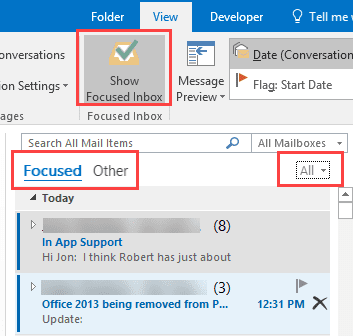
If you are unfamiliar with the Focused Inbox, Outlook sorts your mail by what it thinks is important, classifying some mail (mostly bulk mail) as the less important, "Other". This is a special view, not a folder, and the mail remains in the Inbox.
The Focused Inbox in Outlook 2016 for Windows. (Click on All to select Unread)
The Focused Inbox in Outlook 2016 for Mac. In this mailbox, there are 3 new messages in the Other tab.
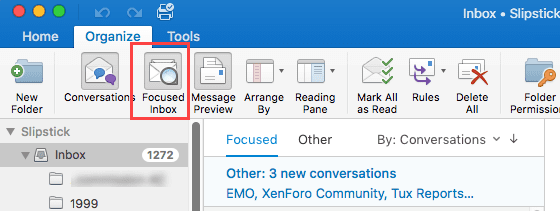
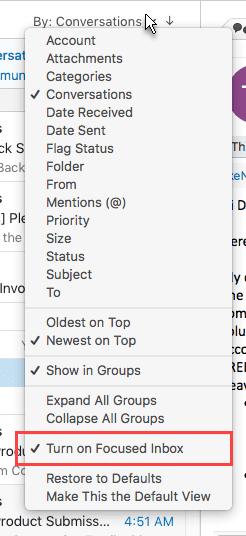
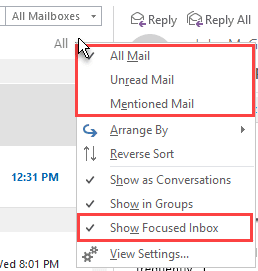
If you say Yes then change your mind, you can turn the Focused Inbox off from the View tab in Outlook for Windows or on the Organize tab in Outlook for Mac. It's also on the All menu (formerly By [field]) in Windows and on the By: [field] menu in Mac.
If messages are misclassified as either Other or Focused, right click on the message and choose Move to the [Focused or Other].
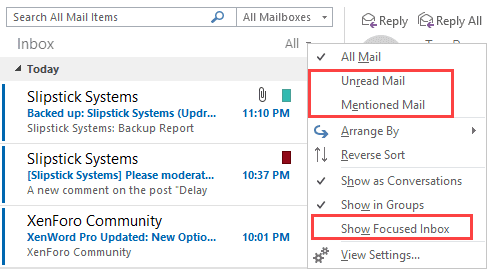
When Focused Inbox is turned off, the only tab you'll see is Inbox; Unread and Mentioned were removed as tabs but are on the All menu (and work with Focused Inbox enabled).






























Hi Diane,
Me and my customers have our mailboxes on Intermedia's hosted Exchange. We want to try/use Focused Inbox on Outlook for Windows & MacOS. We have the correct versions of Outlook to support FI.
BUT Intermedia is telling me that FI is NOT compatible with 3rd party hosted Exchange... it only works with Office 365 Exchange Online mailboxes hosted directly with MS.
Do you know if there's any truth to that? I couldn't find a definitive answer Googling.
I tried adding the FI button manually to my Outlook 2016 for Windows, as you suggested in an earlier comment... no luck.
The really puzzling thing is that FI is working FINE for my Outlook app for iOS. Which seems to tell me that my Intermedia hosted Exchange mailbox DOES in fact support FI... but only for iOS, not for Win/MacOS.
Thanks as always!!!!
Intermedia is correct - it only works with Office 365. If you use their hosted exchange, you won't have focused inbox (at least not now - a future version of exchange may support it for on-prem). I believe they also resell office 365, so it should work in those plans.
The ios app does it a little differently - focused is handled in part by azure. In Outlook, the Exchange server sorts the mail (i beleive it is a little more accurate too.)
Thanks Diane. I got a similar answer from Intermedia about FI on Outlook iOS app... but they thought the filtering was all on the client-side. I think your explanation of it being done in the cloud seems more plausible.
As for the Outlook Win/Mac version of FI, I'm getting the impression that that may not be a "benign" display filter, like the iOS version seems to be, but rather a more active, "permanent" moving of messages to folders like "Focused".
If so, I/we may have to re-evaluate our interest in FI. I was assuming/hoping that MS's "Focused Inbox" would be handled similarly to Gmail's "Priority Inbox" but I guess not?
>> As for the Outlook Win/Mac version of FI, I'm getting the impression that that may not be a "benign" display filter, like the iOS version seems to be, but rather a more active, "permanent" moving of messages to folders like "Focused".
Messages aren't 'moved', they are just 'tagged' as less important and shown on the other tab. Turn off FI and everything is in one folder. This should be identical to the Priority inbox in gmail. (For me, this is a big plus over clutter - i hated messages being moved to a new folder. However, others prefer clutter because it moves messages..)
I agree, I would hate that too! And I'm a little more enthused now, hearing you say that messages are tagged not moved, so that it's ultimately just filtering what you see, and you can always turn filtering off to see your entire Inbox again. Too bad the folks from Intermedia don't seem to understand fully how FI works... I guess that's because MS hasn't allowed FI to work for traditional hosted Exchange.
>> I guess that's because MS hasn't allowed FI to work for traditional hosted Exchange.
it needs built into it and may require another server (or a better server) to process the mail - so even if they add it, on-prem/hosted systems may bulk at adding it. I am expecting that it may be in the next version of exchange - which generally means you might see it at intermedia in 2 years. :(
Outlook 2016. I don't have any option to disable this Focused inbox "feature" as the article describe. I can disable it in Webmail but I never use Webmail.
Hmm. If you have the focused folders, you should have the button to toggle it off and on. If not, you'll need to log into webmail to turn it off. sorry.
Maybe I was unclear but I've already turned it off in webmail
That change *should* sync to outlook.
Check the registry do you have this value?
[HKEY_CURRENT_USER\Software\Microsoft\Office\16.0\Outlook\Profiles\Outlook\1c82ff156a7a334bbc57d1ccfe60a690]
"000b04a5"=hex(3):00,00
it appears to be 01 00 if focus is on, but I'm not sure if changing it in the registry makes a difference.
Thanks for the suggestion. The key 1c82ff156a7a334bbc57d1ccfe60a690 didn't exist. After creating it and the binary 000b04a5 with value 01 00 or 00 00 it made no difference.
I wasn't sure if it would work, but did you restart outlook? I think the key is the same for all computers (i checked 3 here all with the same mailbox), but its possible its unique for each mailbox.
Try resetting the View tab - File, options, customize ribbon. Select the view tab then Reset > only selected. If that is greyed out, its because outlook didn't detect any customizations.
Have you tried adding the Focused button to the ribbon? Look for the Focused button in the view tab under Main tabs - add a new group to a tab (Home or View) then add Focused to it.
Nice idea but I have no Focused anything in Outlook except the not-so-good-idea Focused inbox. I cannot even add a screenshot with IE11. Might be some serious trouble with my computer.
its possible you have an older version that doesn't support focused, but then you wouldn't have the focused tab. I would try the quick repair and see if that fixes it.
>> I cannot even add a screenshot with IE11.
to the comments here? Do you get any error messages? (I'm using Edge on this computer and it works.)
This morning I suddenly had the option to deselect the focused inbox.
I set the binary 000b04a5 with value 01 00 (see above). Restarted the computer just to clear all caching. The option is still there in Outlook so it seems that this registry key kontrols something else.
it flipped back and forth from 00 00 to 01 00 when i tested it, but changing it didn't flip it in the mailbox, so i think it needs more than the key and restarting outlook. An update may have fixed it for you - i saw someone else this morning said he finally got focused inbox in outlook (he's been waiting 'forever' for it). The only weird part was that it was on for you without the focused button to turn it off.
Do you know if the March 2018 update is needed for both PC and Mac versions of Outlook 2016?
I believe that is PC-only as they are on two different cycles. I thought it was in the mac version for all users now (I use the insider build of office for mac, so i cant verify if the 'general availability" Mac version has the focused inbox.)
Is there a Search function in this website? So I can search answers for my question
There is a google site search in the left side bar - if you use a smaller screen, the sidebar is at the end of the article. You can also search from https://www.slipstick.com/search/
I appreciate your work keeping the world on top of Outlook changes. I have been using and really liked the Clutter feature since my hotmail account was migrated to the Office 365 platform. Now I am having trouble with Focused inbox. My scenario, Office 365 Home account holder using a very old hotmail address, Outlook 2016 on Win10, default Mail app on Samsung Android phone. Yesterday, I accidentally opened the Win10 Mail app on my PC. It popped up a message that said "your account is enable to use the new Focused Inbox". I'm familiar with it since I've tried the Outlook App on Android, but I preferred the stock mail app on android and using Clutter (I like that it's was a separate folder, not a mail "flag"). I clicked the "Try Focused Inbox" option in the Win10 Mail app since I know Clutter was going away anyway and that I'd need to switch. That click has me in a weird, semi-converted to Focused Inbox state. -- Win10 Mail app - has Focused/Other tabs, I can use Settings to toggle Focused Inbox. I do not use and don't plan to use this app. -- Outlook 2016 on PC -… Read more »
>> -- Outlook 2016 on PC - I DO NOT have the option to turn on Focused Inbox,
At this time, focused inbox only works in outlook desktop with business accounts as it requires a security configuration on the server. They are working on a solution that will allow it to work with the consumer accounts but I don't have an ETA for it.
>>-- Outlook.com - I DO NOT have the setting option to toggle Focused Inbox.
is it still now working? There was a problem similar to what you describe where focused disappeared. It was fixed.
I have Focused Inbox on Outlook.com now. That changed after I sent my comment to you.
Does MS intent to make Focused Inbox work of O365 Home/desktop Outlook 2016 users?
Yes, they plan to make it available for Outlook.com accounts in Outlook desktop, no ETA though. It requires some magic on the backend of the server so it will be limited to outlook.com & office 365 exchange accounts.
Wrote a script to detect this on the client side if ever needed since that GUID will change per user path.
Also if you change from 00,00 to 01,00 with outlook closed it will change focused inbox to normal and vise versa. You could leverage this script to also be used as the bases to change that value, but you must do it while outlook is closed. Otherwise this as a whole is controlled at the tenant level.
I know this post was old but wanted to add to the value and show you were on the right track and it helped me as we had a major incident in my place of employment where a user didnt respond to a critical e-mail in due time.
$Outlook = "HKCU:\Software\Microsoft\Office\16.0\Outlook"
$Profile = (Get-ItemProperty -Path $Outlook -Name "DefaultProfile").'DefaultProfile'
$CurrentPfile = "$Outlook" + '\Profiles\'+ "$Profile" + '\*'
$FocusValue = (Get-ItemProperty -Path $CurrentPfile -Name "000b04a5" -ErrorAction SilentlyContinue).'000b04a5'
If ($FocusValue -eq "1"){
write-host "Not Focused"
}Else{
write-host "Focused"
}
My Outlook 2019 is showing the reverse:
1 = Focused
0 = Not focused.
Whilst this is a useful indicator, it appears that the setting it reset each time Outlook is restarted as its gaining the setting from Office 365 itself.
It may be that the only way to get rid of it is organisation wide, at the Office 365 end, via powershell
I wonder if the issue is this.... There is a new feature that was enabled by default that syncs settings in the cloud and it is causing changes to revert when you restart outlook.
See if you have this setting in File > Options > General.
In the Cloud Storage Options, remove the check from "Store my Outlook settings in the cloud"
I have more information in this article - https://www.slipstick.com/outlook/outlook-saving-preferences/
BTW, yes, you are correct, it's backwards. 1 is focused, 0 is not focused.