Do you need to view several months in Outlook? While Outlook doesn't have a Yearly view or even a multiple month view, there are several ways to view multiple months at once.
- View additional calendars in the navigation pane
- Use VBA to create an HTML planner-style calendar
- Use Outlook's Share by Email feature
View additional calendars in the navigation pane
Drag either the Navigation pane separator bar or the To-do bar / Taskpad bar inward to show more navigation calendars. If needed, slide the Taskpad down. In Outlook 2007/2010, right click on the To-Do Bar title and choose Options to change the number of calendars. Unfortunately, Outlook 2013 /2016 do not support setting a number of calendars in the To-Do bar; the navigation calendars will show as many as your screen supports.
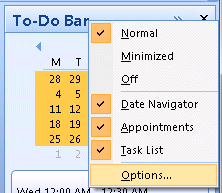
The number of calendars you'll see depends on the size of Outlook's main window and your screen resolution.
In older versions of Outlook, just over half of the Outlook window can be navigation calendars, in Outlook 2007 and newer, you can use just under half the Outlook window.
Outlook 2013 is very limited in the number of navigation calendars it can display. The To-Do Bar can display very few calendars, but you can display more of the navigation calendars.
Video Tutorial
Planner style HTML calendar
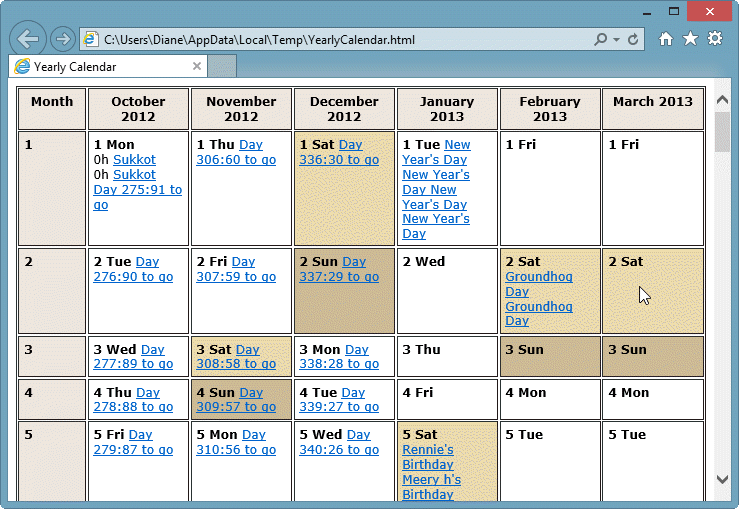
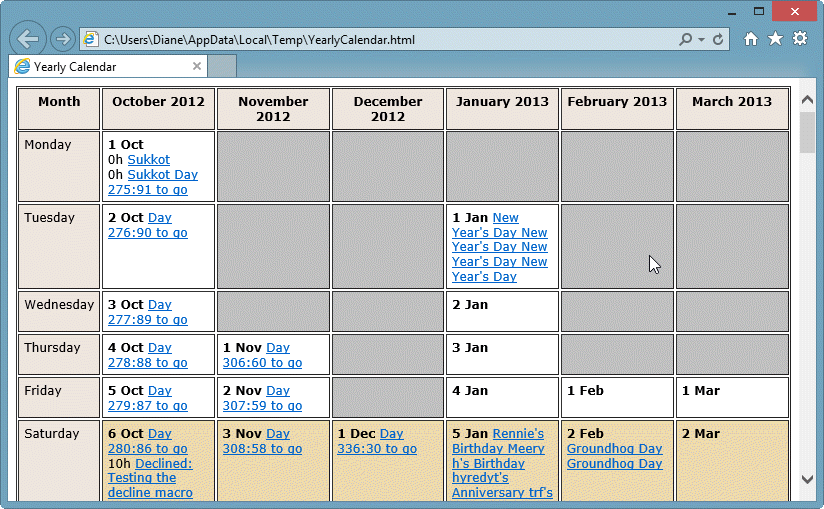
If you want a planner style calendar, you can use VBA to create an HTML web page. The script you need is at Yearly Calendar view for Outlook. This script will create a page with one or more months in vertical format, arranged either by days of the week or by day of the month as seen in the screenshots below. You can edit the code (it's well marked) to display only all day events, filter by calendars and include items marked private. The VBA version was tested in Outlook 2013. It should work in all older versions of Outlook.
A VB script version of the macro is available at Yearly Calendar view VBScript version. The script has better colors and creates 3 HTML calendar: traditional weekly format, months across the top with dates down the side, plus a horizontal version with dates across and months down. This works in Outlook 2013 but categories are not supported (in Outlook 2013 and up).
Share by email
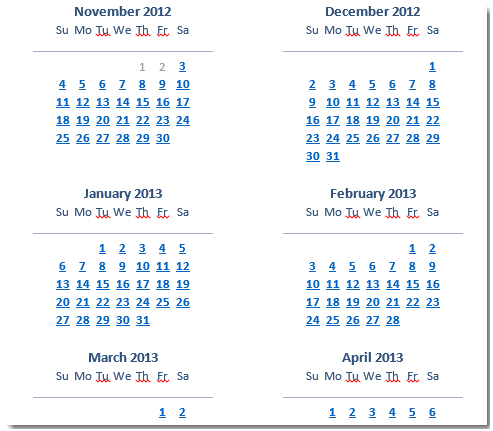
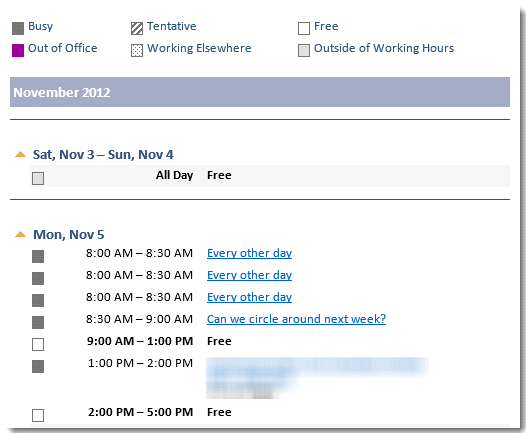
Use this method to create a quick HTML calendar in Outlook 2007 and up. The resulting message contains up to six monthly calendars, a list of daily appointments, and full details (if selected). As seen in the screenshots below, the dates are hyperlinked to the daily appointment lists and the appointments are hyperlinked to the details.
To create an HTML calendar in an email message:
- Right click on a calendar and choose Share > Email Calendar
- Select the desired dates and the level of details.

- When you click OK, a calendar is created in a new email message.
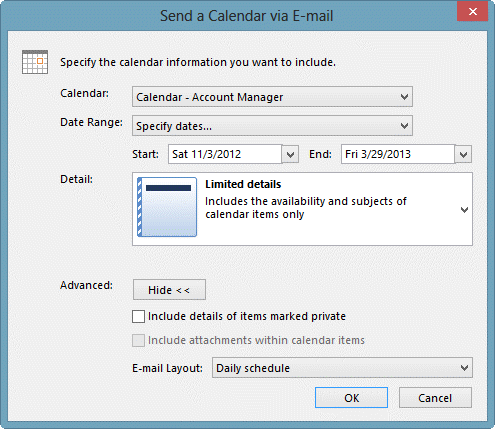
You can save the message as HTML to use the calendar outside of Outlook.

Hannah says
Hi Diane,
Thank you for summarising all these options!
I am very keen on trying the Planner style HTML calendar that you provided the links to above but on those pages, the links are broken and I cannot get a hold of the original poster to ask for the scripts.
I know it was a long time ago but this option is still not something that anyone else is providing, that I can find - do you have contact details for the person at NiveauVerleih?
Any help is appreciated.
Warm regards,
Hannah :-)
Diane Poremsky says
I do not have a way to contact the author but the wayback machine to the rescue -
After downloading, rename the text file to have the extension vbs. The double click to run.
emma says
I try tu use Yearly Calendar vba macro with outlook 2010 under windows 7. but i d'ont understand wy but when i try empty calendar it's wor, when i try non empty calendar, so with my rendezvous, the mostly time its freez or crash outlook.
in the vbs version the instruction
Set objCDO = CreateObject("MAPI.Session")
abort because i have the message
Could not create MAPI session to retrieve appointment colors. Will continue without colors.
Is ther someone who can help me ?
Diane Poremsky says
I will check it on 2010 - it definitely should work. (I made the mistake of trying it on my laptop which had a new version of Outlook 2016 and it does not work with it. I wasted too much time trying to figure out why :( )
It uses CDO to get the colors and that is no longer supported in newer versions of Outlook, but it should work in 2010. However, the error you're getting is pointing to a problem with CDO.
emma says
wher is my comment ?
Diane Poremsky says
It's here. :) The comments stay in moderation until i answer them - it makes it easier for me to find the comments that need an answer. (I don't do too much actual moderating - everything except spam and the occasional comment is that all swear words gets approved.)
emma says
i d'ont understand wy but when i try empty calendar it's wor, when i try non empty calendar, so with my rendezvous, the mostly time its freez or crash outlook.
in the vbs version the instruction
Set objCDO = CreateObject("MAPI.Session")
abort because i have the message
Could not create MAPI session to retrieve appointment colors. Will continue without colors.
Is ther someone who can help me ?
Diane Poremsky says
There are definitely issues with it - colors will not work and if using Outlook 2013 or 2016, it may not be able to find the calendar. When i get a change, I'll work on updating it for new versions.
To get past that error (because outlook 2013/2016 do not use CDO), you'll need to remove or comment out the lines that use CDO.
mark says
do you have anything that works with outlook 2016 or office 365?
Diane Poremsky says
The methods on the page should work with outlook 2016 desktop.
mark says
still no year view calendar for outlook
why dont you make an app orr something people can buy to do this
Diane Poremsky says
My guess is that the various addin devs don't see a demand and/or, its not as easy as it sounds. It requires and activex control to do it in outlook.
dav says
getting type mismatch error on "UBound" line 534
Diane Poremsky says
according to "Anonymous" on the author's websites, you need to make the following edit:
Just add the following statement in the VBA script:
arrBinary = Array(1, 0)
under
'msgbox MainKeyPath
The result should look like this:
'msgbox MainKeyPath
arrBinary = Array(1, 0)
For i = 0 To UBound(arrBinary)
KeyValue = KeyValue & Chr(arrBinary(i))
Next
Johan says
So I need to be a programmer to get a year-view in Outlook... That is so far from user-friendly!!!
Diane Poremsky says
Not necessarily a programmer... but you definitely can't do it in outlook - you'll need a script if the email calendar method doesn't create enough thumbnails.
Phil K. says
I am on a 64 bit machine.
Phil K. says
https://support.microsoft.com/kb/2028411
This may help.
Diane Poremsky says
I'm away on a business trip and haven't had a chance to review the macro. Appt category colors aren't working in outlook 2013, but the vbscript version works. I don't recall if i tested the macro version of the script. You could use RDO (Redemption)
Phil K. says
outlook 2010 and macro version 2.1, 22 Jan 2009
Phil K. says
could not create mapi session to retrieve appointment colors???? Is there I fix for this?
Diane Poremsky says
Which office suite are you using and which macro? I'll take a look at it.
Mary says
I tried to click on the link, and it comes up page cannot be displayed. May I have your email address, and then I can email you and have you send it to be directly? thanks! Mary
Diane Poremsky says
That dash after the url was added to it, I've fixed it now - and verified it works. Right click on it and choose Save target as... (IE). Firefox and chrome have similar options to save linked files.
mary says
I tried to save the file, rename it and it is now showing as a .vbs, but when i click on it is comes up with an error.
script:C:\users\xxxxxx\desktop\yearlycalendar.vbs
line: 1
char: 1
error: expected statement
Code: 800A0400
Source: Microsoft VBScript compilation error
Any suggestions on how to resolve?
Thanks!
Mary
Diane Poremsky says
Did you get the complete macro? That error appears to say the first part is missing. I put the file here - https://www.slipstick.com/files/YearlyCalendarV2.vbs.txt - save it and remove .txt from the file name. I know it works, because it just tested it in outlook 2013/win8. :)
Leoni says
Error: Type mismatch: 'UBound'
Code: 800A000D
Microsoft VBScript runtime error
Diane Poremsky says
Are you using ? I can't repro the error - save the file, rename the extension to .vbs then double click to run it.
Leoni says
hi Diane, i have saved the script as you said above as year-calendar.vbs but when I double click on it, i am getting a runtime error message is this something amiss on my system or the actual fine (I am only a regular user not, as the above mentioned, a programmer)
cheers
Diane Poremsky says
What is the exact error message?
Kay says
I use to be able to see my apts in my calendar in monthly view; now all I see is a drop down arrow for each one. How do I get it back to being able to see words or details?
Diane Poremsky says
Try resetting the view. In Outlook 2010, look on the View ribbon, Reset view button. In older versions, find the customize view command on the View menu.
Sue says
What if you're not a programmer and have no idea how to use this script - why on earth don't Microsoft provide a yearly option - have I got to transpose a whole year's worth of appointments to another program so that my boss can see it at a glance? Crazy...
Diane Poremsky says
No idea why they didnt add the option - all known solutions use an activex control that does only a planner style or create html. The script author included instructions - basically, copy and paste (vba version) or right click, save and run. The vbscript is saved as a text file, rename it year-calendar.vbs - double click it to run. The calendar printing assistant does a yearly format as well.
HAL says
OK yes, that's a yearly calendar, but with barely more functionality than the one I got in the kitchen. How about a true yearly calendar where i.e. I can see all the months by rows, and I can place say colored categories related to my yearly time usage. Like a blue bar from early April to late October dubbed "Academic", and a green bar from late October to mid November dubbed "Vacations". Get the picture? I am amazed that Outlook YET doesn't sport such a functionality. Yearly planning view.
Diane Poremsky says
Check out the script - I added links to the page. Both the VBA and VBS versions work in Outlook 2013 so they should work in all older versions too. The VBS version creates 3 HTML calendars - one of those formats should meet your needs. While it's not within Outlook, it is faster than an ActiveX control within Outlook would be (and cheaper - the scripts are free, the only control I am aware of is not free).
Charles says
Move it back the same way the window was moved open.
man says
And when I exposed so much rows that calendar in right pannel become to big so I cant pick the options menu to put it back what should I do?