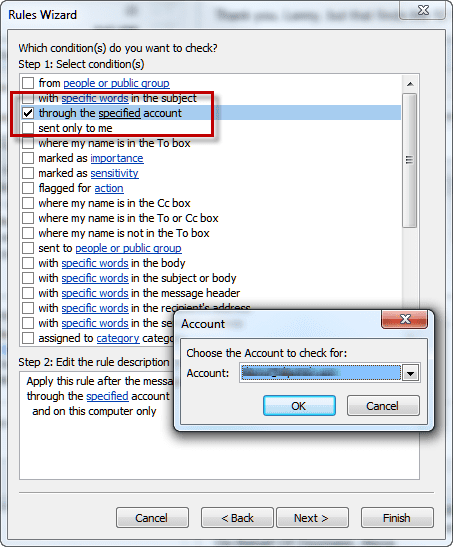
 Current versions of Microsoft Outlook contain a rule condition you can use to sort mail received from multiple email accounts.
Simply choose the condition "through specified account", select the account and complete the rule.
In earlier versions of Outlook that do not include this condition, you need to create a rule using the condition "with specific words in the recipient's address," entering your address for the specific words.
An alternate method is to create an entry for each of the e-mail addresses that people use to send messages to you in your Contacts folder. For each of those addresses, create a rule with the condition "sent to people or distribution list", pick your own address from the address book, and move the items to a different folder.
Note that the "specific words in the address" or "sent to people" methods are unlikely to capture all the messages sent to you via a particular service, since they don't handle distribution lists, which have their own To addresses, and BCC messages won't have your names in the To field. The "through specified account" rule will capture all mail downloaded using that account.

Smitha690 says
Im thankful for the post. Great. kfkcdkfdagbdgeee