This content has been archived. It may no longer be relevant.
Problem: When using Outlook 2003 on Windows 7, users can't open zip attachments from a message - double clicking on the zip brings up the Open/Save dialog but clicking Open does not open it (the zip is saved in the securetemp folder each time you double click though).
To open the zips, users need to save them to the hard drive then open if they want to use Windows Compressed folders feature. (If they install a zip program, there is no problem - zips open as expected.)
This is apparently "by design" and is related to the new Libraries file management feature. There is registry value that controls how the explorer handles certain file types for specific applications and this registry value can be edited as a workaround.
However, because we don't know if editing this key might cause other problems it's highly recommended users install a 3rd party zip program instead. (There are a number of free and low cost zip programs available, many have more features than Compressed Folders.)
Open the registry editor and browse to this key:
Windows 32-bit versions:
HKEY_LOCAL_MACHINE\SOFTWARE\Microsoft\ Windows\CurrentVersion\ShellCompatibility\Applications\outlook.exe
Using 64-bit Windows, the key is:
HKEY_LOCAL_MACHINE\SOFTWARE\Wow6432Node\Microsoft\ Windows\CurrentVersion\ShellCompatibility\Applications\outlook.exe
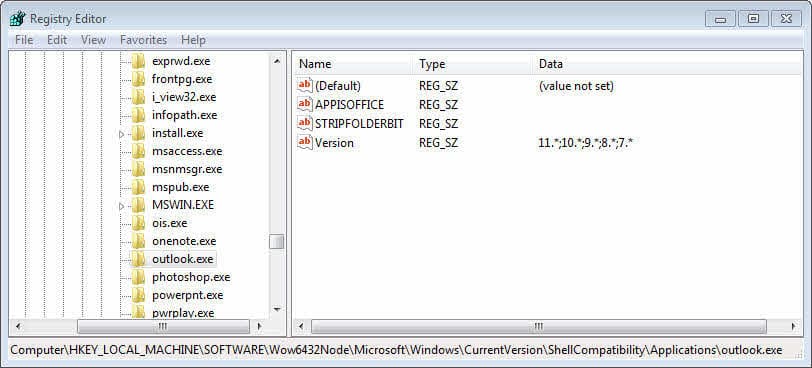
String: STRIPFOLDERBIT
String: VERSION Original Data value: 11.*,10.*,9.*,8.*,7.*
Recommended fix:
Edit the VERSION string value, removing 11.*;
New VERSION string value: 10.*;9.*;8.*;7.*
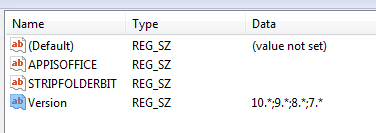
Alternate fix: Delete (or rename) the STRIPFOLDERBIT value
Reboot Windows.
I tested both registry hacks and both allow me to open zip attachments.
Other Issues
We're seeing a few minor complaints with Outlook 2003. The most annoying is Outlook's compose mail windows group with Word on the task bar (when Word is the editor). This was a problem off and on with Outlook 2003 and Windows XP - an update would group mail with Word documents and just when you got used to mail grouping with Word, an update grouped mail with Outlook. I'm not expecting an update to fix it this time, but time will tell.
A second problem being reported is that Outlook hangs and stops sending and receiving. It could be compatibility issues with Windows 7, caused by a 3rd party program (possibly a virus scanner) or just Outlook being Outlook.
None of the problems I've seen reported is serious enough for me to recommend upgrading - you will have a better "experience" with Outlook 2010, but Outlook 2003 should work just fine on Windows 7.

Sylvia Leo says
I am using WIN XP SP 3.0 32 bit on a desktop & email is MS Office Outlook 2003. Browser is Firefox
I received an email with an attachment which is zipped. I saved it to 'Downloads' in a file....I am not sure how to unzip an attachment. I tried with my programme, (7-zip) & it didn't work. So now I updated my zip programme, tried again, but it just gives me a big fat red cross & some info that makes no sense to me! ( It gave me a system error No 2146697211, whatever that means!).
Pleas can you give me step by step on how to unzip it...... my email is about a delivery of a parcel from USPS, (through Australia Post),. & contains the tracking number & details on how to receive my parcel etc.
I am at my wits end, please be so kind as to help me...I am worried that they are gonna send my parcel back to the seller. I must say, I have had deliveries from the US before, several in fact, but never in this way with a zipped attachment!
Many thanks
Sylvia
Garry McCooey says
I can confirm this also works with Server 2008 R2 Standard with Outlook 2003