An Outlook user had this complaint:
Some of my contacts are in both the GAL and my local Contacts folder. Outlook updated my contacts (in my contacts folder) with information from the Global Address Book. How to disable this function? The GAL contains outdated information.
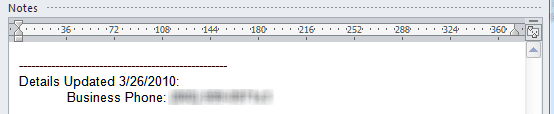
This is a feature of the Social Connector, with the automatic updates of contacts enabled by default. A change log is added to notes so you know what was changed. Note: the social Connector is deprecated and may be removed from a future version. It is disabled by default in Outlook 2016. If you enable it, only the search features work.
Change the Update Settings
To change the setting in Outlook 2010 and up (if the Social Connector is enabled), go to the View ribbon, People Pane, Account Settings, Settings button and change the update option from Update without prompting to Prompt before update or Never update.
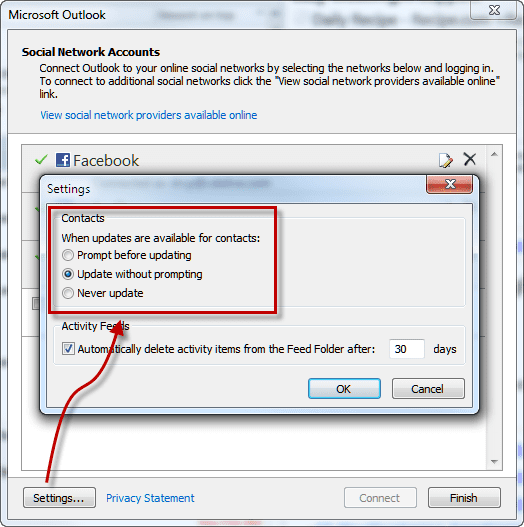
In Outlook 2003 or 2007, the Account Settings dialog is accessed from Tools, Social Networking Account settings.
While it may be tempting to turn off updating, it defeats one purpose of the social connector: to keep your contacts updated. The change log in the notes field displays the changed data, should it try to update the contact with old information.
This setting is stored in the registry. The key is the same for all versions of Outlook that support the Social Connector. If the key or value does not exist, add it.
HKEY_CURRENT_USER\Software\Microsoft\Office\Outlook\SocialConnector
DWORD: RunAutomaticGALSync
Possible Values:
0 (Never Sync)
1 (Update without Prompt)
2 (Prompt to sync)
Default setting is Update without Prompting.
Disable Contact Updates Video Tutorial
Disable Contact Sync using Group Policy
Administrators can disable Contact & GAL sync using group policy. It's found under Outlook > Outlook Social Connector in the Group Policy editor. Look for Block Global Address List synchronization.
HKEY_CURRENT_USER\Software\Policies\Microsoft\office\outlook\socialconnector
DWORD: disablecontactgalsync
Value: 1 (no sync)
More Information
Administrators can disable this feature using a group policy. For more information, see Disable global address list synchronization for Outlook 2010 in TechNet.
Administrators who want to give their users the ability to update the GAL with current information should see the list of utilities located at Active Directory Management Tools - User Updates






























I have an MS365 account and run Outlook. Every time I log on with my desktop or notebook there is a forced modification and update of contacts. This happened 'suddenly' on 2 Feb. This update generally takes about 3 to 4 hours with no visible change in the contacts but under the list / modified view you can see the activity. This hogs a huge amount of computer resources. Any idea how I can fix this?
How many contacts? Do you have? do you sync with a mobile device?
Any sync issues or conflicts in the Sync issues folder? (Ctrl+6 to see the folder list.)
how does an Outlook contact end up with 2 office locations? an old one and a new one. the old should have disappeared.
Something is changing only my newly added contacts. I'm on an Outlook 365 account. My outlook contacts are my only contacts (i.e., no Google or other accounts are syncing contacts). My pc, Android phone, and ipad all sync through the Outlook 365 account. About a week ago, I had 3 email clients installed on the droid phone and ipad and one of them (Atlo mail) had stopped syncing mail so I was reinstalling and adding new email clients. Around this time, all contacts were updated and given new Modified dates. Fine. Since then, I've disabled contact syncing on all droid and ipad email client apps so only droid and ipad systems are syncing contacts. But now, having tried multiple ways of adding new contacts (manually, importing attached contactitems or business cards), the new entries continually get new Modified dates (as seen pc Outlook contacts) at intervals of a few to several minutes (seems timed with sync of mobile devices, but not Application Folders sync). When I deleted an offending contactitem, I noticed in my Deleted folder that the preview of the deleted contactitem indicated that the item contained active content. I noticed there too, that Deleted items were also getting… Read more »
if you turn off contact sync on the devices, do you have the symptoms? (modified date & active content message)
I have and will continue experimenting with your suggestion on devices, thanks, and also with another laptop that I use for this Exchange account but does the following development clarify or rule out anything? The problem above with newly-added items turned out to be a corrupted sync record on top of a problem/question of mysterious updates to Contact items, and these mysterious updates continue. Today (same Exchange account but new machine running Outlook 2016 on Windows 10), at startup there were 100+ random contacts updated somehow, given a new Modified date, but I see no evidence of that Social Connector/GAL thing or any other change to these items. This has been a usual but unpredictable occurrence on this account that I don't always notice, but sometimes (like today) it bogs down my VBA code. In the 6 weeks I've had this machine, it happened 3 times since initial sync of Contacts: 23 days later (21 Contacts updated), 9 days after that (3 Contacts), and another 9 days till today (114 Contacts). These numbers assume none of the updated Contacts were updated more than once. Mystery updates happen on the older machine too (also running Outlook 2016/Win 10) but I never… Read more »
Is a note added with the date of the update? A GAL update should add the update date to the notes field.
Do you sync with a smarthphone?
No note added, nor any other property changes I can determine (I wrote a VBA event to trap for this). I do sync with smartphone (Android) and with an ipad, and have disabled these to no effect.
Note: I am the only user on this 365 Exchange account, which I assume is the reason that my name is the only one in the GAL. Also, I've taken the steps found online for disabling Social Connector (which did not appear to be active in the first place).
I did take one step since last post: disabled Evernote add-in for contact connections. No mystery updates have occurred since, but it will take a few days to see if that holds longer than the typical intervals at which this has been happening.
Was evernote the cause?
At long last I may have discovered what's going on here. Evernote is innocent.
It appears that there are conflict messages in the sync issues folder for the mystery updates to contacts (and appointments). The resulting changes must be resetting the Modified dates.
In most cases I have no idea what the properties are (they are referenced by a hex-looking code), but in the case of appointment items the changes involve User Properties created by my VBA code. So I think all these mystery prop-changes are reconciliations of Outlook-specific properties against the props of my ios and Android Exchange clients.
The only problem this was causing was repeat-firing of an Items_ItemChange event procedure. The proc was repeat-firing 2-3 times after every intentional change. I've fixed that with a trap for _CustomPropertyChange.
Something is changing my contacts. I want outlook contact to be the 'hub' when syncing. When I change something in outlook it can sync with Google one way.
What are you using to sync Outlook with google contacts?
Hi Diane, my company recently upgraded me from Outlook 2010 to 2016. I had turned off GAL sync before, but it has been activated automatically with the upgrade. I can't find a way to turn it off. Do you know how?
Thanks!
i'm surprised it was turned on - it should be disabled in outlook 2016 (along with the social connector). First check addins and see if the social connector is enabled - if so, disable it. if you are using it, set or add the galsync key to 0. (The key is the same for all versions.)
Thanks, Diane. There was no GALSync key under HKEY_CURRENT_USERSoftware MicrosoftOfficeOutlookSocialConnector. I added one (as a DWORD) and set it to a 2 value. That didn't help. I'll reset it to 0 now. Can you tell me please how to disable the Social Connector as well?
Unticking it in Files, options, addins will disable it. If it won't stay disabled, you can set a registry key to never load it. Instructions are here - https://www.slipstick.com/outlook/always-load-an-outlook-addin/ along with a ready to use reg file.
Hi Diane, it looks like I was able to turn off the syncing from occurring automatically. The problem is that now I won't even have the option to see updates. Is there any way possible to reinstate the sync with prompt option that was available under Outlook 2010?
You need the social connector enabled and the RunAutomaticGALSync registry key set to ask (2).
Thanks, Diane. I don't have a RunAutomaticGALSync key. Where should I add it? Should it be a DWORD or QWORD? Should I have keys both for ScheduleContactGALSync and RunAutomaticGALSync?
DWORDS, yes, add both if they are not present.
They would go here - HKEY_CURRENT_USER\Software\Microsoft\Office\Outlook\SocialConnector
Hi Diane, it worked! I needed to add both RunAutomaticGALSync and ScheduleContactGALSync and set them both to 2. Now I'm prompted before the contacts are updated. Thanks again!
P.S. The key I added was ScheduleContactGALSync
I have Office 365 based exchange syncing 2 laptops (one is a mac), a desktop, an Iphone, and an Ipad. I'm using Outlook 2016. I have my contacts sorted by " last updated" in my address book. However, every time I check my contacts which should be sorted by "last updated", old contacts I haven't touched for months creeping up in the top 10 of last changed contact. Is this due to Linkedin connector? I have Outlook/Office 2016, so I don't think it has any Social Connector other than maybe Linkedin. ( I think all other social connectors have been discontinued.
Are they addresses you sent email to recently? It could be linkedin, if you have it configured in your office 365 account.
my contact list in outlook 2016 changes by itself using outlook.com. It adds email addresses to contacts name making it unusable .
Do you know if your outlook.com account is on the new server?
Thanks for reaply ...
We have already disabled the GAL Sync by GPO, but a question...we made this kind of Active directory update every 6 months, why our Mobile number has been modified only this time and not the previously updates?
Should be an Outlook Update?
Thank You
Michele
The fields that gal sync checks would be updated if the GAL value is different than the contact value - to the best of my recollection, the mobile number was always a field that was checked, but if not, then an updated added it to the fields GAL sync checks.