Update September 17 2017: This product is now Freeware.
Download CodeTwo Outlook Sync
What Does It Do:
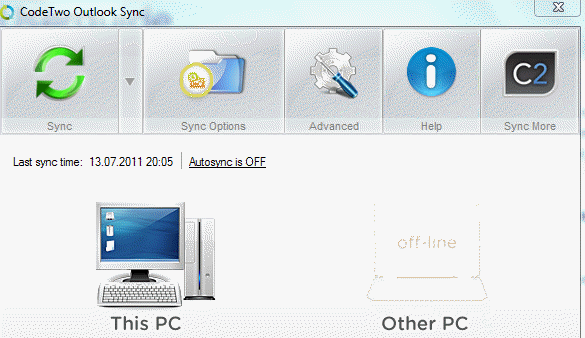
In a nutshell, it allows you to sync the information in Outlook on two computers that are on the same local area network.
Why Would You Want It
It allows you to keep information on two systems in sync with each other but why would that be beneficial. Some examples are if you have both a laptop and desktop this would allow you to keep the data in sync on both systems. It could also be used to sync with another person’s Outlook say your co-worker, manager or family member. The data would then be easily accessible to them.
What Do You Get
Well what you get very much depends on if you use the free or purchased version. There are many more functions in the paid version then in the free which is understandable. Let’s review some of those features that are emphasized on their website.
- Interface: Easy to use interface to manage the systems being synched.

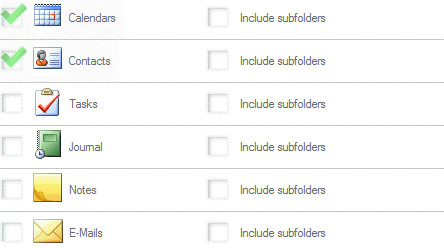
- Synchronizing Outlook between two Computers: Every email, calendar entry, task or a document are always present on both of your machines. Keep in mind that only the paid version will sync all of the items listed above. The free version only does default calendar and contacts. At a cost of $59.00 the paid version in my opinion is worth costs considering how much more usability you would receive. The screenshot below shows the items that can be synched with the free version. The others become available as well as the sub-folder option with the paid version.
- Sync Outlook Calendar and Contacts: Being able to sync calendar and contacts so that another person can view and edit your calendar and share contacts what a great way to easily stay in sync with each other to help promote teamwork. It would definitely help with overbooking and overlapping appointments whether it is in your business/professional or personal life.
- Assign Task To Another Person: Outlook tasks are vastly underutilized feature. The added functionality of being able to assign tasks to another person and keep track of it without having to have an onsite or hosted server will make the feature more attractive to users. It has the potential of improving efficiency by keeping track of not only your own tasks but those you have assigned to another person. Do keep in mind this is only available in the paid version.
- Sub-Folder Synchronization – Using sub-folders really helps to keep Outlook emails organized and manageable think of it as a virtual filing cabinet. Since Code2 Outlook Sync’s paid version has the functionality to sync sub-folders then they can keep being used. The ability to synchronize sub-folders for accessing information on another computer or by another person is great for sharing information in a specific folder.
Limitations
Note: The current version has a 30-day, fully functional trial. After 30 days, it continues to sync the default calendar and contacts for free and never expires.
- Both computers have to be connected on the same local area network. In other words both computers would need to be in the same locations at the same time. This can be limiting if an employer/business has systems locked down from connecting to another network or if they do not allow personal laptops into their environment for security reasons. Of course it may just be a matter of obtaining the necessary approvals but it is something to be aware.
- Allows only two computers to be synched: Truthfully not even sure I would consider this a limitation but let’s say someone has a desktop at home; a work laptop and a co-worker that they need to synch their Outlook. Then for them this application would have limits. To address this CodeTwo offers Code2 Public Folders.
- Free version does not sync emails: Is this a limitation for the free version? Of course as the top three things people want to sync and keep up-to-date are emails, calendar and contacts. It is not that the product does not synch emails, it offered with the paid product. Think of it as a motivation to buy their full product.
- RealTime synch is only available in paid: RealTime synch is important as it takes away the need to stop, think and remember to sync. Though this function is available in the paid version it would cause me pause and consider if I wanted to use the free version. It is a function I think should be both on the free and paid.
- Items marked as private: CodeTwo Outlook Sync does not recognize if an item is marked private, it will be synched. Again something to keep in mind especially if you are synching to another person Outlook.
- Limits if using Exchange Server: Outlook Sync works only for the default mailbox and pst. If the Exchange Account is set to be default there might be problems with the sync as exchange account uses OST which syncs itself with exchange. That might cause duplicates to occur as Exchange removes Outlook Sync's properties from items. In other words - it is not recommended to use Outlook Sync with the Exchange account set as default.
Installation
- Installation is easy and straightforward.
- Free version never expires and has no adware. Get full version if you want to synch more with more options.
- Multiple versions of Outlook supported, OL 2003 – 2010 can be used. The two systems do not need to be on same version of Outlook.
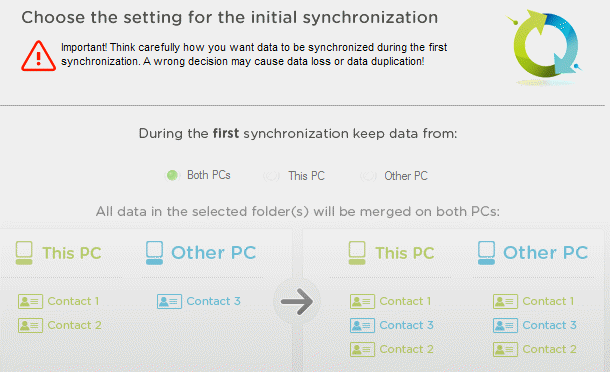
- Options available for first time synch. After the first time then it is a two-way sync.
Summary
Update September 17 2017: This product is now Freeware.
Code2 Outlook Sync paid version is definitely worth considering for syncing your Outlook data between two systems. It is easy and straight forward to use. The paid version offers so much more functionality then the free version that it is worth the cost of $59.00. I like having the options available that are offered in the paid version. However if you only want to sync your calendar and contacts and manually selecting the sync button does not deter you then the free version is for you.

Leave a Reply