While you can remove duplicates by hand, the tools on this page make it easier when there are a lot of duplicates. Although some of these tools work only with the mail folders, many will work on any Outlook folder that contains duplicates.
 ReliefJet Essentials
Manually Remove Duplicates
To remove duplicates, you need to use a single line table view, either by turning off the reading pane (View tab) or by dragging it to the right to make it narrower (on smaller screens, you may also need to collapse the navigation pane and To-do pane). In Outlook 2016, you may want to turn off Message Preview.
If you are using the the default group view in email folders, click on the field names above the message list and deselect Show in Groups.
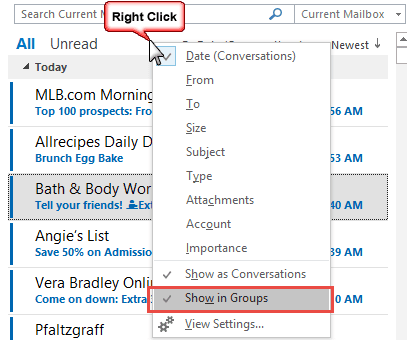
For email folders, all standard views use a table view and you just need to turn off grouping and move (or turn off) the reading pane to enable the single line view. In the calendar, choose Events or By Category view, or in Outlook 2010 and up, the List view. Use Phone view or a list view in Contacts.

With a single line view:
- Right-click any column heading, then choose Field Chooser.
- In the Field Chooser, switch from the Frequently-used fields list to Date/Time fields, and then drag the Modified date field to the view to add it to the fields displayed.

- Click on the Modified column header to sort by that field.
- You should now see your Outlook items in reverse chronological order.
- Click on the first item you want to delete.
- Use the scroll bar to find the last item with the same modified date.
- Hold down the Shift key as you click on the last one. This selects all the items between the two selections.
- Press Delete to remove them all from the folder.
- Reset the view when finished.

This method works well with imported items or when you re-download messages left on the email server because you'll have one set of items with the same modified date.
Deleted Duplicated Email Video Tutorial
The steps for Outlook 2003 and up are basically the same, except for the menu commands to turn the reading pane off and on. The first half of the video was recorded in Outlook 2010, the second half in Outlook 2007.
To turn the reading pane off and on in Outlook 2010, go to the View ribbon and expand the Reading pane menu.
Tools in the Spotlight
Outlook Duplicate Killer is an add-in for Microsoft Outlook. Find, merge and remove Outlook duplicates. Compare, assign the category, flag and move duplicates to selected folders. Find and remove duplicate contacts, emails, calendar events, tasks and notes automatically. Manage duplicates in any Microsoft Outlook folder, including Microsoft Exchange and Public folders. Preview duplicate search results prior to processing. New Duplicate Killer has improved user interface. Now account name and folder path are display. | |
Finds and removes duplicates, even if the messages appear in different folders. Delete, move, or copy duplicates to any folder. Mark duplicate messages with a flag. Search for duplicates in the same folder, or in different ones. Process duplicates in Public folders on the Exchange Server. | |
ReliefJet Essentials is a set of 162 utilities for Outlook, Office 365 and Exchange Server. It can backup, import, export and convert data into different formats. Perform personalized mass mailings. Save, remove and optimize attachments. Find and remove duplicate messages, contacts, appointments, meetings, and other items. Retrieve statistics on email usage and get reports on Outlook data and settings. You can run the utilities directly from Outlook, automatically in rules, via standalone app, or from the command line. |


Tools

Mark says
Just FYI, avoid installing the 4Team duplicate killer. I installed it, did NOT provide my email address and after installation 4Teams sent me SPAM (without any Opt Out) to the private email address of the folder I scanned with it.
Just like a virus...
Cico says
I downloaded Duplicate Killer from 4Team, not Duplicate Remover, specifically to try advanced features like single item comparison. Instead, the setup program deceivingly proceeded to download and install Duplicate Remover without a warning or anything. At first I didn't realize it was a different tool and was about to buy it thinking those are options not available in the trial. I suspect this is because Duplicate Killer is not listed as being compatible with Outlook 2019 64-bit (only 32-bit) while Duplicate Remover doesn't seem to have such a limitation. Still, proceeding installing something different is a misrepresenting practice.
Diane Poremsky says
thanks for the information - i will look into it.
ron says
Will this work on newer outlook versions? Also, will it sync to outlook online and delete all the duplicates there?
Diane Poremsky says
Yes, it will work with all windows desktop versions of Outlook. As long as you are using an exchange account (including Outlook.com accounts), changes will sync to the server.
John says
My MS Outlook 2017 is showing a RED X on the ICON in the Task Bar. Also I notice that the CLEAN UP, IGNOR AND JUNK show red x's except the Junk
shows a cross out symbol. I need help with this because I see also the
OUTBOX showing mail to be sent, but does not seem to be functions.
Probably one simple procedure will clear it all up, but what to do?
Brown Clark says
I use Duplicate Files Deleter to remove all the unwanted, duplicated files from my pc.
niepelnosprawny.org says
where can I get duplicate words remover?
Diane Poremsky says
I'm not aware of a duplicate word remover. Sorry. The spell and grammar checker can mark duplicated words though - but you need to delete the duplicate.
Victor Delta says
Diane - Many thanks for that. It doesn't sound too difficult but I wish I knew where to start...?
Diane Poremsky says
I have a basic script here - I'll try and make time to tweak it to check the sender and subject, and maybe the body.
Victor Delta says
I have an Outlook 2003 folder which often accumulates duplicate emails (usually pairs - don't ask, it's a long story!). Rather than delete them automatically, I am looking for a macro which will highlight one of each pair in the folder. Does anyone know if such a thing exists please?
Diane Poremsky says
I don't have any macros that do this, but it should be easy enough to do, I'd compare the subject and sender of two messages and set a category on one if a match is found, then move to the next message.
Erik Jan says
A few years ago I asked the developer from "Delete Duplicates for Outlook" to add that to the features of his program. He did, it's called "Special Comparison". There's a lot to tweak to make it work and I'm having some problems in the latest versions but in principle it should work.
Jeffrey Dolberg says
Thanks Diane. I'm using Outlook 2007. I found a tool called DupeDuster from Ivitar Software about 12 years ago. I have been using it ever since but it does not handle attachments correctly and often gets confused if an embedded note came from a source other than Outlook. If you know of something else I would be grateful to hear about it.
Jeffrey Dolberg says
I'm looking for a different type of Duplicate Remover; one that removes notes that are contained in other notes.That is, if you send me an email, and I respond to you, then you respond to me, I have 3 different emails, but all I need is the last one because it contains the information from the previous 2. How can I accomplish this? This will require searching both Inbox and Sent Items.
Diane Poremsky says
What version of Outlook? 2010 and 2013 have a clean up conversation feature which does this. There are one or two addins that can do this too - should be somewhere in the long list of tools here, but i forget the names offhand. :( If you aren't using Outlook 2010/2013, I'll see if i can find them.
Federico says
Duplicate Remover or Duplicate Killer from 4Team doesn't work if the duplicates have identical content with even small formal difference. For instance I have for some reasons double items in sent folder. The only difference is that in one the email address names are written [Name Last name <name@domain.com] in the other one ['Name Last name' <name@domain.com]. So just a \' difference. The software is not able to understand that the two emails are identical. I spent money for nothing.
Diane Poremsky says
To be fair, I don't think I'd want a duplicate remover that looked at two similar contacts and decided they were duplicates. They could delete the "wrong" contact, keeping the contact you didn't want and removing the one you wanted to keep - is "O'Toole, Mary emailaddress" the one they should keep, or "OToole, Mary emailaddress"?
roy says
isnt there a full version that is free? :)
Diane Poremsky says
The Outlook Duplicates Remover which is 3rd from the bottom is free. That is the only one that is free AFAIK.
Geoff says
With Outlook 2010, I created an "Unread Mail" folder under my "Search Folders". It compiles all unread messages into one place and you can just highlight and delete. This is good assuming you read all of your mail prior to getting the "dump" of dupes. if you don't, then maybe this other method will suit you better. I just like having it as a permanent addition and not needing to switch my views back and forth. I have to deal with this every few months.
Larry says
I found the "office duplicates remover" free version just an excellent product with easy installation on Windows 7 64-bit even though it was a 32-bit 2003 version. It worked just fabulous and would recommend.
David says
Sorry, but I don't see how sorting by modified date allows me to make any distinction on whether an email is a duplicate.
Diane Poremsky says
The Modified date field shows you when the message was downloaded or imported. When you have duplicated messages they were imported or downloaded at different times than the original copy of the message. With the modified date in the view you can sort by subject and compare the modified dates then sort by modified date so it's easier to select a large number of duplicated messages at once. (hold shift as you select the first duplicated and last duplicated messages)
Jorge Ferreira says
beatiful solution!
simple, basic and smart!
thank you very much! I finally be able to delete my triplicated emails.
Tom says
Thanks so much. I nuked my machine and did a clean install. As I don't delete mail from the server I had over 7,000 messages duplicated. This saved me a lot of time and money :)
David says
GREAT! so simple to just sort on modify date and then delete!
thanks!