Many users are reporting problems configuring iCloud in Outlook on brand new computers. When they check the box for Mail, Contacts, Calendars they receive and error error message that there is no default profile.
The users typically have one profile, it’s set as the default, Outlook is set as the default. Everything should be working.
I am trying to setup Microsoft Office 365 Outlook to sync with iCloud. When I check the box for Mail, Contacts, Calendars I get an error message: "Setup can't continue because Outlook isn't configured to have a default profile. Check your Outlook settings and try again."
I have one profile in Outlook, with the "Always use this profile" selected. I worked with Apple Support and Dell Support, uninstalled and reinstalled both applications, restarted my system many times, all to no avail. I have also confirmed that the iCloud Outlook Add-in is shown as Active in the Outlook File/Options/Add-ins screen.
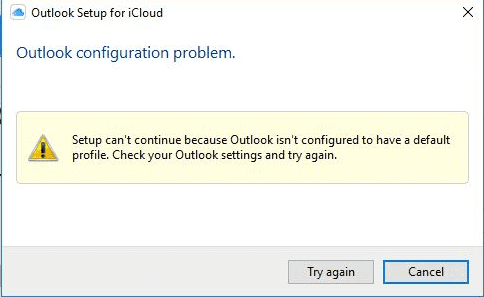
This error is triggered because iCloud does not care for an IMAP data file set as the default data file. This is more common with the Windows store version of iCloud installed but can occur if you use the download from Apple.
IMAP Account is default
If you are using an IMAP account and do not have an Exchange POP account, or PST file, in your profile, you may get this error (or others) because iCloud does not like the IMAP data file.
The fix: Add a pst file to the profile and set it as default then restart Outlook. If you continue to get the error after setting a PST files as default, close Outlook and sign out of iCloud then sign back in. After you set up iCloud, you can remove the PST but I often rename the PST "needed for iCloud" and drag it to the bottom of the folder list.
If you have other accounts in your profile or adding a pst file to the profile does not help, you need to create a new profile and set it as default. Do not copy the existing profile, you need to make a new one. Restart Outlook a couple of times then try setting up Outlook. See Andrew's comment here.
Windows Store version of Office
The original cause for this error was because the user was using the Windows Store version of Office. Installing the Click to run version from Office.com fixed it.
As time goes on, fewer users should have the store version.
If you have a new computer with it installed, replace it while it's still new (removing it deletes customizations, email accounts and IMAP and Exchange data files, leading to the potential for loss of Calendar & Contacts in an IMAP data file.)
iCloud and most addins will not work with the store version. You need to install the click to run version from Office.com.
Installing the current version of Office from office.com should remove the store version, but to insure it is removed, run these cmdlets:
Open PowerShell in run as admin mode then paste:
Get-AppxProvisionedPackage -Online | where-object {$_.packagename –like "*Outlook*"} | Remove-AppxProvisionedPackage -Online
Then:
Get-AppxPackage "*Outlook*" | Remove-AppxPackage
Close the PowerShell window and open it without using run as admin. Run this command:
Get-AppxPackage "*Outlook*" | Remove-AppxPackage
If you are using iCloud installed from the windows store, it should work after running the scripts above. You cannot set the store version to use compatibility mode.
If you are using iCloud installed from Apple's download and are using Windows 10, set icloud.exe to run in Windows 7 or Windows 8.1 Compatibility mode.
To do this, go to C:\Program Files (x86)\Common Files\Apple\Internet Services, locate icloud.exe, right-click on it and choose Properties. Switch to the Compatibility tab and enable compatibility mode.
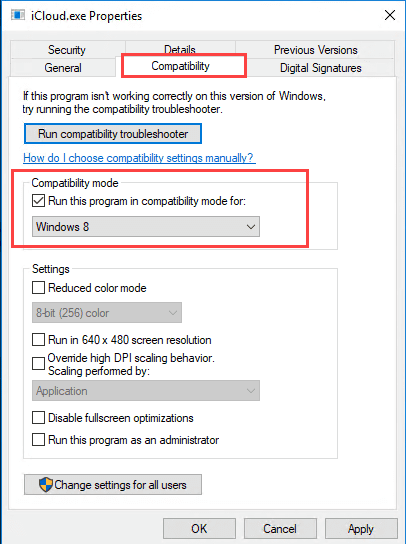
Now try enabling iCloud to sync Calendar and Contacts. It should work.
More Information
See Outlook is Not Recognized as the Default Email Client for other causes not related to iCloud.

Dejan says
Thank you so much for this. Signing out of iCloud was the missing step for me.
Tim says
I added a pst file as you suggested, made it the default, and was able to get past the error message and sign on to the iCloud app. Then I removed the pst file. Your advice was extremely helpful and I am very appreciative! Thank you so much!
Steve says
I have spent hours on the phone with Apple support, and 2 days trying to follow methods that worked without luck.
I purchased a new pc (Windows 11) in January and along with it a family subscription to MS365. I got MS365, including Outlook up and running fine, including getting my contacts from my iPhone to sync with Outlook through iCloud. Something happened, probably in May. I was very busy and do not know when the sync stopped, but all my Outlook contacts disappeared. When I was trouble shooting I found iCloud Outlook add-in was missing from Outlook. Under People I have My contacts and below that Contacts, but none there.
I have followed Andrews suggestions and created a new profile with an email account using a pst as default account in a new profile which I set as default, always use. I reinstalled the add-in and iCloud and with Outloook closed set settings to sync files and Contacts and Calendar. Opening iCloud I can see it has indeed grabbed appropriate info from my iPhone and has it in iCloud. However, I cannot get it from iCloud into my Outlook. I believe I have tried every variation of solution except reinstalling MS 365, which I am loath to do. What should my next step be?
Birgitta says
not working I am afraid.
Diane Poremsky says
What happens when you try to add it? Any error messages?
Leonard Little says
None of my existing mail accounts seem to use a POP server. Any ideas? My main email is thru ipage.
Diane Poremsky says
If your accounts dont support POP and you cant enable it on the mail server, you will need to use imap.
Lobezno says
Gracias, por la ayuda, llevo varios dias probando proque la opcion de sincronizar contactos, calendarios, ... con outlook no iba, habia probado de todo, desinstalado e instalado varias versiones de office y no habia manera, seguia igual y cuando he leido al final el tema de la compatibilidad simplemente lo he hecho y me salido la opcion para sincronizarlo.
Un saludo.
Translate:
Thanks for the help, I have been trying for several days because the option to synchronize contacts, calendars, ... with outlook did not work, I had tried everything, uninstalled and installed several versions of office and there was no way, it was still the same and when I read in the end the issue of compatibility I have simply done it and I got the option to synchronize it.
John says
It's 2022 and I'm now having this problem. Have tried everything above and also read through older comments for any other tips/approaches to resolve to no avail. I am using a MacBook 2021 with M1/ARM64 running Parallels 17 and with Office 365 installed from office.com. I've tried both 32 and 64-bit versions of Office 365 to fix this problem without any luck. iCloud for Windows is the latest version installed from the Microsoft Store. Could the M1/ARM64 be the diffences/what's causing this issue to reappear?
Diane Poremsky says
I'll test it in my parallels... my initial thought is no, it's not the cause but I also know there have been problems with AV and parallels, so I could be wrong.
John says
Thanks Diane. I hope you'll be able to help me find a solution to this most annoying issue :-)
Tim says
iCloud for Windows doesn't work with Windows ARM.
Diane Poremsky says
I'm not surprised, but hadn't given it much thought. Thanks for letting me know.
Howard says
I am trying to use Andrews solution to resolve the problem on my PC. I have a few questions:
- You add a PST file by adding an email account with a POP account. Is that correct?
- After I did this I noticed that the default datafile remains with the original IMAP user account OST. Should I change this to the new account PST?
- How do you establish a new Profile? Is that like using a second version of Outlook? If so, how do you do that?
- When Diane says “ right click on pst in the folder list and choose Close pst-name,” where is the folder? Is that the data file tab in Outlook, or the folder in Windows?.
Diane Poremsky says
>> You add a PST file by adding an email account with a POP account. Is that correct?
No, just add a pst. No account is needed with it.
>> After I did this I noticed that the default datafile remains with the original IMAP user account OST. Should I change this to the new account PST?
Yes, set the pst as default.
>> How do you establish a new Profile? Is that like using a second version of Outlook? If so, how do you do that?
>> When Diane says “ right click on pst in the folder list and choose Close pst-name,” where is the folder? Is that the data file tab in Outlook, or the folder in Windows?.
It's the folder list on the left.
https://www.slipstick.com/outlook/how-to-create-a-new-profile/
>> How do you establish a new Profile? Is that like using a second version of Outlook? If so, how do you do that?
Fred says
Thanks for this page, I've *Wasted hour* and am now giving up...
Bill says
None of these solutions worked for me. I tried building a PST file and making it the default and creating a new profile as well.
After spending hours and days trying to fix the problem, it turned out the problem was caused because I upgraded my Outlook from 2013 to 365.
I ultimately opted to reinstall iCloud from the MS Store. The description of iCloud in the store indicated that it would only work for versions 2016 and above. My assumption is that iCloud never recognized the Outlook upgrade and was behaving as though it was still the 2013 version.
Reinstalling the iCloud app corrected the problem for me.
I'm hoping that posting this here will help as others for whom no other solution worked.
Rick says
There's a mystery step here! "The fix: Add a pst file to the profile and set it as default. After you set up iCloud, you can remove it."
How do I go about doing that??
Thanks!
Diane Poremsky says
Go to File > Account Settings > Account Settings to open the Account Settings dialog. on the data files tab, set the IMAP data file as the default. Restart outlook then right click on pst in the folder list and choose Close pst-name.
Steve says
After at least 3 hours of pulling out what little hair I have left, I found an easier solution in the Apple Forums that worked for me.
See this link for the steps:
https://discussions.apple.com/thread/251360630?answerId=252913029022#252913029022
I cannot say for certain if this problem occurs when a person has ONLY IMAP accounts in Outlook, but that was my case and creating an empty PST worked for me. I then closed the empty PST after the icloud install was successful, changed my default data file back to its original setting, and deleted the empty PST (I created it on my desktop so it could be easily found).
Dwight says
This worked for me. Thanks Steve.
Dwight
BCVolkert says
This thing bit me again. I'm using a desktop install of Office 365 32-bit and a current iCloud installed from the Windows store. The issue this time was that iCloud was not recognizing my correct Apple ID / Password. I use 2-factor authentication and I'm not sure if that was part of the issue or not.
I also tried the Power Shell steps, installing an old iCloud version, and looked around for the option to set compatibility to Windows 8. None of that worked for me on W10, O365 (32-bit).
The fix procedure that worked for me on W10, O365 (32-bit) is:
Thanks for maintaining this site Diane.
Diane Poremsky says
>>
I also tried the Power Shell steps, installing an old iCloud version, and looked around for the option to set compatibility to Windows 8. None of that worked for me on W10, O365 (32-bit).
>>
The store app does not have the compatibility option.
leeg says
Diane, I have been using Outlook and iCloud for a couple years on my PC with no issues until the latest Windows update (9/8/2020). Now I get the error above when trying to reinstall and configure iCloud. I don't know if I have the Store version of Office, or the Click to Run version - is there a way to tell?
Diane Poremsky says
If it worked before, you don't have the store version of Office.
For icloud: Do you have the windows store version or the download from apple? What version of icloud is it? There have been issues with it over the last couple of weeks - but the latest icloud update seems to have fixed it.
Diane Poremsky says
Does this fix it?
>>>
When attempting to initialize MAPI, or perhaps starting Outlook with 3rd party addons, error 0x80004005 will always be returned. Then the PreFirstRun dialog box will display everyone's favorite message: "Either there is no default mail client or the current mail client cannot fulfill the messaging request. Please run Microsoft Outlook and set it as the default mail client."
The current workaround is to roll back to the August 25 Version 2007 (Build 13029.20460) build. I don't know the exact build that introduced the error, just that this one work for me.
>>>
From https://forums.slipstick.com/threads/97451-outlook-2019-o365-build-13127-20408-errors-when-using-mapi-calls/
Diane Poremsky says
Type cmd on the start menu, open the command prompt using run as admin. paste this line at the prompt:
"C:\Program Files\Common Files\microsoft shared\ClickToRun\officec2rclient.exe" /update user updatetoversion=16.0.13029.20460
From
https://www.slipstick.com/outlook/uninstall-update-office-click-run/
Paul says
I've been working on this for two days straight.
THIS FIX WORKED FOR ME!
SpeedyBill says
Hello Diane, I, too, am trying to connect MS 365 Outlook with iCloud for Windows. Same problem as the others. So, I'm the newest member of the "iCloud ... can't set-up ... default profile" club.
Thus far:
1. Confirmed that the iCloud Outlook Add-in is active in the Outlook File/Options/Add-ins screen.
2. Reset protocols to point to Outlook. (I found and corrected one that was not set properly.)
3. Uninstalled previous versions of Outlook. (And, yes, my PC contained a copy of both Outlook and MS 365. Outlook is now gone.)
4. Uninstall the Office installation from the Microsoft Store app. Reinstall.
5. Run PowerShell commands - both with and without the step you listed on this page of running a command while NOT logged in as Admin.
6. Repair Office.
I have not enabled compatibility mode. There are 2 reasons:
1. On 6/7, you wrote: "However, I don't think you need to change the compatibility setting on it. Only on the one installed from Apple." Mine was downloaded from the MS Store.
2. I found the exact folder you described on 6/7. However, I can't find iCloud.exe. Instead, I've got eleven exe files. Each has a properties box and can be set to compatibility mode. But, there are eleven. File names include:
· iCloudServices.exe
· iCloudPrefs.exe
· iCloudOutlookConfig64.exe
· iCloudOutlookCongid.exe
· iCloudMigrate.exe
I'm experiencing the issue in which the repair command uninstalls, but does not reinstall, MS 365. However, on my most recent attempt, it reinstalled for the first time! (FYI - This was after running your 3rd Power Shell command while NOT running as Admin.)
But still, "iCloud ... can't set-up ... default profile". What else can I try? I would greatly appreciate your guidance.
Diane Poremsky says
>> Uninstall the Office installation from the Microsoft Store app. Reinstall.
Did you reinstall the store or go to office.com and install click to run? You need click to run.
SpeedyBill says
Well, I didn't understand that MS store was an app. I was downloading from: https://account.microsoft.com/services/microsoft365/install.
I'm pretty sure it was click-to-run, but I could be mistaken.
I'm downloading the store app now. Thanks. I'm on it and I'll let you know my results.
Diane Poremsky says
if you got it from your account or office.com, it is click to run. You need to be in the microsoft store to get the store app.
>> I'm downloading the store app now.
I hope you mean icloud store app. :)
SpeedyBill says
I followed the advice from BCVolkert:
With that one extra step, iCloud and Outlook connected! Now, my calendar is syncing between my iPhone and Outlook.
I'm pretty sure that without Diane, her web site, and you forum contributors I'd be buying new hardware and starting from scratch. Thank you, all.
Now, I my last step is to figure out why contacts aren't syncing ...
SpeedyBill says
MS 365 was downloaded from Office.com, not from the Microsoft Store. I misspoke. I've got click & run. I've run through all the steps again and still get iCloud ... can't set-up ... default profile". Suggestions?
BCVolkert says
I was having this trouble for a few days too on one old Lenovo PC and one or two Dell computers. I'm running Microsoft 365 32-bit on Windows 10 Pro 64-bit.
I've recently reinstalled Windows 10 Pro and Microsoft 365 on all the machines (some from new installations of W10P) and some were upgraded in place.
Some machines did not have the problem (yet?). The PowerShell steps worked on a couple of the Dell machines (no opportunity to do the Compatibility mode steps). The same process did not seem to work on an old Lenovo machine working on WiFi through an access point at the far end of the house. I don't know if network speed is a contributor or not; but, this is an observation.
On the old Lenovo machine the steps that were finally successful included:
Prior to the 12-step program above, I also tried Quick Repair and Online Repair of Microsoft 365, repairing and uninstalling iCloud Outlook, uninstalling iCloud, etc. without success. It seems that the problem had a lot to do with the "Outlook" profile.
Thanks to Diane and everyone who takes the time to post solutions to problems. I'd be lost without these contributions to the community.
Bruce
Elaine says
I have spent many hours on this. I am trying to set up a new HP laptop and have Outlook work with iCloud. This has always been easy to do in the past, but now I keep getting the same error of not being configured with a default profile. I have the iCloud app from the Microsoft Store. I have Outlook version 2006 (build 13001.20166 Click to Run) through MS 365 subscription. Any suggestions?
Wolfgang says
Hi Diane,
same problem like Jesper. Brandnew computer, Win10 was already installed. Downloaded Office2019 and iCloud is not running. Impossible to find the iCloud.exe and change the settings.
Help is highly appreciated!
Wolfgang
Jesper says
It seems that the latest version of Icloud does not make an iCloud.exe in the app folder. Do you know which one I need to change for the compatability?
I am running Windows 10. Latest update and latest iCloud.
Diane Poremsky says
That is the Windows store iCloud app? It puts it in a different folder, under C:\Users\%username%\AppData\Local\Packages
Jesper says
Hi Diane,
Got it. But could you be more specific?
I have these folders which almost all of them seem empty.
AC
AppData
LocalCache
LocalState
RoamingState
Settings
SystemAppData
TempState
Best regards
Jesper
Diane Poremsky says
My bad. I gave you the path for user files - i should have said 'C:\Program Files\WindowsApps\' - the actual exe is at C:\Program Files\WindowsApps\AppleInc.iCloud_11.2.18.0_x86__nzyj5cx40ttqa\iCloud - but you will need to give the admin account permission to access the folder. However, i don't think you need to change the compatibility settings on it. Only on the one installed from apple.
Sorry about that.
Jesper says
Hi Diane,
Thanx. I guess I need to change the compatability on the exe file somewhere, as my computer keeps giving me the error as you describe in the tutorial.I have many exe files in the folder you specify. Which file is the program file I need to change?
It is really frustrating, that Apple and Microsoft don't make an upgrade to elliminate this error.
Can you please guide me?
Best regards,
Jesper
Jesper says
yes it is from the Microsoft store.
Tim says
Just got a new Lenovo laptop with Windows 10, bought MS Office 2019 with Outlook, and downloaded iCloud from Microsoft store site (latest version 11.2.18.0). Cannot set up synching between Outlook Contacts and Calendars and iCloud due to the “default profile” error. Have followed your suggestions multiple times, but there is no way for me to access iCloud properties to switch to Compatibility Mode, which seems to be the solution for many people. Why is that? Is the latest version of iCloud configured differently than in the past? Is there an update to your remedy which adapts to the latest versions of Outlook and iCloud?
Diane Poremsky says
I don't you need to do that when you use the store version. Which version of Outlook/Office do you have - it should be click to run.
Mark says
Hi Diane
Did everything including the powershell commands(no errors reported on shell commands) but still no joy...
Jim W says
Will this work for a new Dell xps running windows 10 and new Office 365? I tried reinstalling Office - no luck.
Pete D'Luhosch says
Any update on this? I have kind pf the same problem, except I can't install i Cloud for Windows 10 for the same reason:
"Setup can't continue because Outlook isn't configured to have a default profile. Check your Outlook settings and try again."
sheba says
You ROCK, neither MS or Apple had a solution that worked for me (and I used the online repair). on a windows 10 lenovo thinkpad with Office 365 for business.
Paul says
Thank you! I appreciate the clear instructions, this cleared up my parents' issue in minutes - dad had been banging his head against it for days before I found your workaround.
KENT WARD says
I have the Windows iCloud APP installed so no .EXE file to run in compatibility mode. Windows 10 Pro, Office 2019.
Chris R says
This worked for me as well - Windows 10 on a Dell laptop with Office 2013 Professional. Thanks!
Atholl M Truesdale says
Been trying to solve this for two months since I got my new computer Finally found something that works ! Thank you so much
Atholl in Spain
Henry says
Honestly thanks, needed to integrate my calendars and this worked amazingly. Hats off to you friend.
Fahim says
This is amazing. I was looking for a solution for 1.5 years and couldn't find anything. Thanks a lot!!
Kavvya Selvakumar says
This is amazing, thank you SO much :')
Michael says
You might not be the hero we deserve, but clearly the hero we need.
Thank you very much. Not even the Apple Support knew that this was the problem. Been looking for days.
Anything else like re-installing, "repairing" or creating an @iCloud.com mail did not work. But this, surprisingly, did.
Diane Poremsky says
Thanks! I really needed the ego boost today. :) It makes a nice end to a bad day.
Angie says
Thank you!!! I spent hours working on this problem. The powershell & compatibility mode seemed to do the trick, phew!
Mike Ross says
Thank you so much. 1903 broke synchronization between Outlook 365 and iCloud calendar. This fixed it. I have no idea how you figured it out.
Steve says
Tried this today. Just wanted to let you know it worked for me as well. Thanks.
Holger says
Had the same problem and solved it: Just click "change", then "repair" office 365 in offline mode in the app & features list of my Windows 10 computer. (weird ??!!)
Hope not just by luck...
All the best
H.
Mark says
Thank you so Much!!
Jerry says
Wow. I’ve tried a lot of different things on this going back 18 months but the power shell stuff was the freshmaker. Thanks.
Alberto Brignone says
Thank you so much! this worked!!!
Daniel Frasier says
Awesome - it has been nearly a year since iCloud worked with Outlook on my computer. This fixed all the issues.
Thanks!!!
Olivia Vdd says
It worked! I also have a new lenovo and this is a perfect fix
Karl Goatley says
Brilliant fix, thank you so much :-)
Jos says
Fantastic. New Lenovo laptop, couldnt get Icloud up and running. The switch to W8 did the trick! Thank you thank you!
irina conlan says
Thank you so much, after days of trying to fix it, your suggestion worked and without fixing compatibility.
Jeff says
After many failed sync attempts, setting iCloud properties to Windows 8 compatibility worked, even though I use Windows 10. Many thanks!
Crater says
Setting iCloud.exe compatibility mode to Windows 8 was all that was required to resolve this issue. Thank you!
Zlatko says
Thx Diane, You help me a lot!!!
Dwarf says
The first problem can easily be solved by installing the 32bit version of Office.
Nothing else helped in my case.
Using the power shell advises for problem two was not neccesary.
Changing the compatibility mode was all it needed (took me 2 weeks searching!)
Thanks for the help!
Bryanna M. says
This still isn't working for me.
Bjarne C says
Didn't work for me... When I typ in the commands I get this:
Get-AppxPackage : The term 'Get-AppxPackage' is not recognized as the name of a cmdlet, function, script file, or operable program.Check the spelling of the name, or if a path was included, verify that the path is correct and try again.
At line:1 char:1
+ Get-AppxPackage "*Outlook*" | Remove-AppxPackage
+ ~~~~~~~~~~~~~~~
+ CategoryInfo : ObjectNotFound: (Get-AppxPackage:String) [], CommandNotFoundException
+ FullyQualifiedErrorId : CommandNotFoundException
What did I do wrong?
Diane Poremsky says
Are you using Windows 10? Even if the Windows store version is not installed, the command will run.
Are you using PowerShell, not command prompt?
Candace says
This worked perfectly!! Thank you so much.
GT_1985 says
Hi, I'm totally none techy it would appear. So I bought a new laptop and as part of the set up it asked me did I want to use the 30 day trial of 365 and then subscribe afterwards. I selected yes and now I'm having issues with my outlook syncing with my icloud calendar etc. When I try to fix it I keep getting asked to repair the file which I do and then restart but when I go back to icloud it still wont say it's syncing the email and calendar etc. I found this link but if I uninstall office how do I get it on again? I went to the office site and I can see the options to buy it but I don't want to remove it if this means I'll loose my 30 day trial and end up having to pay for it twice - does this make sense? Sorry - I'm clearly not techy!
Jacob brown says
Thank You! This worked for me!
MJC says
OMG! I'm both a PC (at work) and MAC (at home) user. I decided to purchase a MS Surface Pro with Windows 10 since my husband's laptop only had Windows 8. I honestly thought I had made the biggest mistake of my life when I couldn't get the iCloud to sync with Outlook. All I had to do was run the iCloud in compatibility mode and it worked. You're a lifesaver! Thank you so much for this post!!!
Dave J says
Thank you! This worked for me.
Lance B says
Worked for me!! Thanks so much! :-)
jan says
Works fine.Thanks a lot!
Joy says
SO amazing!! Thank you, thank you!!
Bill D says
Thanks again Diane - This worked for me. But should I leave icloud.exe in Compatibility Mode forever?
Was Compatibility Mode ONLY needed to get iCloud installed or is it needed for iCloud to continue to operate properly?
After my Outlook was fully working, I went back and temporarily turned off Compatibility Mode and everything seemed to still work, but since you didn't say to turn it off, I left it on. Could leaving it on cause other problems in the future?
Diane Poremsky says
If it works with it off, leave it off.
Bill D says
I just updated to iCloud 7.12 and after reboot, iCloud didn't show a "Mail" option, but my OL2019 with an IMAP account seems to still be syncing and working OK, so I left Compatibility Mode unchecked, assuming that if I ever need to restart iCloud that I could check it at that time. Should I worry about running OL with no "Mail" option listed?
Diane Poremsky says
No, it will be fine.
Anon says
Worked great for me thanks a bunch
Stephen Ellison Kennedy says
did not work for me.
Diane Poremsky says
Do you have the latest icloud software?
Jim Litz says
Thank you! So glad I found your solution! Installing the "click to run" version of Office 365 on top of my original "Microsoft Store" version seems to have fixed. Cutting and pasting your PowerShell commands was easy, too! I did not need to change the iCloud compatibility to "Windows 8" installing the latest v7.10 iCloud software.
Michelle says
This has been driving me crazy for months. Thank you for a quick and easy fix!!! So happy.
Per says
Will try this above trick - but have been "struggling" with Office 365 (purchased as a "service" on an annual basis) and iCloud for Windows for a LONG time.
Today, March 7, 2019, have uninstalled iCloud", rebooted, downloaded latest iCloud version (today), installed, rebooted, etc, etc. Unsure how many times (10?) with no different outcomes. Outlook (Office 365 - not the 2016 or 2019 version) has a default profile, have tried creating a new default profile, rebooted "everything" several times (computer included) to no effect.
Hence, with NEW and LATEST iCloud version, the "Compatibility Mode" really should not be needed.
Been using a few select words here during the day...
Scott says
Didn't work. I have a brand new HP Laptop running Windows 10. I uninstalled then reinstalled Office and still get the same above error when trying to check the "mail" box on iCloud.
Diane Poremsky says
Did you run the powershell to make sure all of the store version bits were removed?
Diane Poremsky says
BTW, what is your version and build - including the text following the numbers.
Jerry A Bittner says
Not getting a default profile error but after running PowerShell, I still cannot sync among windows 10 desktop, iwatch and iphone. Also running MS home and office 2019
Diane Poremsky says
Do you receive any sync errors? I would sign out of icloud and make sure the icloud data file was removed from outlook then sign back in.
Wiideeye says
Worked perfectly for me, thank you!
Joy says
Oh my gosh. AMAZING. Thank you for this!! SO very helpful!!
Terry says
Brilliant also worked for a novice like me.
AAAnon says
Didn't work for me either - I have Windows 10
Diane Poremsky says
Is this happening on a new computer?
Brandon says
Did not work for me #feelsbadman
solly says
sorry, did not work for me.
Diane Poremsky says
What version of office do you have installed?
Brandon says
I have 2016
Jared says
Thank you so much; quick and easy five minute fix due to your great instructions!
Sergio says
Great! thks!!!!!
I have same issue with office 2013.
Thks a lot!
bjorn says
works perfect thanks
Nicholas says
Was as simple as running in compatibility mode for Windows 8. Thanks for that troubleshoot tip.
iCloud v 7.1
Outlook 2016
Windows 10 build 1803
PIAT says
Hello
Thank you very much ! the issue is fixed... I am so happy !
I did not fin the solution in other forum or blogs
You are the best !
Will says
Thank you! This worked for me, I had the same exact problem.
Kevin Davies says
Great job - many thanks, worked straight away.
Glenn R says
You rock -- this fixed the issue
Eyal says
Fantastic! Followed your steps and it worked. Thank you so much!
Marlene Charron says
Thank you! Finally works after months of mystery.
PJM says
13 January 2019, using Dell laptop with Windows 64 bit and MS Office 2016. I had this problem and the solution works great. Thank you
PAUL SNYDER says
Worked fine for me on Windows 10 - the last icloud.exe compatibility step is no longer available but was not needed to get the Outlook sync working
Diane Poremsky says
Yeah, compatibility mode shouldn't be needed with the newest versions of iCloud.
Dean says
Thank you so much Diane, this did the trick for a new system with Win10 and Office 2019. Per your comment here, I also have the newest iCloud for Windows (7.10.0.9) and the compatibility mode step was necessary.
Mavis says
Thank you - worked like a dream.
Ian Pratt says
Thank You So Much !!!!!!
Berourke says
Awesome- worked for me
Steve Hildebrand says
Thank you - spent hours on other sites, but this worked... I received a new Dell PC today with pre-installed Office 365, which was the main issue. After re-installing 365 I then changed the properties to Windows 8...
Meg K says
THANK YOU! This was exactly what I needed. Your instructions were perfectly clear.
Mark Weaver says
Thank you!!
Anthony says
Wonderful, worked like a charm. Thank you and happy new years!
Kevin Miles says
Thanks that did it.
Andrew Lowe says
Wonderful. Thanks so much for posting this -= was driving me mad!
Vaughn says
Thanks much. The fix worked like a charm!
dan says
Thanks this worked.
Paul says
Can't thank you enough Diane.
The Powershell solution worked just fine after four days of struggling with a double iCloud for Windows 10 issue. First issue was connected to the Store version of Outlook, second issue was the default profile issue.
Many thanks!
Mavis says
Me too - exactly the same two issues.
Charrier Thomas says
Great work, You solved my problem !!!
Thanks a lot
Jaap Blankevoort says
This worked for me! Thanks
JoeSmith says
We don't have outlook. We want to stop seeing this message! You are wrong to assume folks are coming here because they have outlook, most people don't have outlook!
Diane Poremsky says
Well, this is an Outlook help website, so the articles will be targeted Outlook. You should only see the message is you have Office installed and ticked the box in icloud to sync calendar & contacts with the icloud.
Armando Neto says
Thanks a lot! After hours of try and error, I found that guide that worked first try!
Shelley Ford says
In the end, all I needed to do was uninstall iCloud and reinstall and it all worked perfectly.
Diane Poremsky says
Did you get the newest icloud? They released an update the last day or two that *should* fix all of the outlook/windows 10 issues.
HappyDay says
This worked first try
Bryan Butler says
Hi, mine is not a store version of Office but a 365 version I downloaded from Microsoft from my subscription. I get the same error message when trying to instal Icloud ie "setup can't continue because Outlook is not configured to have default profile"
Any suggestions
Diane Poremsky says
It is a new computer?
Carmen Woodcock says
Worked perfectly and fixed my iCloud error. Thanks.
Larry Miller says
Fixed! Actually I noticed from one of the comments and tried just this:
Go to C:\Program Files (x86)\Common Files\Apple\Internet Services, locate icloud.exe, right-click on it and choose Properties.
Switch to the Compatibility tab and enable compatibility mode.All I needed to do was make the iCloud.exe compatible with Win 8.
I ticked the Outlook box in iCloud settings (making sure Outlook and Office apps are closed) and the syncing began!
I didn't have to do anything else at all - that's all I did! It then worked like a charm.
P.S. I am running Windows 10.
Thanks so much,
Larry
Greg Warner says
Thanks Larry...this works wonderfully.
Dave Scanlan says
Nice one Larry, thanks very much indeed
Kate Wilson says
worked for me too - thanking you!
RJK says
WOW, you're a stud Larry. Thanks so much!
Pat says
This worked for me as well. I also just did: Windows + "iCloud" then right clicked "open file location" and the right-clicked again > Properties. Then go to the "Compatibility" Tab and checked the box for Windows 8 compatibility.
Sync'd!
Karen Vierra says
Thanks Larry Miller! I've been trying to figure this out for over a week!
Patrick Potier says
Hi folks
Unfortunately, I had the same problem yesterday with a new PC. Windows 10 Home x64 french system, uninstalled all office preinstalled version, downloaded the office small entreprise from office.com/setup, installed it succesfully in 32 bits mode (default choice), and then installed the icloud control panel;
Icloud is up and running except for the outlook connection
I did the trick without succes :-(
I have to say that i had exactly the same problem a few months ago on my new personal laptop, I tried a lot of things and only your fix was successul :-)
Hope Apple or Microsoft or one of you It guys will find the isue;
Saddly yours
Best regards
Patrick
Diane Poremsky says
Did you install the app version of the cloud or the downloaded version?
Ian Steer says
great work -fixed my problem
thank you
Robyn says
Thanks! This worked great!
Evan says
Brilliant fix! This has been bothering me for weeks//calendar syncing & such. Thank you!
KATZie says
OMG it worked! Yay!!! Thank you! Thank you 100X! This was agonizing me to no end to not find a solution.
PS How can I migrate my iCloud email FOLDERS to Outlook Office 365? Currently my folders can't be accessed on all my devices. My corporate email folders I can see on all my devices but iCloud won't work. I can't seem to find a solution for it unless I want to spend $149 for an Outlook 2016 to O365 migration tool. Help me please? Thanks!
Diane Poremsky says
If you open both mailboxes in the same profile, you can move (or copy) folders between mailboxes.
>> Currently my folders can't be accessed on all my devices.
It's an imap account, so you should be able to see all subscribed folders on all devices.
DAVID GIBSON says
Many thanks for the fix, it worked fine, I now have synced calendars and contacts
Jos Wessels says
Thanks, ik works!!!!!
Archie Godfrey says
Hi everyone. Running Win 10 Home and MS Office 365. Solved it thanks to this article. All I needed to do was make the iCloud.exe compatible with Win 8. I ticked the Outlook box in iCloud settings and when prompted to repair iCloud I did so. I didn't have to do anything else at all - that's all I did! It then worked like a charm.
Robert says
Thank you for this - worked perfectly for me.
Anne L Taylor says
I'm confused by one thing in this proposed solution. My new computer came with a license for Office 2016, that I paid a considerable amount for. There does not appear to be an option on Office.com to download and reinstall Office 2016 - only to download a free one month trial of Office 365 and then start paying for it after the month, which obviously I am not going to do. What should I do?
Anne L Taylor says
Also should I be reinstalling all of Office or only Outlook?
Diane Poremsky says
with Office 2013 and newer, you can only install and uninstall the entire suite.
Diane Poremsky says
Do you know which suite you purchased? If you have a perpetual license version or a business subscription, run the PowerShell to make sure all office store bits are gone. Then repair your office install.
Chad says
Many Thanks! It worked with no issues.. Spent a lot of time reinstalling and installing both Office 365 and ICloud before I found this post! Thanks Again!
rickypd says
OMG it worked! I was very skeptical but now I'm amazed - literally spent 3 weeks looking for a solution to this! THANK YOU!
Lynn Byrnes says
I'm so bummed this didn't work for me. I wasn't sure if we should be installing 32-bit or 64-bit as that distinction isn't made. I installed 64-bit. I read comments and found someone who had installed Office 64 bit and it worked. Am now uninstalling and re-installing icloud for windows.
Diane Poremsky says
Is this on a new computer? Make sure you run the powershell to remove any 'store' bits that might be hanging around, especially if it's a Dell.
I don't know that the bitness matters, except that most people have 32-bit office currently.
Lynn Byrnes says
Thanks for your quick reply Diane. Yes, it's a new computer. I followed your instructions perfectly. Good news is - It's working after I reinstalled iCloud for windows. Here's what I think may have contributed to my issue. When I first (a week ago) went to download iCloud for windows, Windows prompted me to choose iCloud for windows from the Microsoft Store. I figured, "why not," it's for Microsoft Windows so installed it from there. Today I uninstalled it, then pulled iCloud for Windows from Apple.com. Totally different install. I now have iCloud tab in Outlook that I didn't have before. And best of all, no errors. None. Cleaned it all up. I'm good! Thank you for this post because it got me on the right track.
Diane Poremsky says
Thanks - I wasn't aware there was a store version.
Janesse says
I honestly didn't think this would work. I have no clue what I just did, and when I was inputting the commands I wasn't getting any real response so thought it was a bust...But I persevered and IT WORKED!!!!!!!!!!!!!!!!!!!!!! I must have spent 20 hours trying to get this fixed. Thank you SO MUCH! For anyone who isn't tech savvy, follow the instructions EXACTLY. Then it works. Took me less than 10 minutes total.
Mark Bolton says
Diane, thank you thank you thank you this solution is the one that finally works.
Nik says
I spent weeks on this issue with Microsoft level 2 and 3 support as well as with Apple. I ended up buying a new computer anyway but still having the same issue on the new one (Windows 10 with self installed Office 365). Found this link online and it was fixed in 5 minutes. Thank you!!!!
Roy Kim says
It works! Thank you very much!!
Peter says
Worked! I feel like a tech wizard...Not really but a little bit. Thanks soooo much....
Bill Troy says
This worked beautifully! One change, however, that was required for me: I couldn't find an "icloud.exe" file so in hunting around I fould that the "icloud.services" file had the Properties tag which I used to set the compatability to Windows 8. I spent 5 hours on the phone yesterday with Microsoft--to no avail. Found your article this a.m. and very happy!
Janesse says
I had the same problem. I found the file by searching in the window "*.exe" then found one that came up for icloud.
Johnny Yap says
I couldn't find the .exe file either so i also hunted around under "Internet Services" and then, under the properties of ""icloud" (instead of icloudservices"), I managed to enable the compatibility to Win 8 option (although I am now using win 10)
Rita S says
You're the bomb! Thank you!!!
Anthony says
Worked great - thanks for such a clear solution!
Michael R. Martin says
THANK YOU!!
Henry says
Thank you so much!!! It worked for me!
Carlos says
Excellent!! Thank you! We really shouldnt need to do this
Jerry says
You're are a literal MVP of my day. Thank you so much for helping me solve this problem.
Dean Kennedy says
You are awesome. I have never had so much trouble getting email accounts to work on a new PC. This was very easy to follow and worked perfectly, many thanks.
David says
This worked! Thank you.
Erica says
Woohoo! Thank you for solving this annoying problem for me.
Mrs Josephine M Malden says
Thank you! We really shouldnt need to do this. But you have saved me loads of time.
Jackie B. says
After hours and hours trying to fix to this crazy problem on my new Lenovo Laptop, your solution is the only one that really worked! Thanks soooo much for the clear and easy step by step instructions!
Chris says
Thanks saved a headache moving from a Macbook Pro to Windows laptop.
christine says
this method works however for some reason did slow down my computer
Michael says
New computer with Windows 10 and Office 365. Was about to give up until I found your detailed instructions. Worked great. Thanks
Mark Hostettler says
Once again you have provided a solution where I could not find one. Thank you.
Mark Hostettler says
Once again you have provided a solution. Thank you.
Dwight says
Your solution worked perfectly.
Thanks for the detailed instructions and for giving me the confidence to do the fix.
New computer's shouldn't be such a pain in the butt.
Too bad the giant corporations (Apple and MS) couldn't have been helpful.
Kayla says
I am in the internet service file but cannot locate the icloud.exe file. I ran a searh through the file and nothing came up
Diane Poremsky says
Do you have 32-bit or 64-bit office?
Bill Troy says
See my comment (just written): I don't have an "icloud.exe" file either, but "icloud.services" has the Properties tab (right click) and you then click on Compatability to select Windows 8. It works!
Diane Poremsky says
I wonder if this is a new change with the latest icloud update... will check. Thanks.
John Harris says
After days trying to find a solution to the exact same problem on a new Dell XPS with Office 365 preloaded, all I did was change to the run properties of iCloud windows app to run as Window 8 version (last step above) and it worked without uninstalling and reinstalling anything. Thanks sooo much!
Diane Poremsky says
In File > Office Account > About Outlook, what is the suite name after the build #? The "store" version should be preinstalled - one goal is to make all addins work with it but I have tested addins recently. It will be great if it's fixed now.
David says
After weeks of trying this worked! Thank you so much. I used it with Office 365.
Mike says
Many thanks, that sorted my problem.
Vicky Louise says
Diane your the best thing since sliced bread, I can’t thank you enough as my laptop was about to be thrown out the window, all sorted now thanks to you! Can’t thank you enough,
Per Odgaard says
So nice finally some fix that worked, i used 5-6 hours on my new pc for get it working and 10 minutes after i read you post it worked
Stuart says
Fantastic - solved it for me !
John White says
I just purchased new Dell laptop. I have installed Office 365 (which, I think, is not the store version). I downloaded the latest iCloud--and have the same reported issue.
I am far from being an expert and have great trepetation about the fix. So I am looking for an expert to handle--there seem to be lots of hardware experts but few with Windows/Outlook expertise.
Any suggestions would be appreciated.
Diane Poremsky says
It's actually fairly easy to fix - follow the steps on the page to run the powershell to make sure the store version is removed. Then find the icloud.exe file and enable compatibility mode - but if you want to hire someone to do it, i am available 9but on vacation this week) - see the schedule appointment link in the sidebar on every page. It shouldn't take more than a half hour to fix.
Kurt says
Never mind, I found icloud.exe and it worked! Thank you!
Kurt says
I tried following your steps, but icloud.exe was not located under C:\Program Files (x86)\Common Files\Apple\Internet Services and I can't find it. Help!
Sophie says
What if I am using Microsoft 2016 and it is installed from Microsoft.com and it is still not working? I did not buy it from the store. I am not using the 365 version.
Diane Poremsky says
Are you using a new computer? If so, run the powershell to make sure the bits are gone then set the compatibility mode.
If its an old computer, do you have more than one profile configured?
Michel says
Terrific! The only change I needed to make was to change the properties for the EXE to run compatibility for Win8. Worked immediately! Thank you!
Ted says
Thank you, thank you! It works!
Justin says
Yay for you! This was the only thing that worked and apparently the entire rest of the internet as well as Apple and Microsoft have not figured out that this is a problem! Good on you and thanks so much for sharing your insights!!
Sophie says
I am replying to an email I received and I did try everything that was suggested and mine still did not work. I am using Outlook 2016 and not 365 so I don't know if that makes a difference. But I did follow all the commands that you suggested and I still got the same error. ?
Diane Poremsky says
Are you using a new computer? If not, the cause and solution is different.
Mark B says
HI Diane, What is the solution if the same error message occurs, but it is not a new computer?
Diane Poremsky says
for most people, they needed to disable the option to choose a profile when outlook starts. A few needed to remove all profiles but one.
Mark B says
I have this error on an existing computer with just one profile. Is there any solution for that?
Diane Poremsky says
Offhand, I dont recall a simple solution. Which version and build of Outlook are you using?
Paul sternal says
Just for the record, I have spent three weeks with Apple support and no result, came across this and my prayers have been answered thank you guys everything up and running now
BigDaddya says
Thankyou! Just ran it in compatibility mode and worked first time
Ian says
This. Was. Awesome!
Thanks
joe says
Worked great. I had to repair icloud and restart after following the instructions.
Rex says
OMG. I didn't even do the PowerShell commands above, I just found icloud.exe, ran in compatibility mode, and it launched! I'm in Windows 10 but it said it was testing compatibility for Windows 8. I don't care what it calls it as long as it's working. Wow. Lifesaver. Thank you and God bless.
Warren says
I have a new X1 Carbon with Windows 10 Pro and with the 1803 Feature Update. I have Office 365 2016 loaded on this laptop. I had the same error while attempting to turn on ICloud Mail, Contacts, Calendars and Tasks and just revised the Compatibility mode to Windows 8 and it works now!
Thanks!
Sophie says
I have the same problem but I am using Outlook 2016. Is the resolution the same
Diane Poremsky says
Yes... but first, install the latest icloud and check for office updates. I had a user tell me the issue was fixed in the latest icloud build but haven't had a chance to test it yet.
Albert says
I followed your changes and it fixed the outlook default problem. However, icloud loads but does not sync. Also, if I click on the icloud icon in the system tray nothing happens..
Diane Poremsky says
is the icloud addin enabled in Outlook's File, Options, Addins? That wouldn't affect the tray problem but would affect syncing.
Barry says
Just can not thank you enough for these steps. I moved 3 clients from iCloud to Microsoft Hosted Exchange because of this problem, but now we have a solution and it worked!
Derek says
Thank you, it worked!
Marco de Bock says
Wow, this is amazing. iCloud for Outlook didn't work on this brand new Dell Latitude laptop, but after running these commands it worked. I did not need to set the compatability options. I did, however, needed to close any open iCloud settings dialogs and then re-open it.
Carol C says
This was great! I have been trying for a month to get ICloud mail, contacts, and calendar to work on my new computer. Nothing else worked until I found this post.. Thank you so much!!!!
sheila says
mine doesn't have the compatibility tab
Diane Poremsky says
Are you on the icloud.exe file or a shortcut to that file?
Are you using the default Windows account type that has some admin privileges or a user account?
Frank says
Thanks a lot! Struggling for one day on a brand new laptop to set-up iCloud with Outlook and this work around really solves the problem. Office 2016 64 bit and iCloud 32 bit (as shown in task manager).
joel says
worked great for me after two days with MS and Apple support. Only difference is that I had another error on ICloud asking to repair the install. It only helped to reinstall both Office 365 and ICloud, then this post was pertinent.
eopd6971 says
Worked for me right off the bat! Thanks for the fix!
John Dibble says
I had no useful help from Microsoft for weeks over my new surface Book 2, Windows 10 Pro, build 17134.48 but solved it using the Compatibility Troubleshooter on icloud.exe found as above.
Josef says
Thank you very much!
Alex says
Thank U very mach! :)
Sandra says
I spent hours trying to fix this issue following different websites online. But your solution worked straight up, so quick and easy. I was beginning to loose faith :))) thank you so much for sharing this fix
Derek Duncan says
Thanks for your great instructions, it worked! At last!
mr.ferdose says
BTW, I just changed the compatibility settings to Windows 8 and nothing else but it still fixed the problem.
Torben says
Also just changed compatibility settings - and its working.
ERD says
Me too...just change compatibility to Win8 and ...ta-da!!
mr.ferdose says
THANK YOU!!!!!!!!
I've been suffering for months.. finally a solution.. well done and kudos to you guys.
Cheers!!
John says
Darn it!! Went through all steps above and now have a new error message: iCloud for Windows Installation Error. iCloud for Windows did not install properly....blah blah blah........
Diane Poremsky says
Try repair, but will likely remove compatibility mode.
BTW, was this on a new Dell? It seems like Dell has the most problems - it could be because they sell so many computers or something in the way they build their disk image.
Mike says
Andrew, Thank you so so so much!!! That worked perfectly. I can't believe I spent so many hours on this as well. The only mail profile I had should be the default one, so it is absolutely ridiculous that the iCloud software wouldn't recognize it as the default. Thank you again!!!!
Eric says
Thank you soo much! This fixed the problem after trying all the other solutions in this thread. Sure wish I knew a way to force this solution to the top of the thread to save everyone else a lot of useless effort when this fix is easy and does the trick
Andy says
Andrew - your fix worked for me too. Thanks.
HP ProBook, Win 10 20h2, Outlook 2010
Mick says
Thank you very much Andrew - this also worked for me - and like the others I spent endless hours trying to make it work before I found this. Thank you again. Mick
Scott says
Andrew!!! I feel blessed to even have stumbled on to your suggestion. It worked. I am so grateful. First, you are brilliant for discovering this solution. Second, you are a wonderful person for sharing your solution in such detail. I spent several frustrating hours trying to figure this out. Thank you very much!!!
kevin says
Hi Andrew, I am on the latest version of 365. To clarify, are you saying to set up a new profile in Microsoft Mail from the control panel, or a new profile in Outlook? If its in outlook, it will not let me create a new profile the same as the existing one. If it's in Microsoft mail, then I am confused as to the connection between the two?
art boone says
Andrew.........I spent 100 hours trying to fix the profile error and your instructions help me fixed it. I don't know how you came across the fix (accident) but I appreciate you posting the solution.
spw says
Thank you my friend! This saved my life.
Jon says
Amazing I spent days working on wierd and wonderful ways to get this to work so I'm astounded that it is a relatively simple solution, No idea why Apple / Windows have not sorted this out!
Dirk says
Dear Andrew! Thank you so much for ur solution! I was trying yesterday 4 or 5 hours and i was close to give up, but then i found this post and followed ur instructions step by step. And it worked!!!
Frank says
Andrew,
your fix still works in August 2024, and neither Microsoft nor Apple is aware how to fix it. Still - what a shame.
I'm very grateful that I found your note.
Many thanks from Germany
Tom Dykstra says
This was awesome! 5 years after your post and it is still solving the problem. I spend hours and hours following all the MIcrosoft recommendations. This simple paragraph fixit it!
White Tail Group Campground says
None of these worked for me, but what did was uninstalling icloud, rebooting the computer, then downloading the version from Microsoft store. It worked like a champ. This happened to me when I upgraded to Microsoft 365...