All versions of Microsoft Outlook support Archiving. You can use either AutoArchive to move or delete older messages, appointments, or tasks as they age or use manual archiving to move or delete messages in a specific folder and it's subfolders at any time.
You can configure each folder to have unique autoarchive settings or apply one setting to all folders.
If you use an Exchange server mailbox with an online Archive mailbox, Archiving in Outlook is disabled.
Configure Outlook's AutoArchive
To enable, review, or disable the AutoArchive settings in Outlook 2010 and newer, open the AutoArchive dialog from File, Options, Advanced, AutoArchive.
In Outlook 2007 and older, look for AutoArchive on the Tools, Options, Other dialog.
To check for folder-specific settings, right click on the folder and choose Properties, then AutoArchive tab.
If you want to run AutoArchive at any time, use the AutoArchive option on the File, Tools menu (Outlook 2016), File, Clean Up menu (Outlook 2010 & 2013) or in Tools, Mailbox Clean Up, AutoArchive in Outlook 2007.
Configure the Global AutoArchive Settings
Choose how frequently you want AutoArchive to run. Default is 14 days but you can choose any number between 1 and 60 days. If you are using AutoArchive to clean out your Deleted Items and Junk Email folders, choose a lower number, such as every 1 to 5 days. To disable or turn off AutoArchive, deselect this option.
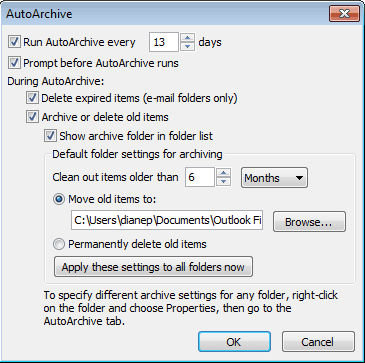
Do you want to be notified before AutoArchive runs? When the prompt comes you, you will be able to cancel it if you think it will interrupt your work.
Do you want to delete expired email? Default setting: Delete expired email.
Archive or Delete old items? If this is not selected, only expired messages will be deleted.
Show Archive folder in the folder list? Choose Yes if you want to keep the archive.pst in your profile. This makes it easier to find archived messages.
At what age do you want items to be archived? You can choose up to 60 days, weeks, or months (5 years). By default, the age is based on the last Modified date, not the received date. Editing, replying, or copying an Outlook item can change the last modified date. See AutoArchiving by Received Date to configure Outlook 2007 or Outlook 2010 to archive by received date.
Select the pst file you want to move archived items to or permanently delete old items. You can create a new pst file or use the default archive.pst which Outlook will create in the default location for pst files. (In Outlook 2010, this is in your My Document\Outlook Files folder.) If you permanently delete old items, archived items will be deleted and you will not be able to recover them.
Apply these settings to all folders. Use this only if you want to use the settings as the default for all folders. I don't recommend doing this if you have a lot of folders you don't want to archive, as you'll need to change the setting for each folder individually.
Configure AutoArchive settings for each folder
If you want some folders, such as Deleted Items or Junk Email, to use different settings, you can change the properties for that folder.
Right click on the folder and choose Properties then switch to the AutoArchive Tab. You will be able to turn off AutoArchiving, apply the default AutoArchive settings, or configure settings unique to this folder.
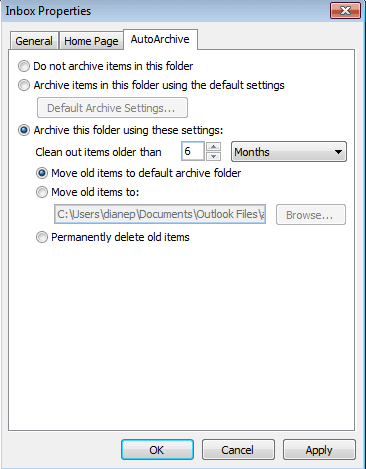
These settings are specific to each folder and are not applied to subfolders. You'll need to change each folder individually.
Manually Archive Messages
If you prefer not to use AutoArchive, you can manually archive at any time. Look for the manual Archive command on the File menu.
In Outlook 2013 and up, the manual Archive option is called Clean up old items. (The button for Archive button on the ribbon moves messages to a folder called Archive.)
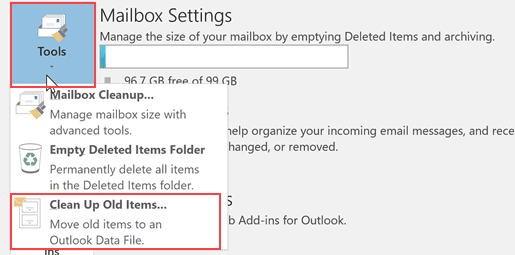
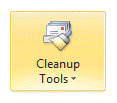 In Outlook 2010, it’s under File, Cleanup Tools. In Outlook 2007 and older, it's at File, Archive.
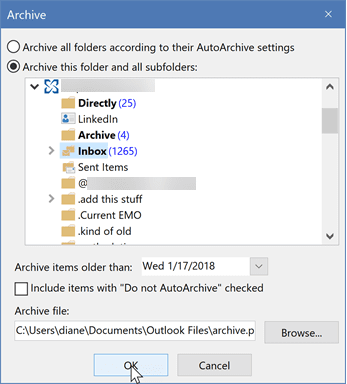
Using Clean up old items (or Archive in older versions of Outlook), you can archive the entire data file using the AutoArchive settings or archive the contents of one folder and it’s subfolders based on a specific date. If you want to archive all folders in an account, select the top level folder (where your account name is), select a date then click Ok to begin archiving.
Video Tutorial
More Information
Housekeeping and Message Management tools for Outlook
Configuring Outlook's AutoArchive settings tutorial
How to Automatically Empty Deleted Item Folder
Create an Outlook rule to expire mail after a certain number of days
Archiving Tools for Exchange Server
How to read items archived using AutoArchive
Description of the Outlook 2010 hotfix package (outlook-x-none): April 26, 2011
How to change the criteria that Outlook 2010 uses to archive different item types
Description of the Office Outlook 2007 hotfix package (Outlook-x-none.msp): December 14, 2010






























good morning, i need your help,
can we create auto archive for client? i use windows 2012 R2 server, i just create group policies in windows server but there are no change for client pc,
the methode i use :
any method that can change the policies for this case? i need your help.
thank you very much
How can I use autoarchive or rules to move items from my inbox to another folder on the server? When trying to setup autoarchive, it seems to only let me delete or move to a .PST file. I need to keep them on the exchange server, just not all of them. We are moving to O365 with 1GB from onsite with 250MB so want to keep as much on server as possible. However, I sync the inbox with my phone and only want to keep the last month in the main inbox and move the older ones to a secondary inbox that doesn't sync. Prefer to have an automatic way such as autoarchive or a rule, but rules only seem to run when the email first arrives, not time based.
autoarchive wont archive to the online archive. you can set policies on folders to move mail to the online archive though. if the folder is not in the online archive, you're out of luck on automatic moves. you'll need move them manually - quick steps or the new Archive button will be a bg help.
Diane - how can I reset all folders back to no auto archiving? I want to start over and individually set each folder the way I want them to be.
Thanks!
Diane, I have the same problem as Jasper. I have a folder where I move any e-mail that I do not want archived. I set up the autoarchive on that folder to "Clean out items older than 1 day" and I selected the "Permanently delete old items" button. Nothing ever gets deleted from the folder. I try leaving Outlook on, I try shutting it down and restarting it. I would think that each day, autoarchive would delete anything that is 1 day old... but that is not happening. Any idea why?
What type of email account is it? Is the folder in the default data file? AutoArchive only works on the default data file, not additional data files in the profile.
If it's in the default data file, it definitely should archive it after 24 or 48 hours - Outlook uses the last modified date, so with it set to one day, it should autoarchive no later than the 3rd day, if the modified date changes.
Hi Diane, I am using outlook 2010 on an exchange server as well. I have changed the global settings to auto-archive every 1 day, and set specific settings for individual folders to run every 1 day as well to permanently delete unwanted messages. I have rules setup to move messages to certain folders, with one being a folder that I want cleared out daily. I can do a manual archive with these settings, and everything works fine. But it never runs overnight or when I open Outlook every morning. Is there something I'm missing? Also, is there a way for it to run when I'm OOO? I receive a lot of emails daily, and my mailbox can fill up quickly. Just being gone for two days can cause my mailbox to fill and me to not receive any other emails.
AutoArchive is client side only - outlook needs to be running for it to work. Does it work at all if you wait? I'm not sure how long after outlook opens that autoarchive runs, but i thought the 1 day setting on the folder is 24 hours after the message was moved to it, not any time the next day.
Do you use Exchange? If so, and if policies are enabled, you could apply policies to the folder and the server will remove them the next time 'mailbox manager' runs. (Might only be weekly tho.)
Hi Diane, I am using outlook 2010 on an exchange server. I have just upgraded laptops. On the old laptop I have the exchange folders and then manual locally archived folders for each exchange folder. The new laptop using outlook 2010 doesnt allow me to click file, mailbox cleanup, achieve. Its greyed out. It also doesnt allow me to import the pst file from the old that I have already exported. Saying outlook files pst disabled on this computer.
Any thoughts?
I have a question regarding how the archiving process works in Outlook. If I delete a folder from my Exchange mailbox, will it sync that deletion in my archives or only delete it from my Exchange account? I am using Outlook 2010, and I clearly haven't round the correct search terms to find this answer (maybe because I don't know enough about the terminology). In case my question/motivation isn't clear, I have a folder in my Exchange inbox called "Topic 1," which has subfolders for each year. I don't need to keep more than the most recent year on my Exchange account, but I still want to have access to the folders/message in my archive file for the account. After archiving the messages, the folder that used to contain the older messages still remains in my Exchange account (with no messages in the folder). I have been afraid to delete that folder in the Exchange account in case Outlook tries to sync that deletion in the archives and deletes my messages. My fear of deletion means I end up with empty folders cluttering my "Topic 1" folder. I'd appreciate any help you could give. Even though I'm not an IT… Read more »
When you delete a file or folder in outlook, it syncs that change back to Exchange, but it will not delete it from an archive - either a pst archive or an Exchange online archive. This applies to other accounts too - you would need to delete it from the archive if you wanted to remove it from the archive.
Thanks for the help!
Good day
My last employer didn't back up everything on the network, so I started doing my own to my own external drive. This included archiving the .pst files from Office 2010.
Now I need to get the address of a vendor and am trying to open the archive files with Office 2007 without success.
In the first instance the system is trying to open the 10gb file with Notebook - it is too large for that.
Grateful for advice!
Stephen B
Any error messages? The pst should open in 2007. Copy the pst from the external drive to the hard drive - outlook often balks at opening files on external drives.