Just as Microsoft introduced roles for Exchange 2007 installations, they also introduced specific roles for Exchange 2007 Administration. Assigning one of these roles replaces the Exchange Delegation Wizard from Exchange 2000/2003 and their three predefined levels of Exchange Full Administrator, Exchange Administrator and Exchange View-Only Administrator:
- Exchange Organization Administrators
- Exchange Recipient Administrators
- Exchange View-Only Administrators
- Exchange Server Administrators
- Exchange Public Folder Administrators
The Exchange Public Folder Administrator role is added in Exchange 2007 sp1. After installing Exchange 2007, administrator roles can be assigned to users or groups. In the Exchange Management Console (EMC), navigate to the Organization Configuration container. Select ‘Add Exchange Administrator’ from the Right Click context menu or the Action Pane in the EMC. This will launch a very simple screen shown in Figure 1.
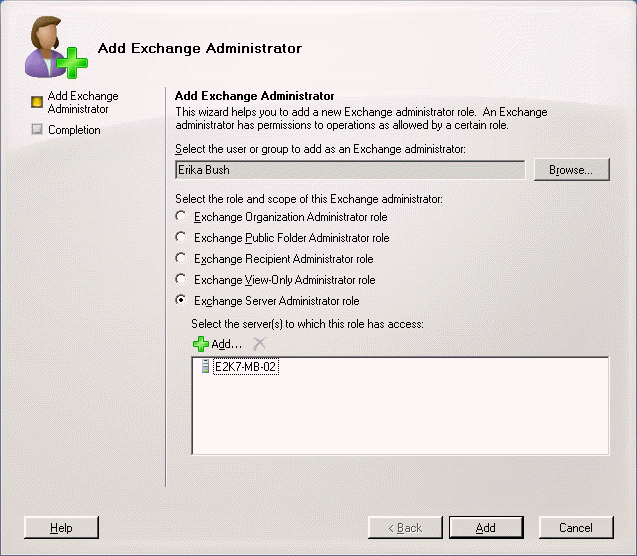
Select the user or group to assign the role to. In the GUI, you have to select the user or group using the navigation window, and you can not assign multiple users or group objects at one time. You would use the interface once for each user or group you want to assign an administrator role to. You can only assign a single role at a time as well. If Exchange Server Administrators is selected, then the section to select an Exchange Server is activated. The Exchange Server Administrator role is not so much a formal role as a means of restricting another role, especially the View Only Administrator role, to a single Exchange server or servers.
When Exchange is installed, it adds a container in Active Directory called Microsoft Exchange Security Groups. Membership in these groups forms the roles assigned through Exchange 2007.
Assigning Exchange administrator roles can also be done using the Exchange Management Shell. Of course, everything you can do in the EMC you can accomplish using PowerShell cmdlets. Adding an Exchange Administrator role is done as follows:
> Add-ExchangeAdministrator -Identity “domain/org_unit/username” -Role “admin_role_name”
The different roles for this cmdlet are listed as OrgAdmin, ServerAdmin, RecipientAdmin, ViewOnlyAdmin, and PublicFolderAdmin. Again, the latter is added with Exchange 2007 sp1. The ServerAdmin role requires assigning the -scope parameter as well defining the server for the role.
Exchange Organization Administrators
This is the grand daddy of Exchange administrator roles with authority over the entire Exchange organization. Any global settings affecting the Exchange organization will require this role, including the ability to assign other Exchange Administrator roles.
Exchange Recipient Administrators
As the name suggests, this role is assigned for administrators to manage Exchange recipients. They have read access to the Domain Users container in AD with write access to Exchange attributes. This requires setup with the PrepareDomain switch in every domain where Exchange users exist.
Exchange View-Only Administrators
This role allows read access only to Exchange organization container and containers with Exchange recipients in AD. They can verify settings, but can not change or add any settings.
Exchange Public Folder Administrators
Added with Exchange 2007 service pack 1, the name basically says it all. This role allows delegation of administration of public folders without allowing any other Exchange administration permissions. Basic Public Folder control is granted such as creating and deleting public folders and controlling folder attributes, like quotas and access.

Leave a Reply