An administrator asked: When we add any new meeting request we get this error "Resource has declined your meeting because it is recurring. You must book each meeting separately with this resource."
Is the resource mailbox configured to decline recurring meetings? You can check this using Outlook or on the Exchange server using the Get-MailboxCalendarSettings cmdlet.
Get-MailboxCalendarSettings MeetingRoom_name |fl
Specifically, check the AutomateProcessing and AllowRecurringMeetings properties. AllowRecurringMeetings should be true if you want to allow users to book recurring meetings. Using AutoAccept means the resource will automatically accept or decline meetings.
AutomateProcessing : AutoAccept
AllowRecurringMeetings : True
Use the Set-MailboxCalendarSettings to change these properties.
If the property is set to True, you need to clean Outlook's free/busy cache using the /cleanfreebusy switch.
In the Run command, type outlook.exe /cleanfreebusy and press Enter.
Direct Booking in Outlook 2010
If you normally use direct booking, note that Outlook 2010 does not implement direct booking in the same manner as older versions. If the resource is configured for direct booking, the meeting will not be booked and , you won't receive an error message.
You can enable direct booking through group policy or by editing the registry on the problematic workstations.
HKEY_CURRENT_USER\Software\Microsoft\Office\14.0\Outlook\Options\Calendar
DWORD: EnableDirectBooking
Value: 1
Group policy key:
HKEY_CURRENT_USER\Software\Policies\Microsoft\Office\14.0\Outlook\Options\Calendar
DWORD: EnableDirectBooking
Value: 1
Configure in Outlook
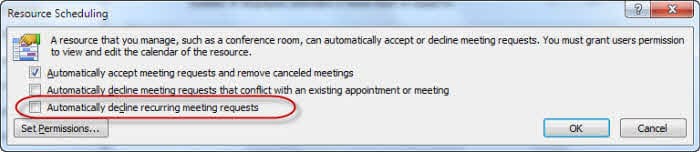
You can also use Outlook to check the AllowRecurringMeetings setting. Open the resource mailbox using Outlook. Go to Tools, Options, Calendar Options, Resource Scheduling and verify that "Automatically decline recurring meeting requests" is not checked.
In Outlook 2010, look at File, Options, Calendar - Resource Scheduling is the last item on the page.
More Information
For more information on the Get-MailboxCalendarSettings command, see
Get-MailboxCalendarSettings (TechNet)

Stephani says
Is there a way when scheduling recurring meetings that I can see the Resource (conference room availability) before sending the invite? The problem with getting the declinations for the resource after sending is that all invitees are involved. If I could see the declined meetings before sending, I could decide that if there were only a few where the resource was unavailable and I would then reschedule those OR if the majority of 6 months recurring were declined - then I would have just picked a whole other time or Resource (room)
James Auman says
This doesn't work for us, because it approves conflicted meetings as well as ones that don't conflict. Is it possible for Exchange to only approve the dates that don't conflict, and then give you a list of ones that did so you can try to book those elsewhere? If not in Exchange 2013, any third-party tools?
Diane Poremsky says
No, Exchange can't approve some dates in a recurring event and reject conflicts. It also can't tell you which dates are in conflict (or not in conflict.) I'm not aware of any 3rd party tools that can do this either. Sorry.
Rob Hintz says
I have an issue where a recurring meeting was cancelled. Another recurring meeting was created 10 minutes later for the same time slots and room. The organizer gets an email with an error: Declined All Your meeting request was declined because there are conflicts. However other can see the new meeting and the room shows to be booked with new meeting.
Is this because not all attendees on the first meeting have cancelled or accepted the cancellation on their end?
raju george says
thx diane for your help
Carla says
Diane- that sounds like it could solve our issue! I previously worked at a company where all recurring appointments were approved and then you received a decline request for the days with conflicts. Is this what you're describing above? Any tips for getting that setup? THANK YOU!
Diane Poremsky says
Yes, that is what I'm describing, except someone needs to decline the meetings (or more them), its not automatic.
Dave says
This is one of the most annoying features of Outlook at our work. If you have to setup a recurring meeting that spans a long time and the room is blocked only one day, it rejects all of the days for that room!!! Why can't it approve the room for all the days except the one where I can find another room. HUGE waste of time because of this lack of functionality
Diane Poremsky says
The admin could change the settings so they are approved if there is a limited % of conflicts.