If you receive an error that reads "Can't open this item. Error loading form..." and have QuickBooks installed, you'll need to edit the registry to remove a zero-GUID registry key entry that is affecting BCM. To the best of Microsoft's knowledge, this is an invalid CLSID, so this will not affect QuickBooks functionality.
The key is
HKEY_CLASSES_ROOT\CLSID\{00000000-0000-0000-0000-000000000000}\InprocServer32Rename this key to something else (such as adding .old to the end of the zero-GUID, OUTSIDE of the brackets), but don't delete it
Example: {00000000-0000-0000-0000-000000000000}.old
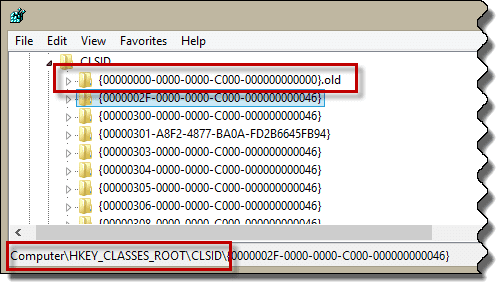
Restart Outlook and the BCM forms should open fine.
Notes
- Various versions of QuickBooks can cause this behavior.
- If you do not have a zero-GUID key listed and have this error, see if uninstalling QuickBooks helps.

Leave a Reply