Complaints about Instant Search and Contacts keep surfacing:
How do you search Contacts on fields other than the ones that are supported by default? If I expand the Instant Search box, it gives me a handful of common Contact fields, but there doesn't seem to be a way to add/get at a lot of the other Contact fields to search on, and apparently the indexer doesn't index the fields I'm interested in, like notes.
Find in older versions of Outlook had an option to include frequently used fields and the notes field was one of those fields. The basic Instant Search doesn't appear to search in the notes field at all. However, the problem isn't that Instant Search doesn't search those fields (it does), only that there is something wrong with the search index and the only results that are returned belong to recently saved contacts.
When problems like this surface, you need to rebuild the search index.
Notes:
When you are searching iCloud folders, you need to have the field you want to search in the View.
When you are searching for phone numbers, you can search for any set of numbers when the number is formatted in groups, such as (202) 555-1212. When it is formatted as on long number, 2025551212, the search term needs to begin with 202.
Rebuild the Search Index
To rebuild the index from the Control Panel, open the System and Maintenance category and select Indexing Options. You can also open it from Outlook 2007's Tools, Options menu or in Outlook 2010 and newer, from File, Options, Search page.
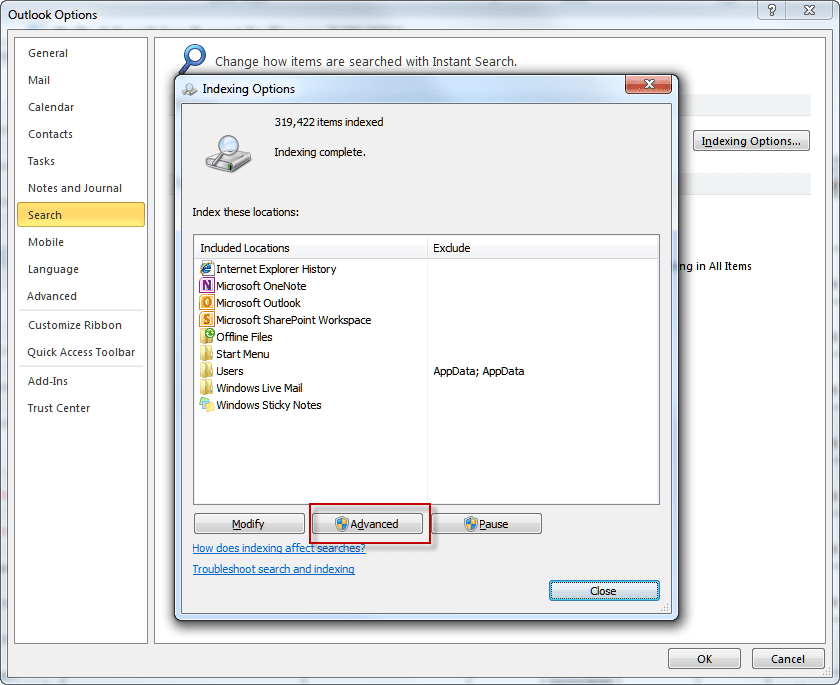
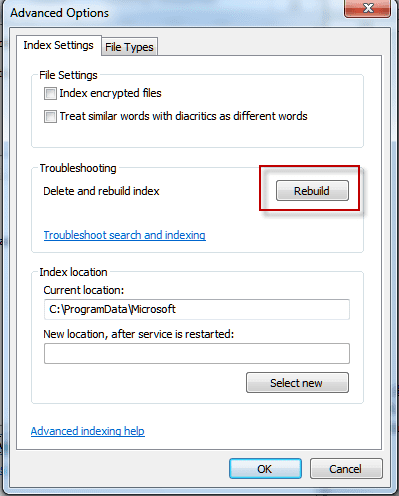
From the Indexing options dialog, choose Advanced, then Rebuild. This will rebuild the instant search index and should fix most search problems.
Find and Delete index files to rebuild index
While it's generally better to use the Rebuild button when you need to rebuild the index, you can delete the search index files from the hard drive to force Windows to rebuild the index.
Delete all files and folders in these directories:
C:\programdata\microsoft\search\data\temp
C:\programdata\microsoft\search\data\applications\windows
Then reboot and Windows will start to index your Outlook files all over again.
More Information
Because rebuilding the index is a slow process that may use a lot of your system resources, you can use Advanced Find (Ctrl+Shift+F) until you have time to let the index rebuild.
If you have contacts folders in different PSTs and don't want to include them in your search, you can remove them from the search by clicking on the arrow found on All Contacts Items and removing PSTs from the list.

Edward Foy says
I'm using outlook 365.
When i search for a contact, through the "people search" field, it finds said contact, but when i hit enter or click on the name, nothing happens.
Any suggestions?
Eddie says
This may be an old post, but it resolved my issue. Thanks for the tip.
Kulani Mkhombo says
Good day
i had the same problem until i archived emails older than 4 months. Now my search results appear with the latest 1st then the rest follows. I hope my solution will help he rest of you.
Diane Poremsky says
Did you change the search scope? There is a bug in current builds where search fails in the all mailbox search.
https://www.slipstick.com/outlook/search-broken-again/
Diane K says
I have suddenly started having a contacts "search" problem. When I add a new contact, it appears in the alphabetical listing but does not pull up when I enter the name in the "search box".
If I delete the contact and input it a second time, the search function works correctly.
Any ideas??
Diane Poremsky says
indexing issues is the usual cause but im surprised it works after you delete the contact.
dawn says
Hi Diane, I have 2010 outlook microsoft exchange. When I go to search in contacts for example dawn s and start typing "da" nothing comes up, even when I type my whole name. I rebuilt according to your instructions but no change.
eric turcotte says
I have recently upgraded to a new computer featuring windows 10. I am using ms outlook 2010 and have two "contact" issues:
1. I used to have small window in the mail page where I could type in a name and the contact suggestions would appear. Is there a way to reinstall this window?
2. How do I make iCloud my default for my contacts when using outlook ?
Diane Poremsky says
1. not sure what window you are talking about, but you should have it in the same place in windows 10/ outlook 2010.
2. the same way you set any data file as a default - in file, account settings. However, not all versions of outlook support it and it's buggy.
Cutter says
I've created custom fields in outlook for contacts. However, when I try to search the information in the search bar they wont pop up. Is it possible to search for values in custom made fields (user identified)?
Evan says
Diane, what do you suggest be done for a user with Outlook 2007 / Windows 7 / Exchange 2003 who has to rebuild their index every 1-3 days. The problem is that it just takes so long to rebuild the index every single time! Thanks in advance!
Diane Poremsky says
It definitely shouldn't need to be rebuilt that often, if at all. One possible cause is a corrupt data file so I'd start with deleting the ost and let Outlook rebuild it.
rt says
How do I search for contacts within a particular domain ????
Diane Poremsky says
Use from:(@address.com)
ARR says
STILL FIGHTING SEARCH OPTION IN OUTLOOK 2010
Diane Poremsky says
What exactly is the problem with search?