This content has been archived. It may no longer be relevant.
If you are using Outlook for Mac, use the following methods to delete messages stuck in your Outbox.
When the message is stuck because it has a large attachment, the Outbox should be visible in the folder list.
- Right click on message in Outbox, choose Open Message
- Remove the attachment
- Press Send
This will re-send the message without the over-sized attachment. If you don't want to send the message, delete it from the outbox instead of removing the attachment.
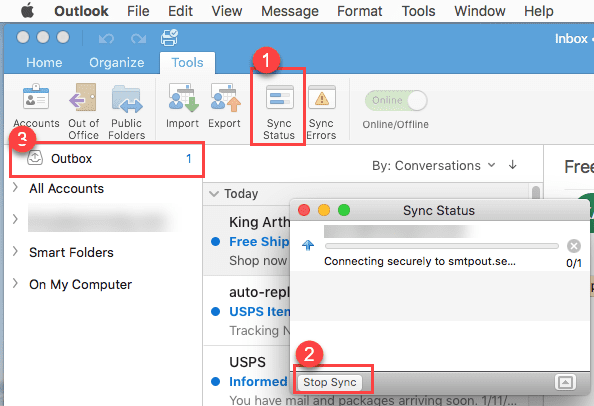
If the Outbox is not visible, and you use Outlook 2016 for Mac, start a Send and Receive then:
- Open the Sync Status dialog (1)
- Either click the Stop Sync button (2) in the lower left or the little x at the right of the entry to stop the send and receive.
- Once you stop the send and receive, the Outbox will be visible (3) in the folder list.
If you use Outlook 2011 and don't want to send the message or its stuck for other reason:
- Close Outlook 2011
- Hold the Shift key down while reopening Outlook.
- Go to Outbox and delete the stuck message.
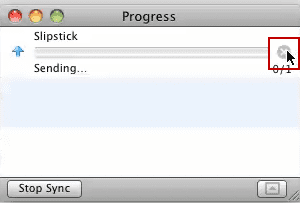
If the Outbox is not visible, initiate a send and receive and open the Progress dialog. Either click the Stop Sync button in the lower left or the little x at the right of the entry to stop the send and receive. The Outbox should now be visible in message list and you can remove the attachments or delete the message.
More Information
Email is stuck in the Outbox in Outlook for Mac 2011 (MSKB)

Noam Doron says
Hi.
I tried all of the above, working offline , opening the progress box and nothing is there andthe comment keeps on popping up.Any idea to solve the issue?
Thank you.
Julie says
Yay! Worked it out. Shut outlook down. When reopening it, hold shift button down and click on Outlook icon twice. Suddenly, there is my Outbox near bottom left hand side above Mail, Calendar, Contacts etc. I was then able to delete my stuck messages
SR says
I have tried to send an email with a list of addresses in the BCC line. Obviously, one of them was not valid so Outlook for MAC 2011 gave me an error message. However, now I cannot see the message anymore and no interrupting during sending or shift and restart will make it reappear. Clueless what else to try. Anybody out there who knows?
S
Amy says
Thank you, Thank you, Thank you. I've been trying to fix this issue for days, but couldn't locate my outbox. So glad you had better directions then everyone else.
livia says
thanks - i was looking to keep visibility to the outbox - which doesn't sound doable. at least i learned that from this - thank you
Lorelle Rousso says
Lorelle Rousso
Thank you so much for this information
Sam says
I accidentally tried to send an email through Outlook to my gmail address a few days ago with a very large attachment (100+ MB). As soon as I realized how large the file was, I tried to stop the send from the outbox while it was showing but it disappeared. Now, I can't find the message anywhere but my Outlook is SLOW! I keep getting the spinning circle with every few characters that I type. I have tried all of the suggested steps above but the email is nowhere to be found. Any other suggestions?
Diane Poremsky says
Unfortunately, no, I don't have any other suggestions. Test machine with Outlook 2011 isn't working so I can't try the steps to see what might be wrong. :(
Ted says
I'm having the exact same issue. I can't "X" out on the sending item in the Progress Folder. Let me know if you have any answers!
Diane Poremsky says
This is with the older (original) outlook client that came with Office 2011 or the newer Outlook client (with the blue icon)?
blackbirdpi says
Oh i have the same thing! I have 1 outbox message - managed to delete the pic (that was too big) but cannot get rid of this stupid message! It says it is partially downloaded, but i try to delete - won't delete. try to send, get a colour wheel of death! every now and then outlook just crashes completely and i get a error message (send report or not)
I am ready to cry - this is my work email (and it can't fix it)
Please can you help me?
Diane Poremsky says
If you disconnect from the internet and wait a bit, can you delete it?
michael says
It's odd, my messages are being send, however after they are sent and the process, they are sent to the Oubox and they stay there (after the fact that they've been sent) can't seem to make the stupid folder go way!
Diane Poremsky says
What type of email account are you using? (POP3, IMAP, Exchange)
Are you using the Outlook 2011 update that was released a few weeks ago?
Chip Grouby says
Thanks!!! Did not know what to do!!! Going to progress bar and stopping made the outbox appear and I could delete old message that was to big to send and holding up other messages!!!
Mika says
I was finally able to delete the email with the too large attachment. However, is there any way to have the outbox permanently show up on my folder list, so this is not an issue again?
Diane Poremsky says
As far as I know, no.
Karron says
I have had 5 messages stuck in Outlook for 2 weeks now, but they were not visible!. Did the steps that were posted here and now they are GONE. Whew!
pepperandblue says
hi, which steps, exactly? please tell me what you did, an invisible message is driving me crazy! tnx!
joe says
worked like a charm
Ross Latimer says
Outlook Mac 2011 is a piece of junk. I've been working hours on trying to find outgoing messages so I can delete a message that is too large. I've done everything suggested and I can find no way to access outgoing messages that are stuck. Every time I open Outlook I get an error message that the email can't be sent. I can't even get to the folder for sent emails now. Worst program ever!!!
Diane Poremsky says
Can you start a send and receive then cancel it? Open the progress dialog - i did it by double clicking on the progress information in the status bar. Once you cancel the progress, it should display the outbox so you can delete the stuck message.
Alicia says
The switch to offline mode worked PERFECTLY for me. Thank you so much!
Charles says
I am having this problem, but it is on my Droid phone and not my computer. Any suggestions. I keep getting the same error message and even with Verizon's help, I cannot delete it.
Diane Poremsky says
Did you try putting the phone in airplane mode? Once its in airplane mode you should be able to open the message and delete it.
Anil says
i see the message sending mail in the microsoft outlook but there are no messages in the outbox. How to solve this problem
Diane Poremsky says
This is with the windows version of Outlook? It's probably a read receipt. See https://www.slipstick.com/how-to-outlook/delete-stuck-read-receipts/ for instructions to check and delete it.
Denise says
I don't have an outbox in outlook. How do I delete a message.
MDL Building says
Thanks Tim
Ken France says
I continue to get an error message that I have a large attachment on an email and it can't be sent but I cannot find the email after trying several different ways to find the email from both this post and others I've found. One possible nuance is that the email appears to be one that was sent using a gmail account that I have setup an an account within outlook. There's no outbox in the gmail account that I can see either. It pops up every 5 minutes over and over again. Would be great to solve this mystery.
Diane Poremsky says
Go to Folder List - CTRL+6 shortcut will open the folder list - if its Gmail IMAP, the outgoing message will be in your default Outbox, aka, in the data file at the top of the folder list.
Ctrl+Alt+S to open the Send and Receive dialog. How frequently are you checking for new mail? I usually recommend 10 minutes, minimum. That won't kill the dialog but it can slow it down. :)
Is the error message from Outlook or another application, such as your antivirus/security software?
Timothy Bowman says
If that doesn't work try the following: Open Outlook. Click Outlook from the menu bar at top and choose work offline. Click on outbox folder, then click on the mail you are trying to delete. Click delete. Open Outlook from the menu bar and unclick work offline.
Justin Credible says
Thank you so very much!! I could not delete the message, despite removing the attachment. But, I did change the recipient to another of my emails. Thus preventing the sending of a useless email to a business client.
Dave says
The shift open worked and i found the outbox, thanks. why is in not always visible ?
Diane Poremsky says
I'm not sure why its not always visible.
Dave says
I have a file that was too big to send and went to the outbox to cancel/delete but I do not have an outbox. Outlook for Mac 2011 ver 14.2.3. I see it trying to send at bottom of pane but cant kill it. HELP !
Diane Poremsky says
For outlook 2011, try this:
Right click on message in outbox, choose “open message”
Remove the attachment
Press send
It then re-send the message without attachment (3kB instead of >30MB) — end of story. Phew!
Another method for outlook 2011: Close out look, hold down shift button while reopening outlook. Go to out box and delete the “stuck” message
Susan Entz says
That was wonderfully helpful.
Aloha
Susan
Peter says
That was amazing! That has been irritating me and grinding my Mac to a halt for days! Thank you...