It took until the release of Office 2016 to get the news and it's not good for Business Contact Manager users: BCM will not be updated to work with Outlook 2016.
While it's a disappointment, it's not a total surprise as many users wondered how much longer Microsoft would support Business Contact Manager. It had a couple of things going against it: it doesn't generate revenue and it had a small user base.
What this means for current BCM users:
Anyone who uses Outlook 2013 and wants to continue using BCM will need to remain on Outlook 2013. This means BCM users should not update to Office 2016 and will need to block the automatic upgrades that are coming October 1 2015 for Office 365 Personal, Home, and University. Upgrades can be held off for up to a year. (Business subscribers will be automatically upgraded at a later date.)
It's very important that Office 365 BCM users do not upgrade to Office 2016. They will also need to block the automatic upgrades to prevent Office 365 subscriptions from automatically upgrading to Office 2016.
Block Upgrades using GPO
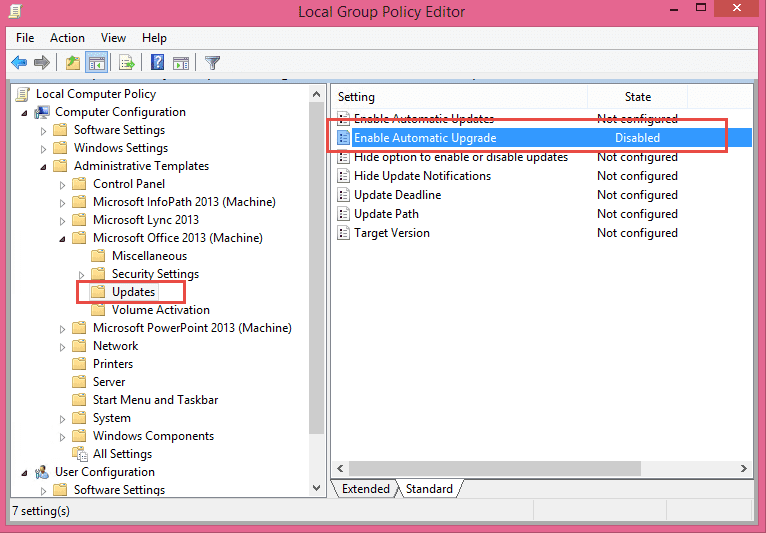
Businesses using Group Policy can block the automatic updates using the updated Office 2013 group policy template. Look for the option to block updates under Computer Configuration\Administrative Templates\Microsoft Office 2013 (Machine)\Updates.
Double click on Enable Automatic Upgrade and choose Disabled, then click Apply and close the dialog. If Outlook is open, close and restart it.
Block Upgrade using Registry
Anyone can block the updates by setting the following registry key (create the keys if they are missing):
HKEY_LOCAL_MACHINE\SOFTWARE\Policies\Microsoft\office\15.0\common\officeupdate
DWORD: enableautomaticupgrade
Value: 0
You'll need to close and restart Outlook for values under the policy key to apply.
If you don't want to edit the registry yourself, download then run this reg file to set the key.
enableautomaticupgrade
Revert to Office 2013
Users who were auto-upgraded to Office 2016 from Office 365 Personal, Home, or University can uninstall Office 2016 and install Office 2013 from their Office account portal.
Business subscribers should have time to block the upgrade using the registry key, if not, see Obtaining older versions of Office for the steps necessary to revert to Office 2013.
More Information
Possible replacements for BCM are listed here:
Customer Relationship Management (CRM) Utilities






























Is there a good reference book you would recommend for creating and customizing Outlook contact forms. I've done a little programming, so would need beginner to intermediate level resource. With the demise of BCM we ideally would like to keep our regular and custom (approx. 100 fields) data in Outlook if possible. Thank you!
The best book is an old book, if you can find it - one of Sue Mosher's programming books will have some chapters on customizing forms. Otherwise, it more what you can pick up online. outlookcode.com has a lot of information.
I do not know if this is appropriate so I am assuming the moderator will remove this comment if it is not, but I hope they will contact me first. I have been having trouble with BCM, and after the last time BCM crashed and took me two hours to repair, plus realizing Microsoft is no longer creating BCM for future versions of Outlook I decided to find a non cloud replacement.
I have found a product that synchronizes with outlook and has the same and better features then BCM and is desktop based (no cloud) and it does not crash. . A company called Carmel Vision has a product called InfoFlo. There is a cost to the product, but I believe it works well. (I am not getting anything for posting this. I have become so frustrated with BCM and have looked at so many other CRMs that I am happy to share my good fortune with others. I hope this helps. Please do your own due diligence.
I also found if you start Outlook as an administrator (run as administrator) in Windows 10 it does not seem to crash,
Sandor
4 1/2 years later, but a note on InfoFlo (InfoFlo CRM to be precise). I have nothing to do with InfoFlo and haven't actually used it yet., but did look into it a little bit and it does seem as if it might possibly be a replacement for BCM but don't see where it can import your BCM data so, if not stored directly in Outlook/Exchange, you'll be figuring out a way to import/export yourself. Both BCM and InfoFlo are using SQL on the back-end, so theoretically possible to export/import for someone that knew SQL and the data structures in both systems, but not for the faint of heart I am afraid. Another note, InfoFlo is not free, but a reasonable $99 for perpetual license. Looks like where they try to make their money is with their cloud option, which looks to start at $30 a month per user with minimum of 3 users. Would start adding up pretty quick if you want to go cloud route, but the one-time $99 purchase would be the closest to what BCM was. If anyone else know any more info about using InfoFlo or if anyone figured out ways to convert/export/import, do let… Read more »
Hi Diane - I'm trying to figure out out to add filters to my contacts - is that even possible? I'm a sales rep for many vendors and I would like to have filters/check boxes in indv contacts as to what Vendors they buy from with me so that when I want to send out a mass email to my customers who buy from XYZ Vendor I can just select that - I like Groups contacts but the problem with that is I'm always adding new customers and may not remember to add them to the different groups. Hopefully this makes sense? Thanks
You can customize a contact form to do this, but I would consider using Categories.
Hi Diane,
Is there a way to install BCM in a fresh install of Office Professional Plus 2013?
The file here should install just fine - it's the full 368MB file.
https://www.microsoft.com/en-us/download/details.aspx?id=36513
Thanks Diane.
I have tried that one and the next one to no avail.
https://www.microsoft.com/en-us/download/details.aspx?id=36511
Seem like either I need Office 2010 or Office 2007+BCM to make either of these 2 work and install BCM over a FRESH copy of Office 2013.
I'm looking for a workaround...
If there is no option, do you have a CRM that you recommend?
What exactly happened when you tried to install it? You need to use the Nov 14 version of BCM. It's latest version. It will work with outlook 2013.
Which version of Office do you have?
Hi Diane,
Don't know if you have received my previous messages (they are disappearing from the chain).
When I install, the process goes smoothly and asks to reboot the laptop. After the restart, the first screen of the installation process automatically pops up - BCM is not installed. I have run this process several times to no avail.
I'm using Windows 10, Office Professional Plus 2013, version 15.0.4787.1002.
Where can I download this Nov 14 version?
Thanks in advance Diane!!
I do have the other messages - they go into the moderation queue after posting.
This is the Nov 2014 version - https://www.microsoft.com/en-us/download/details.aspx?id=36513
Thanks Diane. I tried that one again with the same result.
Thanks again for all your support.
Cheers,
Hi Diane!
Found a solution...turns out that I needed to do a Clean boot (https://support.microsoft.com/kb/929135) to install BCM.
According to this guy, "Clean Boot is performed to disable all start up programs and 3rd party services on the machine to check if they are conflicting with OneNote." - so, OneNote was the dealbreaker here...
Diane, THANKS SO MUCH FOR YOUR HELP...
Are you sure onenote was the culprit? When clean boot helps, it's usually antivirus that is at fault, especially when its a 3rd party AV.
The sad irony is that I went all out to purchase a brand new computer to do a clean install with the new operating system and the creme d'le creme I'd heard much about for the new office 2016. I was flying thinking I'd enjoy the learning curve on the BCM upgrade. As a professional, I've operated my business from home over the last 15 years. I have a large database. Except for a slow and outdated computer, I actually enjoyed the BCM on my Vista! It was customizable for my needs. I was looking forward to a complete, fresh new outlook altogether. Way to go Microsoft!!! Just because there is no real market for you, you shouldn't cloud over our sunshine! What SHAFT! At least you could exclusivize it on your PRO version. If there is no real intent to roll out a BCM update for 2016, I will demand my money back for such misleading because you could have given advance knowledge before releasing 2016 to give us an option. But we all know whats behind that strategy - aye Microsoft? No secular kingdom lasts forever. MS you've had a pretty good run. Maybe its time another sovereign… Read more »
Well even with the end. Diane thank you sooooooo much for all your work. I don't think we would have BCM up and running without you.
Thanks Diane, could not have kept BCM running without you. Do you have any insights on how to get all of the data out of BCM so it can be migrated to another application? Do you have any recommendations for a BCM replacement? Thanks
It's all in sql, so you can export to csv if you install the SQL Management studio. So far, no really good replacements for it - there are a lot of options (at varying price points) and it really depends on what features you need. Most do not integrate with outlook and are online/cloud based.
Please treat this is an official request to extend the support for BCM in Outlook 2016 and future versions or release the code to the open source community so we can continue extending it or provide a cut down Dynamics CRM version for free to allow users to migrate to it without additional license costs. This is very disappointing, at least revert your product plans and provide compatibility support without extending BCM's features. Does anyone at Microsoft calculate the impact on Partners that are Microsoft’s extension to the customer base in the field? Why do you leave your loyal customers in the cold with no options by shrinking the feature base every year instead of extending it? Same story in history repeating itself for Microsoft Money and Microsoft Office Accounting to name a few. BCM was one of the great features that resulted in convincing our customers to move to Outlook and you are removing support for this add in now? Then why not just sell your Office customer base to the competition to use GoogleApps or OpenOffice that are free, at least your investors will be happier. It appears that this is the product strategy for Office and Outlook… Read more »
I have been using BCM since it inception so that I have almost 12 years of communication that I simply cannot afford to lose. On the other hand staying with Outlook 2013 indefinitely is not a viable long term solution. I have looked at every
Since I primarily use BCM to maintain a history of all communications / meetings I realize that I can most likely accomplish this through a series of rules.
What I cannot figure out is how I can access the 12 years of communication history that currently resides in BCM when I finally update to Outlook 2016.
Any suggestions will be greatly appreciated.
You'll need to export it - although, you might be able to access it using Access as a front end. The big thing with using access is writing the sql to load the records so they make sense.