Instead of using email rules to move message, you can leave the messages in your Inbox and use Conditional Formatting rules in a custom view to highlight messages (or use filters to hide messages).
This tutorial shows you how to highlight and show only messages from specific senders but you can use any criteria in the filter dialog.
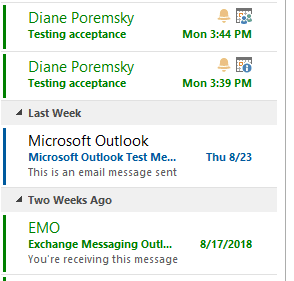
In this example, I'm highlighting messages from a sender in Red then creating a copy of the view so I can show only the messages from that sender.
Create a Conditional formatting rule.
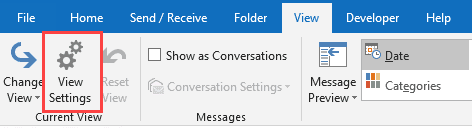
- Open the Customize view dialog. In Outlook 2010 and newer, look for the View Settings button on the View tab. In all versions, right click on the row of field name (or Arrange By) at the top of the message list and choose Customize (or View Settings).

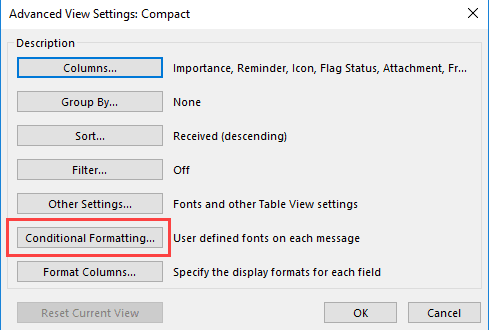
- Click Conditional Formatting button (it's called Automatic Formatting in older versions of Outlook.)

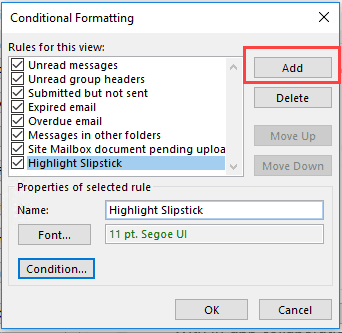
- Click Add and enter a name for the formatting rule; choose your Font.
- Click Condition
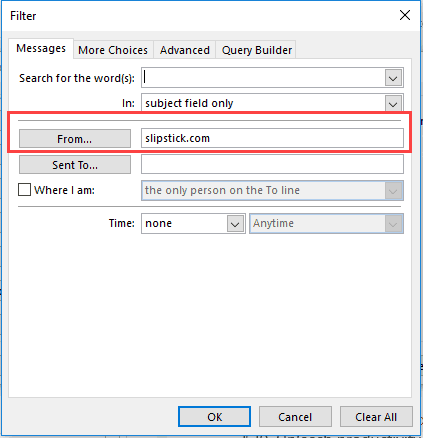
- Select your conditions. If you want to filter by email address, not display name, type the address or part of the address in the From field on the Messages tab. Do not use the From field on the Advanced tab. In this example, I'm going to highlight all messages from slipstick.com.
- Close the dialogs and apply the view when finished.
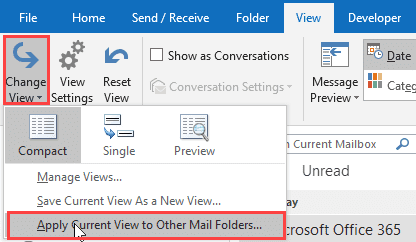
Because Conditional formatting is part of a view, it may only be applied to the current folder (or to folders using the current view). To apply it to other folders, use Change View > Apply Current View to Other Mail Folders to set the view on other folders.
You can make a copy of the view; thus is recommended if you customized a default view as it's very easy to accidently reset the view. If the original view gets messed up, use the copy and apply it to the folders.
To make a copy of the view, choose Save Current view as a New View from the Change View menu.
Video tutorial: Outlook 2010 and newer
Video tutorial: Outlook 2007 and earlier
Click on Arrange By to expand the menu and select Custom... then Automatic Formatting button.
Remove or Reset Custom views
If you decide you don't like the custom views, you can delete or reset them several ways. Or to restore all of Outlook's views to the default settings, use the /cleanviews switch.
More Information
The Automatic Formatting filter dialog uses the same filter dialog as Search folders, Advanced find and Views.
When you are applying filters to domains, use the From field on the first tab for the address or partial address. The From field on the Advanced tab is used for display names.

Derek says
I can't figure out how to highlight meetings that have a start time between certain times. I would like to flag in red any meeting before 8 AM so I see them on my calendar. Under conditional formatting Advanced tab, I set Field:Start, Condition:between, Value:3:00am-7:59am. Outlook seeming randomly highlights in Red (my selected color) only certain of my meetings, but those with start times of 6 AM (correct), 8 AM (incorrect), 8:30AM(incorrect),9:00AM(incorrect) and 12:00PM (incorrect). It doesn't highlight meetings with start times of 9:00AM (for a different meeting), 12:00PM(for a different meeting),or 1:00PM. There is no apparent reason. Also there appears to be zero help indicating what "Start" field means or what are acceptable Fields (since the fields are unfilled and you just randomly guess what to enter).
Diane Poremsky says
If you use categories, conditional formatting won't work at all. The time condition works good for days, but not hours - and recurring times will meet the condition.
Using Start between 7:30AM AND 10:30AM works... for today (should work for every 'today' - will confirm in about 30 min.) This is because not having a date assumes today. It also applies to recurring events unless you add recurring = no as a condition.
Diane Poremsky says
This filter sets the green color - the calendar is yellow, and pink is categorized, so the formatting would not work even if it met the start time constraint. It only applies to "today"... (it's 12:02 AM here)
Derek says
Thanks for responding and looking into this. It looks like you can't do this even though relatively simple.
I have done a lot with VBA in Excel. There isn't any way to record yourself running through steps and then to modify that within Outlook, right?
Diane Poremsky says
No, outlook doesn't have a macro recorder. no, you can't do it.
Sean says
I use conditional formatting in my calendar and have a rule to color meetings where I am the organizer.
I want another color for meetings I organize from my home mail account, but can not get this to work.
My work appts condition is "Organized by: Last, First"
My personal appts condition should be "Organized by: name@personal.com" but I have also tried @, @personal.com, personal.com, attendee: name@personal.com etc.
In all cases, those appts are seen by outlook to be organized by "Last, First" and have that same color.
Is there something else I can use in the condition?
JayC says
Let say I have the word "Point" as my condition. Now if the word "appointment" came up, it would also apply the condition because the word "point" is in appointment. Is there a fix?
Roxy says
So I have set up multiple shared calendars, I created conditional rules that if XYZ word was in the subject of the appointment or meeting it would turn it a certain color. They work fine but then outlook seems to enjoy erasing all of those conditions. I'll leave the calendar for a bit and come back and the formatting is gone. At first I thought it was the calendar I was viewing didn't have the formatting applied. So I went back in and redid the conditions had it set up working, but again after a bit all the formatting was cleared. - Also side note question with shared folders and formatting like that. Will others be able to see it or is it only on my view?
Diane Poremsky says
something is causing the view to be reset. rather than editing the current view create a new one and apply to the foldr.
Roxy says
Thanks. I did figure out that the formatting wouldn't be shared along with the calendar. So at this point it's moot. It was something I needed to be sent out along with the shared calendars.
Diane Poremsky says
The view needs to set to be for 'this folder, everyone' and they people you are sharing with might need editor permission.
Joy says
I've set messages to me only to appear in red font which works fine in my inbox view - how do I get the font for messages sent only to me when viewing in the Unread Messages folder? This used to work for me in an earlier version of Outlook. And to be clear I don't want all my Unread messages in red - only those addressed to me. Thx.
Murray says
I have had a similar problem which I seem to have resolved. Just had laptop re-imaged with 8.1 64 bit and Office 2013 Professional
I had several rules which were working OK on 2007 & 2010 but one of them (the standard "Unread Messages" (which I had as Bold Red Font) would only work intermittently in 2013. The "lower priority rules for Read Messages (eg where I am the only person on the To line etc) were OK.
The fix which worked for me: Create new rule for Unread Messages, Move it up above the other standard rules, disable the standard Unread Messages rule - now working fine
Jennifer Owens says
I tried moving the other person up and it did not work. I deleted him and put him back in and still only the one condition works.....
Diane Poremsky says
It sounds like the rule is not being triggered. How does the rule read?
Jennifer Owens says
Can I have more than one conditional format? I have set up emails from one individual to come in as red and emails from another individual to come in blue. The first rule to red is working but the 2nd to blue is not.
Diane Poremsky says
you can have multiple conditionals. Does the rule work if you change the order? Are there errors in the conditions?
Dean Paterson says
Hi, I am trying to conditionally format emails in Outlook 2010 where I am cc'd only (eg highlight in blue). I already have a conditional format for unread emails(highlight in red), which want to keep and that takes precedence, The "move up / move down" buttons to move my new rule above the exisiting pre set rules are greyed out? Is it possible for my new rule to override the existing one for cc emails only?
Diane Poremsky says
No, you can't move them up the list. You can untick the default rules and make new ones that do the same thing and position them in the order you want to use.
Kane says
Thank you so much!! This has made my Outlook a lot more functional!
Alison says
Excellent; thanks!
Fran says
GREAT - Solved a problem a line manager was having and I've learnt something new. Thank you.
Neslihan says
hi, i did some rules on auto. formatting. it was working but since 2 days it is not working. i delete the rules and create the same rules but still not working. can you help me pls.
Diane Poremsky says
How do the rules read? Is this a mail folder? As you using categories?
vickvern says
This was great advice. Is there away to remove the line from the completed tasks showing in the calendar for Outlook 2010. I managed to remove it from the tasks section with your tutorial, but they still show up lined through in the Calendar view. I appreciate your assistance,
Diane Poremsky says
Right click on the row of field names at the top of the task list and deselect Show completed tasks.