Many thanks to Hernan Cibello for this tip, originally used with Exchange 5.5 and Outlook 2000. With later versions of Exchange and Outlook, you need to add the distribution list to a new message form and expand it. Copy and paste the names into an Outlook distribution list form and Outlook will resolve the names to entries in your Contacts and the Global Address List. At that point you can save it as a text file or Choose Forward as vCard to create a text list of the names and addresses.
Naturally, this works only if the membership of the distribution list is not hidden.
Outlook 2003 and later
- Open a new message form
- Add the Distribution list to the message
- Expand the list
- Copy the names
- Paste into the Members field of a new DL form
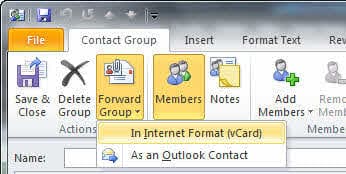
- Save as a text file or Forward as an vcard to create a text file.
Outlook 2000 and 2002 Distribution Lists
- Choose File | New | Distribution List.
- Click Select Members.
- In the Select Members windows, select the Exchange GAL distribution list that you want to print, then choose Properties.
- In the DL's Properties windows, select the first member inside the Members panel and, holding the Shift key down, press the down arrow key to select all the members.
- Choose the Add option in the same window, and respond Yes to the popup question. This has a limitation about how many members you can paste (around 131).
- Choose OK to close the two open windows.
- In the untitled window for the new DL, choose File | Print to print the distribution list. Close this window without saving.
More Information
Printing Microsoft Outlook and Exchange Address Books -- including distribution lists

Ali says
Thanks....Really helped....