There are two issues that affect the display of Outlook's calendar at the beginning and the end of the month.
Vote on this Uservoice suggestion to display a monthly view that begins 'this week': Provide an option to start current week in Monthly View in Microsoft Outlook 2016
Outlook's Monthly calendar begins with last month.
Outlook's Monthly calendar displays dates at the end of last month because Outlook always displays full weeks and begins the month with the first day of the week that contains the first day in the current month.
Outlook does not offer a setting to display only the week containing "Today" and the next 4 weeks or to show blank cells for the dates in the previous or next month (as a paper calendar may do).
This screenshot shows September 2018. Since the first day of the month is in the last square of the top row, the calendar starts at the end of the previous month.
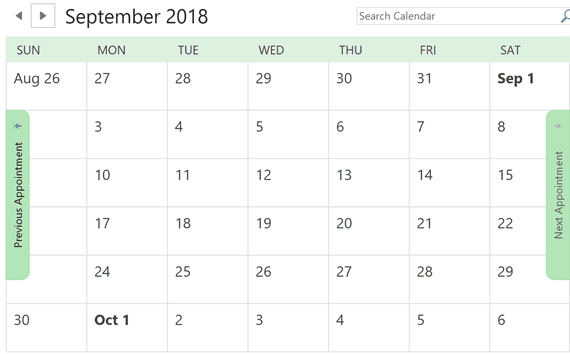
Today's Date is not Selected: Outlook displays the end of last month instead
When either of the following conditions are true and the month begins on a Saturday or Sunday, and ends Monday or Tuesday (causing the month to span 6 Outlook calendar weeks), it appears that the last Monday of the previous month is selected as "Today".
- You use the default setting of "First Day of Week: Sunday" and the default of Compress Weekend days enabled.
- You use "First Day of Week: Monday".
Screenshots taken August 31, 2004: August 30 and 31 are not shown on the calendar. The last Monday in July is selected because today (August 30 or 31) is off the screen
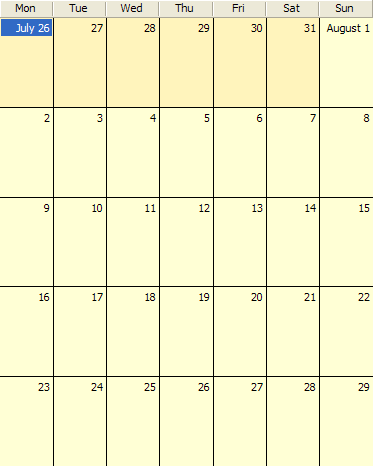
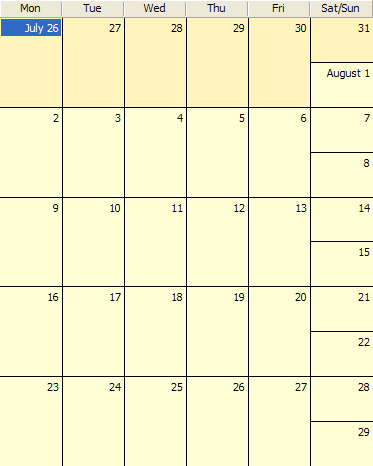
The screenshot on the left shows the week beginning on Monday. The one on the right uses compressed weekends.
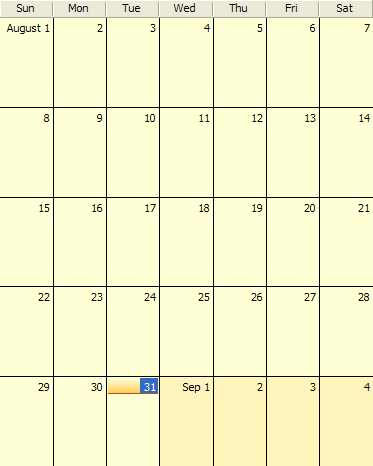 When you begin the week on Sunday and don't use compressed weekends, it should display properly, with 'today' highlighted in the last week of the month.
***Note that while these settings are the default or most common, other First Day of Week: settings may have the same affect, depending where the first day of the month falls.
This happens because Outlook displays only 5 weeks at a time and it always displays the week containing the first day of the month at the top of the screen. The first day shown on the calendar (which happens to be the last Monday of the last month) is selected because 'today' is off the screen.
The workarounds:
- Change the first Day of Week or Compress Weekend settings so the month spans only 5 weeks.
- Press the Today button or right click on the calendar and choose Today.
- Wait a couple of days for the first of the next month to correct it.
To change your default First Day of Week setting, Tools, Options, Calendar button.
To change the compressed weekend settings, right click on the calendar and choose Other Settings.

Someonze says
When you click 'Today', Outlook shows te full month in the calendar. Even if today is oktober 31! In that case, you can not look more than 3 days forward without scrolling! I don't care about the calendar - information of the past 30 days!
Mozilla Thunderbird does better! In Thunderbird, the calendar starts with the Monday of the current week, so I can look 4 - 5 weeks forward (i.s.o. backward)
Jim says
my calendar displays wrong date when I print calendar. June calendar shows 18 as Monday.
Diane Poremsky says
What version of Outlook? Are you using the print features of Outlook or something else, like Calendar Printing Assistant?
Diane Poremsky says
Also, I assume you've verified the year is correct? :)
Arlene says
Rats! most annoying...thanks for your help.
Arlene Carlson says
Hi Diane: When outlook opens I would like the week with "today" in it to be at the top of my screen and the next 4 weeks following. I don't care what happened last week anymore...How can I set Outlook to do that?
Diane Poremsky says
Unfortunately, Outlook doesn't support putting 'this week' or 'today' on top. It's like a paper calendar and the default layout is fixed.