With the introduction of two-factor authorization since the original date of this article, there is a second (and becoming more common) cause of this error: Outlook needs the app password, as it will not currently bring up the second authorization screen.
The message that comes up when Outlook can't set up an encrypted connection automatically caught a couple of users off guard this week. After calling their mail provider to verify the account supports encryption, they asked me what was wrong with Outlook.
An encrypted connection to your mail server is not available. Click next to attempt using an unencrypted connection.
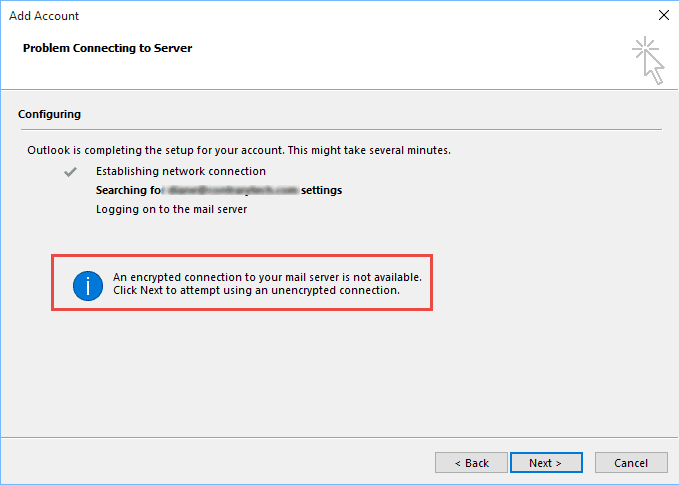
This message doesn't mean that the mail server doesn't support encryption, it just means Outlook's Auto Account Setup can't determine the correct settings to use. This is caused by incomplete or missing autodiscover records in DNS. As a result, you'll need the account up manually if you want to use encryption.
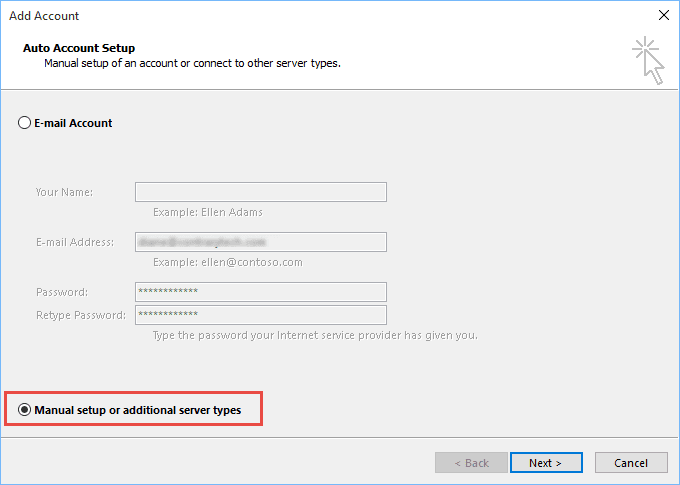
When this message comes up, click Back, select Manually configure server settings then click Next.
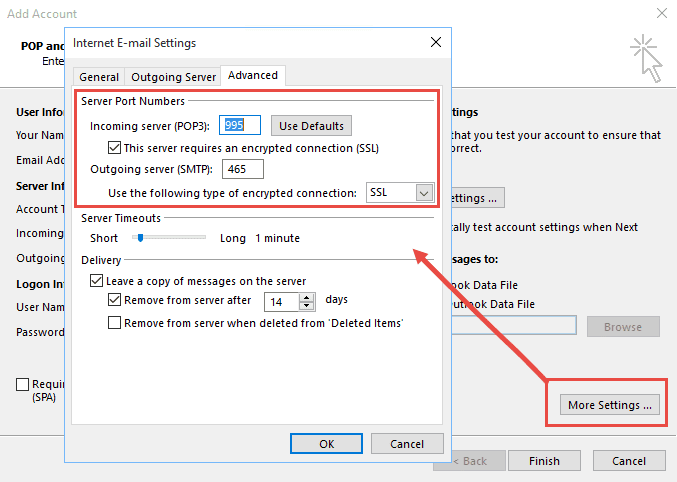
You'll need to enter your account information and server names then click More Settings and configure your SSL or TLS settings on the Advanced tab.

Muhammad Aleem says
Dear Sir how can solve this issue? update the browser when we configure company email on outlook
Ali says
is there a need to mention incoming and ougoing server information in this blog?
and the screenshot that you attached is not the window that opens when you select manual configuration for setting up Outlook.
Jeremy says
Did you notice the article was written in 2017? There have been a few new releases of MS Office since then, so yes, things may look slightly different.
Chris says
I am having this problem too. I've manually entered the settings. I'm using MS Outlook 2007, attached to an AOL mail account. I receive and send email using that account from all my other devices, which suggests the problem is in my Outlook app or my PC. I can use the online AOL account. I've run "Repair email account," tried turning off the Windows firewall, and other things. Any suggestions?
Vitalstats says
I don't know if this will help, but I finally found that the problem was not on the desktop side, but on the server/hosting side. I use exchange server, hosted by Microsoft, and had to turn off "Security Defaults" in my Office portal. Once I had done that, Outlook stopped asking repeatedly for the password. I guess the problem might be the same with other email hosts as well, just try to find out if there is a setting somewhere on gmail/yahoo/outlook or whatever you are using. Gmail have a "support for less secure apps" setting that caused some trouble if it was enabled.
To fix my Exhange security settings, I just did the "Turn Security defaults on or off" part of https://docs.microsoft.com/en-us/microsoft-365/admin/security-and-compliance/set-up-multi-factor-authentication?view=o365-worldwide
Yash Shrestha says
Hi there,
My security defaults are turned off in AAD but still the issue persists. Also, the user in getting is prompted by " Help us protect your account "every time trying to login to Azure portal. Have troubleshooted with re configuring MFA to Microsoft authenticator app and SMS but seems to have not fixed the issue.
Karim Saad Efat says
It is not working. i am trying to connect my gmail account. the incoming server IMAP number is what? & the outgoing SMTP number is what?
Diane Poremsky says
Typically, IMAP is 993 and 465 or 587 for SMTP but you need to check with your email provider to verify. Most have this information on their Support pages.
Diane Poremsky says
Edit, sorry I missed the gmail part earlier. It is 993 and 465.
Diane Poremsky says
BTW, gmail has had issues this week, especially with sending.
Wieger Otter says
how can this "issue" be addressed as the earlier support remarks don't work for me
Renwa Karkabi says
I am trying to setup my email using Outlook 2016.
no matter what I do, it keeps giving me an error message.
I've tried to use the auto setup then I tried to set up manually.
it keeps asking me to enter my password - which I've done.
HELP!!
Diane Poremsky says
Who is your email host?
Louis Audon says
Doesn't work, waste of time !
Diane Poremsky says
What type of email account are you trying to set up in Outlook?
Ernie Tamminga says
Two days ago, our "alifrant@yahoo.com" login credentials suddenly started getting "rejected by the server." None of the suggested fixes makes any difference. Tried various things for two days, with no luck. We're going to install Thunderbird and see if that will work for us in place of Outlook.
Diane Poremsky says
You need to use app passwords with Yahoo accounts now.
https://www.slipstick.com/outlook/yahoo-aol-accounts-outlook/
Tish says
how can you get this to work on windows 7 outlook 2016 for army enterprise email
Muhammad Aleem says
Slaam
Chris Bedford says
Yeah... I have all those settings correct, and Gmail was working fine until "all of a sudden" today - password entry dialog box keeps popping up. But that's not the problem, because I have verified I'm entering the correct user name & password, and all the server settings are correct.
Also gone through the Google security settings, and "less secure app access" is set on, and IMAP & POP3 access is set on (as one would expect, when Outlook has been working correctly for several years now).
I have also done an Outlook repair install, to no avail. What now!!!
Diane Poremsky says
I think there is a bug with the gmail service - had a customer today where one of his 4 accounts was failing. We could not get it fixed
Jerry says
Used the settings and still have password prompts from smtp and imap. Simple password update and I am supposed to be an IT expert? Wow doesn't work for the masses POS Outlook.
Diane Poremsky says
do you have 2 factor auth enabled for your email account? Use an app password instead of your real password if you do.
Sharad Kumar Rastogi says
This idea is not working , I have tried as you mentioned above but not succeed.
Angela says
Unfortunately this still doesn't work for me.
Diane Poremsky says
Are you using two factor authorization? What type of email account are you using?
Jim Barr says
I am using MFA and all of the sudden, I can't load a profile any more. I have the correct app password too, not the login password. Just stopped working, and I had it working before with MFA. Please help. Our autodiscover record is fine and shows no errors.
Diane Poremsky says
Any error messages? Was an update installed right before it happened?
What OS are you using?
Philippe says
Same issue here
Philippe says
The solution is here : https://docs.microsoft.com/en-us/office365/admin/security-and-compliance/enable-modern-authentication?view=o365-worldwide
Mike says
Hello,
I have 2 gmail accounts - 1 for home, 1 for work. The home one was created over 10 years ago and the work one less than a year ago.
Using Outlook 2010 both at home and at work; both are windows10.
I can connect my older gmail to both Outlooks, but neither one will accept the newer address.
I have tried to install it on Outlook 2016 to no avail.
Diane Poremsky says
Do you get any error messages? It sounds like it might be security settings in gmail- you need to enable 2 factor auth then use an app password in outlook or set gmail to allow less secure apps.
Sondra says
Our company email is in Outlook 2013 and has suddenly stopped allowing email to come since yesterday morning, I have tried all the suggestions, called Microsoft support, Hover support, restarting, removing Windows and Generic Credentials, and I STILL cannot receive email. There have been no updates and no changes made so I have no idea what has happened. I am getting the no encryption message that all seem to be talking about. I HAVE to get me email back up and need help ASAP. Thank you!
Sondra (I have typed my personal email below so I can receive your response. )
Diane Poremsky says
What type of email account is your company email? did you try adding the account to outlook again?
Lotus says
hi when i i configure gmail account in outlook office incoming mail is error showig unenerypted
Diane Poremsky says
what are you using for the port #? use 995 & SSL/TLS for incoming and 587 and TLS or port 25 and STARTTLS (2016 only)
Mudassar says
I am using gmail with outlook 2013 and have enabled less secure apps and imap. It was earlier working fine but now prompting for password again and again. I have followed all steps but didnot work. plz help.
Diane Poremsky says
Does it ever connect?
Did you double check the setting in google, in case it got enabled somehow?
Anurenj kn says
still i not working
Diane Poremsky says
Are you using 2 factor auth? If so, you need to use the app password.
Grant Ardern says
Not for me either and mine was working for years - now I can only use unencrypted
Diane Poremsky says
What type of email account do you use? Are you using two factor authentication?
Michael Kelly says
If you are using an Outlook.com or MSN.com email, and have enabled two-factor authentication on your Microsoft account (which you should have!!) you need an AppPassword to login since Outlook client isn't capable of doing the two-factor auth dance of prompting for a code. Get the app password at https://account.live.com/proofs/AppPassword
Seb says
This works with my to email accounts (outlook.com and hotmail.com). Both have two step verification, which prevented me using the usual email logon and password. The App password however works and lets outlook connect. Great comment, not even MS advised me of this work around!
NyNy777 says
I too am having the same issue. However, my outlook account has been set up for over 2 years. I'm not sure what's going on. I started having a problem when a message "enter your name and password for the following server" keeps popping up, every time that I send an email. I only need click okay and it sends, but it is annoying to have that repeatedly popping up. I do not know what is causing it. I went to account settings and went through the repair option, hoping that would somehow correct it, it did not. I checked the advanced setting for yahoo small business which is already the same as what you have in the GUI screenshot above. It gave me the encrypted connection not available message. I hit "back" and chose the manual option. It gave me a confirmation that my process was successful, but continues to behave this way. Any suggestions on how to resolve this issue? Thank you in advance for any help provided.
Diane Poremsky says
Does mail sync once you enter the password? Are you using another computer or device to check mail? If so, and if using POP3, this message will come up when checking or mail when the pop3 device is checking mail.
VanguardLH says
Does not apply when using EAS (Exchange ActiveSync). Manual config means the user has to enter the server name. The user won't know what is Microsoft's server name (FQDN) for their Hotmail, LIve.com, or Outlook.com account. That is information that is supposed to be recorded at Microsoft's name server for auto-discover.
Serge Ayotte says
Hello Diane!
I am having this issue on occasion, with no idea where to look. Microsoft connectivity test gives me all green, all account already set are working, and when it does not work externally, I find that it doesn't internally either (using a computer not associated with the domain). No error in the events on the CAS
I tried tracing http on the CAS, nothing found, and no idea anymore where to look.
Would you have an idea?
Nikki says
Hello! I just added an email account to my outlook but had some difficulty; receiving the same message : Outlook Auto Account Setup: Encrypted Connection not available.
The option to click next to set up unencrypted was available and this proved successful. I just don't know a lot about the differences and so my question is: What does unencrypted mean exactly? Is this a safe option for my business email? Thanks in advance for the help!
r potter says
using outlook 2013 and this message pops up when I try to repair "an encrypted connection to your email server is not available. click next to attempt using an unencrypted connection." all my settings are as att has indicated, but still wont log onto server, but the test email is sending my account which I can see the emails via a web browser. any suggestions?
Diane Poremsky says
Did you check the Port and Security settings? If they are correct and the account works, you can safely ignore it.
AT&T uses:
Incoming server (POP3): 995. Check the checkbox for This server requires an encrypted connection (SSL).
Outgoing server (SMTP): 465. Select SSL in the dropdown for Use the following type of encrypted connection.
rpotter says
all the settings you indicate above are as you state. any other suggestions?
not sure if this has anything to do with this, but windows had several (many) updates on 4/14 and 1 update on 4/15 including several for ms office service pack 3 and my issues started on 4/18 as near as I can tell.
Diane Poremsky says
If it was the updates, the problem should have started right after you rebooted after they were installed. Assuming you rebooted on the 14/15, it's possible you didn't notice it for a couple of days.
Lottie Marie McWherter says
I do not want my pictures nor anyother file that belongs to me encrypted,
Diane Poremsky says
It's just encrypting them while they are passing between the server and your computer - otherwise, they are sent in plain text and anyone (who knows how) could intercept them.
John says
I did all you suggest re manual configuration and it returned an 'OK'. However, I still cannot see recent emails.
Diane Poremsky says
Are you receiving any email messages?
ragavann@nedbank.co.za says
When i try adding google business acount to outlook i keep getting error connecting to server whether i do it manualy or auto, please assist.
MJ Skivers says
I am trying to set up a GMail account in Outlook 2010 and I am receiving the same error with respect to the encrypted connection to the server not being available. However when I try and set up the account manually, everything is grayed out and my only option is Text Messaging (SMS). I do not understand why this is the only option as I had my GMail account set up in Outlook 2010 but it recently stopped working. Any help you can provide would be extremely appreciated.
Sara says
Hi Dianne, I am wondering if you can help me. I have three email addresses which I use out of my outlook account, however one of them has stopped being able to send emails. I have gone to my service provider and can send and receive emails directly from their site but not via outlook. I get the error message "Outlook cannot connect to your outgoing (SMTP) e-mail server. If you continue to receive this message, contact your server administrator or Internet service provider (ISP)." I have gone in and manually changed the Outgoing Server (SMTP) to 587 and the encryption connection to None, and when I do this the emails will send. When I turn it back to my original outgoing server number and the encryption back to SSL it will not work. I then discovered when I close outlook and reopen, it has reset the Outgoing server (SMTP) to 25 and the encryption to None all on its own. I am a little confused as to why it is just happening with one of my accounts and not all of them. Do you have any suggestions?
Thanks
Sara
Diane Poremsky says
It's possible Outlook is getting the server info from the autodiscover file... when you change the setting, make sure you use the OK button to close all of the dialogs, not the X after Ok'ing the port change. If you close the dialog using the X, the change only applies to the current session.
shan says
If I try manually entering the settings because the autodiscover from DNS does not work how do I know which settings I should use? Where can I find these settings? I can add emails perfectly fine unencrypted but not encrypted. Would appreciate a swift response. Thanks
Diane Poremsky says
you'll get the server information from your mail host. You can let outlook set it up unencrypted then go in and change the server ports and ssl information.
Raymond says
Hi Diane,
Ive been researching this issue for a client on Outlook 2007/2010. I have received both errors in a loop scenario,
With default port settings for both POP and IMAP I get the error:
"Send test e-mail message: None of the authentication methods supported by this client are supported by your server."
(which occurs when outgoing server tab > "Use same settings as my oncoming mail server" box is checked)
and
"554 5.7.1"
(which occurs when outgoing server tab > "Use same settings as my oncoming mail server" box is NOT checked, so when any other option is checked instead)
There are so many simple solutions that work for most but I still can't get to the bottom of it...
Ive tried all the solutions that have worked for other people such as trying each variation of the outgoing server options on both POP and IMAP, but also:
On POP version of the account
1) Changing encryption types but my server (pacific.net.au) wont allow SSL or TSL anyways. = encryption type not supported by server error
2) Changing outgoing server port to 587 (with no encryption type as server wont allow it as above) = authentication methods not supported by server error
On IMAP version of the account
1) Changing incoming and outgoing port numbers to 993(SSL) and 587(No encryption) respectively = authentication methods not supported by server error
I feel if there was some way to easily contact the mail/server provider, they could simply authorise any of the encryption ports/methods such as port 587 / SSL or TSL and itd be fixed?
Anyways Ive exhausted myself after trying for a day looking at every solution online. I keep running into issues with outlook and the support is quite hard to find.
I hope you can help me,
Regards,
Raymond
Diane Poremsky says
Are you using the correct server names?
POP3 mail webmail.pacific.net.au
SMTP mail smtp.pacific.net.au
if they don't support encryption, it should work with the standard ports of 110 and 25.
phillip says
I am not able to send emails. on very bottom right it is saying sending/receiving error. I am using outlook 2010. Then when I go into account settings and repair it is saying the unencrypted deal everyone is talking aboul
Diane Poremsky says
Double click on the send/receive error in the bottom right to open the send and receive dialog then check the errors tab - what is the error?
Jorg says
My problem is that it is only happening on a couple of computers when setting up a new user. One of those machines has been used before and had no problems with a previous user, but the newest version of Office 2013 seems to break. But other machines (75 or so users) are working just fine. (Windows 7, Office 2013)
GAURAV PANDITZ says
i am unable to configure a gmail account in outlook.
error
microsoft outlook error an encrypted connection to mail server is not avaliable
please help me as soon as possile
Diane Poremsky says
If you click the button to look for an unencrypted connection, does it work? If not, you'll need to set the account up yourself, following google's instructions.
Alexey says
Dear Diane, I have the problem with auto account setup the auto filling not working and users have to type in manually all settings.
Diane Poremsky says
What type of email accounts do you use? The usual cause of this problem is no autodiscovery file configured in Exchange and Outlook can't get the correct servers to use from DNS records.
Donna Davis says
Jessica or Diane Poremsky; I've been reading through your conversations and I have been having the same issue with sending e-mails through outlook. I use Microsoft Outlook 2010 for my internet e-mails and if you could tell me what add-in you had to disable, I would GREATLY appreciate it.
Diane Poremsky says
The error message should tell you want addin (it would vary with each person), but you could try disabling all addins in File, Options, Addins - click Go at the bottom and uncheck non-Microsoft addins.
Jessica says
Hi Diane, I tried everything taking every step over again reading everything on google. I downloaded hotfix and it came back to me saying a add-in had an error. once i disabled this it worked fine! Thank you for your help!
Diane Poremsky says
Thanks for the update. Do you know which addin was the problem? It may help other who have a similar problem.
Jessica says
no this is through webmail (jimsgroup.dedicated.int.net.au or mail.jimsmowing.net) it won't send through this to anyone
Diane Poremsky says
Are you authenticating with the server? Go into File, Account Settings, double click on the account and then more Settings. Check the outgoing server tab. In Outlook 2007 and older, Accounts is on the Tools menu.
Jessica says
thanks for the quick reply! yes i get the error message "None of your e-mail accounts could send to this recipient." even when i try different addresses. it worked fine before i rebooted my computer
Diane Poremsky says
is this with your Hotmail address? It may be a problem on their end - I know they are having issues the last few hours.
Jessica says
I set it up manually but it won't send any emails
Diane Poremsky says
Do you get any error messages when you try to send? Who is your email host?
GIlles says
I have done what you said but still having trouble to received and re-create my account as I deleted it and tried to re-create it. Now, I cannot create it on outlook.
Diane Poremsky says
Are you getting any error messages besides the encrypted message?
lindsey says
I have done that and it still will not work.
Diane Poremsky says
What type of email account do you have in your profile?