Former Outlook MVP Jay Harlow provided this information in a newsgroup posting:
In Microsoft Outlook, making someone an 'Optional' attendee is the same as Cc'ing that person. Making someone an 'Resource' attendee is the same as Bcc'ing that person.
To CC (or BCC) someone to a meeting
To CC someone to a meeting, you can use one of three methods to place the address in the Optional attendee field. (To BCC, use the Resources field and see the Notes, below.)
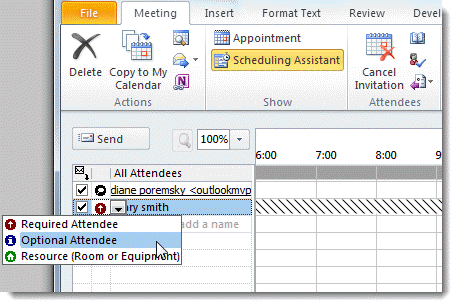
1. Select the Attendee Availability tab (Outlook 98/2000), Scheduling tab (Outlook 2002/2003), or Scheduling Assistant (Outlook 2007/2010)
Click in the Attendance column, and change the attendance for the person to Optional Attendee. Choose Resource if you want the person BCC'd.
2. On the Scheduling Assistant page, click the Add Attendees button to open the address book dialog and select invitees.
3. You can also click the To button on the Appointment page to open the address book dialog and put the person in the Optional (or Resource) list.
Forward as an iCal
Another method for BCC'ing invitees is to forward the meeting as an iCal. Add the attendees to the message BCC field. When the invitees accept or decline the invitation, the organizer will receive the response.
Notes
The Sender will see the Resource names in the To field of the meeting request, but when they click the To button, the addresses added as Resources will be in the Resources field.
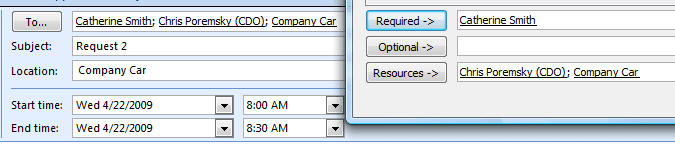
Resources will be listed in the Location field - the sender will need to delete the BCC'd names from the Location field. If the Location field is empty, type in a location, otherwise Outlook will add the Resources back to the Location field.
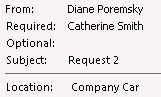
This screen shot shows what the recipients see. If someone is CC'd, their name or address would be in the Optional field.
Tools

Charlotte Thouvard says
Unfortunately, the names and addresses are visible under "follow-up" even though they are not visible on the invitation email.
Diane Poremsky says
Because of changes Microsoft made, this doesn't work for office 365 mailboxes. It should still work for POP and IMAP and older exchange.
Kimo says
Hi Diane,
I followed the steps to BCC emails, I did it before and worked but this time the deleted emails from the location appeared with a strike through line after the exact location. Please see attachment ... Thanks
Kimo
anybody says
Still no FYI option in the Outlook calendar. None of the available selections or settings make any sense, when the correct selection is FYI. Microsoft has been ignoring the customer base for over 20 years on this issue. Right up there with Microsoft ignoring requests to put back the search assistant with its multiple field entry options that actually worked. There is no reason users should have to write their own code, or install third party software to do a detailed search of their files, with accurate results.
sheik says
To schedule a meeting and to add To, CC and BCC... just click on
New Items: Meeting: Click on "To"
For "To" address mention direct participants under "Required"
For :CC" mention it under "Optional"
For BCC: Mention it under : Resources"
Hubert says
I have sent a calendar invite to 40 people using the 'Resources' field so they are unable to see who was on the invite list. I haven't received any replies (accept/reject) and it is not showing on the tracking page. The tracking page still has 'None' displayed.
Can you please assist if I am alerted from who has accepted or rejected the invite.
Diane Poremsky says
if they accept, you will receive the acceptance, unless they choose the option to 'do not send a response'. It may or may not be auto processed (it depends if the TNEF data is damaged). If it is auto processed, the acceptance will be on the Tracking tab, otherwise, the acceptance message will remain in your inbox so you know it was accepted.
Emilee Cafarelli says
Hi Diane. The status tracking is not working. When emails outside of the company receive an invite as a "resource" they do not get the option to "send response" to sender when accepting an invite. They are hitting accept and it's "going away". How can I see if someone accepts if they are blind copied?
Thank you!
Diane Poremsky says
>> When emails outside of the company receive an invite as a "resource" they do not get the option to "send response" to sender when accepting an invite. They are hitting accept and it's "going away".
It sounds like they are getting it as a meeting invite, which is good and eliminates one potential cause. Another potential cause is spam filtering - the response is identified as having spam characteristics and is dropped. This is more common with read receipts though, but worth testing. If using Exchange, the admin can check the logs for the responses to see what happened to them.
If they reply with comments, does the message arrive?
Emilee Cafarelli says
Hi Diane. Their responses are not showing on the Exchange (online version) either :/
Do you know if Appointments will show a response?
Also, I have not received any comments. Once someone hits Accept / Decline they don't have the option to send any comments.
Diane Poremsky says
Once they accept, you should get the acceptance - exchange or outlook normally autoprocesses it and adds the response to the message. Occasionally, especially if the invitees are outside the organization, the response might not be able to be auto processed and it remains in the inbox.
Now... If you use a new version of exchange or office 365, they have a new process for handling meetings - this could affect it. One of the changes is that invitees can see all responses - I will check and see how resources are handled.
sheik says
It wont give them any option to select wether to accept or reject/ you can only put those emails under Resource who are not the actual part of your meeting
Dimitri says
This didn't work. I did it as a test and choosing 'Resources' and placing recipients into that category did not blind carbon copy the recipients.
Diane Poremsky says
What version of Outlook and what email server do you use?
Did you type something in the location field? If you don't enter something in for the location, the BCC entries will be added as the location.
Julie York says
Hi there, as per Tammy' query below, using O2013, we have sent a meeting invite to a list of users - listed as Rsources. However, we are not getting responses.
How do we see the RSVP status in tracking? At this stage, it appears not one person has responded, which we know not to be the case.
Diane Poremsky says
If the TNEF data is missing from the response, it won't process (and will stay in the inbox). If you aren't getting any messages back, check your junk folder or spam filter.
If the responses are processed, it will show on the tracking tab - but as long as you get a reply back, you can update the response on the tracking tab. (click on the response field and select from the dropdown.)
Tammy Brady says
Hi there - how do I track RSVP's when I have created a meeting appointment (outlook 2013) + Bcc'd the guests in?
Diane Poremsky says
When they reply, the tracking will be on the Tracking page. If the tracking reply can't be processed by outlook, you can update the tracking manually only if the BCC'd recipient is listed on the tracking tab (they should be listed as a resource).
Note that if you use Office 365 exchange, this may not work as the list of invitees may be sent to everyone - test it to see how it works on your tenant. it works 'as expected' using older versions of Exchange or outlook.
Christina says
I am sending a calendar invite to external email addresses using the BCC option from a Shared Mailbox. External recipients are accepting the invitation, however responses are not being sent back to the shared mailbox, nor are responses being reflected in tracking.
Diane Poremsky says
If the responses aren't returned, then tracking will not update automatically. Are the recipients not sending a response or are the responses coming back to your address instead of the shared mailbox?
RDRD says
Hello. As the sheer number of issues in the comments above demonstrate, this method does not work well. I think you should delete this entire page, because it's creating more problems than it's fixing. It's certainly messed up my work.
Diane Poremsky says
It works every time I test it. You need to type something in the location field - if you don't the Bcc'd addresses will be added as the location.
Matthew says
Thank you, this method is useful, even if it has certain limitations. We use an internal distribution list that we do not want to be revealed to all and it works fine for that.
Elizabeth Reidy says
I followed these steps to set up a recurring meeting. I want to cancel one occurrence in this meeting series. How would I cancel that occurrence with keeping the email addresses/recipients private?
Diane Poremsky says
Cancelling the meeting should keep the named in the Resources/BCC private, otherwise, you'd just need to send an email alerting the people that the meeting was cancelled.
Tanya says
The names are showing up in Resource when I try to use this method. So the invitation shows "Resource" with a list of names. Any suggestions?
Diane Poremsky says
Did you delete the names from the resource, leaving only the resource room, if there is one, or typing something in? You don't want that field blank, but if you replace the entries in it, they won't be added back.
Debbie says
Looks like even after doing the above, the names still show up in the scheduling assistant
Diane Poremsky says
They'll show up in your copy but not in the recipients side - provided you type something in the location field. do not leave the BCC address in the Location field when you send it.
Elda Ruelas says
Hello,
We started using this method to send invitations to webcasts. Most people in the company use Windows computers. It works great for these users, but we have been notified that Mac users cannot see the option to accept the meeting request. Is there something we need to do or add to the meeting invitations so that Mac users can accept these meetings?
Diane Poremsky says
I will check, but i don't think so. (It behaves the same way on Outlook 2016 Mac - looks like a bug to me.)
PL says
Hi, what if i'm sending a schedule recurring email in Outlook with VBA code. How can i do a cc or bcc so that my recurring email has it?
Diane Poremsky says
Add oMail.cc = "address" or oMail.BCC = "address" to the macro.
PL says
so the code would look like:
Private Sub Application_Reminder(ByVal Item As Object)
Dim MItem As MailItem
Set MItem = Application.CreateItem(olMailItem)
If Item.MessageClass "IPM.Appointment" Then Exit Sub
If Item.Categories "Send Schedule Recurring Email" Then Exit Sub
MItem.To = Item.Location
MItem.Subject = Item.Subject
MItem.Body = Item.Body
MItem.Send
Set MItem = Nothing
oMail.cc = "xx@abc.com"
End Sub
? tried this but doesn't work. Thanks.
Diane Poremsky says
Because you are using Mitem, you need to change the line to mitem:
mitem.cc = "xx@abc.com"
and it needs to go before the send line.
https://www.slipstick.com/developer/send-email-outlook-reminders-fires/
Carol says
Thank you, thank you, thank you. This has made our HR Adviser very very happy for doing internal interviews for job changes etc.
Jeri Meola says
how can I set up a meeting with 80 individuals and keep the meeting invite and the invite attendees private. As the meeting organizer I'm the only one who wants to have details on who I invite and their reply
Diane Poremsky says
You either put all of the addresses in the resource field and type something in the location field - or you can create a meeting and invite yourself and sent to the others (using the BCC field) as an attachment. (the basic steps are here)
Lynnette says
Every time I add or delete an attendee using the resource method, every single 'resource' gets a new meeting request. Since the meeting is to a large number of clients, the updates happen quite frequently, which is annoying to the rest of the clients, who see no change in the meeting. When you add or delete a required attendee or optional attendee, I receive a notice asking if I wish to send to all, or only to changed attendees. For a resource, I am not prompted with that message. Is that normal, or am I doing something wrong?
Diane Poremsky says
It's normal, because attendees need to know the location so Outlook updates them.
jason says
Thank you for the article. I came across an issue with it today. One of my co-workers sent an meeting invite to an Email List. She put the email list in the To field. Whenever people accept it, it shows them as optional. How does she have them accept but keep them as required?
Thanks!
Diane Poremsky says
Because it was forwarded to them by DL, they will always show up as optional.. but you can click in the field on the Tracking tab and select Required. It's a bit of a manual effort, especially if you have a lot of attendees.
Diane Poremsky says
BTW - try this: on the tracking tab, expand the DL. It should add everyone in the DL to the list as required.
thapelo says
am have a problem on my outlook 2010 i can't cc more three people
Diane Poremsky says
what happens when you try? Could it be your ISP limits the number of people you can include on a message? It's often used as a spam prevention step.
CJ says
How come it appears that tracking is virtually useless for external clients? I can set the stage with what I did if anyone can repro this:
1. I sent a test invite to myself as the Organizer in the hard "To" line.
2. In the Resources line, I put in four external email clients. Only one was Exchange-to-Exchange. The other email clients were gmail and yahoo.
3. Gmail and Yahoo allowed the users to "accept" and lock the calendar invite onto their personal calendars. However no "accept" notification went back to the Exchange organizer.
4. External Exchange address allowed full feedback loop: Accept, Send Response to Organizer. Organizer can view the "Accept" in Tracking.
The conundrum I face is that every invitee needs to be private and not see others, and the organizer needs to keep track of responses.
Diane Poremsky says
3. Gmail doesn't send back notifications (if you use webmail)- so Outlook has no idea if they were accepted. It sounds like Yahoo doesn't either. Outlook needs to get something back so it can track. Outlook might not automatically process it, so you'd need to edit the tracking manually - but you need something back - Outlook doesn't have ESP or use magic to know if they accepted it. :)
If the person uses Outlook to read yahoo or gmail, they will get a response back.
Elle Vi says
Just don't forget that no matter what, a delegate, who's receiving the invitation for a manager, will be able to see **ALL** the recipients that were added as resources.
Diane Poremsky says
Correct. Delegates see everything.
Ryan Pinke (@Pinke2020) says
I have been using 31events.com to do mass invites and keeps everyone's email address separate. Then I get a dashboard to see who's calendar the event is on and can customize my marketing based on that. In addition I found my webinar attendance rate is over 75% based on the sign ups since it is on their calendar. Plus it works with Constant Contact & Mailchimp. One other great features is it is mail client agnostic. Outlook and Gmail invites appear as native invites to the users without having to download an ICS file.
Kay says
i tried sending this as a icalendar invite and the individuals respond to the request. I get an email stating if they accepted or declined, but the tracking in the invitation doesn't update.
Diane Poremsky says
Do the recipients use outlook? What icon is on the response messages? If the response is sent as email, with the envelope icon, then Outlook won't autoprocess it. If it has the tracking icon, Outlook should process it.
jim says
I agree with Elle Vi Diane. On the received invite, on the schedluing tab, the attendees email address is available. Not a good option for those who need BCC.
Diane Poremsky says
What type of email account are you using? What is your scenario? I'll see if i can repro it with specific account types, but it does work in the accounts most likely to send meetings- Exchange accounts.
Y R says
outlook 2007
i was sending it from a private domain with imap setting to a gmail account
Diane Poremsky says
I'll will check that scenario. Thanks.
Y R says
Just realized that if you propose a new time that you do get to see other attendees even tough they were BCC through Resource, is there a way to conceal it?
Diane Poremsky says
I'm not seeing that - I only see the organizer and the address(es) from the To field. (I assume I'd also see optional attendees, but I didn't test that field.) I don't see any of the addresses added to the BCC (Resources) Field.
What version of Outlook do you use and what type of email account do you use?
DiAnna says
Hi. I am sending out an invite to a multiple people but I don't want them to know who else is being invited. Is there any way of BCC and calendar invite in Outlook 2007. Or do I have to send each recipent their own invite? Thanks.
Diane Poremsky says
If you enter their name in the Resources field and put something in the location field, it will BCC the meeting.
Elle Vi says
Sorry Diane but that is not true. Resources were never intended to be used this way and it shows. When you say that adding people as resources is like adding them in BCC it's just not true. Please avoid this method as it's just doesn't do what this article implies it does (please see my previous posts and also YR post below. AVOID!
Diane Poremsky says
Although the resource field was not intended to be used this way, it's the only way to BCC a meeting request, which some people want to do. The only other option to hide names is by forwarding a meeting to one person at a time or forward as an iCal and BCC the message.
I can't repro seeing the resource field when proposing new times. Only the organizer and optional is listed. If you have specific steps or configurations that show the "resources", please share.
If you leave the names in the location, they will show up whether you propose a new time or not. You need to delete them and type a Location in the field.

Elle Vi says
Thanks for your reply but you still missed my point.
I'll give you an example.
Person A sends an invitation as described in your article, adding person B and person C as resources and removing the location pre-populated entries with some random text.
Person D receives the invite because is a delegate of person C.
Person D sees all recipients (person B and C) of the invitation.
That's why using this method to hide recipients is NOT GOOD!
The delegates of the recipients (and please note I'm talking about the recipients and not the organizer) will be able to see the entire list of recipients!!!!!!
Diane Poremsky says
That shouldn't happen - the delegate should see the same information the invitee sees. I'll look into it.
The only way to avoid this is to forward the meeting to invitees by email and an icalendar. They'll definitely only see their own names and the delegates won't get a copy.
Elle Vi says
Sorry but that's not my point.
What I'm trying to say is that the delegate will see all the recipients of the meeting invitations, even if they were added as resources and the location manually set to some random text. This defeats the purpose of this method because a few users (those receiving the message as delegates) will be able to see who the recipients are.
This resources method to hide recipients is flawed.
I tested this using different versions of Outlook, Exchange, and Office 365.
Diane Poremsky says
Right, delegates of organizers should see everything - they have full access to the list of invitees. Delegates of people invited to the meeting should only see what the person who was invited sees. If it's set as private and private items are hidden from the delegate, can they see it?
Meeting requests were not meant to be CC'd or BCC - the oalternate method of BCCing a message is to create the meeting and invite yourself, then forward the meeting to everyone else as an icalendar, but the delegate will still be able to see who accepts (unless its set as private).
Elle Vi says
I found a major flaw in this method. A delegate receiving the invitation for a delegatee will see the full list of recipients.
Diane Poremsky says
Yes, that is usually how it works for delegates- they can see everything the person they work for can see.
Cathy Loughead says
Thanks.
Does it makes a difference if it’s being sent on behalf of another
person?
Diane Poremsky says
No, that shouldn't matter. Are you getting errors or running into problems with it?
Cathy Loughead says
Is there a limit to the number of invitees that you can add as a resource?
Diane Poremsky says
No, not as far as I know. If there is, it would be fairly high, like near 100, which is the limit for any field in Outlook with some account types.
C says
Diane this does not work. I invited people both inside and outside of the company to an event and only got accepts/declines from my colleagues. I know that people outside the company received the invitation but when they accepted/declined, I did not get the response.
In short: You will not receive accept/declines from external emails if you use "bcc".
Diane Poremsky says
Whether you receive confirmation depends on a number of factors, not specifically limited to using the location field.
Two common causes of no responses returned are:
The respond buttons may be missing in some clients. Assuming the client the invitee uses supports meeting requests... I've only seen this happen when every name was in the Resource/BCC field. If at least one person is in the To field, the buttons should be visible.
The antispam filter or Exchange may reject the responses because the From address is missing in the response.
Traci Salzer says
How do you copy an individual on an Outlook Invitation without inviting them? We 'invite' participants to training but want to copy their management.
Diane Poremsky says
You can't, really. You can "BCC" them by putting their name in the resource field, but it's still an invitation. You could use a macro to send an email with the details of the meeting to management, or to send an appointment containing the details. Again, not perfect, but it can be workable. Something along the lines of this macro: Send an email when you add an appointment to your calendar
Thank says
Excellent tip! Thanks for sharing.
Ashley Eldredge says
I tried the method of marking everyone as a resource and keeping the location I specified. I sent it out to over 300+ persons. But now I don't get accepts/declines or tentative responses. I called someone outside my company that said they couldn't attend and they declined. I never saw the response. I'm thinking the calendar item broke because there are too many people. Help.
Diane Poremsky says
Either it broke or the responses were lost on the server, most likely due to antivirus / antispam scanning.
Kristen says
I have an Access 2010 database to keep track of my team's cross-training sessions. I added some VBA coding to display an Outlook meeting invitation (Outlook 2010) with the session particulars. The session instructor(s) and participant(s) are required attendees; the supervising manager is an optional attendee.
The invite displays fine at first, but I've noticed something strange happening when Outlook resolves the email addresses. If the addresses are resolved while the main invite tab is showing, the manager gets converted from an optional attendee to a required attendee (if the addresses are resolved while I'm on the scheduling assistant tab or when the global address list is open, the manager remains an optional attendee).
Is this a bug? Is there a way to keep this from happening?
Thanks.
Diane Poremsky says
How are you coding the meeting? Try setting the status to olmeeting
Set objAppt = Application.CreateItem(olAppointmentItem)
objAppt.MeetingStatus = olMeeting
J says
I often send meeting requests to a group (i.e. all staff-headquarters), but when each recipient accepts the request individually, they are automatically listed as optional in the request. So, if I then send an update to the group, those people think they are now optional attendees - and it confuses those who have not sent a response as why they're not listed individually on the update.
I've tried not requesting responses, but many people send them anyway. I've also tried deleting the individual names from the updates, but people then receive a cancellation notice causing even more confusion. Would the BCC/resources option be a solution to this problem? If individuals send a response (even if not requested), would they show up as optional or would they remain anonymous?
As of now, I've started sending an entirely new calendar request with the updated materials, but that is confusing as then there are two items on each person's calendar for the same meeting.
Any ideas of how to handle this? Thank you!
Diane Poremsky says
When people send a response and aren't listed on the message, they are added to the tracking list by name. Did you try changing attendees from optional to required on the tracking tab? When I do that and click the Save button, then close it using X, an update is not sent.
Yes, it's a bit of effort if you have a lot of invitees, but if its a frequent issue, you could probably use VBA to change optional to required.
Diane Poremsky says
Oh, another option is to expand the GL before sending. It looks messier though and group policy may block it.
Rathan says
I want to fetch recipients from "To:" in schedule meeting, please help me with a answer.
Thank you in advance.
Diane Poremsky says
What version of Outlook? There is a button on at least newer versions for Reply with Meeting.
Angie says
A large batch of the email addresses I put into teh resource box later appaered in the optional box. Why would this happen?
Diane Poremsky says
it's hard to say why they moved - was it sent using exchange or gmail?
mantrababy says
Forward as iCal method is great except it does not work for Blackberry devices (they cannot open the attachment on their Blackberry phone to view the invitation, let alone "Accept" or "Decline").
Richard nicholls says
I have tried the above and works well. Except on one persons computer when someone accepts a meeting they always show up in Attendee and Optional. Always show up twice. Not sure why.
Diane Poremsky says
Are they a delegate for one of the invitees?
Lisa says
I have a group of contacts that I always send meeting requests to. I'd like to always make them "optional", but is there a way to set that up automatically without going into the "to" field each time to do it?
Diane Poremsky says
Only by using one or two methods: a custom form with the addresses in the optional field or with a macro to open the meeting form and add those addresses to the meeting.
Angie says
Will the response tracking feature still work?
Diane Poremsky says
Yes, it will. This doesn't change how that works.
Peter Jakobsen says
Am I correct if I assume the "optional"choice is not really of any value and more a left over from "cc" in mailing?
At least in my outlook 2010 you can't see if you're optional or required unless you open up the invite in its own window. No one does that were I work, as they can see all other information in the preview window of an invite and even accept or decline here...
Would have been a smart feature, if it was clearly visible in the preview....
Diane Poremsky says
I wouldn't say its of no value, but yes, it would be better if required or optional were visible in the invitation.
Pierre says
Very helpful, thanks a lot !!!!
This function is available in Lotus (to inform but not to invite someone) but not in MS Outlook.
Nice solution to use this missing function!
Diane Poremsky says
Yeah, there are a number of little things like this where Lotus outshines Outlook. (Cc's on messages with attaches is one that comes to mind immediately.)
Noor says
You are the best, you saved my day thanks soooooooo much
Mark says
The problem with using location as a BCC is that it isn't a true hidden email address. I've looked at the underlying code and the email address for all locations does indeed show up in the email push. Also this only works if you use the lookup button first because it has to add each address to mail to in the To box anyway.
Diane Poremsky says
Are you looking for the address on the sender's side or in the recipient's copy? I have yet to see the address in the recipient's copy (when the names are removed from the location field and something entered in the location).
In any event, you can forward a meeting to others after sending it - it's an extra step but the original recipients definitely won't know.
Kiki (@Kiki3268) says
I see it on the recipient side. It's also in the scheduling assistant for both sender and receiver. So I don't see listing someone as a resource as at all helpful to keeping attenees' emails private. I'm in Office 2013, not sure if that matters
Diane Poremsky says
What type of email account do you use? The Resources field is not included on invitees version of the appointment here. Did you type something in the location field? If you leave the names in the location, others will see them, but if you remove the names and type or leave a location, they are not included in the meeting request. *If you don't have something in the location field, outlook will add the names back.*