 Beginning with Microsoft Outlook 2010, you can open more than one Exchange account in your Outlook profile.
So how many Exchange Accounts can you add to an Outlook 2010, Outlook 2013, 2106, or Outlook 2019 profile?
In Microsoft Outlook 2013 and newer, the default is 10 accounts and the maximum allowed is 9999 accounts. Outlook 2010 supports up to 15 accounts in your profiles, but, by default it is limited to 5 accounts.
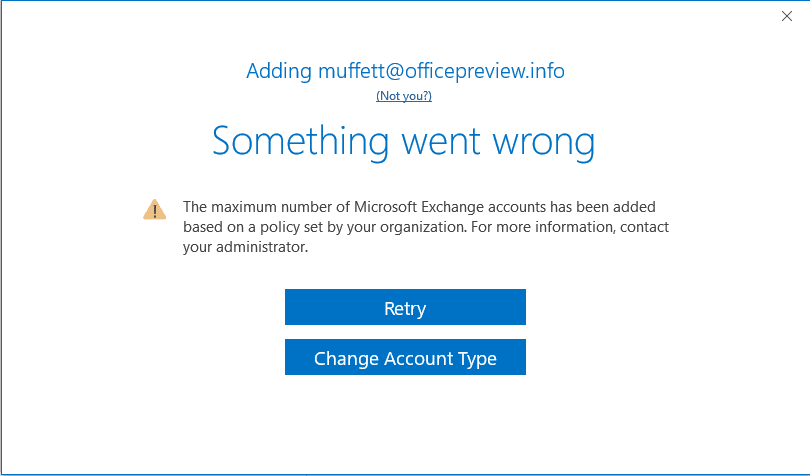
If the administrator wants to allow more (or less) than the default number of accounts, he or she needs to edit the registry or apply a group policy.
The relevant Group Policy key for all supported versions of Outlook is:
HKEY_CURRENT_USER\Software\Policies\Microsoft\Exchange
DWORD: MaxNumExchange
Outlook 2010 values: a decimal value between 1 and 15
Outlook 2013 values: a decimal value between 1 and 9999
Outlook 2016 values: a decimal value between 1 and 9999
Outlook 2019 values: a decimal value between 1 and 9999
In the Group policy editor, the setting is under Outlook > Account Settings > Exchange > Set maximum number of accounts per profile.
If you prefer not to add it as a policy, use these keys instead. Note: if you are using the consumer or Business version of Outlook 2013 and newer, you may need to use these keys instead.
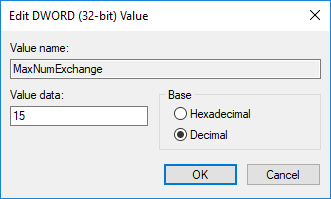
HKEY_CURRENT_USER\Software\Microsoft\Exchange
DWORD: MaxNumExchange
Outlook 2010 values: a decimal value between 1 and 15
Outlook 2013 values: a decimal value between 1 and 9999
Outlook 2016 values: a decimal value between 1 and 9999
Outlook 2019 values: a decimal value between 1 and 9999
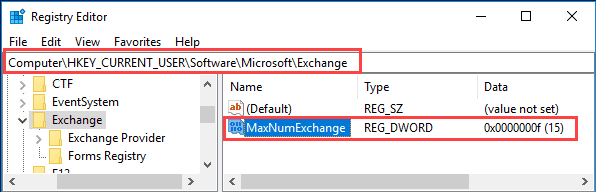
The new setting won't take affect until you restart Outlook.
Do it for me
To set the registry key to allow 15 accounts, use this registry file. This works with Outlook 2010, 2013, 2016, or 2019. (In HKCU\Software\Microsoft\*)
15 Accounts, user keys
This registry file will set a Policy key to allow up to 15 Exchange accounts; works with Outlook 2010, 2013, 2016, or 2019.
(In HKCU\Software\Policies\*)
15 accounts

Thierry says
Bonjour Diane, un grand merci car vous avez solutionné mon problème de manière simple et très efficace! J'ai exécuté les deux fichiers et maintenant je peux ajouter un nouveau compte. Parfait et merci pour ce partage et tout le temps que vous y avez consacré. Bien à vous, Thierry
----
Hello Diane, a big thank you because you solved my problem in a simple and very effective way! I ran both files and now I can add a new account. Perfect and thank you for sharing and all the time you put into it. Yours truly, Thierry
Daniel says
Ive added the key to the registry, but it would be pretty helpful to add to the article that one needs to right click, modify, choose decimal and enter value 1-9999 for number of accounts.
End result would be a key called MaxNumExchange \ REG_DWORD \ 0x0000270f (9999)
awpmi says
FYI
In the following article from MS in 2022, they DO say you can have multiple Exchange accounts open in Outlook, if you basically have full access to them. They list the versions, and it goes back to 2010.
https://learn.microsoft.com/en-us/outlook/troubleshoot/profiles-and-accounts/issues-that-occur-when-adding-multiple-exchange-accounts
quote:
"In Microsoft Outlook 2010, Outlook 2013, Outlook 2016, Outlook 2019 and Outlook for Microsoft 365, you can add multiple Microsoft Exchange accounts to the same profile if one of the following conditions is true: "
Diane Poremsky says
You can add multiple accounts to a profile if you have the username and password - that is what my article is about.
The article you linked to refers to shared mailboxes added as accounts. For example, your own mailbox has full access permission on a mailbox and you add the mailbox as an account, using a username and password. When you do this, some features will be buggy.
Richard Hemes says
What is the length of the UNIQUE PASSWORD LIST for Outlook 2013?
Rajeev Velankar says
Does this apply for Office 365 Outlook Application installed on Windows 10
Diane Poremsky says
Yes, it uses the Outlook 2016 keys. Default is 10 accounts.
amelie says
Does this also work for non exchange email accounts ? If not is there another tutorial for non exchange email accounts
Thanks
Diane Poremsky says
You shouldn't need a key with pop and IMAP accounts - they should allow unlimited.
Did you hit a limit and if so, how many accounts are in your profile?
amelie viennot says
Hi Diane
Is there a way to increase the limit of non-exchange email accounts that we can add to outlook ? I am talking about increasing the limit of gmail and yahoo accounts that we can add on the outlook app
I have been searching a lot online but all I find is how to increase the limit for exchange accounts ..
Thanks
Diane Poremsky says
How many account are in your profile and did you receive a message that you can't add more? I don't recall a limit to the number of internet accounts in a profile.
Ajay Kumar says
It's not working. As simple as that. And I cannot find any entry named outlook in the group policy editor. I'm using outlook 365 on Windows 10 Pro.
Diane Poremsky says
You need the office admin templates to use the group policy editor. The registry files I have linked in the article will set the key for 15 - if you need more, you can open the registry editor and change the value.
Windows Registry Editor Version 5.00
[HKEY_CURRENT_USER\Software\Microsoft\Exchange]
"MaxNumExchange"=dword:00000015
Leu says
Hi, just for information:
Office 2016 professional plus
You have to go to HKEY_CURRENT_USER\ Software\ Microsoft\ Exchange and add DWORD32bit with MaxNumExchange and decimal 15 (15 for example).
It is described above and works perfect.
Thanks a lot!
sachin says
I have added 8 email ids in single profile. However, i am facing deadlock issues with office 365 2016 x61 business version.
Diane Poremsky says
They are all exchange? Are they all to the same server?
Thomas says
Updated the 64-bit key and still didn't work.
Diane Poremsky says
Did you use the user key or the policies key? Did you restart Outlook?
Thomas says
i'm using the 64-bit version. Is that why this isn't working for me?
Diane Poremsky says
Nah, version doesn't matter - its a generic key for both versions. Did you see https://support.microsoft.com/en-us/help/3101356/the-value-of-the-maxnumexchange-registry-key-doesn-t-work-for-exchange ?
Actually, never mind on that KB - you should have those updates installed since you use an E3.
cameron says
Thank you for this, it has been very useful.
fyi the second option you provide under 'do it for me' is a registry file that allows 21 accounts, I believe the error is that you have entered 15 as the hexidecimal value, which, converted to decimal, is 21. At least I think that's the case-- I'm a newbie to this.
Diane Poremsky says
Correct, i realized it after i saved it and kept forgetting to fix it - figured it was better to be high than low. :)
Jay says
This worked great for Windows but I cant find anywhere on if this is possible to do for MAC. I just bought a new MacBook Pro and would like to add all my exchange and Outlook accounts but I get stuck after the 5 one. I have researched everywhere and cant find anything on this for the MAC.
Diane Poremsky says
I will ask about it.
Azaam says
Just to check. how can we limit exchange mail box creation limit to 2 ? is it possible .
Example.-
How can we restrict users from creating corporate email account in their personal laptops. can we disable or limit to 1 per user ID ?
Diane Poremsky says
You can control it in computers covered by corporate policy but it's a policy setting, not a mailbox setting, AFAIK you can't control it on user-owned computers. I hav looked at mobile device policies but I'm pretty sure they only apply to small devices, not laptops and home computers.
You can turn off remote access and force everyone to use OWA, but that can be less productive in the long run.
Patrick says
Hi,
You explain that one can have several Exchange accounts in an Outlook profile.
However, https://support.microsoft.com/en-us/kb/291626 "How to manage multiple Exchange mailbox accounts in Outlook" states that “you can only have one service in your Exchange Server profile”.
So, what is the difference between the two ?
Does it mean that you cannot have both “me@myExchAccount.com” and “you@myExchAccount.com” Office 365 email Exchange accounts in the same Outlook profile? - I asking this before purchasing a second office 365 email Exchange account.
TG2 says
Patrick, as you've seen microsoft explicitly stating "is not supported" over and over in many places.
The fact that these registry tweaks exist, suggests that microsoft will at some time in the future support multiple exchange accounts, just like they do with Pop & Imap and even 1 exchange with multiple pop & imap accounts.
BUT .. and to everyone reading this .. only 1 exchange account should be configured in a single profile, regardless of "being allowed" or "it didn't give me an error" because ...
... at some point in the future, until microsoft officially updates and provides direct reference for support for it, you will at some point find problems from running more than 1 exchange account.
Common issues:
* email won't send from one or the other account
* rules don't run on one or the other account
* rules don't save to the exchange server
* outlook stops syncing mail for one account or the other
I've seen this for many years, and the problem always comes back to it not being officially supported (yet).
https://support.microsoft.com/en-us/help/981245/issues-that-can-occur-when-you-add-multiple-exchange-accounts-in-the-s
*LAST UPDATED Sept 2018 !!
(still not supported)
Diane Poremsky says
The only real problem with multiple accounts is when you add shared mailboxes that are automapped too, you'll have the issues you mentioned. If the mailbox is licensed and added using its own user/password, there shouldn't be any issues. Well, rules might be funky 0n the secondary mailboxes - some client side rules will work, some wont. (All server rules will work.)
Taophiq Alabi says
Hi, I get this but want to automate the creation/addition of email accounts process. So that one doesn't need to enter server details one at a time. Say I have a CSV with all the IMAP and SMTP server info and user account and password info. How can I automate the account creation process for say 50 accounts to be cr3ated within one profile?
Taophiq Alabi says
is it posisble to automate account creation. I need to add 100 accounts to outlook and all have the same server details just different email credentials. Can i use a csv file to create mutiple accounts in outlook?
Diane Poremsky says
A CSV won't work. Outlook can only set the accounts up using a PRF - and a prf only makes sense if you frequently reformat the computer.
Arjan de Jongste says
Hi Diane,
thanks for this great information.
Do you know if there is a limit in Exchange 2013 of users accessing simultaniously the same mailbox? We have a customer who has6 employees working in the same mailbox, but we can only access the mailbox with 5 users at the same time?
Any toughts?
Thanks
Arjan
Raju Gurav says
i m facing same issue at my organization, did you find any solution for your issue
Diane Poremsky says
AFAIK, there is no set limit, but there is a limit to the number of open RPC/MAPI calls. To minimize issues, used cached mode. If there are a lot of items in the folders, reducing the number of items in the most frequently used folders can help.
Raju Gurav says
We have a common mailbox which is configured on 5 systems but when we are trying to configure it on 6th system at the same time when it is used on 5 system, its giving an error "cannot open your default email folders, you must connect to Microsoft Exchange with the current profile before you can synchronize your folder with your offline folder file. We have MS Office 2007 installed on all the systems. Please help me out with the solution.
Diane Poremsky says
This is 6 separate profiles? Can that computer connect to other mailboxes or to the shared mailbox if the other outlook profiles are closed?
Raju Gurav says
No, it a common mailbox (1 profile) which i want to configure on around 10 systems but it only works on 5 at a time, when we try to configure it on 6th it gives out the above mentioned error.
brahmanand says
it didn't show Exchange option under Microsoft in regedit. Kindly help
Diane Poremsky says
If the registry keys do not exist, create them. Outlook only creates keys when an option is changed - default settings don't have keys. Settings under the Policies keys only exist when a policy is set.
Mike G says
Hi Dianne: I tried this solution on one of our servers using Office 365/Outlook2013 and while it did work, allowing me to enter all 28 of the accounts needed
(Note: I did used a modified version of your script to allow for up to 40 users)
I am also wondering about the need for something on the "other end" as the Microsoft Exchange Servers seem to be on some kind of 15 second cycle (an estimate).
I want to be sure that doing this does not adversely affect any of the same accounts' installations in other equipment.
The reason for this setup is to be able to keep an "on-site" backup copy of all of our users'
emails as we are required to store this information for several years. Many of the employees work from other locations. Before with Outlook 2010 they were required to submit a copy of their PST file once a month which we archived If this arrangement could be done all in one system here at the Home Office and stay accurate all the time it would be a great improvement.
Diane Poremsky says
Does your office 365 plan support litigation hold? You could put all of the mailboxes on hold - users won't be affected but they won't be able to delete mail.
The 15 second cycle is how frequently Outlook and the Server ask each other if there are changes that need synced.
Mike G says
If I understand the concept, It would mean that all users would always have every email they send or receive inside their Desktop Outlook copy? Disable the "Delete" function? Or does it allow the User to empty the files from their laptop but not from the Exchange Server?
If "Journaling" is the same thing then I know we can't get it. Our 365 plans came from Go-Daddy and they stated that "Journaling is not available" when the account was set up.
The intent is to prevent malicious deletion prior to or immediately after employment termination. I don't think anyone would do it to them-selves on a day to day basis. As far as I know, we have never had to provide forensic details to that extreme but you never know.
The other possibility, which may be slim, is that the main copy of the Users' DB held in the MS Exchange Server could become lost or corrupted.
Recent experiences where a User deleted emails from their Cellphone not knowing that this would result in the same emails being deleted from their Laptop and if deleted from deleted I presume irrecoverable.
As a Data Mgr. I always consider backups of any data a good thing to have. Even multiple backups.when possible. So I tried making a "Master System" set to handle all 30 accounts and whose only use was to server as a backup of everyone's OST files. It worked fine for maybe 2 weeks before crashing for reasons still unknown. If I could find a way to make this concept work, I would surely do it.
Thanks for all your good info. I consult your column regularly.
Therese Cerny says
Hi Diane. What are the disadvantages of allowing multiple users of a department Outlook account to be designated as owners...and allow each of them to add owner Outlook profiles to each of their local machines?
Diane Poremsky says
If they open the mailbox as an account, you won't know who did what. If they open it as a shared or managed mailbox that is mapped to their profile, it's easier to see who did something as their own account name will be in the metadata. But there may be times when its not added and you won't know who did what.
Probably the biggest problem will be syncing updates (in cached mode) if a lot of people are accessing it at once - they may have problems with conflicts and updates syncing in a timely manner.
Mark L says
The full answer is BOTH ....
Anyway, its now sorted and for anyone else who hits the problem it is answered here now both for Outlook and for Exchange.
Thanks.
Mark L says
Really, it goes hand in hand with the overall solution me thinks.
If you don't make this change then yeah, you can see more than 30 calendars in Outlook but you cant edit the extra ones (in excess of 30) you are looking at.
So just making the change to the limit in Outlook doesn't solve the problem.
Diane Poremsky says
It really depends on the total number of users. How many users are on the server and are they having problems editing appointments?
Which limit needs to be changed?
Mark L says
Diane ... no quite right, there is also a limit on Exchange ... see https://technet.microsoft.com/en-us/library/ff477612.aspx
Diane Poremsky says
Those are session limits, not a limit to the # of calendars you can have open in the mailbox.
Mark says
Thanks Diane. Please confirm this is a limit in Outlook and nothing to do with Exchange. We have some clients thinking they have to roll back from Windows Server 2012??!
Diane Poremsky says
This is a limit set in Outlook.
Mark L says
Hi Diane
I have a client who has recently upgraded to Windows Server 2013 R2 and I presume whatever Exchange version runs on that ... they cant open more than 30 Calendars in Outlook 2013. is that right? Can you get around it (they have 35 Doctors they need to see in one view to check who is available to do an Operation List and they need to see them all).
Diane Poremsky says
You need to change a registry key to allow more. See https://www.slipstick.com/outlook/calendar/view-more-than-30-calendars-in-outlook-2010/ for the steps. It's the same method for 2013, but the version is changed (I'll update it next).
zkluck says
Correction:
The above mentioned key didn't work (tested to add more than 10 accounts into one profile)
KEY_CURRENT_USER\Software\Policies\Microsoft\Exchange (didn't work)
The key that worked:
Key: HKEY_CURRENT_USER\Software\Microsoft\Exchange
Value name: maxnumexchange
Value type: REG_DWORD
Note: You still have to create entry maxnumexchange (DWORD), it is not there by default.
Diane Poremsky says
Did you restart Outlook? Policy keys (generally) only take affect when outlook loads.
Shady says
@zkluck - thank you so much for your comment. My issue was that I ran outlook on a home PC with 16 email accounts. 10 were Exchange, 6 were ActiveSync. Microsoft recently have disabled ActiveSync forcing uses to use Exchange only accounts for outlook/hotmail type accounts. It's here where I was blocked from changing as the pre-set limit on my Outlook 2016 was only 10 Exchange Accounts.
The instructions in the post made sense to me, but they would not work. The issue on this home PC is there is no Outlook group policy in the group policy editor. The registry keys mentioned, are ones that set the policy, but if there is no policy set, then they aren't relevant.
Your post correctly tells where the registry keys need to set on standalone systems like home PC's, where there is no outlook group policy.
I've been looking for a good four hours for this solution. Thanks for this, I realise your post is old, but it really helped me out.
Diane Poremsky says
FWIW, in most cases, you can set the policy keys without using group policy - you just need to create the keys that don't exist. The policy keys will work with computers that don't sign into networks.
Bob says
Great. Thank you so much. Can you direct me to a resource or provide me with information as to how to add the "Exchange" folder in the "KEY_CURRENT_USER\Software\Policies\Microsoft\Exchange" location since that "Exchange" folder does not yet exist there? Or would I create the entry here: HKEY_CURRENT_USER\Software\Microsoft\Exchange ?
And, then how to create the necessary entry? (I can probably guess on this part of it, but I don't want to make a mistake.)
Diane Poremsky says
I didn't test it in the regular path, it might work but anyone can use the policy keys, so I'd use the one i know works. So, create the key in the policy location. To create it, right click on the last folder in the path and choose New > Key. Once Exchange is added, right click on it and choose New > DWORD.
Bob says
Hi Diane. Great information. Thanks! I am trying to increase the limit of "number accounts allowed per profile in Outlook 2013, in Windows 7 64 bit" from 10 to 40 or so.
The key in the registry does not exist. I see this path: HKEY_CURRENT_USER\Software\Policies\Microsoft\ ... but then there is no Exchange folder. I did see this path as well: HKEY_CURRENT_USER\Software\Microsoft\Exchange ... but there is no "MaxNumExchange" key there.
In fact when I did a "Find" search for "MaxNumExchange" but there were no results.
Thoughts?
Diane Poremsky says
You'll need to create it if it doesn't exist - it's not present by default.
Cindy Kearney says
Do you know what the reg key might be for 10 site mailboxes limit for sharepoint when using office 365, but local install of outlook?
Diane Poremsky says
It should be the same - that is a client side key. On the other hand, I'm not sure what you mean with 'for sharepoint', so this might not work.
Sam Jakimovski says
is this registry change on the client side or server side?
Diane Poremsky says
Client side.
Ermanno Ferrari (@efmos) says
Hi Diane,
"In Outlook 2010 the default is 10 accounts and the maximum allowed is 9999 accounts."
I guess you meant Outlook 2013.
Regards.
Ermanno
efmos.com
Diane Poremsky says
Yes, that was a typo. Thanks for letting me know it needed fixed!