• Outlook User
  • New Outlook app
  • Outlook.com
  • Outlook Mac
  • Outlook & iCloud
  • Developer
  • Microsoft 365 Admin
    • Common Problems
    • Microsoft 365
    • Outlook BCM
    • Utilities & Addins

Send Out of Office Replies with Outlook.com, POP, or IMAP accounts

Slipstick Systems

› Outlook › Send Out of Office Replies with Outlook.com, POP, or IMAP accounts

Last reviewed on August 12, 2022     No Comments

We are often asked:

"Can I create an "out of office" message if I'm not on a Microsoft Exchange server?"

Yes, you can do it using a rule that replies using a specific template, but it's often better to set up a "vacation reply" on your email server. (Many POP3 and IMAP mail servers support this.)

If you use Outlook.com, you'll be able to use Automatic Replies feature found at File, Automatic replies for 'vacation replies' but can use the rules method.

To create the automatic reply message using Outlook rules, follow these steps.

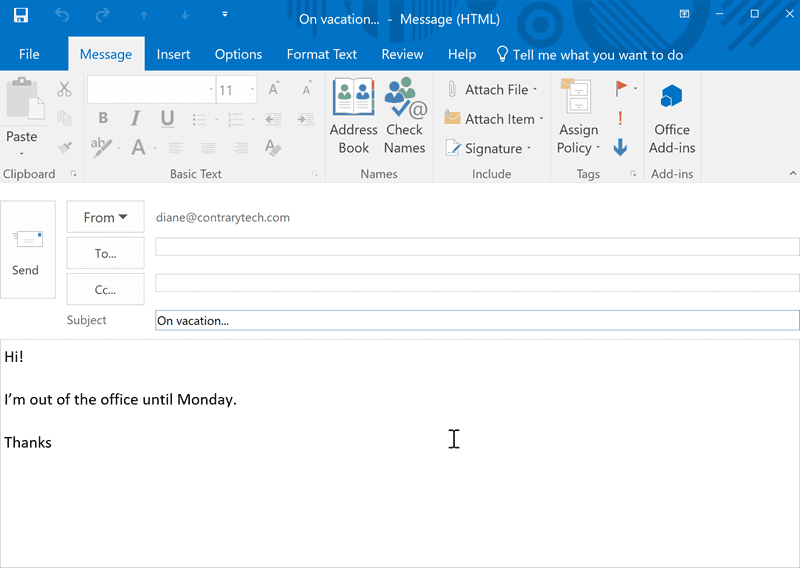
  1. Create the message in Outlook. If you want a signature on the response, it should be saved with the template.
    create the message
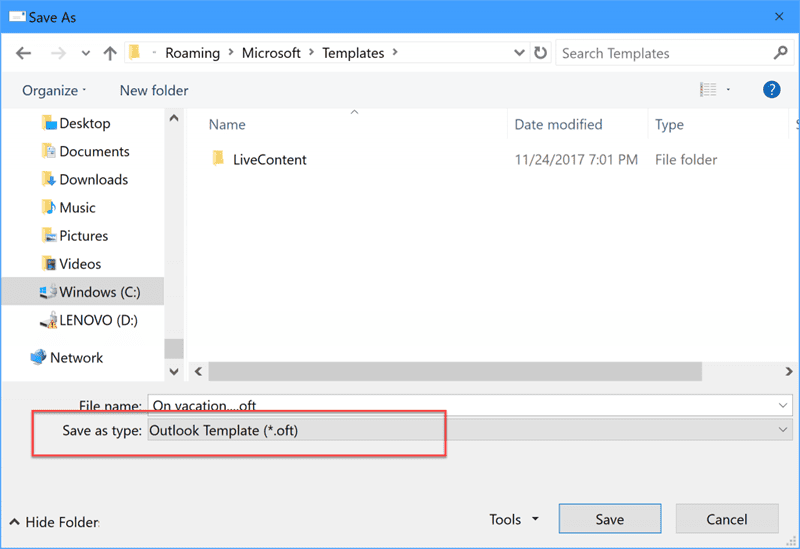
  2. Save as a template using File, Save as, Outlook Template (.oft).
    save as a template
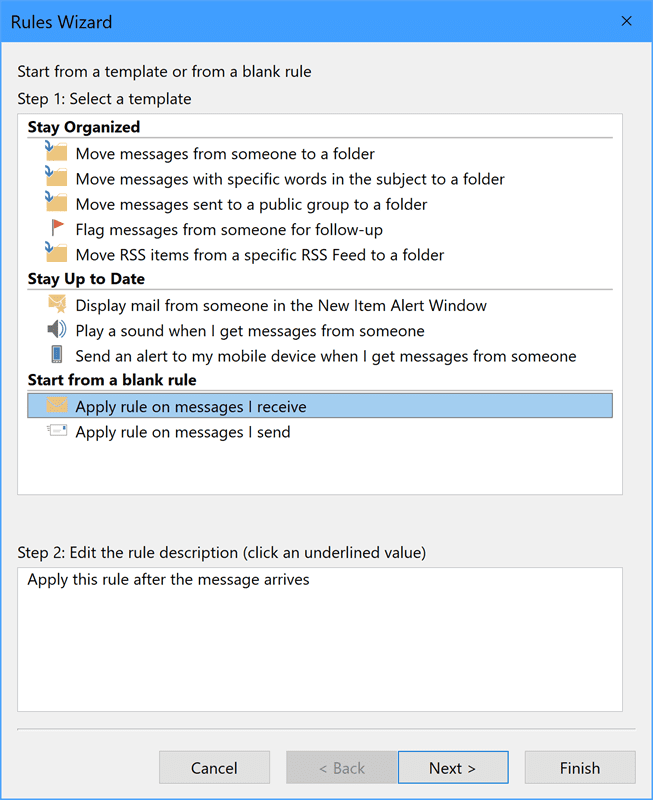
  3. After you save the template, create a rule for messages you receive by selecting Apply rule on messages I receive. Click Next
    apply to received message
  4. Select your conditions, click Next
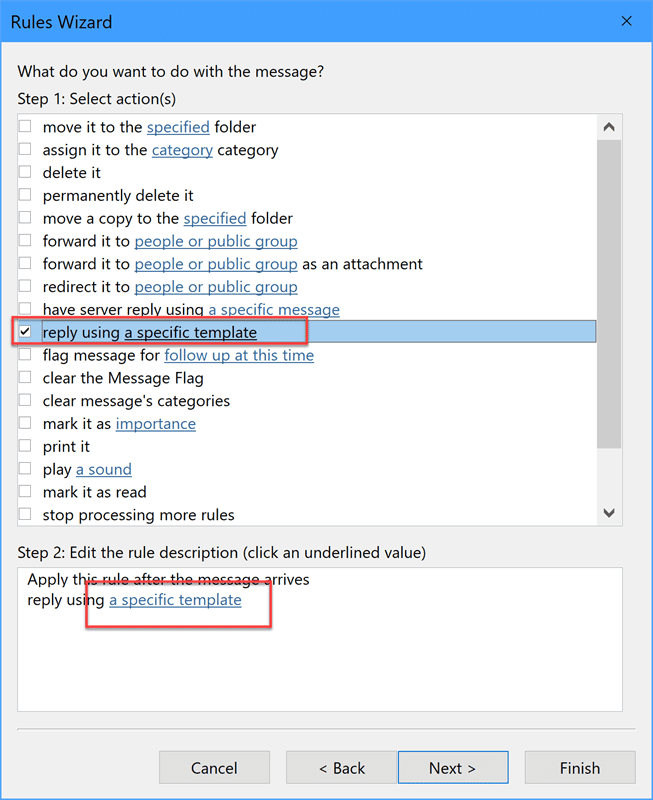
  5. Choose the Action to reply using a specific template then click the link in the lower section to select the template.
    choose reply with template action
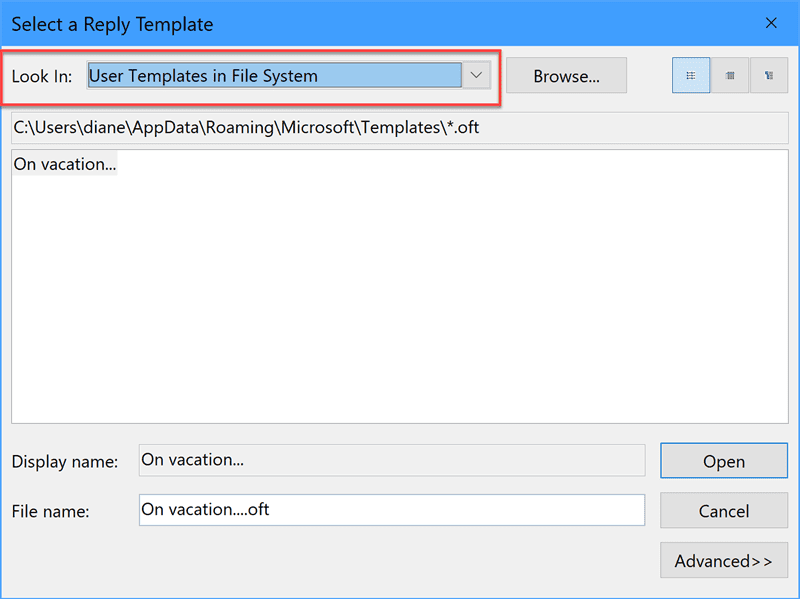
  6. In Look in:, choose User Template in File system in the dropdown then select your template. Click Open
    choose the template
  7. Add exceptions and complete the rule.
This will only reply to email after Outlook downloads mail. This means you need to leave your computer turned on and Outlook needs to connect to the Internet regularly to check for new mail. It's much easier and safer to set up an automatic reply on your mail server, if your server supports it. (Many do.) Look for the option to create a "vacation reply", as this is the common terminology used on many servers.

To use a Run a script rule to emulate an Out of Office reply, see Run a Script Rule: Send a new message when a message arrives or Run a script rule: Autoreply using a template . Using run a script will send a reply with every message that meets the condition of the rule.


Outlook.com accounts

Outlook.com users can set up an automatic reply in either Outlook or Outlook on the web. This will reply to all messages (unless limited to Contacts) once per address, until the automatic reply is turned off. This is the same automatic reply feature available to Office 365 and Exchange server accounts, although without the option for Internal and External recipients.

In Outlook, setup the automatic reply at File, Automatic Replies. Click the Rules button to configure options for specific messages.
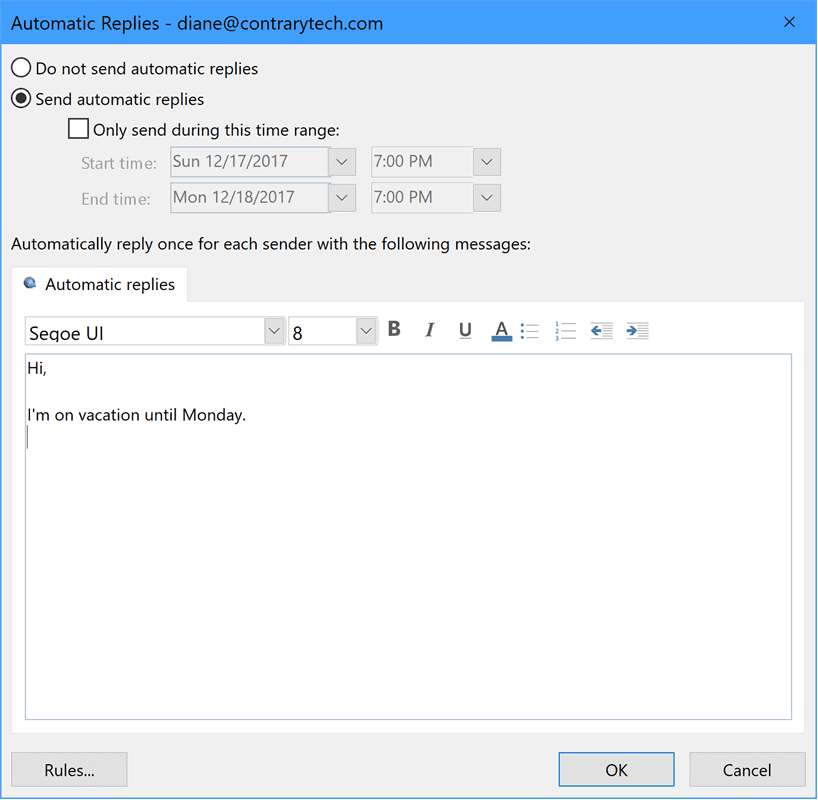
automatic reply option in outlook

In Outlook on the web, open Settings (gear icon) > View all Outlook settings > Mail and select Automatic Replies to open the automatic replies dialog. Outlook on the web doesn’t have the option to create automatic reply rules but can be configured to automatically decline or cancel meeting requests.
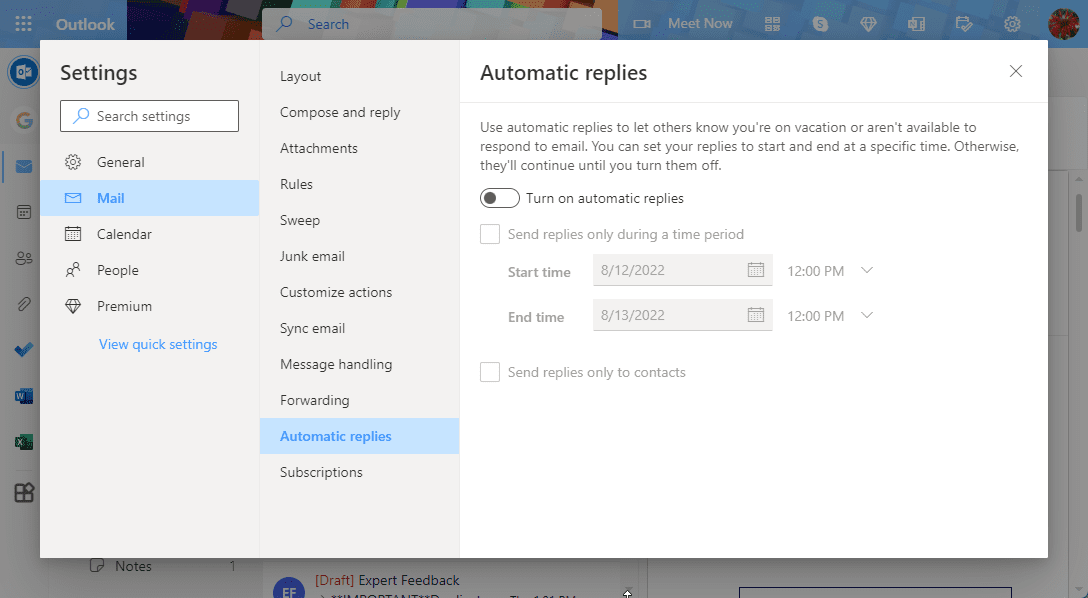
set up automatic replies in outlook on the web

Send Out of Office Replies with Outlook.com, POP, or IMAP accounts was last modified: August 12th, 2022 by Diane Poremsky

Related Posts:

  • Use Automatic reply rules without sending an Out of Office message
  • To Make Automatic Reply Rules
  • Using Out of Office Replies
  • How to change the Out of Office message subject

About Diane Poremsky

A Microsoft Outlook Most Valuable Professional (MVP) since 1999, Diane is the author of several books, including Outlook 2013 Absolute Beginners Book. She also created video training CDs and online training classes for Microsoft Outlook. You can find her helping people online in Outlook Forums as well as in the Microsoft Answers and TechNet forums.

Subscribe
Notify of
0 Comments
newest
oldest most voted
Inline Feedbacks
View all comments

Visit Slipstick Forums.
What's New at Slipstick.com

Latest EMO: Vol. 30 Issue 36

Subscribe to Exchange Messaging Outlook


Support Services

Do you need help setting up Outlook, moving your email to a new computer, migrating or configuring Office 365, or just need some one-on-one assistance?

Our Sponsors

CompanionLink
ReliefJet
  • Popular
  • Latest
  • Week Month All
  • Use Classic Outlook, not New Outlook
  • How to Remove the Primary Account from Outlook
  • Reset the New Outlook Profile
  • This operation has been cancelled due to restrictions
  • Disable "Always ask before opening" Dialog
  • Adjusting Outlook's Zoom Setting in Email
  • How to Hide or Delete Outlook's Default Folders
  • Removing Suggested Accounts in New Outlook
  • Remove a password from an Outlook *.pst File
  • Syncing Outlook with an Android smartphone
  • Opt out of Microsoft 365 Companion Apps
  • Mail Templates in Outlook for Windows (and Web)
  • Urban legend: Microsoft Deletes Old Outlook.com Messages
  • Buttons in the New Message Notifications
  • Move Deleted Items to Another Folder Automatically
  • Open Outlook Templates using PowerShell
  • Count and List Folders in Classic Outlook
  • Google Workspace and Outlook with POP Mail
  • Import EML Files into New Outlook
  • Opening PST files in New Outlook
Ajax spinner

Recent Bugs List

Microsoft keeps a running list of issues affecting recently released updates at Fixes or workarounds for recent issues in classic Outlook (Windows).

For new Outlook for Windows: Fixes or workarounds for recent issues in new Outlook for Windows .

Outlook for Mac Recent issues: Fixes or workarounds for recent issues in Outlook for Mac

Outlook.com Recent issues: Fixes or workarounds for recent issues on Outlook.com

Office Update History

Update history for supported Office versions is at Update history for Office

Outlook Suggestions and Feedback

Outlook Feedback covers Outlook as an email client, including Outlook Android, iOS, Mac, and Windows clients, as well as the browser extension (PWA) and Outlook on the web.

Outlook (new) Feedback. Use this for feedback and suggestions for Outlook (new).

Use Outlook.com Feedback for suggestions or feedback about Outlook.com accounts.

Other Microsoft 365 applications and services


New Outlook Articles

Opt out of Microsoft 365 Companion Apps

Mail Templates in Outlook for Windows (and Web)

Urban legend: Microsoft Deletes Old Outlook.com Messages

Buttons in the New Message Notifications

Move Deleted Items to Another Folder Automatically

Open Outlook Templates using PowerShell

Count and List Folders in Classic Outlook

Google Workspace and Outlook with POP Mail

Import EML Files into New Outlook

Opening PST files in New Outlook

Newest Code Samples

Open Outlook Templates using PowerShell

Count and List Folders in Classic Outlook

Insert Word Document into Email using VBA

Warn Before Deleting a Contact

Use PowerShell to Delete Attachments

Remove RE:, FWD:, and Other Prefixes from Subject Line

Change the Mailing Address Using PowerShell

Categorize @Mentioned Messages

Send an Email When You Open Outlook

Delete Old Calendar Events using VBA

Repair PST

Convert an OST to PST

Repair damaged PST file

Repair large PST File

Remove password from PST

Merge Two Data Files

Sync & Share Outlook Data

  • Share Calendar & Contacts
  • Synchronize two computers
  • Sync Calendar and Contacts Using Outlook.com
  • Sync Outlook & Android Devices
  • Sync Google Calendar with Outlook
  • Access Folders in Other Users Mailboxes

Diane Poremsky [Outlook MVP]

Make a donation

Mail Tools

Sending and Retrieval Tools

Mass Mail Tools

Compose Tools

Duplicate Remover Tools

Mail Tools for Outlook

Online Services

Calendar Tools

Schedule Management

Calendar Printing Tools

Calendar Reminder Tools

Calendar Dates & Data

Time and Billing Tools

Meeting Productivity Tools

Duplicate Remover Tools

Productivity

Productivity Tools

Automatic Message Processing Tools

Special Function Automatic Processing Tools

Housekeeping and Message Management

Task Tools

Project and Business Management Tools

Choosing the Folder to Save a Sent Message In

Run Rules on messages after reading

Help & Suggestions

Submit Outlook Feature Requests

Slipstick Support Services

Buy Microsoft 365 Office Software and Services

Visit Slipstick Forums.

What's New at Slipstick.com

Home | Outlook User | Exchange Administrator | Office 365 | Outlook.com | Outlook Developer
Outlook for Mac | Common Problems | Utilities & Addins | Tutorials
Outlook & iCloud Issues | Outlook Apps
EMO Archives | About Slipstick | Slipstick Forums
Submit New or Updated Outlook and Exchange Server Utilities

Send comments using our Feedback page
Copyright © 2025 Slipstick Systems. All rights reserved.
Slipstick Systems is not affiliated with Microsoft Corporation.

:wpds_smile::wpds_grin::wpds_wink::wpds_mrgreen::wpds_neutral::wpds_twisted::wpds_arrow::wpds_shock::wpds_unamused::wpds_cool::wpds_evil::wpds_oops::wpds_razz::wpds_roll::wpds_cry::wpds_eek::wpds_lol::wpds_mad::wpds_sad::wpds_exclamation::wpds_question::wpds_idea::wpds_hmm::wpds_beg::wpds_whew::wpds_chuckle::wpds_silly::wpds_envy::wpds_shutmouth:
wpDiscuz

Sign up for Exchange Messaging Outlook

Our weekly Outlook & Exchange newsletter (bi-weekly during the summer)


Please note: If you subscribed to Exchange Messaging Outlook before August 2019, please re-subscribe.

Never see this message again.

You are going to send email to

Move Comment