One sure sign that people are upgrading from Outlook 2007 to Outlook 2013: I’m seeing more complaints about a script error in Outlook Today.
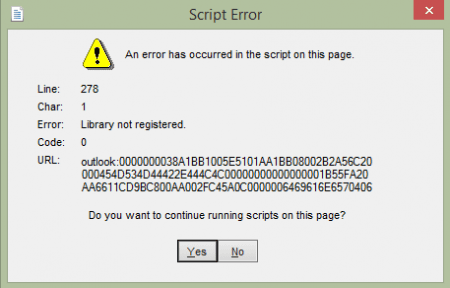
When you upgrade from Outlook 2007 to Outlook 2013 and then open Outlook Today, you may receive a script error: Line 278. Char 1. Error: "Library not registered." When you click "Yes" in response to "Do you want to continue running scripts on this page?" everything seems to work correctly.
You may also receive an error if you attempt to customize Outlook Today. A yellow banner above Outlook Today will warn you that ActiveX controls are blocked along with a script error ("Unspecified error") pointing to the URL "res://C:\Program%20Files\Microsoft%20Office%2015\root\office15\1033\OUTLWVW.DLL/outlook.htm.
Your web browser has blocked this site from using an Active X control in an unsafe manner. As a result, this page might not display correctly.
The first fix most people try is running a full repair on the Office installation. However, this won’t fix it. The problem is a registry entry referencing an older version of the Outlook View Control that was left behind in the upgrade.
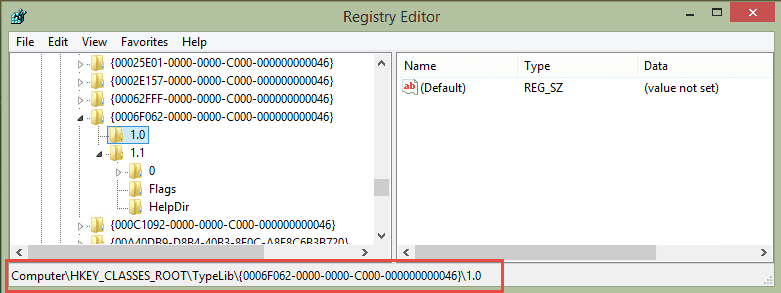
To fix, close Outlook then open the registry editor. (Press Windows key + R then type regedit in the text box and press Enter.)
Browse to find this key: HKEY_CLASSES_ROOT\TypeLib\{0006F062-0000-0000-C000-000000000046}
Under the key are two keys: 1.0 and 1.1 (Outlook 2016 users will have 1.2 key). You need to delete the 1.0 or 1.1 key, leaving the highest numbered key (Right click on the key and choose Delete). When you reopen Outlook, the script error no longer appears.
Do it for me
If you don't want to edit the registry, you can download and run this .reg file to delete the 1.0 or 1.1 key.
Delete 1.0 Key Delete 1.1 Key
If you are unable to edit the registry, you may need to ask your IT staff to delete the key for you. If you have a home computer and are using a standard user account, right-click on the registry editor shortcut and choose Run as Administrator to open it as an administrator. To run the .reg file as administrator, hold Shift then right-click and choose Run as Administrator

Christy says
Hello,
How can I restore back key 1.0. It didn't work for me?
Diane Poremsky says
If you exported it, it is saved as a reg; file. Double click to run it - click yes or ok on the dialogs that come up to add it back to the registry.
If you don't have a backup, this is the reg file to ADD the 1.1 key to the registry.
outlooktoday-1.1.reg
lyna says
Hi Diane
I had the same problem with a windows 10 laptop and installed office 2013.
But then the message disappeared after I deleted 1.1 (there was a 1.1 and 1.2) but then realised that 1.1 key was kind of empty, so i copied the keys info from another laptop which pretty much have the same system, then the message disappeared; however when i tried to do use Sage accounting software to generate documents to email, it failed, message says check windows event log, the log registered the following message ''System.InvalidCastException: Unable to cast COM object of type 'Microsoft.Office.Interop.Outlook.ApplicationClass' to interface type 'Microsoft.Office.Interop.Outlook._Application'. This operation failed because the QueryInterface call on the COM component for the interface with IID '{00063001-0000-0000-C000-000000000046}' failed due to the following error: Library not registered. (Exception from HRESULT: 0x8002801D (TYPE_E_LIBNOTREGISTERED)). at System.StubHelpers.StubHelpers.GetCOMIPFromRCW(Object objSrc, IntPtr pCPCMD, IntPtr& ppTarget, Boolean& pfNeedsRelease) at Microsoft.Office.Interop.Outlook.ApplicationClass.CreateItem(OlItemType ItemType) at Sage.Email.Outlook.OutlookMailer.SendMailInternal(Email email, SendMailOption whenToSend) at Sage.Email.Outlook.OutlookMailer.SendMail(Email email, SendMailOption whenToSend)"
Would you be able to shed light on how to solve it? I've contacted the software support team, but they don't seem to know to do solve it?
You would be my last bet now.
Diane Poremsky says
That looks to be an issue with an addin or with Sage, not the outlook today page.
Thomas says
Hi,
Thanks for the article. I have the office 2013 version, and in the registry, there were 2 keys :
1.1 and 1.2.
After deleting the 1.1, the error message was still here.
After restoring the 1.1 key and deleting the 1.2 key, it works!
Diane Poremsky says
Thanks for the information!
Alessandro says
Hi, I have W10Pro 21H1 + Office 2013.
I used Thomas procedure and it works.
Christy says
how did you restore your 1.1 key? can you help because it didn't work for me. Thanks.
Carlahls says
bonjour, comment restaurer la clé 1.1 ? Merci
hello, how do I restore key 1.1? Thank you
Diane Poremsky says
If you don't have a backup, this is the reg file to ADD the 1.1 key to the registry.
outlooktoday-1.1.reg
Double click to run it - click yes or ok on the dialogs that come up to add it back to the registry.
Joseph says
I went straighforward deleting 1.2 key.
Totally worked with me! Thanks, Thomas.
Miles says
Worked for me. Had 2016 with 1.2 and deleted 1.0 and now it works
RSPC says
Deleting the 1.0 and 1.1 did it for me. Thank You very much!
Jack says
Hey Diane,i also getting same error and also delete 1.0 in regedit and then restart my outlook but issue not resolved please help...
pubg says
http://www.slipstick.com/outlook/outlook-today-script-error-line-278/
Fionagirlie says
Hi Diane,
I have attached screenshot of error message I get after installing O365 & opening Outlook to add account on my new Lenovo AIO. I only have 1.2 key in regedit I'm not sure where to go from here
Diane Poremsky says
Are you click one of the buttons ot dismiss it, right click on the folder name and choose Data File Properties, then Home page tab. Try resetting the home page - if that fails, set a different start up folder in File > Options > Advanced
JRD says
Hi, I was so hopeful as this article describes the exact problem I have. I upgraded from 2007 to Office 365 (2016?)When I search for the key (the correct one with 'C000'), I see only 1.2 and no 1.0, or 1.1 keys are there. I renamed 1.2 but no outlook still gives the same error :(
Hi, I was so hopeful as this article describes the exact problem I have. I upgraded from 2007 to Office 365 (2016?)When I search for the key (the correct one with 'C000'), I see only 1.2 and no 1.0, or 1.1 keys are there. I renamed 1.2 but no luck, outlook still gives the same error :(
Diane Poremsky says
Is the error message exactly the same?
JRD says
Not exactly, the title of the error and line are the same but the Error message is different. "The specified module could not be found". Before that page, first I get 'Webpage Error' box where it says, "Do you want to debug the webpage?", there are two check boxes - 'Do not show the message again' (not checked), and ;Use the built-in script debugger in IE" (checked). Below, the details section has 'Line: 278 and Error: The specified module could not be found". Click 'Yes' or No' takes me the message as above in your article but a different 'Error'. The URL has a different code (outlook:800101014 ....and so on).
This box has 'yes/no' option as well , and clicking on wither takes me to 'Failed to register a VB script DLL. Reinstall or run Regsvr32.exe Vbscript.dll to self register."
I did register it as an admin, and got 'successful' message, but still Outlook does give the same message.
Thanks for looking.
Diane Poremsky says
the error only comes up when you go to outlook today, correct?
Try disabling outlook today then reenabling it.
right click on the outlook today folder, choose properties then folder home page and until the option to show a folder home page.
JRD says
I should have specified - I had Office 2007, I uninstalled it. Then installed Office 365. it did, no errors. I am able to open other office apps like Word, Excel, and Powerpoint. However, when I just try to open the Outlook, this is the error I get. After the last message about installing VBscript DLL, it completely closes. So, I am not able to open Outlook at all.
Diane Poremsky says
I'm not so sure the issue is with Outlook Today. Are you opening Outlook to start in Outlook Today?
If yes, try opening outlook using this switch:
Outlook.exe /select outlook:Calendar
Can you open it in Safe mode? To open Outlook in Safe mode: Close Outlook then hold Ctrl as you click on the Outlook icon. You'll get a message asking if you want to start in Safe mode. Click Ok.
JRD says
Hello, first of all, thank you for your continued guidance and support. I just wanted to update that I did a lot of things to fix this so not sure if I can say one thing helped, but to recap and to help others, here are the things I tried:
Outlook opened without any error! Thank you again.
Bhargav says
Hello,
As you said I just deleted the both keys 1.0 and 1.1 and restarted the Outlook ,still facing the same issue showing same like previous.i'm using 2013 version.please help me mam.
Nico says
Hi Diane, regarding OUTLOOK - Line 278. Error: "Library not registered – Is there a “Registry” FIX for this or am I compelled to keep pressing YES for ever? Thx
Diane Poremsky says
Deleting the older version keys in HKEY_CLASSES_ROOT\Typelib\0006F062-0000-0000-C000-000000000046. should fix it/ (1.0, 1.1 - leave the key with the highest value).
Nico says
Worked a treat. Thank you so much Diane ... Stay Safe
Eric G. says
Hello, thank you very much. Your solution with .reg files worked for me !
Charlie says
I installed Office 2013 on a new computer that had a newer, unactivated OEM version of Office. I'm receiving the error above but have only 1.1 and 1.2 registry keys. The 1.2 value looks like the 1.0 value in the screenshot above. Not sure if there is an action I could take here - I didn't upgrade from 2007 and I didn't customize the Today screen. Appreciate any thoughts.
Btw, Diane your advice has helped me greatly!
Diane Poremsky says
Rename the 1.2 key - i usually add a couple of dashes to the end. If it still errors swap it - rename 1.1 and restore the name on the 1.2 key.
Charlie says
Unfortunately no luck. I tried renaming 1.2 with extra dashes (as 1.2--), same error. Then I restored 1.2 and renamed 1.1 (as 1.1--), same error.
Charlie says
Fixed! I renamed 1.2 as '1.2--' and renamed 1.1 as 1.2.
Laertes says
This way works for me! THANKS!!
Suki says
Thanks Charlie, this way worked for me too! Appreciate this tip Diane, this was driving me nuts.
Suki says
Whoops, no, scratch that. Did all Diane's suggestions but did not work. When I tried Charlie's last fix the Error message vanished, but Outlook no longer received emails. YIKES! Undid all regedit changes.
Will have to live with this darn error I guess. Phooey.
George says
I tried this and it worked. Thank you so much!
ranjitha says
i am not finding the key itself ..please help...im getting script error when i try to login to outlook
Diane Poremsky says
Is it the same error message? What version of Outlook desktop software are you using?
Mike says
One more point, some people reported not being able to find the registry key. I'm guessing they copied the key (0006F062-0000-0000-C00-000000000046) from the article and there's a typo (missing a 0 after C00). The key shown in the screenshot is correct (0006F062-0000-0000-C000-000000000046).
Diane Poremsky says
Thanks for catching that.
Mike says
30 minutes wasted with Microsoft, then a few seconds reading this article from Diane and problem solved! We love you Diane!
Jon says
This has worked, so many thanks
Peter says
Also worked for me, thank you very much !!
John says
Thank you!
Links says
,I found something you guys can try about it .when you installed a another version office,you have to ensure that you had completely delete all the
software which concerned about office ,such as skype for business.
Diane Poremsky says
That shouldn't affect this error but uninstalling older versions is generally a good idea.
Andrew says
Under the Typelib subdirectory there is a long list of numbers, but I do not see one beginning 0006F0620-....
I have an updated Outlook and Windows 8
Any suggestions? Thanks
Diane Poremsky says
What version of Outlook do you use? It definitely should be there...
Claudio ssegawa says
Thanks alot this actually works out very well
Ben says
Thank you! That worked - the script error is now fixed!!! I'm happy.
Ramiro says
This worked for me. Wonderful instructions. Thank you.
Scott Mace says
My Office 2016 doesn't have that key (HKEY_CLASSES_ROOT\Typelib\0006F062-0000-0000-C00-000000000046). There's a similar one, but....
Diane Poremsky says
if you select one of the subkeys, does it say 'outlook view control' on the right side? if not, its not the right key.
BTW, what is your build #?
Chris says
Diane Another excellent result. I had tried so many other things, but your "simple" solution worked perfectly. Thank you
Maureen says
There was no Typelib folder. Any other ideas?
Diane Poremsky says
What version of Office do you have installed? Look on File, Office Account, About Outlook.
(You should have the folder, but it might be in a different location.)
Stan Graff says
Wait a minute. I discovered that Comcast.net requires that 1.0 file!!!! I renamed the file. Everything started working again.
Diane Poremsky says
I'm not sure why Comcast would need it... it applies to the outlook view control, which Comcast shouldn't use... but as long as it works.
Stan Graff says
You are a genius. How in the heck did you discover that the 1.0 file was causing this problem?? Talk about a needle in a haystack. I just ran the regedit and actually renamed the file X1.0X and that took care of the problem. Not that i doubted you, but deleting a file that may cause other problems, gave me the willies. Anyway, THANKS!
Diane Poremsky says
I had a little help from Microsoft support. :)
Nika says
Thank you!!!
Baudouin says
Dear Diane,
I apologize for my precedent message rather confuse.
2 different subjects:
One perfectly solved thanks to your explanation and thank you again
Other one concerning a synchronization with a smartphone become impossible after round trip of Outlook on 2016 via outlook on 2003: have you any idea of where I have to look.
Thank you again
Baudouin says
Thank you Diane. I effectually tried to leave Outlook 2016 for Outlook 2003 and without successful i decided to turn back to Outlook 2016. Have you any idea about the message I obtain now when I synchronize my smartphone with myphoneexplorer (Android) " the load of the data since Outlook failed ". The application worked before the installation of Outlook 2003
Steve H says
Thank you Diane. I was with Microsoft Tech for 2 hours and the girl just finally said "well, just click yes because everything works". I wasn't satisfied so I searched and you're the first site that came up and I deleted the old 1.0 reg key and now there is NO error! Thank you so much.
Beth says
I have the problem but
The key HKEY_CLASSES_ROOTTypelib006F062-0000-0000-C00-000000000046. could not be found in my registry?
Diane Poremsky says
What version of Office do you have installed?
Beth says
Office 2016
Beth says
Hi, thanks for getting back, its 2016.
Along with this problem, I cant download emails without restarting the laptop every time, although I can check emails on my phones. Would the problem be linked?
Diane Poremsky says
I don't think they are linked, but who knows. :) What i would do first is an online repair. (If you aren't using a subscription version, make sure you have your activation key - you'll need to enter it to reactivate.)
What type of email account?
Is the error message the same as on this page?
Do you get any send and receive errors? I'm assuming the Send/Receive or F5 buttons also fail to download mail?
Beth says
If I do a repair, will I lose all my emails?
I have pop accounts. The error is 0x8004210A The operation timed out but if I restart the messages are then downloaded. I have deactivated Norton but still same.
Diane Poremsky says
Norton is a potential cause. Try running outlook in safe mode for a bit and see if it works. To open Outlook in Safe mode: Close Outlook then hold Ctrl as you click on the Outlook icon. You'll get a message asking if you want to start in Safe mode. Click Ok.
Try increasing the timeout setting - File, Account Settings, double click on the account, then More Settings. Select Advanced tab - default is 2 min i think.
Do you access the mailbox using a smart phone or second computer? This can cause errors with pop accounts, although it is usually a different error message.
Beth says
I disabled Norton totally, so that it did not load at start up, its odd because I have been using Norton for years without problems.
Tried safe mode, still the same. I will try timeout settings, thanks.
I use the computer at home and at work, also on one smart phone. Never had any issues with either. have scanned laptop for virus etc. I think its a glitch with outlook, what you think?
Just to say that I much appreciate your help and taking time out of your day to help us all!
jennifer says
hi. sorry 4 the bad english, i speak french and try to speak english.
i've got the same probleme but in my case there is just one key instead of two. just 1.1
what i'm supposed to do in this case ? should i delete this only key ?
Diane Poremsky says
What version of Outlook do you have? (I would probably delete it then do a full repair of office.)
Ian says
Worked for me, many thanks, saved me ages.
kirsty hill says
Fantastic, worked like a treaT1
Arend says
Thanks a lot, it works.
Noor says
Thank you, it works.
Steph says
Like Christi below, I have 1.1 and 1.2. Regedit will not let me rename or delete either. (Could be a security issue? This is Exchange/company email.)
Diane Poremsky says
If it is a company computer, they likely have group policy enabled that prevents you from editing the registry. You'll need to ask the admin to edit it for you.
Stefanie says
Hello, i can not delete the file 1.0. It would not let me. It says: 1.0 cannot be deleted. Failure attempt while deleting the key (I have translated this from my language into english. Can you help me with that?
Regards
Diane Poremsky says
It sounds like there is a group policy in effect that is preventing you from editing it. This is common on work-owned computers or personal computers logged into work networks. You'll need to ask your admin to fix it for you.
Doug says
Just had 2016 Outlook installed. The tech didn't know how to eliminate the error notice. This worked perfectly and easily. Thank you, thank you.
nigel says
didn't work
Diane Poremsky says
What version of Outlook do you use? Did you restart Outlook?
christi says
I am receiving this error but when I follow these steps I don't have a folder labeled 1.0. I only have folders labeled 1.1 and 1.2. If anyone could help me out I would appreciate it.
Diane Poremsky says
Try deleting (or renaming) the older key - 1.1.
Jesse says
My installation used 1.1 not 1.2. Renaming 1.2 resolved my error.
Fran says
Thanks, it works perfect now!
LUCIANO RAMOS TENORIO DE HOLANDA says
Obrigado! Tks!
Alan says
Thanks , Sorted out my issue after upgrading office 365 outlook 2016
peter says
Thanks for your help. Worked perfect.