I'm going to begin this by saying that I really think it's time to find another solution for journaling. I have no idea how many more versions we'll see before Microsoft rips Journal's heart out. It's time to move on to something that is going to be around longer.
On the other hand, it's possible that Microsoft has removed all they can without breaking backwards compatibility, in which case, the Journal module might be mostly left alone for another 10 years. I don't have a crystal ball and Microsoft isn't saying anything more than the "journal is deprecated" and deprecated features have a way of hanging on, thanks to their need to provide backwards compatibility.
OneNote is one possible option as a replacement for the journal. I have a VBA sample to Copy Outlook Journal Entries to OneNote.
For those users who aren't ready to move on.... I'll share some facts about the state of the Journal in Outlook 2013 and workarounds to make it more useful and less broken.
Opening the Journal folder
The Journal button was removed from the Navigation pane / Peeks row. The keyboard shortcut of Ctrl+8 works or you can select the Journal from the Folder list.
Currently, a Journal button can be added to the ribbon or QAT.
- Open the Options dialog to Customize Ribbon or Customize Quick Access Toolbar.
- Select All Commands in Choose Commands From:
- Find Journal (click in the commands list and press J)
- Add a New Group then Add journal to the group.
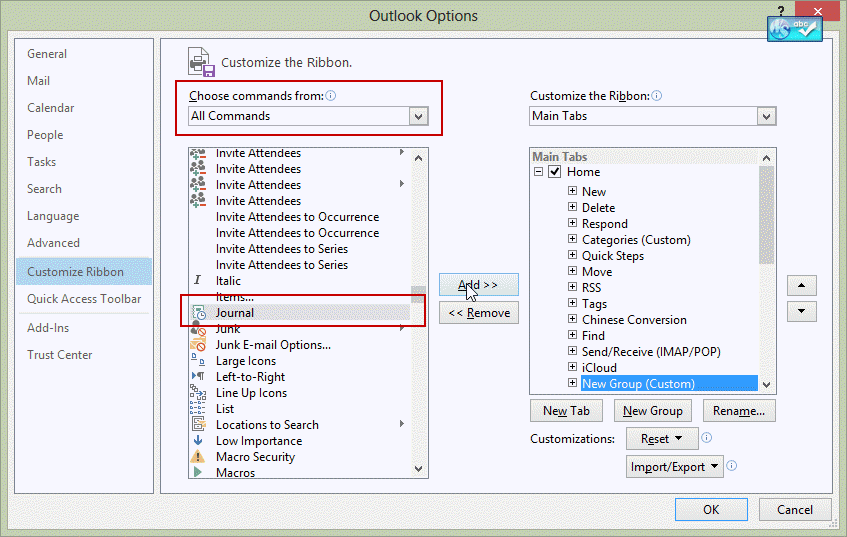
If the Journal command is missing in your version of Outlook, you can use VBA to switch to the Journal and assign it to a QAT or ribbon button.
Sub GotoJournalFolder()
    Set Application.ActiveExplorer.CurrentFolder = _
    Session.GetDefaultFolder(olFolderJournal)
End Sub
Creating New Journal Items
The New Journal button was removed from the New Items command and the shortcut to create a new journal item from any folder (Ctrl+Shift+J) was removed. You can either browse the New Item button and open the More Forms command and select Journal, switch to the Journal folder first, or use VBA to open a new journal item and assign it to a QAT or ribbon button.
If you have Outlook 2013 v.15.4535, New Journal Entry is listed in ribbon customization. Use the steps above to custom the ribbon or QAT. Look for New Journal Entry under All Commands. If you have an earlier version of Outlook, you need to install updates.
Sub NewJournal()

Set objFolder = Session.GetDefaultFolder(olFolderJournal)
Set objItem = objFolder.Items.Add("IPM.Activity")
  objItem.Display
' start the timer automatically
  objItem.StartTimer
End Sub
New Journal entry for Contact
This code sample creates a new journal entry for the selected contact. To work with open or selected contacts, get the GetCrurrentItem function from Work with open item or selected item and use Set oContact = GetCurrentItem() instead of Set oContact = ActiveExplorer.Selection.Item(1).
Sub CreateJournalForcontact()

If TypeName(ActiveExplorer.Selection.Item(1)) = "ContactItem" Then
 Set oContact = ActiveExplorer.Selection.Item(1)

Dim oJournal As JournalItem
Set oJournal = Application.CreateItem(olJournalItem)

 With oJournal
 .Companies = oContact.CompanyName
 .ContactNames = oContact.FullName
 .Body = oContact.MailingAddress
 .Categories = oContact.Categories
  .Display
  .StartTimer

End With
  Set oJournal = Nothing

Else
MsgBox "Sorry, you need to select a contact"
End If

End Sub
New Journal entry for email message
This variation of the macro creates a new journal entry for the selected email message. As with contacts, you can use it with open or selected items if you use the GetCurrentItem function and change the Set oMail line.
Sub CreateJournalForMail()
Dim oMail As MailItem

If TypeName(ActiveExplorer.Selection.Item(1)) = "MailItem" Then
 Set oMail = ActiveExplorer.Selection.Item(1)

Set oJournal = Application.CreateItem(olJournalItem)

 With oJournal
 .ContactNames = oMail.SenderName
 .Body = oMail.Body
 .Categories = oMail.Categories
 .Type = "Email"
  .Display
  .StartTimer

End With
  Set oJournal = Nothing

Else
MsgBox "Sorry, you need to select a message"
End If

End Sub
Setting Journal Options
Journal options were removed from Outlook 2013's File, Options dialog, meaning that there is no UI around to edit the settings. This included the dialog where you could choose to journal email from specific contacts, and automatically create journal entries for Office documents.
In applications that support VBA, you can create journal entries automatically using VBA. See Create a journal entry for Word documents in Outlook 2013 for a sample that creates a journal entry when you open a Word document.
Ah... well what about creating the journal keys in the registry yourself? I tried and so far, no luck. You need to create at keys in Outlook\Options\Journal, SharedTools\, and Outlook\, possibly other keys as well. (I'll keep trying.)
Activities
Contact activities were broken in Outlook 2010 and completely gone from Outlook 2013. You'll need to use Instant Search or custom views to find journaled items.
You can use VBA to create an Instant search in the journal folder. Use the VBA code samples at Use Instant search to find messages from a contact, then select a contact and run the macro. With the journal tweaks, the macro will open the journal folder and search for the contact's name in the Contacts field.
Link contacts to Outlook items
Tools
UBitJournal Outlook 2013 will run from your startup folder and emulate the file journaling capabilities that Microsoft has removed from Office 2013. UBitJournal will add open Microsoft Office files from local drives and server (including those synchronized locally) to your Outlook journal. Currently seeking testers. |

NLD says
Any thoughts on how to save attachments from a task into a journal entry? I used the second macro from here, but I can't figure out how to save the attachments to the entry. I tried "NewJournalEntry.AttachmentAdd" but I get an error message that the property is read only. thanks.
Dan says
Out of curiosity, why was the Journal deprecated? It's fantastic for those of use who have to complete timesheets, because it made it ludicrously easy to summarise what we were working on throughout the course of the day (and importantly, which documents?!). </rant>
Justin Peterson says
Thanks for this great piece of code. The code helps me track my time and organize my efforts more effectively.
Cheers!
Tomas says
There is easier way to add "Journal" to the Navigation Pane at the bottom, next to Calendar, People, Tasks etc.
Just modify this Registry key:
[HKEY_CURRENT_USERSoftwareMicrosoftOffice15.0OutlookPreferences] "ModuleVisible15"="1,1,1,1,1,1,1,1,0"
That 1 at position 8 is the one that enables "Journal".
Mike Burrows says
Thanks - not as slick as dialing fromt he contact record and having the Journal record open - but still makes journal usable.
Diane Poremsky says
yeah, its definitely not as good as it used to, but unfortunately, they wont be bringing those features back. :(
Ginger says
I use the journal in order to be able to keep track of documents I worked on for timekeeping purposes without having to physically write down all the time entries and then type them into a timekeeping program. I just go to my journal to see what I have saved or where I have been. I love the journal!
HAL says
For all things, the author has stated the hard and dull reality of the MS Office Outlook Journal - it's EOL'ed. All that is left to keep it somewhat useful, are patches and workarounds. I wish I had half of the author's ability for the workarounds. I've been bouncing into this webpage for years in order to learn about in-hand solutions around Office Outlook. The demise of the Outlook Journal is, for me as for many more, not just a "deprecation". It's a major inconvenience.
In my ongoing quest for a good & stable journal, I've come to the conviction that all our journaling needs can feasibly be moved to calendars. For one, the Journal itself IS A CALENDAR. It only happens that we don't use it in a calendar view. If you review the fields that any Journal entry has, they're mostly of a calendar entry. A journal entry is a variation of a vCal entry, just as the Outlook Tasks entries are, as well. For all I know, that's how the Outlook calendar was initially formatted, in vCal, however I recall it was eventually re-formatted in ICS or something. OK, rephrasing, perhaps the Journal is not a calendar in its own right, but it's a calendar's brother. And, there is a reasonable expectation in that everything we used to pour into the Journal, can be now poured into calendars. Behind the Outlook Journal, there is a database that is pretty much like that of a calendar. And point in fact, much of the workaround expertise that the author shares over here, are ways to reach that database and enregister things into it.
That shift from Journal to Calendar has already started. Calendars have gone clouded, and this is not new. Android apps that copy the SMS and the phone log into a calendar, which is somewhat recent. There are contemporary efforts into this pathway. I, however, am yet to find an app that makes entries with a datestamp and a timestamp, as a journal, and allows a view in a list instead of a timeline, in the fashion of the old Chapura PocketJournal for PalmOS.
Diane Poremsky says
You can use any view on the calendar - timeline, list, calendar format.
You can either use the Date stamp feature or a custom form with code behind to insert a date stamp - or use a macro to create the entry and add a date stamp ( .Body = Date + Time) A macro could handle timer features, although it might not be a convenient as the journal's built in timer.
The journal folder is going to be around for awhile yet - while I'm discouraging people from using it, those who want to use it can. if you need the timer and other journal specific features, use it. The only thing that is broken is the Activities and autojournaling features.
HAL says
Count me in as discouraged :'(
I've been reviewing and trying different options in order to replicate a journal experience using calendars. The online calendar alternative appeals me because it allows me what MS never fully achieved: to make the thing more ubiquitous. Journals are not available but to the user, not even within the costly Microsoft Exchange Server assembly. I have frequently been in the situation where I have to use more than one computer throughout the day, and my own is not necessarily at reach. Or, where I have a job-issued computer but I cannot install what I need/like into it. Using online calendars, I'm going into lengths in order to have my journal clouded (YEY!) and less Outlook-and-addins-and-plugins dependant. Currently you can plug almost anything into Outlook except for the coffee machine, provided you ain't got restrictions on behalf of the IT Dept., but of course it doesn't mean all that poured info will be available outside Outlook, or across Outlook installations.
Several of mi needs don't actually depend on a desktop-based environment. Mobile phone calls, SMS, and location have been for years related to the mobile device, not actually to the desktop device. Used to sync much of that info into MS Journal, now it syncs into calendars straight from the smartphone. Other needs do and inevitably depend on the desktop device where MS Office Outlook resides, such as the aforementioned autojournaling of Office documents usage. That, I'll try to work it out later. You know, a keen advantage when using online calendars for the purpose, is that all this data is more openly available, and not Outlook-encased anymore. Besides, provided it's possible to connect these calendars into Outlook, much of the other & desired Outlook funcionality can still be exploited.
(Before I forget it) Diane, I thank you so much for all the knowledge shared with us, throughout all these years. It's been here where I've found many of the best options in order to empower my MS Office Outlook experience :)
Phil says
Wanting to put the contact'sbusiness phone number in the journal's body but have yet to figure out what "variable" to use in lieu of "MailingAddress". help
Diane Poremsky says
phone would be .BusinessTelephoneNumber - to see all of the phone fields, open the object browser (F2 or View menu) then select Outlook from the libraries list and type phone in the search field.
Roger says
First of all: Many thaks for your superb site. So much help here!
I tried to get your "new journal entry for selected contact" work in Outlook 2016. A journal entry is created. But unfortunately only the "company" field of the selected contact is transferred not the name (more precisely: the "linked contacts" entry which I reactivated via registry entry "ShowContactFieldObsolete") . How can I fix that?
In addition using Set oContact = GetCurrentItem() to create journal enry from open contact gives me a failure "sub or function not defined" with the first line of the code highlighted in yellow. What did I do wrong?
Cheers
Roger
Diane Poremsky says
did you get the GetCurrentItem function from https://www.slipstick.com/developer/outlook-vba-work-with-open-item-or-select-item/ ?
On the contact field entry, that field uses the 'subject' field of the contact, which I'm guessing is set to company name (which is surprising - it's usually either full name or "full name - company") To verify, use a list view on the contact folder and customize the view by adding the subject field to the view.
Chris says
Journal can record files from Excel, Power Point, Word, and Access, Is there a method to add OneNote to the record file menu? I'm using Outlook 2010.
Diane Poremsky says
No, and with the journal being deprecated, it's not something they are going to add. (They removed the office document tracking in Office 2013).
JBG says
Has ANYONE actually found a viable alternative for the Journal in being able to take notes or call logs and have them linked/attached to contact profiles? Either as an Addon for Newer Outlook versions or completely replacing Outlook? There seems to be nothing out there except maybe the extremely expensive CRMs (and those cannot import from journal either).
How do other people handle taking daily call notes and linking them to a contact file?
I cannot believe I am the only one stuck here unable to move from Outlook 2010.
Diane Poremsky says
You can still use journal and you can link contacts to the journal entry. What you can't do is use activities to find them or automatically journal incoming email or other office documents.
if you don't see the contact field, set the key here : https://www.slipstick.com/outlook/2013/show-contact-linking-fields-in-outlook-2013/
Crystal Franco says
Hello Diane, the company I work for is still on Outlook 2010. I recently started using Outlook Journal and I find it easy to enter journal entries however, I am having trouble figuring out how to transfer the entries onto an excel spreadsheet. Can you please advise? Thank you.
Diane Poremsky says
You should be able to export the folder to excel or use a list view with the fields you need, copy and paste.
https://www.slipstick.com/tutorial/no-export-way-to-use-outlook-data/
VICTOR ESPINO SANTANA says
Hi, Diane. I have the Function GetCurrentItem on Module1
and on Module2 I have the macro CreateJournalForcontact. But when, after selecting a contact, I get the Journal entry by running the macro, it is not associated to the contact. Any ideas? Thanks in advance.
Diane Poremsky says
When they ripped out parts of the journal, they broke parts of it and it looks like they broke this. I know they removed the linking ability and the contacts field is basically a simple link.
David Holley says
I'd like to sit a MicroSoft Vice President down with a gun to his/her head and tell him/her that he/she has 2 minutes to find all of the documents that he/she viewed on a specific date from a month ago or I'll shoot.
Diane Poremsky says
Honestly, most people don't need to know what documents they viewed 2 months ago... Only a very, very small percentage of people used Journal and many admins disabled it so their users couldn't use it. It had more haters than users and was deprecated.
Joshua says
Trying to get the Macro for a New Journal Entry for Contact to work within a Contact Form, but I am getting an error "Sub or Function not Defined".
I am a newb using VBA so getting the Macro to run within a Contact Form is messing me up. Please help!
Sub CreateJournalForcontact()
If TypeName(ActiveExplorer.Selection.Item(1)) = "ContactItem" Then
Set oContact = GetCurrentItem()
Dim oJournal As JournalItem
Set oJournal = Application.CreateItem(olJournalItem)
With oJournal
.Companies = oContact.CompanyName
.ContactNames = oContact.FullName
.Body = oContact.MailingAddress
.Categories = oContact.Categories
.Display
.StartTimer
End With
Set oJournal = Nothing
Else
MsgBox "Sorry, you need to select a contact"
End If
End Sub
Diane Poremsky says
You're calling the getcurrentitem function which don't have.
Use this instead, if you want it to work only in an open contact.
If TypeName(Application.ActiveInspector.CurrentItem= "ContactItem" Then
Set oContact = application.ActiveInspector.CurrentItem
or get the getcurrentitem function and use this so it works with open or selected contacts
If TypeName(GetCurrentItem()) = "ContactItem" Then
Set oContact = GetCurrentItem()
Nick Fluck says
Diane I use Outlook 2013 and for my own convenience I would like to add what ought to be a simple feature. How can I change the colour of any message that has been printed? I work from my laptop all the time and am really bad at forgetting to print either new messages received in my inbox or replies or new messages I send from my sent items. I would like a (simple!) VBA call that simply spots either a right click quick print, or a message open and print and just changes the displayed (selected) message line from black to grey, or green or some other distinguishing colour?
Diane Poremsky says
You'll want to add a category when the message is printed. I'm not sure if we can detect that automatically, but you could call up the printer dialog from a macro and add the category. Once the category is added, you can use a view to change the text color or format in the message list.
Diane Poremsky says
This macro will do an instant print to the default printer and add a category.
Sub printout()
Dim objApp As Outlook.Application
Dim Item As Object
Set objApp = Application
On Error Resume Next
Select Case TypeName(objApp.ActiveWindow)
Case "Explorer"
Set Item = objApp.ActiveExplorer.Selection.Item(1)
Case "Inspector"
Set Item = objApp.ActiveInspector.CurrentItem
End Select
Item.printout
Item.Categories = "printed," & Item.Categories
Set objApp = Nothing
End Sub
Manuel says
Hi, I wonder if you could assist me in trying to figure out a way to sync journal with Office 365 and Iphone, I can see the journal in Outlook but cannot find it in Office 365.
I really like the semplicity of the timer and entry type which tasks do not seem to have.
Thanks in advance
Diane Poremsky says
The journal is only visible in Outlook - it's not accessible in OWA. The only way you could use it on the phone is if there is an app for it.
Tasks don't have a timer - but there is a macro you could use to add a timer. It won't work on phones (and it's possible the journal timer wouldn't work on a phone either).
This shows how to add a timer to appointments - it could easily be added to tasks. I would consider using a custom field for the times, not the task start and end time.
https://www.slipstick.com/developer/code-samples/create-appointment-diary/
Christian says
I now use "Chrometa," which works as an Outlook plugin. Tracks similar information and is pretty user friendly. If you want to track more than 1 month of activity at a time, though, you need to pay for a subscription. Also tracks all running programs on your PC, which helps with billable hours as well. May be worth giving it a shot.
George Leiner says
I realize this is a very simple, if not simplistic, question, so please forgive me in advance.
I had used Journal for years to keep track of work on Word and Excel documents. I had set the defaults to start a Journal entry for every Word, Excel and Power Point document I created. I have added a JOURNAL tab to my Outlook (Office Professional Plus 2013) Ribbon as per Diane's instruction above.
I am looking for a way for Outlook to start a Journal entry for every Word, Excel and Power Point document I create. Is there any way to do this in 2013? Or, must I manually create a new Journal entry for every document I create?
Thanks is advance for the help.
Diane Poremsky says
Unfortunately, it's not possible to autostart the journal like we could in the past. I have macros that tries to replicate it but it's half=@ssed (and that is being kind!) You need to use autonew macros in word and excel but it's really more annoying than useful (IMHO) because it wasn't fully automated.
Henk Ombelet says
We've also just been upgraded to Office 2013, and very disappointed the automatic journaling of Office programs has been removed.
Johan Decraene says
Since 2008 we use the Outlook Journal very intensively and extensively and are very happy with it.
Abolition of the Journal function would have a very negative impact on our organisation. We provide social services on a daily base for the most vulnerable segments of the population while using the Journal for keeping track of our interactions (phone call notes, mails, word or excel documents etc) with thousands of citizens and suppliers. We now have more than 140.000 activity items journalized for 17.000 contact items.
Thanks to the Journal function, we think Outlook is of one of the most useful and powerful products Microsoft ever made. Thanks also to Microsoft we were not forced to buy and maintain a much more expensive crm in an area where funding is a daily problem. We would be extremely thankful to Microsoft continuing at least passive support for the Journal function in Outlook.
We think the Outlook Journal is one of the most useful and user-friendly functions Microsoft ever delivered to the World. Microsoft, don’t let us down please.
Johan
Diane Poremsky says
I don't expect any additional changes to it. The current state of the journal should remain for at least 2 more versions, if not longer. It's still in Outlook 2016 and i fully expect it to remain for backwards compatibility for at least the next couple of versions (they'd need to remove it from exchange first).
dourily says
We just upgraded to office 2013 and so far this is the worst upgrade I've ever experienced. Aside from making my work computer incredibly slow, the changes to both Excel and Outlook are awful. I am spending so much more time on the same amount of work... previously used the record feature in journal to keep track of time on projects in word excel and access for billing and time... and no one seems to have a good replacement suggestion. I also can't find anyway to change settings so I don't see previews of read emails and the search function seems to be completely useless in outlook 2013. I need to be able to find past email on a regular basis and it just doesn't work!
Diane Poremsky says
Previews of read messages: it's either on or off for all messages, no option for preview unread only
I have macros that can call up the journal form - I don't recall if it tested it with word's automatic startup macros, but it was a PITA with Excel. A button on Word or Excel's ribbon could trigger it. I start a lot of documents from contacts and have a macro to open a journal form and then the word doc. That works better.
Antoine says
This is purely unbelievable. How much time Microsoft developpers spent to revamp design for this horrible, space wasting interface with subtle effects when moving items or changing view ? Did someone seriously asked them for ? I would be pleased to hear someone finding major improvment. But real useful features in a professional context are probably not fun to maintain and to evolve for developpers ? I spent hours to configure Outlook 2013 to work approximatively as 2010 was. Synchonisation does not work anymore with iTunes for a local opened PST file for example. If I had to upgrade again from 2010 to 2013, I won't do it. Let's tell things as they are : 2013 is a regression compared to 2010 from features perspectives, i.e. I am less productive with it than what I was doing with 2010. Ah yes, we just have to wait for Office 2016 with very new features (probably Journal coming back as a major improvment ?). Just a way to make business, changing look and feel and removing features so people don't see it immediatly, then re-adding old features, changing again interface, etc...What Microsoft did with Windows 7, 8.1 and 10. What Apple did with new iWork suite... Yes, we should think, as users, about grouping ourselves to make pressure on major software editors to do what they have to, and not what we don't expect to...
Greg says
This is very useful, thank you.
Do you know, does the journal item need to be displayed to start the timer?
I've tried to remove the .Display line, but am finding the outlook entry doesn't have the activity time in it when I do. Is there a way to have it all work in the background without it being displayed as another open window on the screen?
Diane Poremsky says
As far as I know, the journal form needs to be open/displayed for the timer to work.
Greg. says
Oh, that's disappointing, but thank you for the prompt reply.
I'll have to try and write directly to the .Start, .End and .Duration properties.
Therese Cerny says
The contact name that is displayed in the field to the right of the "Contacts..." button is not updated. But, like you said, when you click on that name it allows you to link to the actual contact and that's when you see the updates that were made. So if this is the case, is it safe to conclude that after a new journal entry is created and saved and closed, there is no contact synching function and all the user is left with is a simple hyperlink to the contact?
Diane Poremsky says
Correct, it's just a simple hyperlink.
Therese Cerny says
Thanks for responding Diane. Can you describe the changes you're referring to?
Diane Poremsky says
I should clarify that the name field is not updated, correct? When you double click to open it, the opened contact should be updated. In older versions, Contacts were linked to other outlook items and you could bring them up using the Activities page. That still works a little in Outlook 2010 & 2013, but a lot of the functionality is gone.
Therese Cerny says
Please help me!!! When I update a contact in the Contacts module for a particular contact that is associated with a journal entry, the "Contacts" field in the journal entry does not show the update I just made. What do I need to do??
Therese Cerny says
BTW, I'm using Outlook 2010.
Diane Poremsky says
Because of changes to the Journal and "contact links", the contact field isn't sync'd with the contacts.
Gary A says
I apologize if I am repeating something above, but to clarify, is there some way of getting the journals I have created for specific contacts into Outlook 2013 from an older version of Outlook? I have Outlook 2013 on my new laptop and Outlook 2007 on my old laptop. If I want to look for an old journal relating to a specific contact, I have to go to my old laptop to access it. I'm hoping there is some way to get these onto my new laptop for viewing. Thanks for any comments.
Diane Poremsky says
You can copy the pst (or export just the journal folder) and open it on the new computer. The journal folder works and you can create new journal items - its just the automatic journalling that doesn't work. And activities is gone.
To view the journal folder in outlook 2013, go to Ctrl+6 (the folder list) to select it.
Gary A says
Diane, so if I export the 'Journal' from Outlook 2007 as a .pst file, then import this .pst file into Outlook 2013, are you saying I can see all my past journals posted within Outlook 2007 contacts in my Outlook 2013 journal? If so, how do I ensure the imported .pst file will not replace the new journals I have created within Outlook 2013? Thanks in advance for responding.
Diane Poremsky says
New journal items should just add to the existing ones - the dates will be different but choose the allow duplicates option and outlook will keep everything. Yes, you will be able to see the old ones, but unlike in Outlook 2007, the Activities search feature is gone from Outlook 2013. Regular instant search will work though.
Gary says
Diane, that worked. Thank you very much. I was afraid I was going to have to go back to Outlook 2007 to view old journals but now all good.
One additional question please: After the import, I see all my contacts with journals but, I also see over 5,000 entries for a contact called 'None'. The subject column shows windows paths to word and excel documents.
Why would these entries be in the 'journal'?
Can I delete all 5,000 of these entries without affecting any of those documents?
thank you.
Diane Poremsky says
Older versions of Outlook could journal Word and Excel documents you edited, so you could track the time spent on them. You can safely delete anything in the journal folder that you don't need, such as these items.
Lynda says
We use journal for meeting notes but when our Outlook was updated to 2013 it looks like some of the entries are missing. How do we retrieve them so I can transfer them to another platform? I have the .pst backup file. Is there a way to go into it and just get the journal entries out?
Diane Poremsky says
Upgrading should not have removed existing items, but new items wont be automatically created like they were in the old outlook version. Open the pst file using File, open, outlook data file and switch to the folder list (ctrl+6). look in its journal folder for the missing items and copy them.
JH says
Many thanks! I was not happy to be forced to use ONENOTE.
SH says
Thank you for your TIPs...
You saved me !!
Efthimios says
Than you Diane! I'll give it a shot...
Efthimios says
Following the idea of using tasks instead of notes, I'm planning on importing journal entries as tasks (first I prepare a csv and then I import to the appropriate folder). My only problem is that I cannot map the creation field (date & time format) which is crucial in reviewing history of every contact. Is there any way to work around this?
Thank you for helping!
Diane Poremsky says
No, you can't set the created date. Since you are using tasks you could set it as the task start date or add the date to the body field.
Gary says
I found the 'Contact' field. Thanks.
Gary says
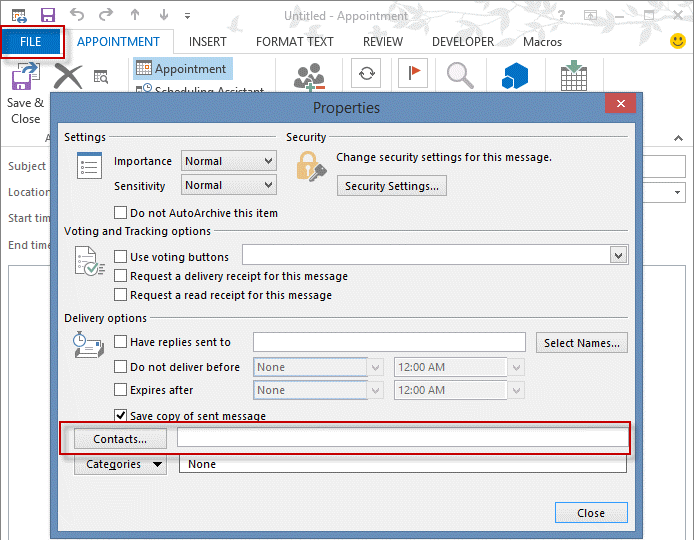
Your link says the following: "You can still link Contacts in File, Properties (or Options dialog) of an open item but that is an extra step." The link also mentions to change the registry.
Are you saying you can link a contact by going to " File, Properties (or Options dialog) of an open item." without altering the register OR must the registry be altered as you say further down in the article?
Under File/Options, I don't see a box to link contacts - do I need to alter registry? Thank you.
Diane Poremsky says
The registry is only needed to show the field at the bottom of the form, like it was in the older versions. Screenshot of the properties dialog: https://screencast.com/t/d9GEXEmn
Gary says
Thanks for responding so quickly. I have completed a couple of new journals. I see 'CONTACT' in the title bar of the list of journals - can you please tell me how I complete the 'contact' field for a particular journal as I don't see that field in the journal. Thank you.
Diane Poremsky says
Try enabling the contact linking field - instructions and a ready to use reg key are here -
https://www.slipstick.com/outlook/2013/show-contact-linking-fields-in-outlook-2013/
Gary says
Hi, after upgrading to Outlook 2013 I am also very surprised I can't access my journal by contact. By following the notes above, I can create new journals in Outlook 2013 but how do I attach/associate these journals with specific clients? Thanks for any info.
Diane Poremsky says
Contact linking is gone. The journal items won't be shown on the contacts - the only way to fin them is by search for the contact name in the journal folder.
Sonny says
we use Journal for time tracking. but I was wondering if anyone knew of an iphone/ipad app that we can use to access the Journal as most of our folks are on the road.
thanks
Diane Poremsky says
I'm not aware of anything - even newer version of OWA don't include the journal folder.
Kati Hungerford says
Tobias - I would love to hear more from you on how you are using the journal as a CRM in 2013, I just started today after a month long headache and heartache searching for a CRM I would like
Mike Mandell says
It is still pretty easy to create new journal entries or open the journal folder by including a shortcut on the top menu. I have both an "open journal" shortcut and a "new journal entry" shortcut (these are still available in the "commands" menu).
The biggest problem for me and probably most users is the inability to migrate from thousands of journal entries to something new because Microsoft has provided no way to import journal entries. I have exported thousands to an Excel file as a backup, but can't use BCM, OneNote or anything else I know of with these. Microsoft has largely abandoned a module without any migration plan.
In my opinion, they are making Outlook a lot more like a free web-based app than the desktop PIM it started out to be. They should note web-based apps are free. Outlook is not.
Diane Poremsky says
At the time I wrote the article, the Journal command wasn't available and I didn't check for it in later builds. New Journal Entry was added by a recent update. I'll take both as a sign that someone at Microsoft is listening, but i don't expect too much else to change (it would be great if they brought back autojournaling but there is no hope for Activities). Journal was burned in the early days because it ate up small mailbox quotas - admins turned against it. As quotas grew, admin kept hating it.
Yeah, migrating is a problem - while there is VBA to transfer journal entries to Onenote if you use 2010, i don't have a working script for 2013. Plus, it's just not the same.
I do not expect to see Journal removed from Outlook for a few versions, if at all, for backwards compatibility.
Claudia Cedill says
Losing Journal entry tracking of files and duration of files being worked on was my way of charging to different projects I can bill to. I had not idea I was losing this feature with my update. I just realized it and have no clue or notes on what all I worked on. Is there any fix or patch for this yet?
Diane Poremsky says
They will not be patching it - removing it was intentional. Sorry. The forms work, but are harder to get to and you have to make the effort - its not automatic. I worked on one macro that opened a new journal when i opened a word doc, but it was kind of a PITA to have the form open every time i opened word.
Mark LaPirow says
Probably the people that use Office 2010 on a serious level have not upgraded. I have because I have bought a new computer and I cannot buy Office 2010 Professional. What a disappointment. I will not use the new computer to replace my existing one as my main device. I will maintain it as a backup only.
D says
Is anybody else incredibly irritated by this, or just me? I used the Journal to track contact activity, Office program activity, etc. DAILY, and referred to it often. Now suddenly I have no tracking. One Note, IMHO, is next to useless. Why in the world did the @$$hats decide to break this?
Diane Poremsky says
I'm somewhat surprised that more people aren't complaining. I don't know if no one uses it or if they haven't upgraded yet.
Bill North says
Well, Diane and all...
As to why "more people aren't complaining"? Perhaps because there is noone and no identifiable forum for complaints at Microsoft that ever acknowledges, responds, or appears to give a s**t???
I thought Journal (the way it worked before) was one of the most useful and valuable components of Outlook. I used it daily and have not found anything even remotely close to its capabilities. If you have any insider contacts that can advocate for retro-improvements to the new and decidedly inferior product, please register me as complaining!
Thanks for doing what you do. Your patience is inspiring!
Tim Strafford-Taylor says
Me too - only just founs this out., harumph
Steve McNamara says
I have been using Journal linked to Word and Excel to track the time I spend on files and by having the files saved in folders with client names I have been able to use Journal as an effective time costing tool. Is there any way to link Journal in Outlook 2013 to Word and Excel to get the automatic tracking, and if not is there a substitute?
Diane Poremsky says
No, sorry there is no built in way. It is possible to use VBA in Word and Excel to start (and stop) a journal entry. See create a new journal entry for a code sample for Word. Excel will be similar - I'll try to get one up sometime this week, I only had time for one right now.
ray coleman says
Hi Diane, did you ever get to creating the code for this? I'm really missing this as part of 2013 Outlook for recording my time based work...
Diane Poremsky says
No, sorry, I haven't had a chance to do anything with it.
darrylgittins says
Is there a way to modify the newjournal macro to create a new journal item populated with details from the currently selected Outlook item?
Thanks!!
Sub NewJournal()
Set objFolder = Session.GetDefaultFolder(olFolderJournal)
Set objItem = objFolder.Items.Add("IPM.Activity")
objItem.Display
' start the timer automatically
objItem.StartTimer
End Sub
Diane Poremsky says
It would be. I don't have a code sample handy, but the macro at create an email to contact has the basics of creating a new item from a contact. Just put it together with the code above.
Tobias Morris says
Thanks so much Diane. That is a great help. Does the removal of the Navigation pane mean that you can no longer diarise a Journal item for a specific date? If you can do this, where is this visible? I hope you dont mind me asking. I really appreciate your advice on this. I cantseem to get the information from anywhere. Regards Tobias Morris
Diane Poremsky says
You can use the Folder list and drag items from other outlook folders to the Journal folder to create a journal item with a shortcut (right click drag for attachments).
Tobias Morris says
Hi Diane
I have been using Journal as a CRM tool now for 13 years for my business. I have created around thousands of journal entries directly from the Journal folder. That is, I open Journal folder and then create the entry. This is independent of other records so I dont need cross referencing capability. Can you tell me whether these journal entries will be visible and editable in Outlook 2013 as I am about to upgrade (currently I run Outlook 2003). Can I also create new Journal entries in Outlook 2013? Any help you can give me would be much appreciated. Regards Tobias Morris
Diane Poremsky says
As long as you are doing everything manually, the journal will work for you in Outlook 2013 (and probably beyond, due to backwards compatibility). You may need to change some habits - the journal navigation pane link was removed, so you need to use Ctrl+8 or the folder list instead. If you want to open a new journal form from any non-journal folder, you need to go through Choose Form or use a macro.
Jay Farnsworth says
You can create draft emails without a "To:" entry, and move the emails from the drafts folder to the contact's folder. Then, when you look at their folders, you will see these items as if they were journal entries.
jeremy says
Diane
Does anyone have any suggestions for potential Journal replacements moving forward?? The best thing about the Journal is the ability to take Phone Call notes while speaking with a contact and having that recorded and immediately available linked to that Contact's page. When activities was working you could get a single page view of all activities including email and journals so this is ideal.
Does ANYTHING do the same thing within or outside of Outlook?
Tried ACT! and that is a headache with the syncs back to Outlook and it won't import old Journals.
Onenote is barely 1 step above keeping stacks of Yellow legal pads on the desk.
Anyone recommending addins or replacements??
Diane Poremsky says
You can use appointment forms (in a separate calendar if desired). Post forms to use as a diary would also work, but Post forms look to be on the way out too. I'm not aware of anything for outside of outlook, other than onenote. I haven't tried Evernote as a journal replacement (i use it on my ipad) - i suspect it will about as good or bad as onenote and won't like contacts.