I'm frequently asked about message recall, specifically, they want to know why it doesn't seem to work at all. For example, Bob writes:
"I wrote a reply to a co-worker in anger and left it open on my desktop. Later I accidentally sent it. Thankfully, this is one time Message Recall worked. Moral of my story? I learned to close messages and save them to Drafts instead of leaving them open on the Task bar."
Unfortunately, Bob's story is all too common, but most of the time it's not a happy ending as Recall has a history of failing more often than it works. The major problems are that it only works with Exchange server accounts in the same domain as your account and the message you are recalling needs to be unread. However, even allowing for those limitations, recall still has a high failure rate.
Several things need to happen for recall to work. You need a blue moon on a warm starry night, then throw a pound of salt over your left shoulder: and once you do all that, it still probably won't work. I'm just kidding on those steps, but I'm not kidding when I say that recall really only works under certain very specific conditions.
The first and most important is that it only works with Exchange server accounts and only if the sender and recipient are in the same server organization.
Recall won't work on messages that are delivered through the SMTP connector (which means messages sent to the Internet will never be recalled).
Recall is now available in Outlook on the web and Outlook for Mac.
Recall in Microsoft 365 Exchange online can recall read messages. In older versions of Exchange, the recipient can't be sitting at Outlook reading their e-mail since recall fails once the message is opened. They can have Outlook open to the mailbox, but since it takes up to two minutes for the recall to automatically process, they are more likely to read the original message before it is recalled. If by chance they happen to read the recall before the message, it will process and remove the message.
Avoid Using Recall
Since Recall was one of the most useless features in Microsoft Exchange server (it's much improved in Microsoft 365 Exchange), make it a habit to type random letters into the CC field before you begin your reply. If you hit Send accidentally, the message will try to resolve the letters to a contact and fail, giving you a chance to cancel the send and avoid embarrassment. Along with saving messages to drafts and closing them, the Always check spelling before sending option can help prevent some people from accidentally sending messages.
If you send messages but have second thoughts soon after sending a message, create a rule to hold messages in your Outbox for several minutes before sending it to the server. In Rules and alerts, choose an After sending rule and set the Action to defer delivery by a number of minutes, up to 120 minutes. Either of these methods is much better than sending a recall that probably won't work.
Both of the methods above will work with any account type.
Hybrid Exchange Server
The question is from an Exchange administrator in a hybrid environment, with some user's mailboxes in "the cloud" and others using an on-premise server.
When a user with an on-premises mailbox recalls a message, it's recalled from all the users whose mailbox is on-premises. but not for the users who are on the cloud. Users in the cloud can recall messages sent to other cloud users but not to the on-premises users.
Recall only works for messages on the same Exchange farm, which normally means all users in an organization. Even though you are in the same organization, the servers are separate. There really isn't anything you can do; the mailboxes need to be in the same server farm.
How to Recall a Sent Message
Now that I've covered who Recall will work for, I'll show you how to recall a Sent message.
- Open the sent message, which in most cases will be in your Sent Items folder.
- The Recall command is accessible from the File menu or the Message menu.

- Or... Look for the Actions button on the Message ribbon and choose Recall this message.
- If you are using Outlook 2016/365's Simplified ribbon, the Actions command is in the overflow area on the far right.
- Choose your recall options. I recommend replacing the message with a new message which contains a short note about why you recalled (or attempted to recall) the previous message. Click OK to process the recall.
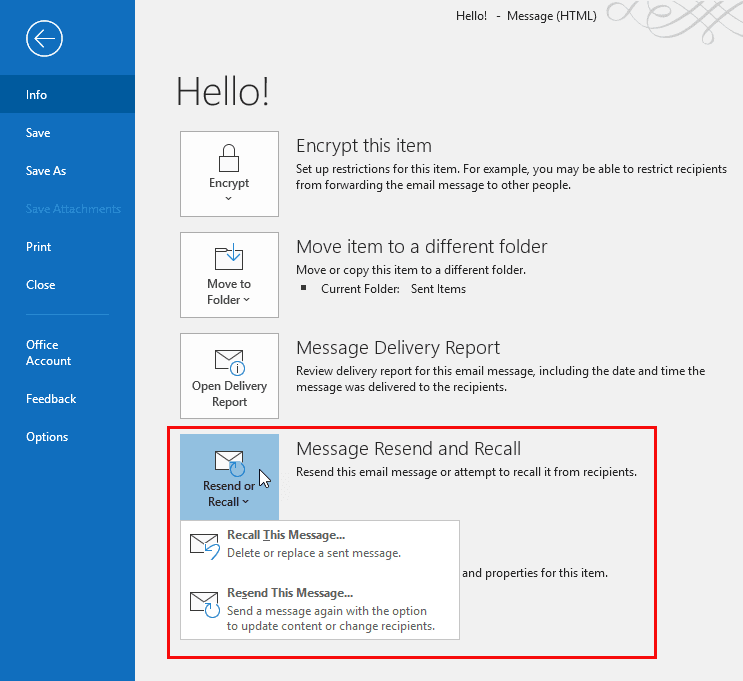
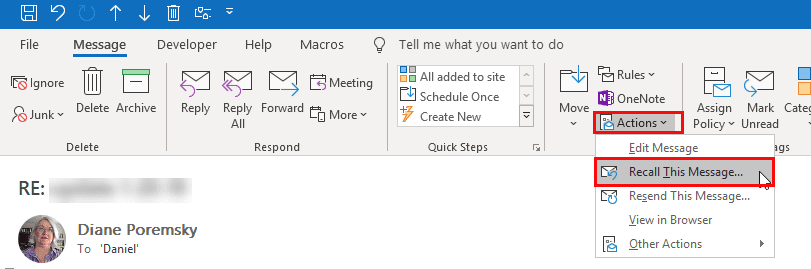
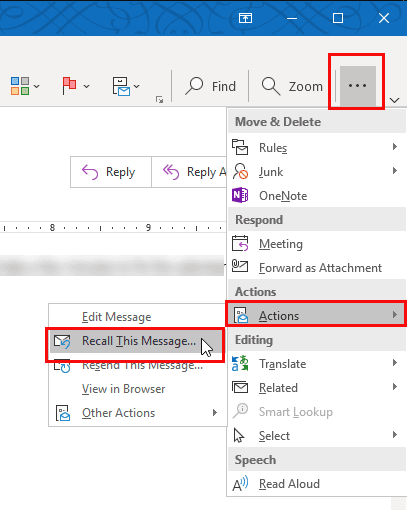
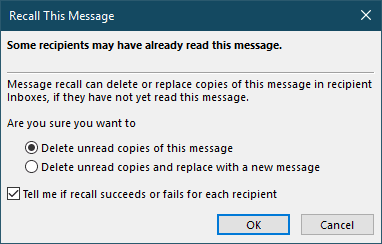
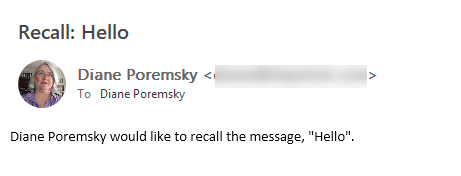
The recipient will receive a second message, and if the message has not yet been marked read, it should be processed and recalled within a minute or two. Sometimes the recall is not processed until the recipient attempts to view it. When recall is successful, both messages will disappear from the Inbox. If you are using the option to replace the message with a new one, the new message will be in the Inbox, whether or not the actual recall is successful.
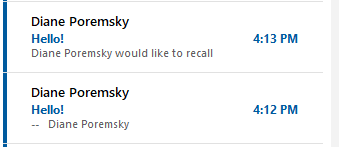
After the recall is processed by the recipients side, you'll receive a success or failure message in your Inbox. Note: if the recipient's email client does not support Outlook's RTF formatting, you will not receive tracking information back.
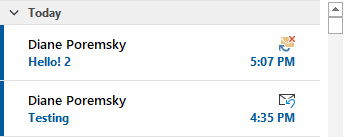
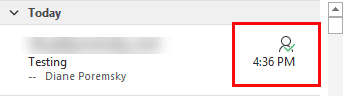
When you look at the Sent item in the message list, you'll see the Tracking icon once Outlook receives a Success or Failure report back
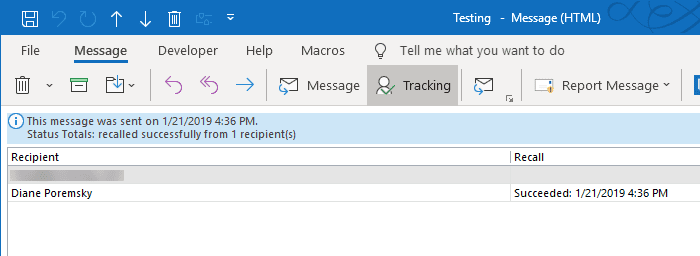
Open the message and look at the tracking page to see if the recall was successful or failed.
When a recall is attempted to an Internet address, the recall message stays in the recipient's Inbox. If you used the option to replace the message, the replacement message will be in the recall too.
Shared Mailboxes
You cannot recall messages sent through shared accounts. Recall only works if the account is opened as an account in Outlook. If the account was added to your profile as a secondary mailbox or as a managed or shared mailbox, recall is disabled, even if you have Send as permission on the mailbox.
OWA (Outlook Web Access)
In the desktop version, It's very easy to recall a message. Is it possible to recall a message from OWA?
In Microsoft 365 Outlook on the web, recall is on the right-click menu on the sent item. It's also on the menu in the reading pane. Older versions of Outlook on the web do not support recall.

Automatic Processing
In order for the recall messages to automatically process, the recipient needs to have his Outlook configured to automatically process meeting requests and responses.
In Outlook 2010 and up, it's in File, Options, Mail - near the bottom; in Outlook 2007 and below, it's in Tools, Options, Email options, Tracking.
With this option enabled on the recipient's system, recall should take less than a minute. With automatic processing disabled, the recall is not processed until the message is selected.

AGRG says
Is the recalling an email from shared mailbox still not available? :(
Sameer says
Hi,
For some reason, when i am at the office, i can recall messages. However, i just sent a message (from home) and it's been over 20 minutes, and no messages of success or failure. I have noticed previously as well, that for some reason at home, i can't recall messages.
Is there any way that you can help? * yikes *
Thanks.
Sameer
Diane Poremsky says
Are you trying to recall a message sent from the work address?
Recall will not work for mail sent from your personal address.
Sameer says
Thank you for your reply.
No, i am trying to do the recall from my work address itself (but from home and on wifi). Is it possible that due to some setting on wifi it doesn't recall (i haven't received any message - whether of success or failure - and it's been a couple of hours.
Diane Poremsky says
As long as the account is added to outlook as an exchange account, it should work just like it does at work. The recall success or failure is only generated by outlook - they may not have outlook open.
Yan says
Hi i recalled an email which most of the recipient is in my coy exchange, but so far i only received 4 delivery note saying either success of failure.As it is pass working out im quite sure most of them have no read the email. Will i receive the notification only when the recipent login to their email.
Corey says
Can you recall from a cc'd recipient?
Diane Poremsky says
Recall will attempt to recall from all recipients.
shahril says
i was send to 500 people in my tower , how bad today
Diane Poremsky says
If you can recall some, maybe not so bad... unless a lot of people hit reply all... then really bad. :(
Haydee says
What happens if you recall an email and you receive a message back saying 'Sender responds M'? The recipient and I are co-workers and both use the same server/email web so a recall of the message can be made. At the moment the Recipient is on leave and her messages aren't being read as she's overseas. After I sent her the email an automated message came back to me saying that messages will not be read until she returns next week.
Tina says
When I check recall status, next to 2 of the recipients it says failed, but the other 1 is still blank (don't have visibility if the 3rd recipient was or was not an outlook email. Is there a way to determine if the recall worked?
Diane Poremsky says
No, sorry... It's possible the recall wasn't processed by their outlook yet. Keep in mind that recall only works with Exchange and only if they recipients are on your server.
Nicole says
Is there a way to only email me if a message recall failed and not the receiptant also?
Diane Poremsky says
No, sorry, you cant change that behavior.
chfakht says
Please I cannot find this option in my outlook 2016 and it's not available under quick access toolbar.
Thanks
Diane Poremsky says
You need to open a sent message then look on the Action menu.
Camille says
I recalled an email, and received a successful recall message, and it shows success in the tracking as well. Does recipient still receive something alerting them that a recall happened?
Diane Poremsky says
Only if you chose the option to replace the original message.
Kris says
Hello, I recalled an email from 4 recipients. When I check recall status, next to one of the outlook emails it says successful, the second outlook email says failed, then the 2 gmail addresses are blank. I know for sure one of the gmail recipients opened the email (so I's sure that recall failed). At the top of the status check, it says successfully recalled from 2 recipients. So does this mean that the 1st outlook recipient and the 2nd gmail recipient were successful? Thank you for your help
Diane Poremsky says
Recall only works with Exchange accounts (on your own Exchange server) so, no, it did not work with the second gmail.
kell says
What does it mean when you recall a message and get the message back "sender responded M"
Sam says
I use outlook at work, when sending paperwork to our payroll team my team Cc our department's generic email also so we can track all emails sent for any follow up needed. I received an email to my account generated by outlook telling me someone else had recalled an email I had sent and It was unsuccessful, this employee has denied trying recall the email. Is there any possible way outlook would generate a recall notification email of this kind with out the action taking place ?
Eric says
Sam - did you receive any insight into this? One of our users also had this happen.
Diane Poremsky says
Because there are several steps involved, it would be difficult to impossible to do it accidentally.
If you use Office 365 email, you can turn on logging and might be able to determine who did it. You might even be able to tell by looking in the mail box - add the changed by field to the view. I can't say for sure that recall will show the last person who touched it, you'll need to test it to be sure.
maria says
Hi - I did the dreaded "RECALL" yesterday never expecting "success" replies since I waited probably WAY too long - maybe 30 min. before realizing the info I sent could cause a problem. The message was sent within our VA Microsoft Outlook system.... we are so behind...I think we have 2007 version. All the recepients were physically local and have VA.GOV as their address. SO my question is....did the message really get deleted? And one person had their "OUT OF OFFICE" reply on...so I didn't get a "failure" or "success" recall message. I'm mostly worried about that one...but the others also, if not deleted...could bite me in the butt maybe.
Diane Poremsky says
Until you get success or failure messages, you won't know... I'm surprised you didn't get something back...
J says
Can only the original sender recall and/or receive a successful recall notification? Or can anyone in a group CC recall a message?
Diane Poremsky says
On the original sender can recall a message. Messages sent to Exchange DL's won't properly recall. If it was sent to individual users, there is a higher chance that someone read the message and that would reduce the chances that it will work.
Regina says
I received a Message Recall Success: response - partially good news. I also CC'd someone. When I checked the tracking feature, the CC'd recipient line was blank - neither listed as success or failure. If it was successfully recalled for the main recipient, then would be successfully recalled for the CC'd????
Hopefully yes!
Diane Poremsky says
No, not necessarily. If the CC'd recipient read it, it can't be recalled.
Lina says
An email was clearly sent to me in error while I had my out of office on but I opened it on my iPhone/iPad I marked it unread and next time I opened my email it disappeared before my eyes. It was on exchanger server as same workplace. I did not receive a recall message either. I have since gone via remote access to my recover deleted items folder and neither the message or recall are there. Would this mean that someone would have accessed my email to delete it. The message was business critical and would have an impact on the organisation
carefullycackling says
I sent a one off to a coworker, well, tried to, but hit reply all. The team lead approached me and told me that my tone about another coworker in the email could be misconstrued as mean. I meant that he always has the misfortune of difficult and complex projects but since this coworker is struggling it could sound like I am singling him out and saying that he is a poor worker. So we decided to try to recall the message on Outlook 2010. It was sent to my coworker and my department of like 10 people. I recalled it and elected to have it deleted and to receive notifications about the failure/successes. I did it this while in the Outlook 2010 client. Didn’t know what would happen next. I have to add that we did not realize you could do this in 2007 which is what is at my desk. So I went over to a different station and configured my account to the 2010 version and did the recall. I also had the Webmail account open. After I did the recall and message from the original sender who I do not want to offend was up and it was actually the same as this commenter:
Anna says
October 25, 2014 at 12:46 pm
I received an email from the recipient's address that read. "The Sender Responded M." What does this mean regarding the success of my recall?
Reply
I then went back to the Outlook client and the message was there in full, it said that it was successful. I believe. I was shaking and very nervous because I did feel like it was sort of mean but I didn’t mean it like it came off! So then I texted a friend and had her check from webmail I believe that if what she used. I highly doubt she would add the account to an Outlook client if she even has it. I think she would have gone to webmail.xxxxxxxx.com. She said the she still saw the email but from my research it appears that people Could read the email from the internet and apps. I went back to my desk and tested recall with another coworker. I emailed her the test, waited a minute and recalled. Then I got a message that went to her folder that said the recall was successful and being in proximity with her I saw that she never received it at all. But from webmail and the apps the success messages say The Sender Responded M. Please help me.
Diane Poremsky says
If recall works, it would remove it from any app checking the mailbox using either Outlook, webmail, or ActiveSync. So it work be removed from the device - if the message was already marked as read, it won't remove it.
Did you send the original message to a distribution group or individuals? It won't work well, if at all, with distribution groups.
ame says
Message goes out to an organizational list that I am also on, seconds later update comes in so I recall the message. Microsoft says it has been recalled. Then 15 minutes after the recall confirmation is received, the "recalled" message shows up in my inbox. As far as I'm concerned if it says Microsoft, it's destined to fail. I'll be happy to go back to typewriters and fax machines any day now.
Diane Poremsky says
Recalling a message sent to a list is very problematic because it gets distributed to others. Not that recall works all that good to individuals either...
Mischa says
Question.. Just for example I sent an email around 7 in the evening. Then I recalled the message around 7:30 PM. The outlook of the recipient is offline by the time I recalled the email. After 20minutes I still haven't received a notification if the recall message is successful or not. Does it mean the recipient have not yet read my email?
Diane Poremsky says
It probably means the users hasn't opened the mailbox in Outlook yet. (Recall is really buggy and has a high rate of failure.)
Rosella says
Hi Can you please help me? If the first attempt recalling a message fails, as recipient is offline, can I try the second time when she is online? does this work? I am pretty sure the email has not been read yet but I haven't received any response recalling it.
Diane Poremsky says
If you received a failure message, it failed. Trying again won't make a difference - it will fail again.
exchameedik says
Do we have any keyboard shortcut to do recall message in Outlook 2013
Diane Poremsky says
No, sorry, I'm don't know of any that are short... Alt+H, A1, T will do it or you can customize the QAT and add recall so it's Alt+a number.
jo says
Please can you advise . Outlook 2013. Why has the Recall and Replace box disappeared under information in my outlook 2013. It was there yesterday. And working. I was able to recall an email OK. Now it has disappeared. Help ?
Diane Poremsky says
Do you have the sent message open? If yes, try resetting the ribbon.
Prince says
Dear Diane,
Please enlighten me. I created an outlook email using POP3 from an Official email of my company. Only me can access the messages but my supervisor says y official email is empty that I should put all the emails back on the official email. Please how do I stop the outlook from retrieving mails from my official email. Please treat as urgent. Thank you
Diane Poremsky says
You are using POP3 and are deleting mail from the server as you download it. Outlook 2010/2013: Go to File, Account Settings, double click on the account then More Settings. Leave mail on the server is on the Advanced tab.
https://www.slipstick.com/outlook/email/to-leave-internet-messages-on-the-server/
bev samsa says
I just want to recover a deleted e-mail.
Diane Poremsky says
What type of email account is it in? if it's not in an exchange account, its hard to recover deleted items - a backup copy of the pst file is your best bet.
See https://www.slipstick.com/outlook/config/recover-deleted-messages-pst-files/ for more information.
Anna says
I received an email from the recipient's address that read. "The Sender Responded M." What does this mean regarding the success of my recall?
Diane Poremsky says
That was the full text? It sounds like recall probably didn't work. Recall only works with Exchange server and only when the other person is in the same org or on the same server.
Abel says
We have hybrid environment in the organization. Some users mailbox are on-premise and some are in cloud. when i am trying to recall a message from my on-premise mailbox, the mail is recalled from all the users whose mailbox is on-premise. but for the users who are on the cloud, message recalling is not happening.
Please confirm if the recalling of mails is possible for cross premise?
If yes, please suggest what could be done in this case.
Diane Poremsky says
Recall only works for messages on the same exchange farm - and even though you are technically in the same org, the servers are separate and it won't work. There really isn't anything to do - they need to be in the same server farm.
Kirstyn Chante Balkrisna says
if I have a customized email like ****@plastic.co.za, will the recall work then also???
because I tried but it says "an object is missing"
Diane Poremsky says
Recall should send but it won't actually work. Recall only works with Exchange mailboxes and only with other people on that exchange server. So... you shouldn't get the error message, but unless that is an exchange mailbox, it wouldn't recall the message.
Is that the only time you get that error? It often means there is a problem with the address book service.
Snazzleq@gmail.com says
Quick question - I sent a recall message, via "deleting the original and replacing it with a new message" as well as "notifying me re: the success". So I received a "Message Recall Success" notification/email, but my question is, is it still possible that the message was read, even though the recall was deemed a "Success"? I sent the recall within about 30sec of sending the message and I know the recipient was on her email at that time. Does this just mean she opened the "replaced" message and the other was deleted, so she didn't see it? Could she have seen it via "preview"? Thanks for the feedback!
Diane Poremsky says
It's possible she could have read it using preview, as long as her preview setting is not set to mark mail as read, because as soon as it's marked read, recall will fail.
Skippy says
I sent an email (outlook 2010) that had someone receive a CC of it. The original recipient opened their mail and the CC recipient had their out of office on, can I I recall the CC recipients mail
Diane Poremsky says
No, I don't think recall will work. You can try it... but I'm pretty sure it's going to fail.
kk50392 says
when i try to recall message from sent items of functional mailbox i am getting error message,It's being tried to remove or replace a message you have previously send. Because you are not the original sender of the message, the message is not being recalled or replaced...kindly help
wendy says
hi there - this is very useful. If i already recevied a recall success reply with the icon of a tick, is there any way the original recipient can still retrieve it? she uses blackberry.
Diane Poremsky says
If she uses BES, the message is delivered to the BB almost instantly - It's been forever since I tested this, but think as long as she doesn't open it, recall will succeed and it will be removed. I no longer use a BB, so i can verify this is the correct behavior. Sorry.
Betty J Madden says
Can I and if so, how do I recall a forwarded Outlook calendar meeting?
Diane Poremsky says
Meetings can't be recalled, only cancelled. Only the owner can cancel the meeting. Sorry.
Mrinalini Rao says
Both recipients are in same exchange server and they do not use smartphones.
Mrinalini Rao says
Hi,
One of our exchange user tried to recall a message that was sent to 2 user's. The mails were unread. But the recall failed and failure message was received 3 days later,
Diane Poremsky says
Both recipients were on the same exchange server as the sender? Do they use smartphones? There is a lot that can go wrong with recall, it's really hard to say why it failed, but the notification wouldn't be generated until Outlook downloaded the mail and processed the recall message.
Freddie says
There is no AntiVirus, User has a POP account as well. The user has now received over 560 replies to say the message failed to recall. Thanks
Diane Poremsky says
Ouch. I would delete the message from the Sent folder - Shift Delete to get rid of it for good. Ask the recipient to do the same. If that doesn't stop it, I'm not sure what will. You could browse the pst file using MFCMAPI - look for something in the root folder and the outbox but I'm not sure if it's being generated by your user or the recipient. (Outlook 'hides' automatic outgoing mail in the root level folder.) Or close Outlook, rename the pst and create a new default pst for that account then import the old pst.
Freddie says
I had a message recalled from a POP account and it failed. The problem is that the failed attempt receipts are now going on 170 and climbing. I have now diverted it back to my deleted items, abut it still comes through. When will it stop, or can I stop it manually?
Diane Poremsky says
What antivirus are you using? The request could be 'stuck' in the antivirus scanner. What type of email account do you have? (I'm reading the 'pop account' as the recipient's account.)
KT says
Thanks for your clarification. I would also like to know if I forgot to check the "notification of recall status" when I use the recall message function, I should not receive any notification (or the exchange server will still inform me those recipients with recall failure). And i would like to confirm if the tracking function can only work properly if the "notification of recall status" is checked. Please enlighten also. Trillion thanks. (FYI, I am using outlook 2010).
Diane Poremsky says
If you don't request status, you won't be notified for successes or failures. Sorry.
KT says
I would like to know is it a must to have the recipient opens the outlook by the time I recall the message in order to make the recall success.
I also want to know if I send the message recall on Friday but the recipient already close his computer, will the recall work if the recipient opens the outlook next Monday?
Please advise. Thanks.
Diane Poremsky says
Outlook needs to be open for recall to work. If you recall on Fri and outlook remains closed, the recall won't happen until they come back Monday morning, but it should work, as long as they don't read mail on a smartphone over the weekend.
Diane says
Where do I find the "Message" tab?
Diane Poremsky says
What version of Outlook do you use? In Outlook 2007/2010/2013 it's the default tab in email messages. In Outlook 2003 and older, open the email message and look on the Actions menu for Recall.