This code is based off of the macro used to always use the Tasks folder, not the To-Do List, when you switch folders in Outlook.
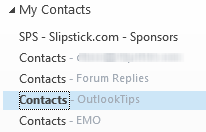 Use to it always open a specific folder when switching to the Contacts (or People) module.
To select a specific folder in the list, change the number in this line to open a different folder. For example, the code below opens the 4th folder in the My Contacts group as seen in the screenshot.
Dim WithEvents objPane As NavigationPane

Private Sub Application_Startup()
    Set objPane = Application.ActiveExplorer.NavigationPane

End Sub


Private Sub objPane_ModuleSwitch(ByVal CurrentModule As NavigationModule)
  Dim objModule As ContactsModule
  Dim objGroup As NavigationGroup
  Dim objNavFolder As NavigationFolder

 If CurrentModule.NavigationModuleType = olModuleContacts Then
     Set objModule = objPane.Modules.GetNavigationModule(olModuleContacts)

' Use the Group name the folder is in
     Set objGroup = objModule.NavigationGroups("My Contacts")

' Replace 4 with the index number of the folder you want to use
     Set objNavFolder = objGroup.NavigationFolders.Item(4)
     objNavFolder.IsSelected = True
  End If
  Set objNavFolder = Nothing
  Set objGroup = Nothing
  Set objModule = Nothing
 End Sub
Opening specific folders in other navigation panes
You can use this method to default to a specific folder in other navigation panes.
| Module | Dim objModule As ? | olModule? |
|---|---|---|
| MailModule | olModuleMail | |
| Calendar | CalendarModule | olModuleCalendar |
| Contacts | ContactsModule | olModuleContacts |
| Tasks | TasksModule | olModuleTasks |
| Notes | NotesModule | olModuleNotes |
| Journal | JournalModule | olModuleJournal |
Replace the group name and index number with the group name the folder is in and it's position within the group.
Note: Mail works with the Favorites list.

ianandrews999 says
I would like to open several Outlook default folders - eg calendar, contacts etc - AND launch each in a new window. Every folder displays its own icon, making it easy to identify with ALT-TAB, if I open it manually, (right click, open in new window). However, every folder displays the same inbox icon, making it difficult to identify with ALT-TAB, if I open it programmatically in vba, using the following code:
+++++++
Sub openfolderwindows()
On Error Resume Next
Dim NS As Outlook.NameSpace
Dim Folders As Outlook.Folders
Dim F As Outlook.MAPIFolder
Dim ExpandDefaultStoreOnly As Boolean
'which folders should be opened?
'(false = all +/- conditions; true = personal folders only)
ExpandDefaultStoreOnly = True
Set NS = Application.GetNamespace("Mapi")
If ExpandDefaultStoreOnly = True Then
'open personal folders only
Set F = NS.GetDefaultFolder(olFolderInbox)
Set F = F.Parent
Set Folders = F.Folders
loopwindows Folders, True
Else
'open all folders
loopwindows NS.Folders, True
End If
DoEvents
End Sub
Sub loopwindows(Folders As Outlook.Folders, ByVal bRecursive As Boolean)
For Each F In Folders
Set Application.ActiveExplorer.CurrentFolder = F
If F = "Outbox" Or F = "Calendar" Or F = "Contacts" Or F = "Tasks" Then
F.Display
DoEvents
If bRecursive Then
If F.Folders.count Then
loopwindows F.Folders, bRecursive
End If
End If
End If
Next
End Sub
+++++++
Although the same folders that were open in the last session should appear when restarting Outlook, the program crashes too often to rely on this. I've also seen information about setting a custom icon for Outlook folders; but not all accept custom icons - in particular the default folders.
I'm using Outlook 2010 at present but just about to upgrade to 2013. Can anyone help?
Diane Poremsky says
Upgrading to 2013 won't change a thing. :( I just tested it. The code is basically opening in place and that always uses the main outlook icon - same as if you selected a different folder in one outlook window.