Following a post-SP1 update, Activities now works. All items, including Journal items, are found.
An Outlook user had this question:
After upgrading to Outlook 2010 the contact activities list shows only e-mail no matter what is selected in the Show: dialog box. This showed all linked activities in 2007. Is there a setting I am missing?
If you are using the same profile and *.pst and didn't import, Activities will only be listed by item. Activities' "All Items" lists all items that were mailed - meeting and task requests listed there are from mail folders (usually the Sent folder), not your Tasks folder and Calendar.
You can use VBA to send a contact's name or email address to the Instant Search field in another folder. See Use Instant search to find messages from a contact for details.
Supported Activities
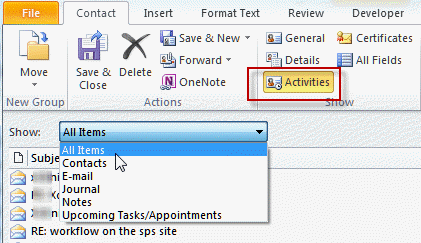
Of the item types you can Show, only email, contacts, and notes work as expected:
- All items: Shows only e-mailed items, including e-mailed meetings and tasks requests from mail folders (usually in Sent items).
- Contacts: Works as expected (searches Contacts folders)
- Email: Shows email only
- Journal: Does not work.
- Notes: Works as expected (searches Notes folders)
- Upcoming Tasks and Appointments: Does not show tasks and appointments from Tasks or Calendar folders.
According to the product group, they do plan to fix this in a future update.
Activities in other data files
Activities (as limited as they are in Outlook 2010) are only supported in the default data file. Contacts in other data files will not have an Activities button on the toolbar.
Opening Journaled Files
Outlook can create journal entries when you work on files created in the other Office applications. However, unlike previous versions, you can't open the associated document. The journal entry opens when you choose the option to open the associated document.
Adding folders to Activities
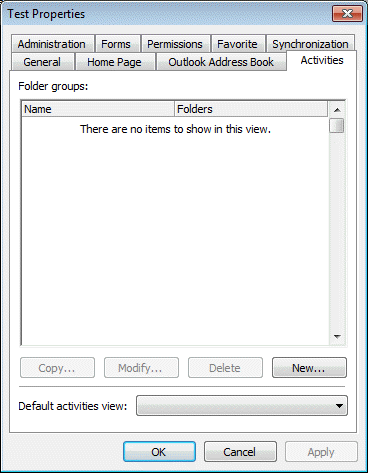
In older versions of Outlook you could right click on any Contacts folder and in the Properties dialog, Activities tab, select additional folders to include in Activities displayed for Contacts in the folder. This feature was removed from Outlook 2010.
People Pane as a replacement
The People Pane offers some of the same features found in Activities - this is the future of "activity" searching. While it doesn't support every Outlook item type, it works well for both contacts and non-contacts alike and is accessible from email or contacts.
One drawback to the People pane is that it seems to stop after maybe 200 messages are found. (I haven't counted the exact number, mostly because only a few people send me that much email.)
Using Advanced Find to replace the Activities tab
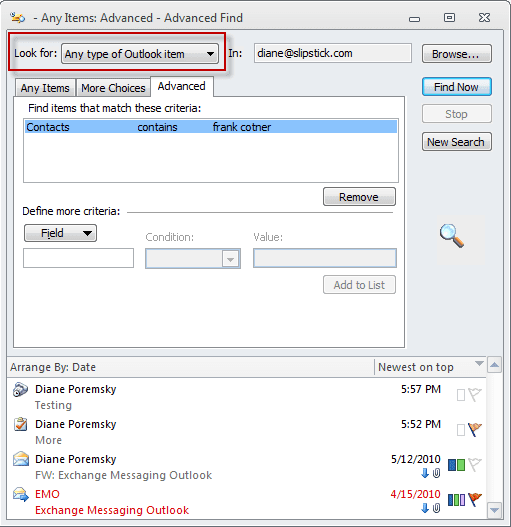
If you need to find all Outlook items that are linked to a contact, using Advanced Find will find everything. You need to select All Outlook Items from the top of the dialog then switch to the Advanced tab. Type Contacts as the Field name and enter the contacts name in the Condition field.
Using the Contacts field in a Group by View
While not as useful as the Activities pane or Advanced Find, if you only need to view items within a single folder, a custom view that groups by the Contact field may be useful.
When in a single line view, right click on the row of field names and choose Field Chooser. Find the "Contact" field and drag it to the row of field names. You can group by this field or sort by it.
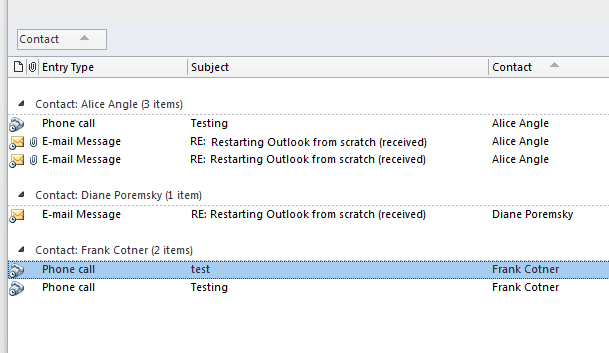






























In this article, you have listed several alternatives to view items related to a contact in a single location (e.g., Group by View).
Would a Search Folder not offer the same functionality, but with the benefit of seeing all related items from more than one folder?
Yes, it's one option, but you need to create search folders for each sender. (I have a macro that creates a search folder for a sender - it's definitely handy when I'm working on a project.)
The advanced find suggestion isn't working for me in Outlook 2010. .My indexing says all indexing is complete. I've had no trouble with the file. I have two .psts - one is my basic with all contacts in it. The other is newer (year old) and has all email related to a client in it. I have all contacts in the original .pst. I have tried the suggestion above for every imaginable combination but it doesn't work for me. I put in a contact whose email is all in the main/original .pst and if I do all Outlook items I only get contacts linked to her. If I do only messages I get nothing. If I do Advanced Find the regular way by putting her email address into the from field I will get those. But if I use the suggestion above with Contacts Contains HerName I get nothing. This is on Windows 10.
Did it ever work in windows 10? Search broke with an update recently but was supposed to be fixed earlier this week.
Wow, quite the coincidence cause I've never tried this before. I only added the 2nd .pst a few months ago so I never had a need for this. My problem only started with the 2nd .pst. When I click on activities before with everything in the same/one .pst I got all the emails to and from and cc'd for a contact. Now I can't get any of the emails that are in the 2nd .pst so I tried your tactic but still can't seem to get them. I will I could fill in Advanced Find for 'from' OR''to' but if I do that it interprets it as AND so of course I get no results cause I don't really have any emails for a contact that are both from that person and to that person at the same time. So I guess the coincidence that after 7 years of having this product, I go to use this feature the week it's not working. Is that what's happening? That would be a huge coincidence.
Well, it hasn't worked in a long time, but yeah, it sounds like you picked the wrong time to start learning how to use the feature. It's also not worth using the people pane as that is deprecated too and will be removed from future versions.
I have some instant search macros that replicate the feature in outlook 2013/2016 that work in 2010 too.
https://www.slipstick.com/developer/instant-search-messages-selected-contact/
Was there ever a workaround for the missing Activities tab in the Contacts folder properties dialog box? Did Microsoft ever reinstate this feature?
No they never added it back. They fixed the actvities search but had no intention of restoring the settings on folder tab.
Hi Diane. I'm using Outlook 2010 and have two accounts, a personal and a shared. For the shared contacts, when I am in my personal profile, the Activities button does not appear. When I am in my owner of the shared acct profile, the Activities button appears. Any idea why this is?
It's a limitation of shared mailboxes - Instant search doesn't work. When you are in the account as the account owner, it can search the folders for matches, so its enabled.
Win 7 and Office 2010 with all updates. Sent items did show in activities and now do not (due to SP2?). Sent items at a glance on contact record are one of the MOST important items in a 'real' sales process. Microsoft is the WORST!!
lol what a display name.
I'll have to look into the Activities - I didn't think they changed anything, but it wouldn't surprise me if they did.
What the... I used this feature extensively in OL 2003 however have since enraptured on to a real CRM. I simply sold a client on the feature and upgraded them to OL 2010. whatever happened to the golden rule of not modifying presently released practicality. Sure, provide associate choice to flip it on/off however to get rid of it?
It should work if you have all updates installed, however, it is removed from outlook 2013. It used the old search function and that was replaced by instant search. They were unable to make it work in the activities and the people pane offers similar capability.
It's my theory that nobody at Microsoft uses Outlook at all. I cannot imagine anyone with the power to change it putting up with all its idiocies.
LOL That's not quite true - they use it, but they definitely do not use it like 'real' people do.
I have a plus net account which outlook downloads from, Diane.
Cheers
RJ
Well, then it's not because it's a hotmail account. I'll see if i can find any thing out.