Below are some common questions about Outlook's conversation view.
Two separate conversation threads happen to have the exact same subject because they were originally produced by an automated system that gives all e-mails the exact same subject line. How can I tell Outlook they are unrelated?
Short answer: You can't.
Long answer: This should only happen with an Exchange Server 2003 or Exchange Server 2007 mailbox. Messages retrieved using POP3, IMAP, or using Outlook Connector/EAS, or received by Exchange 2010 or 2013 servers should be organized as separate conversations even though the subject is identical.
Somebody doesn't reply to an e-mail in a conversation, but rather creates a new e-mail with a new subject. How can I tell Outlook this new thread is part of the same conversation?
Sorry, you can't add messages to a conversation.
Somebody uses an e-mail in a particular conversation to start a new topic or refer to an existing topic that is unrelated to the current conversation. How can I tell Outlook this needs to be in it's own conversation thread?
Unfortunately, you can't remove messages from conversations either. Outlook's POP, IMAP, Outlook Connector/EAS message transport and Exchange Server 2010/2013 add a conversation property to the message when messages arrive and uses this value to group messages by conversation. When the conversation property isn't available (in Exchange 2003/2007), Outlook uses the Subject field.
Show as Conversations options
To enable or disable Show Conversations, switch to the View tab and check or uncheck the Show Conversations option. Expand Conversation Settings to fine-tune the conversation display.

Show as conversations is only available when you group by date. If it's grayed out, you need to switch to the Date grouping. When Show as conversations is enabled, the Date group is labeled Date (Conversations).
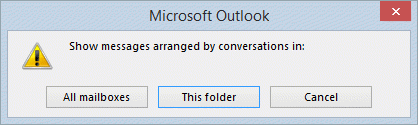
In the Arrangement group select Date. A dialog box will open, asking if you want to arrange by conversation in all folders or this folder only, as well as an option to cancel. This dialog box comes up each time you enable or disable Show as Conversations.
When you upgrade from an old version of Outlook, Upgrade to Conversations is set automatically during the first run process after upgrading, but administrators can use group policy to block the use of conversations.
HKEY_CURRENT_USER\Software\Policies\Microsoft\office\14.0\Outlook\Setup\
DWORD: UpgradeToConversations
Data Value: 1 (use conversations) or 0 (don't use)
If your computer doesn't use group policy, check the UpgradeToConversations value under the Outlook key at
HKEY_CURRENT_USER\Software\Microsoft\Office\15.0\Outlook\Setup
DWORD: UpgradeToConversations
Data Value: 1 (use conversations) or 0 (don't use)

Laura Starbird says
My Conversations are not threading through...but only when the initial outreach originates by mail merge. Is there a setting that could cause this? It is working for colleagues where the recognition of a continued thread follows through...but for me, the connection breaks between initial outreach and the person's response.
Kara says
I want to view conversations, but I also need to quickly see my flagged emails. What's the best way to do that?
Diane Poremsky says
Assuming outlook desktop, a search folder for flagged messages. If you use conversation view, you'll see all messages in the conversation if one is flagged. A custom view that shows only flagged items also works (if show as conversation is enabled).
Angelo Velissaris says
Have come across something that has stumped us here in my IT department. A user forwarded me an email he received from an outside source that contained multiple conversations. When opening the email using either outlook 365 web version or the full client, it only shows parts of the conversation. However, when I open the email through the ios outlook app, it shows all of the conversations in the email. Is there a setting in Windows that we are missing that prevents us from seeing the all the conversations associated with that email?
Diane Poremsky says
No, there is no setting that would hide part of it in outlook desktop - the web version can hide, but has a link to show all. I've only ever seen this with actual conversations that, not in a forwarded thread.
If you hit forward, do you see all content?
Aleksandr says
THANKS!!!!
Mahmood says
I came into same issue, but I recognized that when I sort by anything rather than "Received" the message will be grayed out i.e. sorting by Sender or subject.
By the way, I am using 2016 pro version.
Harish Sharma says
Hello Diane,
Thanks for the good article which solves some of my queries regarding the mailbox.
But I have an issue:
Recently I migrated all of my emails from Gmail to Outlook. the process successfully completed. However, at some steps, it stopped, but on retrying it completed.
Mails are migrated to Outlook but some of the conversations are not showing properly in a thread on Outlook (but they belongs to the same thread and showing properly on Gmail).
Please check this image, by which I migrated emails (Exchange Admin Center)
https://s3-us-west-2.amazonaws.com/dev-lsquared-hub/cl/images/1578404316.875-2020-01-07-0826.jpg
Please help me, If I am did something wrong,
Thanks
Robby says
What if the show conversations command button is missing from the ribbon? But it should be there as it’s outlook 2013
Nara says
Hi, I have the conversation working perfectly fine till now but in our company they have implemented a data classification tool due to which the messages are marked Internal, Confidential etc., in Subject line which is not allowing it to group under same conversation. Is there anyway, we can configure to exclude such tags?
Diane Poremsky says
No, you can't exclude the tags. Sorry. :(
Drew G says
Hi Diane,
I have a shared inbox that my team uses to address incoming inquires. I would like to utilize the conversation feature in Outlook 2010. Is it possible to have all emails within the inbox folders tied together? Below is the current setup. I want to be able to view all emails in the conversations regardless of the folder they are in. Is this possible?
Inbox
->Quotes
->Orders
->Sent Items
Diane Poremsky says
You could use a custom field and assign an account number to a custom field then sort or group by the custom field. If you have contacts for the people, you can set the account number there and use a macro to look up the contact and set the field on the incoming item. It would be based off this macro - https://www.slipstick.com/developer/categorize-messages-using-contact-category/ - but working with a custom field.
Also, conversations apply to one shared folder as the instant search feature that enables this doesn't support multiple folders in a shared mailbox. You'd need to ad it as an account if you wanted conversations to work properly.
Sandra Duckworth says
We use a common email address for the entire team in order to provide coverage for vacations, sick, etc. We manage this daily by assigning categories by associate name (depending on the company categories we are assigned to). It is crucial we use conversation mode with the work we do. However, I would like to sort by category. I cannot find where Outlook allows to sort by category AND view in conversation mode. Am I missing something?
Diane Poremsky says
Unfortunately, group by conversation is only enabled when you sort by date.
Pete says
Windows Live Mail 2012 sorts conversations beautifully, all the mailing list I have subscribed to work, email from numerous persons with the same subject work... Now that I 'was' thinking of moving to Outlook and noticed this problem I'm doubting the other benefits of Outlook are worth the move. It's just another one of MS upgrades that ever slowly harm their reputation and one day we'll be eating apples served by droids :/
Diane Poremsky says
If live mail meets your needs, there is no reason to change... but a lot of people need the power of outlook. If you are using outlook.com, Outlook works with the new server better than the updated live mail does.
Jason Boyette says
Related question: In conversation mode, all of the emails you send have "Sent Items" in the Received column. Is there a way to make that show the date/time you sent the message? (I've been BCC-ing myself to get this to work, but wondering if there's a way in Outlook to automatically show this.) It's helpful to know the date/time you sent a reply, without having to click on the message itself.
Chris says
Hi Diane - Thanks again - as usual extremely helpful ! Thanks
Alex says
How do you group by conversations but NOT by date? in View/ Arrangements I can uncheck "View in Groups" but it reverts to view grouping by date sooner or later.
Diane Poremsky says
you can't group by conversations any other way -you need to use by date. Sorry.
David says
This not good, I'll stay on Thunderbird wich can sort by flag (so I want flags to be shown on top of all) then by date and all of it groupe by conversations. Works well. Mozilla: 1 - MS: 0
Diane Poremsky says
It's always better to use the client that meets *your* needs the best. Don't use outlook just because it came with office.
Asen says
Good morning Diane,
I just switch to 2013 Outlook from 2010. The "show as conversation"'s look is awful and I cannot follow well my conversations.
If there is the way to see it as on 2010?
Best Regards,
Asen
Julian says
I'm seeing emails that are part of the same conversation failing to group together. The email subject has not been changed and the one email not grouping is a direct reply to the last message grouped.
We've only recently moved to Exchange 2010. I think we were on 2003 before (with Office 2003). It's possible some of the emails in this example were pre-upgrade.
Is there any way this can be fixed, either overall or case by case? Thanks in advance.
Diane Poremsky says
Any mail that was received by an older version of Exchange will not group correctly. That can't be fixed - the properties are set at the time the message is sent or received. Going forward, new mail should group correctly. Occasionally, mail from outsider the organization might not group - this is because the properties that facilitate the grouping was removed by the client and the subject doesn't match. (I see this most often with mailing lists.)
Mike says
Hi,
When I forward an email, Outlook adds FW: at the front of the subject, nevertheless this forwarded email and original one are still treated as one conversation. However when I forward that email using iphone, it is not marked as one conversation, even though the subject is the same. Is there any way to improve that?
It's pretty annoying since I'm using PC, as well as iphone and Ipad.
Thanks
Diane Poremsky says
No, unfortunately, you can't change that. Outlook uses a conversation index property and the subject to determine if a message s part of the thread and apparently the phone is not including the conversation index.
Bob says
Very helpful explanation. Now that I am using it I find two things annoying when progressing through the inbox. Maybe you have another helpful trick or two!
1. Conversation group is always minimized when the cursor is not on it. How to keep all un-collapsed all the time?
2. When advancing through the inbox the cursor jumps over previously read emails which appear in the conversation group. Is there a way to always proceed to the next email, not the next unread one?
Thanks
Diane Poremsky says
1. No.
2. The Up and Down arrow keys and the previous and next buttons should hit all messages, not just unread messages.
chris says
As usual you never fail to deliver ! Many thanks for this help
chris says
Hi Diane , Just wondering if one can have a summary in the tracking options of the meeting – of how many accepted /declined or not made up their minds in outlook 2013 – Thanks in advance
Diane Poremsky says
You can copy the responses and paste into Excel and calculate it or you can use VBA - outlook doesn't have it built in.
The macro here - https://www.slipstick.com/developer/list-meeting-attendees-responses/ - creates an email with the invitees, their response and includes the totals at the end.
Chris says
Thanks so much for that
Chris says
Thanks for this information - it is really informative . Would there be an add-in to group related conversations .
Thanks for your help
Diane Poremsky says
I'm not aware of any addin that groups the conversations (or ungroups them, as many users would like).