Newer versions of Outlook let you start in any folder in your profile. You can use this method to open Outlook with a non-default folder - this is especially handy if you want to start in a different calendar folder.
If your startup folder is a Mail folder and Outlook is opening in the Folder list, not the Mail module (or vice versa), see Choose the Startup Module below.
In Outlook 2010 and up, choose your startup folder at the top of the File, Options, Advanced page.
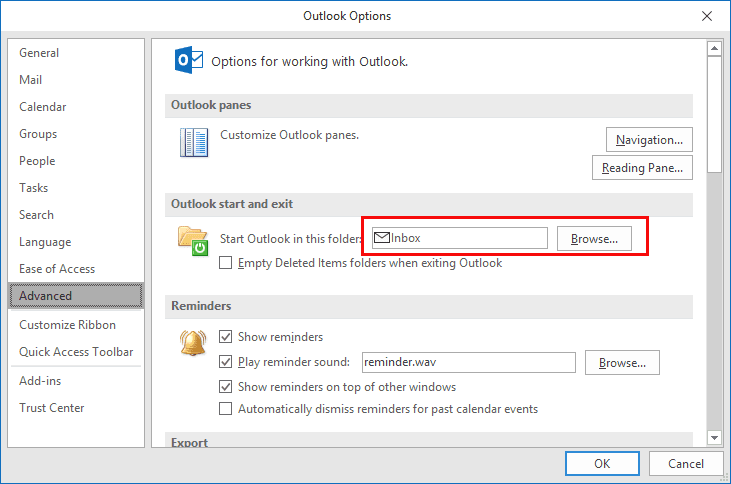
You can choose any folder type, however most people will select a calendar, their Inbox, or Outlook Today (select the mailbox folder).
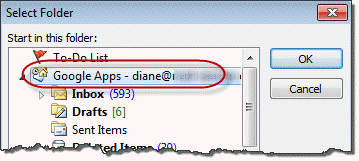
You can choose a Search folder in your default data file, but Outlook will not use a search folder in a non-default data file. You'll need to use a startup switch to start in a search folder in a non-default data file.
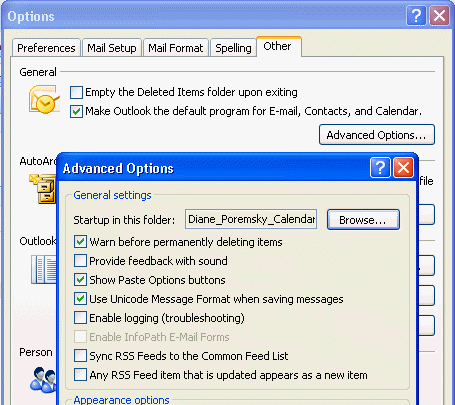
In Outlook 2007 and older, go to Tools, Options, Other tab, Advanced options and change the startup in this folder setting. Click Browse and select any folder from the folder list.
See Using Command Line Switches to Startup in a Folder below if your version of Outlook does not allow you to pick from any folder your profile.
Using Command Line Switches to Startup in a Folder
If your version of Outlook limits you to selecting folders in the default PST, you can use a command line switch to start in other folders.
At Start menu, Run command (press Windows key + R to open), use the /select command as shown in the samples below, changing the folder path as needed.
The basic format is Outlook.exe /select outlook: followed by the folder path and name. If you want to use a different folder in the default message store, you need just the folder names in the path:
Outlook.exe /select outlook:Calendar\Testing
To open a folder stored in another PST in the profile, use the PST name and folder path:
Outlook.exe /select outlook:\\Archive Folders\Calendar\Testing
Outlook.exe /select outlook:\\Internet Calendars\Diane_Poremsky_Calendar
To open a Search Folder in a non-default data file, use this format, wrapping the path in quotes because it contains spaces:
Outlook.exe /select "outlook:\\alias@domain.com\search folders\unread mail"
Choose the Startup Module
If you choose a Mail folder as your startup folder, Outlook should start in the Mail module. If it starts in the Folder module (or you want to start in the folder module) and the Mail module is the first one in Folder navigation, you can change a registry key.
- Exit outlook
- Update the registry key (for Outlook 2016/2019/365):
HKEY_CURRENT_USER\Software\Microsoft\Office\16.0\Outlook\Options\WunderBar - Change BootModule to
- 0: Mail view
- 5: Folders view
- 6: Shortcuts view
Outlook will now start with selected view of the Folder pane
More Information
For more information on using command lines, see Using Command line switches

Sonja says
THANK YOU!! ?
Outlook wasn't opening my default mail account and google searches were flooding me with "how to change default account" despite my careful keyword selection!
Your link is the only one that pointed to this additional setting.
Much appreciated.
Shelley Mitcham says
The registry for the user having this issue does not contain a WunderBar node. Could it be elsewhere in the registry for a Windows 10 / Office 2019 machine?
Diane Poremsky says
No its there. Do you have a lot of keys under options?
HKEY_CURRENT_USER\Software\Microsoft\Office\16.0\Outlook\Options\WunderBar
There should be around 20. If you don't have any/many, look in file > account - does it say click to run after the version number?
Shelley Mitcham says
Thank you for your reply.
No luck. There are few keys under options. I even searched the registry for WunderBar and HubBar, neither of which was found in the registry. I'm not clear where you mean when you say "look in file > account." It's possible that firm policies impact the keys differently on firm imaged computers (which have undergone numerous upgrades over the years). But I still plan to look for this key on my user's personal machine when he calls again tomorrow. I will update with results.
Iain Chisholm says
brilliant....thanks
Miroslav Jablonsky says
many thanks for the great post!
Hill says
In case anyone wants to change the opening folder in Outlook '07, go to
=>Tools =>Options=>Other=>Advanced Options=>Startup in this folder;
Browse for the folder you'd like.
Kelly says
When I start Outlook 2016, I want both the mail and the calendar windows open. How can I do that?
Diane Poremsky says
right click on the calendar folder, choose Open in new window then close outlook using File, Exit command. When you reopen it, both windows should open.
Tim Murphy says
On start-up, I want Outlook to open both my calendar and a calendar that is a separate "tickler" calendar that a former assistant used to track recurring reminders. Is this possible?
Diane Poremsky says
No, not from that screen. If you don't start in the calendar, then all calendars selected (for side by side or overlay) when you closed outlook should be selected when its reopened.
mel b says
how do i change the default folder in outlook for mac. it does not have the"file options" option
JennW says
I've used your fantastic advice to set my Mum's default email program, BigPond.com, to open as her initial page but just wondering if it's possible to move it up above the outlook email 'folder' in the left hand side pane? She's finding it a bit annoying to have to scroll past all the outlook folders etc to get to the actual email program that she uses :/
Diane Poremsky says
if she has either outlook 2013 or 2016, the folders, including the pst files, can be rearranged - just drag them up and down the list. if they won't drag, look on the Folder tab - is Show All Folder A-Z highlighted? if so, click once to turn it off.
If you have an older version unfortunately you can't rearrange the folders.
JennW says
Thanks Diane, once I'd turned off the Show All Folder A-Z, it let me drag & drop!! Really appreciated all your help! :)
Gay Abarbanell says
I need to know how to set Outlook to open in my gmail address inbox? I set it as the default acct. but it opens in the archives inbox instead.
Diane Poremsky says
Unless you use a really old version of Outlook, change it at the top of File, Options, Advanced page (Outlook 2010 and up)
JochenS_Berlin says
Hi, I'm searching for a hint: I (admin) would like to start Outlook from the command line and it should open the current day of the calendar of an specific exchange-user. I found a tip for opening an public folder, but that's not exact the thing I'm looking for:
"c:\Program Files (x86)\Microsoft Office\Office14\OUTLOOK.EXE" /select "outlook:\\Public Folders – joe@domain.com\All Public Folders\Calendars\Joes Calendar"
Must I publish every calendar of every exchange-user to realise this...?
Greetings from Berlin!
Diane Poremsky says
i think you can only open mailbox folders using command lines if the mailbox folder is in your profile. I can use this to open a managed mailbox -
outlook /select "outlook:\\Forum Replies\Calendar -cbut i can't set a specific view using a cmd line.
Kimberly says
Please tell me how I can get to the home page that shows the overview of the calendar, mail, and to-do list. I have it set up as my initial page but in order to get it back I have to close out my outlook and start it again. This is the worst set up for those of us who use this program for all the above at the same time. The old outlook let you organize yourself so much easier. I need the old home page back!
Diane Poremsky says
To get back to Outlook Today at any time., click on the top level default folder. If you have one data file, it may have your email address in the name. In the video, its the one called Personal Folder at the top of the folder list. In Outlook 2010, it will have your email address but not the little house icon.
You can also add the Outlook Today button to the Quick Access Toolbar at the top of the window so its easy to access from anywhere. Click the little arrow in the QAT and choose More Commands. Select "All Commands" in 'Choose Commands from' menu then scroll down to the O's and find Outlook Today then press Add. (If you click in the commands window then press O you'll jump to the O's). A tutorial on editing the QAT is here: Edit Quick Access Toolbar