• Outlook User
  • New Outlook app
  • Outlook.com
  • Outlook Mac
  • Outlook & iCloud
  • Developer
  • Microsoft 365 Admin
    • Common Problems
    • Microsoft 365
    • Outlook BCM
    • Utilities & Addins

Don’t email, Yammer

Slipstick Systems

› Microsoft 365 › Don’t email, Yammer

Last reviewed on June 5, 2015     2 Comments

One of the major trends we are seeing in the technology landscape is the move away from traditional communication mediums like email to social networks. If you don’t believe that, stop and take a look at how your kids and the way millennials communicate. The first thing they check in the morning is definitely not email, it is probably Facebook, Instagram or Twitter.
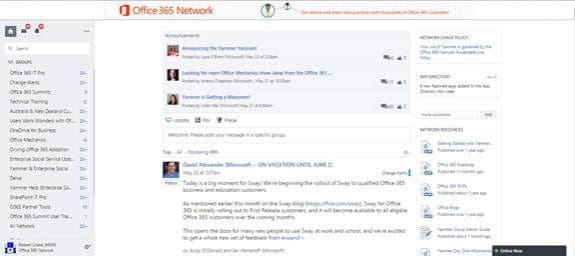
yammer network

Chances are they don’t even use emails at all any more, much like they only use a mobile phone to send text messages and surfing the Internet. This move to social is also now being mirrored within the enterprise and for very good reason. If you reflect on the messages you receive via email, chances are the vast majority of them don’t need to be private and many could in fact provide value to someone else, if not now somewhere in the future. The problem is that stored in your inbox means they are locked away from anyone else who could make use of them.

The need to remove information silos from within organizations is leading the greater adoption of social networks within the enterprise. One of the leaders in this space is Yammer, now owned by Microsoft, and incorporated into all Office 365 plans. Yammer maintains a free version but incorporates much more control and compliance when upgraded to the enterprise version. Even more power and functionality is gained when it is adopted as part of an Office 365 subscription. Yammer is also a cloud only solution, it doesn't have an on premises version.

The easiest way to describe Yammer is that it provides a newsfeed section in the middle of the page where users can post updates and comment on existing posts. In here they can also use hashtags to highlight a certain topic and 'at' mention people to ensure they are notified of what is said. Yammer also supports the concepts of dedicated groups which live below the all company feed. Access to these groups can be restricted and are generally designed to be focused on a particular topic so it doesn’t swamp the main feed and those who may not be interested in that topic.

Beyond the home network Yammer users can join existing external networks or even create their own to collaborate with partners outside their business. That can allow both enterprise and free Yammer users to share information and collaborate.

Although Yammer does allow file storage, when combined with SharePoint Online as part of Office 365 it allows conversations around documents stored throughout. The Office graph technology is also at work behind the scenes surfacing relevant information within an Office 365 users Delve. We also expect to see the new Office 365 Group technology to become more prevalent throughout Yammer as it will with the whole Office 365 suite.

One of the big shifts in the way people communicate is via social networks. This is now also becoming a major part of the way that businesses are also beginning to work. Yammer is a mature enterprise social network that has free and standalone versions but gains much more functionality when enabled as part of all Office 365 subscriptions. Social networks inside the enterprise are not something to be feared, they are a new tool that will increase the productivity of your workers and make them feel much more engaged.

Don’t email, Yammer was last modified: June 5th, 2015 by Guest Author
Post Views: 15

Related Posts:

  • The changing way to access information in Office 365
  • LinkedIn Social Connector Provider: Gone
  • Search Tools for Personal Use
  • Office 365 or Office 2013/2016?

About Guest Author

If you would like to submit guest articles to Slipstick.com, please contact us through our Feedback form. Please note: article suggestions that are not specifically about Outlook and/or Exchange Server will not be acknowledged.

Comments

  1. Brian Tillman says

    May 29, 2015 at 10:25 am

    I think "This move to social is also no being mirrored within the enterprise" should be "This move to social is also now being mirrored within the enterprise"

    Reply
    • Diane Poremsky says

      May 30, 2015 at 1:16 am

      Thanks. I fixed it.

      Reply

Leave a Reply Cancel reply

Your email address will not be published. Required fields are marked *

Visit Slipstick Forums.
What's New at Slipstick.com

Latest EMO: Vol. 31 Issue 5

Subscribe to Exchange Messaging Outlook


Support Services

Do you need help setting up Outlook, moving your email to a new computer, migrating or configuring Office 365, or just need some one-on-one assistance?

Our Sponsors

CompanionLink
ReliefJet
  • Popular
  • Latest
  • Week Month All
  • Jetpack plugin with Stats module needs to be enabled.
  • Sync Issues and Errors with Gmail and Yahoo accounts
  • Error Opening iCloud Appointments in Classic Outlook
  • Opt out of Microsoft 365 Companion Apps
  • Mail Templates in Outlook for Windows (and Web)
  • Urban legend: Microsoft Deletes Old Outlook.com Messages
  • Buttons in the New Message Notifications
  • Move Deleted Items to Another Folder Automatically
  • Open Outlook Templates using PowerShell
  • Count and List Folders in Classic Outlook
  • Google Workspace and Outlook with POP Mail
Ajax spinner

Recent Bugs List

Microsoft keeps a running list of issues affecting recently released updates at Fixes or workarounds for recent issues in classic Outlook (Windows).

For new Outlook for Windows: Fixes or workarounds for recent issues in new Outlook for Windows .

Outlook for Mac Recent issues: Fixes or workarounds for recent issues in Outlook for Mac

Outlook.com Recent issues: Fixes or workarounds for recent issues on Outlook.com

Office Update History

Update history for supported Office versions is at Update history for Office

Outlook Suggestions and Feedback

Outlook Feedback covers Outlook as an email client, including Outlook Android, iOS, Mac, and Windows clients, as well as the browser extension (PWA) and Outlook on the web.

Outlook (new) Feedback. Use this for feedback and suggestions for Outlook (new).

Use Outlook.com Feedback for suggestions or feedback about Outlook.com accounts.

Other Microsoft 365 applications and services


New Outlook Articles

Sync Issues and Errors with Gmail and Yahoo accounts

Error Opening iCloud Appointments in Classic Outlook

Opt out of Microsoft 365 Companion Apps

Mail Templates in Outlook for Windows (and Web)

Urban legend: Microsoft Deletes Old Outlook.com Messages

Buttons in the New Message Notifications

Move Deleted Items to Another Folder Automatically

Open Outlook Templates using PowerShell

Count and List Folders in Classic Outlook

Google Workspace and Outlook with POP Mail

Newest Code Samples

Open Outlook Templates using PowerShell

Count and List Folders in Classic Outlook

Insert Word Document into Email using VBA

Warn Before Deleting a Contact

Use PowerShell to Delete Attachments

Remove RE:, FWD:, and Other Prefixes from Subject Line

Change the Mailing Address Using PowerShell

Categorize @Mentioned Messages

Send an Email When You Open Outlook

Delete Old Calendar Events using VBA

Repair PST

Convert an OST to PST

Repair damaged PST file

Repair large PST File

Remove password from PST

Merge Two Data Files

Sync & Share Outlook Data

  • Share Calendar & Contacts
  • Synchronize two computers
  • Sync Calendar and Contacts Using Outlook.com
  • Sync Outlook & Android Devices
  • Sync Google Calendar with Outlook
  • Access Folders in Other Users Mailboxes

Diane Poremsky [Outlook MVP]

Make a donation

Mail Tools

Sending and Retrieval Tools

Mass Mail Tools

Compose Tools

Duplicate Remover Tools

Mail Tools for Outlook

Online Services

Calendar Tools

Schedule Management

Calendar Printing Tools

Calendar Reminder Tools

Calendar Dates & Data

Time and Billing Tools

Meeting Productivity Tools

Duplicate Remover Tools

Productivity

Productivity Tools

Automatic Message Processing Tools

Special Function Automatic Processing Tools

Housekeeping and Message Management

Task Tools

Project and Business Management Tools

Choosing the Folder to Save a Sent Message In

Run Rules on messages after reading

Help & Suggestions

Submit Outlook Feature Requests

Slipstick Support Services

Buy Microsoft 365 Office Software and Services

Visit Slipstick Forums.

What's New at Slipstick.com

Home | Outlook User | Exchange Administrator | Office 365 | Outlook.com | Outlook Developer
Outlook for Mac | Common Problems | Utilities & Addins | Tutorials
Outlook & iCloud Issues | Outlook Apps
EMO Archives | About Slipstick | Slipstick Forums
Submit New or Updated Outlook and Exchange Server Utilities

Send comments using our Feedback page
Copyright © 2026 Slipstick Systems. All rights reserved.
Slipstick Systems is not affiliated with Microsoft Corporation.