A user recently asked about a problem with the dialer in Microsoft Outlook 2010:
In Microsoft Outlook 2007 (32 bit), I could initiate a telephone call from a contact by clicking on the appropriate icon. A screen for the call asked if I wanted the as journal entry started for the call. I could proceed to make a call out of Outlook whether I did or did not want a journal entry. I purchased Office 2010 Home & Business several weeks ago. After opening a "Contact" Clicking on the "Call" icon in the Ribbon does not initiate a telephone call to the Contract. Nothing happens. Should I uninstall and then reinstall?
No, you don't need to uninstall Microsoft Office and reinstall it. There is a known issue with Office Communicator and TAPI (which Outlook uses for making calls). Outlook will not use TAPI if Office Communicator 2007 R2 is running. Both Outlook 2007 and 2010 are affected and the fix is the same for both: You can either exit Communicator and retry or create a TAPIOVERRIDE registry entry.
Note: If you have Outlook 2007 or Outlook 2010 32-bit installed on Windows 64-bit, make sure you edit the correct registry value. If you don't want to edit the registry yourself, a *reg file is available for download
Other applications that can be used for calls, including Windows Messenger and Skype, may also cause this problem.
Using Windows 32-bit or Outlook 2010 64-bit
If you are using Windows 32-bit or Windows 64-bit with Outlook 2010 64-bit, you'll need to add the following value to your registry.
Press Windows key + R to open the run command, type regedit and press Enter. Browse to the following registry key and add the TAPIOVERRIDE DWORD value. If the Call Integration key does not exist, you'll need to create it.
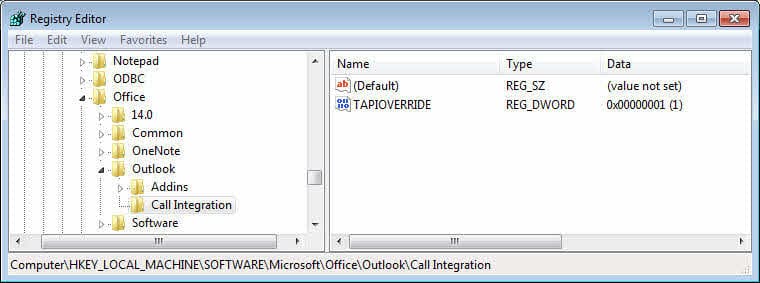
HKEY_LOCAL_MACHINE\Software\Microsoft\Office\Outlook\Call Integration
DWORD: TAPIOVERRIDE
Value: 1
Restart Outlook for the change to take effect. At least one user needed to re-select the modem in the dialer, so if the fix does not work, verify the modem is selected.
Using Windows 64-bit with 32-bit Outlook
If you are using Windows 64-bit and a 32-bit version of Outlook, you need to add the TAPIOVERRIDE value to the registry keys used by the WOW64 node.
Press Windows key + R to open the run command, type regedit and press Enter. Browse to the following registry key. If the Call Integration key does not exist, you'll need to add it.
HKEY_LOCAL_MACHINE\SOFTWARE\Wow6432Node\Microsoft\Office\Outlook\Call Integration
DWORD: TAPIOVERRIDE
Value: 1
Restart Outlook for the change to take effect. At least one user needed to re-select the modem in the dialer, so if the fix does not work, verify the modem is selected.
Do It For Me
Download and run the correct registry file for your installation to add the TAPIOVERRIDE value to your registry.
Windows 32-bit or Outlook 2010 64bit
Windows 64-bit with 32-bit Outlook
Tip: While you can choose Run, we recommend you Save the file to your hard drive, then view it in Notepad before double clicking on it to add to your registry. It's just good practice to know what you are installing, even from trusted sites.

Mark says
Hi!
I just got and setup a new laptop. Of course, one of the first (among many!) things I discovered not working properly was that I could not dial the phone from Outlook contacts. I'm using a Zoom USB modem which worked fine on the old machine.
After attempting to dial, I would get a window opened over Teams that said "Couldn't complete the call, With your calling license, you can only call people within your organization"
On my previous laptop I remembered needing to install and set the TAPIOVERRIDE in the reg and so I did the same on my new laptop, rebooted and voila, it worked and I could dial from a contact, but when I started things today, it would not work and gives me the same message over Teams.
I verified the the setting in the registry and it has not changed and matches exactly, the one on my old laptop.
Any ideas as to why this worked initially but doesn't any longer?
Thanks
Richard Edwin Perry says
Used Dialer.exe to make a call.
After doing this, calls from Outlook contact works fine.
My problem solved.
Richard Edwin Perry says
Forgot to mention, that I have a USB modem, connected to our telephone line.
Richard Edwin Perry says
I'm running Office 365, on 64 bit Windows10, on a Microsoft Surface 3.
When I try to "Call Contact", in Outlook, I get the error message:
Configuration information for the telephony service is damaged. Check the configuration of telephone devices in Windows Control Panel.
Do you have any ideas?
Richard
Steve says
I'm using Outlook 2003 32 bit with Win 10 64bit. My dialer was working fine for months then one day it didn't. Tried your regedit. It worked several times, then didn't. Rebooted machine, reselected modem (I only have one) - same problem. Any ideas? No other telephony programs.
This problem has occurred intermittently for years with Outlook versions and OS's.
Thanks,
Steve
Diane Poremsky says
What is your windows build? Outlook uses the windows dialer and its possible an update broke it. I don't have a modem in my system - the dialer works with Skype for business, but it uses a different process.
Steve says
Hi Diane,
Thanks for the quick reply. My Win 10 Pro version is 10.0.16299 build 16299.
I use a USB modem which has worked well. My laptop at home has the same setup and it still seems to dial out without this problem. However, it could change. Hard to trust it now.
I wondered about an update breaking something. I considered going back a restore point to see if it might solve it for a while but eventually the update will occur again - unless you think the update did a one time corruption of some file and it may work if I try it again.
I had this trouble fairly consistently with Win 7. Win 10 seemed to finally solve it and I was sooo happy for a year or so, but now it has returned. One time it will work and then not for a while. Then I try later and it works again one time after which it locks .
Appreciate any help. This is such a useful feature.
Thanks,
Steve
Steve says
Perhaps that Communicator could be disabled?
Diane Poremsky says
Communicator is the precursor to Lync/Skype for business - if you have a version of office installed, you could disable it so it won't load.
Steve says
I just have Outlook 2003 so I guess that wouldn't be it. Any other suggestions? The dialer on my Win 10 notebook is working.
Thanks.
Diane Poremsky says
Do you have any IM utilities installed or running - such as skype? It's preinstalled in Windows 10.
Steve says
Yes Skype is installed (it says "new" but I don't know when it installed) I've never used it on this computer. Should I uninstall it?
Thanks.
Diane Poremsky says
it may have been preinstalled. if you open it, does it sign you in to Skype? if you don't use it, uninstall it, but if it was pre-installed with windows, it might not uninstall.
Steve says
I tried a few earlier restore points. No luck, but I have noticed a pattern. When I reboot, the dialer works once. After that it does not until the next reboot. Since Outlook is the only program that dialed and the problem occurs immediately after, I wonder if Outlook is locking up the dialer after one use and not releasing it. Should I uninstall/reinstall Outlook? Any registry modifications you could suggest to get it to release the dialer?
Thanks.
Diane Poremsky says
Ah... that makes sense. offhand, i cant think of any issues or reg entries relating to this but will look into it.
Steve says
I just tried deleting and recreating my profile without uninstalling Outlook yet. In the past, I've been able to correct some problems by doing this but those were probably e-mail related not telephony. No luck yet.
My next move will be to do a complete uninstall/reinstall unless you have a better suggestion.
Thanks.
Diane Poremsky says
Nope, no better suggestion. I'm out of ideas on this. If you figure it out, be sure to let me know as it might help others in the same boat.
Steve says
Seem to have a solution. If I "close" the dialer instead of "end call" the dialer doesn't release the modem. Don't recall how I disconnected calls in the past months when it was working, but so far this strategy has worked.
Occam's Razor may apply here!
Thanks for the help.
Diane Poremsky says
Thanks so much for the update! Who'd think it mattered... but i guess its not properly ending the call if you don't click End Call. :(
Steve says
Perhaps the Outlook portion of the registry is or becomes corrupted from time to time.
Diane Poremsky says
It shouldn't... but it has happened. I don't recommend using CCLeaner and similar - they can remove keys you need.
Steve says
I don't see Skype running under processes. Can I somehow disable or uninstall it? Or should I try going back a few restore points?
Thanks.
Diane Poremsky says
If you know when the problem started, going back more restore points could help.
Bulldog says
"At least one user needed to re-select the modem in the dialer/" - no explanation of how this is done
Diane Poremsky says
That is the windows dialer - open it, select tools, connect using... and choose the modem, or open line properties from Dialing options - see https://www.slipstick.com/outlook/config/dialing-outlook-phone-numbers/ for more info.
Bulldog says
None of this works for Outlook 2016.
Diane Poremsky says
Are you trying to call using a modem attached to your phone line or Skype?
JohnS415 says
Skype on Windows 10.
Diane Poremsky says
Is this is the universal app?
Walt says
I am about to buy a phone for my office and want the ability to use outlook to dial the calls. Any suggestions on a phone that will allow me to do this I am using win 10 outlook 2016.
Diane Poremsky says
If it's a landline, you need a modem then can dial from outlook and would pick up the phone to talk. if you want to call from outlook and talk using the computer's speaker and microphone, your modem or VoIP software needs to support it.
John Barwise says
How do you do this bit please..."While you can choose Run, we recommend you Save the file to your hard drive, then view it in Notepad before double clicking on it to add to your registry. It's just good practice to know what you are installing, even from trusted sites."
Diane Poremsky says
Save the file to your hard drive. Right click and choose Edit. This should open it in Notepad so you can read it. Close then then double click to run. If the reg file is saved as a txt file, change the extension to reg.
Rob says
Dear Diane, I just wanted to say thanks for posting this solution. It reenabled my ability to use Outlook 2016 Contacts to dial my phone with a modem while maintaining Skype/Lync messaging funtionality. Thank you, thank you, thank you. Having problem solve by helpful people on the internet is really a great think.
Mathew Samuelle Nuevo says
None of these work, I wanted to use the dialer and pin it to my task bar, using my datafax modem and connecting rj11 cable of my landline phone to it, all I can do is just dial and receive my call from the party I'm calling, but when they pick it up i can't hear anything even the sound of may supposed to be ringing,
Diane Poremsky says
When you use the dialer, you need to pick up a handset to complete the call. In most cases, outlook won't hand the call off to a voice modem, only a real phone.
Jc says
Please help me. I am having a problem with this for long time. I already followed all the instruction on the internet and I can't still call thru outlook using avaya phones. In the dialing options, the avaya ip office is not showing. I tried to uninstall and install the phone manager and tapi all over again but nothing works. I have 32bit windows and 2010 MS Office. Please help me, I don't know the exact problem and this is very stressful for me since I have a deadline to make this thing works. The tapi is showing when I open the control panel and in Phone and Modem > Advance and configured the Avaya IP Office TAPI2 Service Provider with the correct details. But then again, no progress. What is the cause of this? I also followed your instruction thru regedit but still, nothing works. Please help! :(
Gabriele says
Thanks, it's all ok!
Stephen Coleman says
Many thanks Diane. Works a trick. ;-)
Kevin says
Diane,
I wanted to follow up with you as my problem is now solved. As it turns out, these Call Integration/TAPIOVERRIDE registry keys do indeed work (as a precaution, I created both); however, it appears they have to be in-place when you install Lync to have any effect on a 64-bit installation. I'm guessing that these keys may impact how Lync installs. I had uninstalled Lync so that I could use Outlook with Windows dialer, but when a Microsoft technician had me reinstall Lync 64bit (after the keys had already been created), presto, Outlook still uses Windows dialer rather than Lync to try to place a call. I thought I'd update you on this just in case it might be helpful to you or someone else who happens upon this page having the same problem.
All the best,
Kevin
Kevin says
Thanks, Diane. I'll take a look at the link you sent over. Very best,
Kevin
Kevin says
Diane,
Several of my previous attempts to reply have disappeared from this page, so let me try again. In the intervening time, I have uninstalled Lync and that does, indeed, fix the issue. Without Lync installed, Outlook call function brings up the Windows dialer, as it should.
Just so you know, my cloud-based SIP/PBX service is new, and I've installed a TSP named SIPTAPI that is supposed to be able to send commands to the SIP/PBX. I'm optimistic that it will work. However ...
I'm now in the unhappy position of having to choose between (i) being able to dial from Outlook contacts, or (ii) using Lync for IM, presence and screen sharing. Or I suppose I could uninstall MS Office and reinstall as a 32-bit installation. Other than being a huge time inconvenience and a pain, I would then be without the power of the 64-bit installation for Excel. None of these are good choices.
Do you have any further suggestions on how we can get Lync Basic 2013/64 to stop hijacking the call function of Outlook 2010/64? I've been scanning the Win7 registry for any other settings that might bear upon the problem, but I'm clearly in way over my head with that.
Thanks.
Diane Poremsky says
They didn't disappear - they went into the queue for approval. :) No, sorry, I don't have any other possible solutions. Does it work with 32bit Office? If so, the problem is with the 64bit driver, or lack of it.
Kevin says
Thanks, Diane. I couldn't speak personally as to whether it works on a 32 bit installation of Office since that would a be a huge amount instability and lost productivity to introduce into my office environment. It's disappointing, but I think I agree with you that the problem is with the 64-bit architecture. However, it's not like Microsoft isn't on all sides of this issue, and they should know how to fix it. Perhaps that's why Microsoft says 32-bit is recommended, but in light of all this statements like that start to sound just lazy.
Diane Poremsky says
I'm not sure it would work differently in 32bit. I was going through my database today, cleaning up bad links and saw this - https://www.itguaranteed.com.au/Outlook-Contacts-VOIP-Dialer-Menudex.aspx - i wonder if that would work with your pbx?
Kevin says
Sorry, Diane, I should have read your reply more carefully. I haven't tried uninstalling Lync to see if that fixes the problem. Based upon other posts to this and other discussion boards, I suspect it would. However, that would come at the cost of not having the IM, presence and screensharing functions of Lync that I rely upon.
My cloud-based PBX service is new, and I am working to implement a solution whereby Windows dialer can send commands to the SIP server. I "think" I have that solution ready (siptapi TSP from provider IPCOM), the only hitch is that Lync is hijacking the Outlook dial commands that would otherwise (I believe) go to Windows dialer.
I am also led to believe that your recommended "Call Integration" registry key may work on 32-bit installations, but I have seen one other post in a Microsoft TechNet discussion board from another user with a 64-bit installation that is having the same problem I am having. Might there be an added wrinkle in 64-bit installations that we're either not addressing or not aware of? I really don't want to uninstall MS Office and reinstall as 32-bit. Besides being a pain the rear-end, I'd lose some performance capabilities in Excel that I need.
Any insights?
Kevin says
Lync and PBX are separate and are not integrated. I have a TSP that I've installed in System32 that "should" allow me to send Windows dialier commands to the PBX; however, the dial command in Outlook sends me to Lync rather than Windows dialer. If I could get Outlook dial to connect to Windows dialier, I think I would be in business.
Kevin says
Diane,
I am running Win7/64, Outlook 2010/64 and Lync Basic 2013/64. When I attempt to initiate a call from the Outlook interface, Outlook attempts to engage with Lync to dial the call. However, I need Outlook to interface with Windows dialer, instead. I use Lync only for IM, screen sharing and presence. I have a cloud hosted SIP/PBX service, so I don't need Lync for voice calling. I've tried your TAPIOVERRIDE registry entry to fix the problem (HKEY_LOCAL_MACHINE\SOFTWARE\Wow6432Node\Microsoft\Office\Outlook\Call Integration - DWORD TAPIOVERRIDE, Value =1), but it is not working on my system. Outlook seems to be ignoring the TAPIOVERRIDE registry entry and continues to hand the call over to Lync. Can you advise?
Diane Poremsky says
Can outlook use the pbx service if lync is not installed? Does the PBX service install a TAPI driver?
Jay says
You guys rock!
CG says
"Yeah, the dialer feature is one of the most useless and most misunderstood features in Outlook. It's more bother than its worth for most people - especially when it can only dial the call - then passes it off to a handset to talk. Only a few speakerphone drivers work with it."
You have killed off my search but thank you. I have been working under the misapprehension that given I can make a call using Outlook, I might have be able to communicate using my Microphone and speakers. Ah well.
Regards CG
Walter Teague says
Thanks for the help with turning off the Skype hijacking of Outlook. Your registry edit worked on my Outlook 2010, 32bit and Windows 7 64 bit. Also found that I could just turn off Skype and then Outlook worked ok, but this works better. Skype is great except when they try to take of the world!!!!
Stephen Wilson says
Hi Diane,
I've been using dialer.exe for at least 12 years. Every time I upgrade the OS (currently W7 64b) I have to spend at least an hour to get it working. Latest issue was with Cisco Jabber. Turned it off, but Outlook still wouldn't dial. Found out Jabber is like the old DOS TSR programs that lurk in memory. discovered how to make Jabber turn off and viola! Dialer works again.
I must have over 1,000 names and phone numbers in Outlook Contacts and use dialer at least 10 times a day.
Thanks!
Diane Poremsky says
Do you know how rare you are? :)
Thanks for the information - it may help someone else.
Steve Tutt says
Just tried another modem. Still can't find a dial tone. Funny, all the stuff MS publishes says nothing about differentiating between voice and data modems. Not doubting you, just lamenting all the time I've spent chasing what seems to be a dead end when better information from both MS and the modem manufactures would have save a lot of my time. But in this day and age manufacturers and service providers have thrown the concept of placing value on their customer's time completely under the bus. Time is the only resource a person possesses that absolutely cannot be replaced. Thank you for your information on the difference between POTS and Digital lines Diane, great for the knowledge based but chalks up another big zero in the usefulness to the problem at hand category.
Diane Poremsky says
Yeah, the dialer feature is one of the most useless and most misunderstood features in Outlook. It's more bother than its worth for most people - especially when it can only dial the call - then passes it off to a handset to talk. Only a few speakerphone drivers work with it.
Steve Tutt says
I must have a digital phone line and modem literature says it will no only work with analog...
Diane Poremsky says
Modems work with the old fashioned copper phone lines - POTS in geek-speak. Digital would be phone service from cable company or voice over ip. FiOS is digital too.
Steve Tutt says
I finally found and selected the proper modem. Now it say it can't detect a dial tone. I am using a USB modem plugged into a a splitter with my phone plugged into the other side of the splitter.
Diane Poremsky says
Does the modem support voice? If so, you need the proper drivers. If it doesn't support voice, outlook won't work with it.
Steve Tutt says
To my surprise, I found Yahoo messenger (never used), uninstalled it and re-booted. No change. I went through the entire program list in the control panel and found nothing else looking like it has anything to do with phone.
Steve Tutt says
Sorry, Outlook is 2010 32 bit
Steve Tutt says
Windows 7 32 bit, Outlook 32 bit. No Skype, or other VOIP stuff. Thanks.
I get an error message saying another program is using the telephony device. Try again after the other program is finished.
Steve Tutt says
It looks like this thread is being ignored but Diane, your fixes are not in the least helpful. First of all I am running 32 bit windows and 32 bit outlook and secondly I cannot find "communicator installed anywhere on my computer. Thirdly your incomplete registry chart is not in the least bit helpful for a user like myself that is not a professional techie. How about a solution for us mere mortals with no 32/64 bit issues?
Diane Poremsky says
Which version of Outlook and Windows are you using? Do you have Skype installed? Any other program you can use for making voice calls?
Tom says
Yes, works! Thx!
Graham says
Diane,
Thanks for the fix. It worked fine.
BUT you should not need to edit the registry to stop MS coercing your use of their services. This should be readily available in the Outlook options. Usual MS story.....
Graham
dlowrie3 says
I made the Registry Edit as described. I'm using a Polycom IP 550 phone. We are tied into a Talkswitch (Fortinet) unit. I have downloaded and installed the Click-to-dial Fortinet software. I set up New Call - very simple as we have DLA. Still doesn't work. After about 20 seconds Outlook tells me to click the 'Talk' button in the call window. Very frustrating.
Diane Poremsky says
Did you restart Outlook? From what I can see, it should work with outlook.
John Climenhaga says
I am running Office2010 32bit with Communicator on Win7 64 bit and this allowed me to use our third party TAPI. Thank You!
Carl Heissenberger says
I have the same problem, Win7 64bit home version. I do not have "call integration" all I have is HKEY_LOCAL_MACHINE\SOFTWARE\Wow6432Node\Microsoft\Office\Outlook\ xxxx. I ;like the features in Outlook 2010 but I miss not being able to dial from contacts it worked perfectly with Outlook 2007. What can I do?
greg says
additional info:
I am using a VOIP system with 3cx MyPhone and X-Lite softwares. I am trying to integrate the programs to where I can call my clients by simply clicking the contact information in Outlook.
Thanks for the help
greg says
How do you reselect the modem?
Diane Poremsky says
It's in the dialing options when you open the dialer to enter the number - should be a line properties field. Select the modem there.
Bulldog says
Not there for Outlook 2016 on Win10 with Skype v 7.39++
Diane Poremsky says
What's not there? The key doesn't exist by default - you need to add it.
Bryce Elkins says
Diane -
Ran the version Windows 64-bit with 32-bit Outlook program; it worked as suggested.
My auto dialer now performs as expected.
Thanks, Bryce
Dennis Cappel says
I am running window 7 and Office Professional 2007.
When I try to make call from contact page, the system tells me that 'another deceive is using my telephony, try later when dive has stopped'
I have unplugged my fax printer and closed scipe?
Diane Poremsky says
do you have any instant messages type programs installed? also note, if you used the reg key above, that you need to reselect the modem in the dialer after rebooting.