If you use Outlook 2010 or newer, you can sync calendar and contacts with Outlook.com. To set up the account in Outlook, follow these steps. To add the account to your smartphone, choose Outlook.com or Exchange account type and enter your Outlook.com address and password.
Outlook 2003 and Outlook 2007 (as of October 31 2017) can only connect to Outlook.com using POP3 or IMAP protocols, neither of which sync calendar and contacts.
If you don’t have an Outlook.com account (or Microsoft Account), go to Outlook.com and create an Outlook.com account.
If you have a Microsoft account, you don't need to create a new account. If it does not have an Outlook.com email address associated with it, add an "Outlook.com alias" to the account. You'll need to use the Outlook.com address to set up the account in Outlook.
Add Outlook.com Account to Outlook
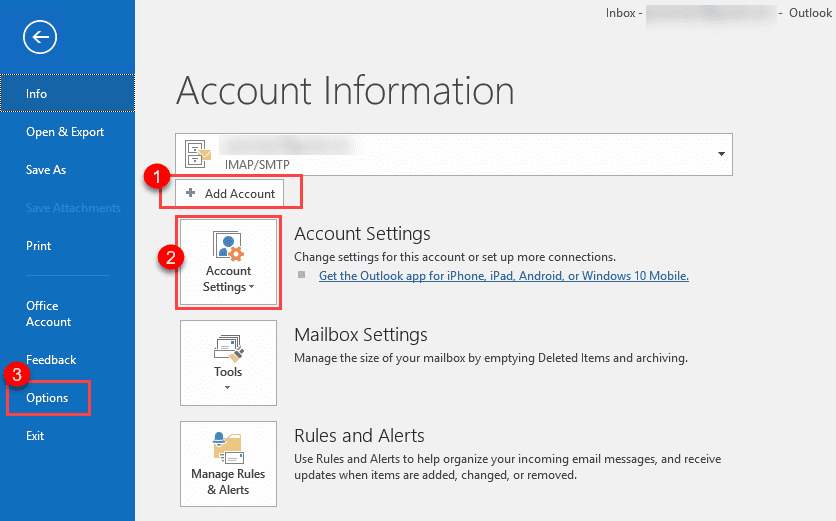
In Outlook, go to File, click Add and enter your Outlook.com email address and click Connect (or Next).
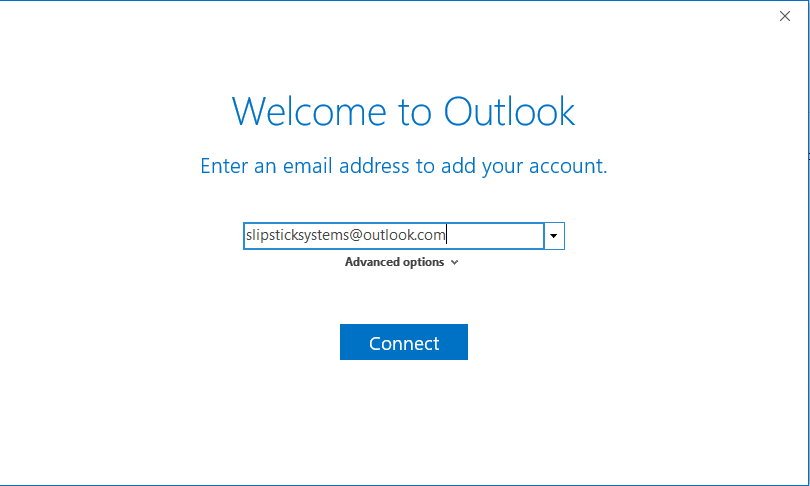
This uses auto account setup to create the account in Outlook as a Microsoft Exchange account. In updated versions of Outlook 2016, the dialog looks like this:
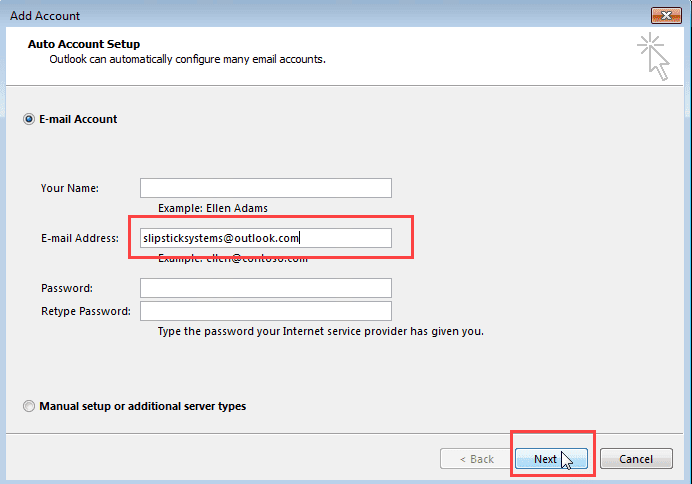
In Outlook 2010 or Outlook 2013, the dialog looks like this. Because it's going to be setup as an Exchange account, you can leave the name and password fields empty. Outlook will ask for the password after it finds the account.
After adding the account, the Outlook.com data file will be set as default data file but the default email account won't be changed. If you want to confirm these settings, go to File, Account settings (#2 in the first screenshot) to open the email settings dialog to verify.

If you're using Outlook 2016, you won't be required to restart Outlook after adding the Outlook.com account but you will need to restart it before changing the Address book. Restarting Outlook is required if you are using Outlook 2013 or Outlook 2010.
After the account is added...
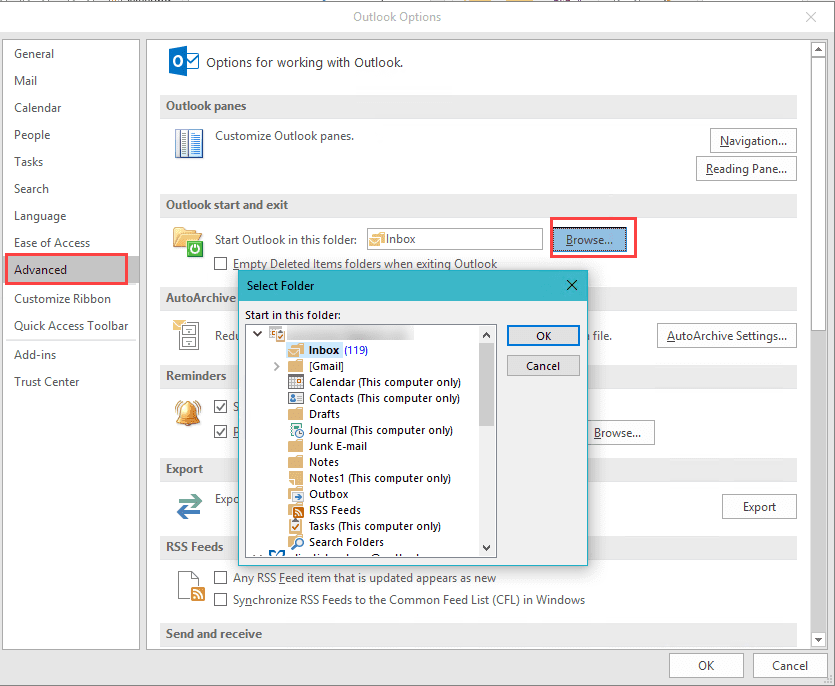
The folder that Outlook opens to will be changed to the Outlook.com Inbox. Go to File, Options (#3 in the first screenshot). Select Advanced then choose a new start up folder.
In Outlook 2013 and Outlook 2016, you can drag the set of email folders to the top of the Navigation pane.
If you have appointments, contacts, tasks, or notes in another data file, move them to the Outlook.com folders. Open the folder, Select All (Ctrl+A) then use the Move to folder command to move the items. In the Calendar, first switch to a list view then select all and move. If you aren't sure how to do this, see "Merging Two Calendar Folders" for more details.
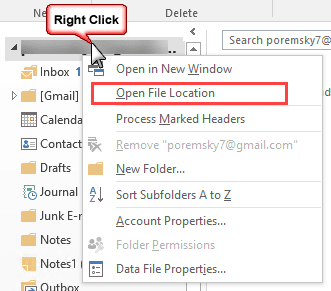
If your email account is an IMAP account and there are folders in it's data file named Calendar (this computer only) or Contacts (this computer only), make sure all of the 'this computer only' folders (including Tasks and Notes) in the data file are empty then right click on the folder and choose Open File Location. This will open File Explorer with the account's data file selected. Close Outlook and delete the data file. Outlook will rebuild it without the ‘this computer only folders’.
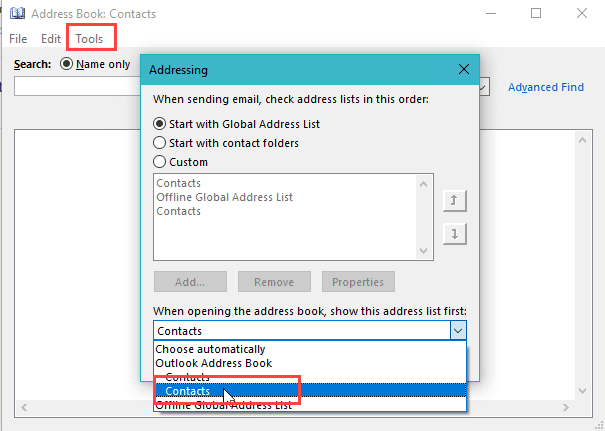
If you don't see the correct contacts folder when you click the To button, open the Address book from the Home ribbon.

Click on it's Tools, Options menu and choose the correct Contacts folder from the bottom of the dialog.

Marcin says
Works like a charm with Outlook 2019. Thank you!
Sven says
I've used this method for a while, but it doesn't suit my needs anymore.
My hotmail exchange address is not my primary mail account. I use an imap account with my own domain setup via gmail for business.
Meeting requests and acceptance/declines will automatically be sent using the outlook account and this can't be changed.
If you add an alias in your outlook account and define that alias as primary, then everything will be sent using an outlook_<long string of characters>@outlook.com
Microsoft simply doesn't allow to sent meetings using the alias address.
Diane Poremsky says
Yeah, that is one big limitation of using this method.
With a google business account, you can use the google sync utility to sync your google calendar and contacts with Outlook desktop .
jafar says
I added exchange account for sync but my IMAP account
can no longer send an email, and if I send it all goes to the outbox
Diane Poremsky says
Do you receive any send and receive error messages? Just adding an account to the profile would not affect the ability to send from another account.
Nancy Z says
I just want to share the appts in my Outlook 2010 with my iphone. Does all this above mean that I will have two .pst files - one for my email and one for my calendars?
Diane Poremsky says
If you are using Outlook.com to sync, yes. Your other option is to use icloud or itunes - i cloud will add another data file, itunes won't but it doesn't work for everyone.
Philip Das says
Hi. I hope this is still active. I am using Outlook 2010.
All went well when adding my outlook.com account and it then asked me to restart Outlook. When it went to start a windows security box came up with the username put in as the name of this computer. I tried changing to my outlook email but no joy. How do I get past this?
Diane Poremsky says
That usually means its not properly configured - usually because some updates are missing. Do you have all office updates installed? Make sure all updates are installed then use the SaRA utility to check for issues. https://diagnostics.outlook.com/#/
Grace Long says
I was previously able to sync my Outlook 2010 contacts and calendar changes directly between microsoft outlook and iphone when connecting the phone with the computer using usb connection and the earlier itunes program. There was no necessity to create hotmail, gmail or exchange account. The process adopted was managed through itunes which showed the syncing process and also allowed changes with regard to precedence for transfer of information from respective devices to ensure the latest information was updated. I purchased new iphone xr devices and new microsoft Windows 10 computers with office 365 installed and this functionality no longer works. I have tried the new itunes setup and also downloaded icloud which has caused massive issues and hours of work to rectify problems in our setup and itunes has been changed and does not have the functionality required
Could you please suggest a program we can use or purchase which might allow us to be able to connect our phones to the respective computers containing outlook 365 contacts and calenders, preferably by usb, or wireless if necessary so we can sync the information of contacts and calendar directly between the respective devices.
Scott Mather says
This is the portion of your instructions I was referring to below. Not sure why it didn't copy into the message box.
>>>If your email account is an IMAP account and there are folders in it's data file named Calendar (this computer only) or Contacts (this computer only), make sure all of the 'this computer only' folders (including Tasks and Notes) in the data file are empty then right click on the folder and choose Open File Location. This will open File Explorer with the account's data file selected. Close Outlook and delete the data file. Outlook will rebuild it without the ‘this computer only folders<<<<
Scott Mather says
<<>>
Will doing the above cause future incoming calendar appointment requests to auto-populate to the new default outlook.com calendar instead of the to former "this computer only" calendar?
Diane Poremsky says
Yes, setting a pst or exchange account's data file as default and letting outlook recreate the imap data file without the 'this computer only' folders will cause future meeting requests to go into the new default calendar.
Scott Mather says
Thank you! Interesting that in my copy of Outlook 2016, it did this automatically without my having to delete the "this computer only" folders, whereas my colleagues copy of Outlook 2016, set up almost identically, behaved as expected according to your tutorial. For him I will go in and get rid of the "this computer only" folders.
Jay Sneddon says
I should add that I know I can view both separate calendars simultaneously from within in Outlook 2016 in overlay format, but my goal is to combine my work calendar entries and my personal calendar entries so only my truly open slots in both professional and personal life are viewable by co-workers.
Thanks,
Jay Sneddon says
Hello Diane,
I think I'd like to implement this advice to use Outlook.com calendar as a unified (work+life) calendar that I can access on the web, but I'm concerned because I have already added Outlook.com account to my work Outlook 2016 software, and I still have completely separate calendars-- so I'm hesitant to try this advice for fear of screwing things up.
That is: when you say above that "After adding the account, the Outlook.com data file will be set as default data file but the default email account won't be changed." this does not match my experience.
Perhaps I simply forgot that I made changes when I set it up, but as it stands now, my work emails (inbox, sent, various user-created folders, etc.) and my work calendars are one thing, while my Outlook.com emails (inbox, sent, drafts, etc.) and the Outlook.com calendar are another, separate, thing. When I navigate to File->Account Settings (per your #2 graphic above) select under the tab E-mail, my work email is checkmarked default, and under the tab Data Files my work email ".ost" file is also set as the default. Under File->Account Settings, the Outlook.com (microsoft exchange) email is shown, and the with the Outlook.com ".ost" data file is shown, along with other ".pst" files that I have created to contain excess and work emails-- but it is my work email/data files that are checkmarked as the default.
So here is my question: If I understand your instructions above, in order to achieve a unified work and personal calendar that I'd be able to view and edit both through Outlook 2016 on my work laptop and on the web at Outlook.com-- do I merely need to:
1) leave my work email address as the default email address
2) mark the Outlook.com data file as the default data file
3) view my existing work calendar folder as a list, hit cntrl+A to highlight all, and then copy to the Outlook.com calendar folder..?
From that point on, as far as coworkers are concerned- I assume they would see no difference in terms of email communications, as the email address still defaulted to my work email-- but would they see the correct (newly unified Outlook.com) calendar when they go to check my availability for meetings? or would they see a completely empty and unscheduled work calendar?
Not sure if it is your habit to respond to this kind of detailed question, but this has been bugging me for months, so figured I would finally just write and ask, before doing anything.
thanks,
Diane Poremsky says
Is your work account an Exchange account? This article was targeted to POP/IMAP users, mostly so they can sync calendar and contacts to smartphones.
>>
That is: when you say above that "After adding the account, the Outlook.com data file will be set as default data file but the default email account won't be changed." this does not match my experience.
>>
That means when you add an outlook.com account to a profile with imap or pop, the outlook.com data file is set as a default but the default email account is not changed. If you have an exchange account already, nothing changes - it stays the default.
>>
So here is my question: If I understand your instructions above, in order to achieve a unified work and personal calendar that I'd be able to view and edit both through Outlook 2016 on my work laptop and on the web at Outlook.com-- do I merely need to:
1) leave my work email address as the default email address
2) mark the Outlook.com data file as the default data file
3) view my existing work calendar folder as a list, hit cntrl+A to highlight all, and then copy to the Outlook.com calendar folder..?
>>
It really depends on what type of account the work address is. If its exchange, it wont work - you'd need to share the outlook.com calendar with them, when you should be sharing the work calendar with them.
>>but would they see the correct (newly unified Outlook.com) calendar when they go to check my availability for meetings? or would they see a completely empty and unscheduled work calendar?
>>
hey would see your work calendar, empty if you moved everything to outlook.com.
If you want them to see your personal events, copy them to the work calendar.
Mike Hall says
Does adding an account in this way work with MS 2FA correctly or do I still need an App password?
Diane Poremsky says
You'll need to use an app password. At this time, Outlook doesn't bring up the second factor screen for outlook.com accounts.
Stan Walsh says
Awesome! I searched the official support pages for an hour before I went to general web search. You told me everything where MS told me nothing! I'll be back. Thanks much.
Bernd says
Hello Diane,
I am trying to understand the syncing of contacts. For my work email I must use an Exchange email account setup in Outlook 2016. That has automatically replaced my personal contacts with my contacts saved in the Exchange account. I have found some info on how to "force" my personal contacts over the email accounts' contacts, but I was wondering whether you could confirm whether there is a safe way of doing so. I obviously must keep my personal contacts. My current single reason to use Outlook 2016 is to enable contact sync with my iPhone.
I am sorry if I have not found an existing thread to help me with my problem, and I'd really appreciate your help.
Best wishes,
Bernd.
Diane Poremsky says
>> some info on how to "force" my personal contacts over the email accounts' contacts,
Not sure exactly what you mean by this. You can copy (or move) the contacts to a folder in the exchange mailbox.