There is a filter option available that works with Views, Search folders, Advanced Find, and Automatic formatting or Conditional formatting. It's called Query Builder and it's simple to enable and easy to use. To enable it, add the appropriate key called QueryBuilder to your registry.
HKEY_CURRENT_USER\Software\Microsoft\Office\xx.0\Outlook\QueryBuilder
where xx.0 equals your Outlook version number.
To use the QueryBuilder, select the QueryBuilder tab from the Filter dialog and select or enter the criteria. After adding two or more conditions, select a group and choose the AND or OR operator from the logical group menu. Create nested conditions by moving the criteria up or down.
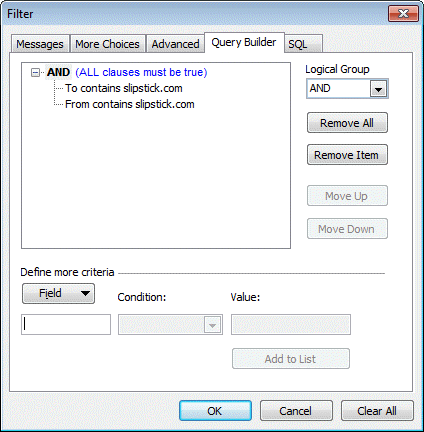
For example, QueryBuilder allows you to create one filter that looks for messages received today from Mary OR for messages received today which request a read receipt. Using the Advanced filter you needed two separate filter rules, one for each condition. QueryBuilder needs just one rule and looks like this:
- AND
messages received today
- OR
from Mary
request a read receipt
You're probably wondering why QueryBuilder remains largely unknown when the ability to create OR filters is often requested. Apparently QueryBuilder can cause instability in Outlook. Your mileage may vary, but I've used it off and on since Outlook 2002 without a problem and it's worth trying if you need to create filters using OR.
Don't want to edit your registry? See Do it for me for reg files. Download then double click on the file to make the change to your registry.
Outlook 2016
HKEY_CURRENT_USER\Software\Microsoft\Office\16.0\Outlook
Create key named: QueryBuilder
Outlook 2013
HKEY_CURRENT_USER\Software\Microsoft\Office\15.0\Outlook
Create key named: QueryBuilder
Outlook 2010
HKEY_CURRENT_USER\Software\Microsoft\Office\14.0\Outlook
Create key named: QueryBuilder
Outlook 2007
HKEY_CURRENT_USER\Software\Microsoft\Office\12.0\Outlook
Create key named: QueryBuilder
Outlook 2003
HKEY_CURRENT_USER\Software\Microsoft\Office\11.0\Outlook
Create key named: QueryBuilder
Outlook 2002
HKEY_CURRENT_USER\Software\Microsoft\Office\10.0\Outlook
Create key named: QueryBuilder
Do it for me
Click on the appropriate link to download a registry file (*.reg) containing the QueryBuilder key and add it to your registry. If you want to view the file before installing it, save it to your hard drive and open the *.reg file in Notepad. To install, double click on the file.
Outlook 2016 Outlook 2013 Outlook 2010
Outlook 2007 Outlook 2003 Outlook 2002
You do not need to close Outlook or restart it after adding the key to your registry.
Query Builder and From Addresses
The problem: You want to use Query Builder to create a Search folder that filters by email address, but Outlook's Query Builder appears to ignore the email address and uses the display name instead. The only time it works as expected is when the email address is the display name.
The cause: The filter dialog has two From fields. The From field on the first tab uses the email address while the From field you use on the Advanced tab uses the display name. The Query Builder uses the same From field used by the Advanced tab.
The solution: Install a CFG to expose the email address field then use that field in your query. We have a custom CFG available for download along with installation instructions available at Adding Extended MAPI Fields to Outlook.

Adam Williams says
Thanks for this page... years later and it's still helpful!
This doesn't say it, but seems even m365 is at v16.0, right? So the reg file for 2016 works for 2016 and newer?
And would you know - is there a way to export / manage a set of criteria from another way other than in the (limited) query builder in outlook?
My OCD is wanting me to alphabetize the criteria.
Or if someone else wants that query that I have. Any way to give it to them that they can import into their outlook?
I have the same criteria of a search folder on 2 different PCs using the same mailbox. So the folder / criteria are stored on the exchange server, not on the PC? not sure using m365 exchange, if that makes it easier to get the criteria? a power shell script?
Jeanine says
Is it possible to bring events and messages into one view?
Nathan says
This is great - thank you! I think it's funny that Microsoft would advise "QueryBuilder can cause instability in Outlook" because, in my experience, crappy hacked-together SQL queries are even less stable!
heavymod says
I keep coming across your site, or your post on MS boards! Thanks for all the insight on rules and filtering.
Ben says
I'm a bit stunned that this actually worked. But it worked.
Thank you!
Carsten says
Hi Diane,
I could already convince our IT department to do the registry trick but what I still cannot implement is an AND search folder with certain categories. I'm using categories like "Finance", "Budget", "FY1718" and "FY1819".
And I would like to have a search folder for all mails having the categories "Budget" AND "FY1819".
Do you maybe have a hint how to insert that in the query builder?
When I use the given machanisms without the query builder I can select the desired categories but then the search folder gives me all emails with "Budget" (which could be related to several fiscal years) AND all emails with "FY1819" (which could also be related to other matters than budget).
Thanks in advance for any hint!
Carsten
Mark says
Carsten, in case you still need this: upon enabling Query Builder, use that tab to first create a Categories Contains Finance entry. Click Add to make sure that entry is populated in the above window. Then, create a new entry for Categories Contains FY1819, and click Add again. The logic will default to AND such that "ALL clauses must be true" and will return the hits you're looking for.
Make sure to leave the More Choices tab empty for Categories, and make sure you're using CATEGORIES, which is a Mail field and not CATEGORY, which is a Document field.
Hope you already implemented this or that this helps.
Mark
Todd says
Diane, thanks for your useful advice. Your MapIt regedit was helpful. In this case,
I couldn't find QueryBuilder in my RegEdit. Using SEARCH I found one QueryBuilder in the RegEdit
under Explorer, but none under Office or Outlook.
I have Japanese Windows, so perhaps the QueryBuilder function was removed
for some languages.
Diane Poremsky says
It's not present in the registry by default, so you need to add the key to all computers - as long as the office keys are in the registry in English, then it should work - if it needs localized, it don't know what it would be.
Peter says
Hello Diane,
Is there a way to have the search folder looking for one or two keywords but only in the last reply and not the entire body of the e-mail?
I'd like to get all my mails that have a request for my actions in one folder. Often there are multiple ppl. in the to field of mails I receive and even if my address is there, it's not always directed to me for an action. I would like to disregard mails where I may have already replied back earlier and someone else should handle the case but the sender forgot to remove me or add to CC instead.
Therefore, I'd like to go beyond looking just for the mail address and see if my name actually appears in the first few lines of the message. How would this be possible with Query Builder or any other search tool in MS-Outlook?
Diane Poremsky says
No, sorry. it will find all matches. You can't limit the search the the first few lines using the search tools native to outlook. Not sure if 3rd party utilities could do that. One option is a macro - you can limit it to searching the first nn characters. I'm not sure what might be the best way to implement this - maybe run it on the search folder to add a flag or category if the search term is within nn characters.
Joy says
Diane, I'm looking for a way to create a conditional format in a folder based on all messages that are older than 30 minutes. I've tried the Advanced tab in the Filter dialog box and even turned on the Query Builder tab here. (Great tip by the way!!) How would I construct the criteria for these messages?
Thanks in advance!! You Rock!
Dan says
Thanks for the info. I was able to enable query builder, but it appears that it cannot be used to search for key words in attachments, for example PDF attachments. Is this really correct? If so, it severely limits the usefulness of query builder
Diane Poremsky says
the query builder is based on views and no, it doesn't search attachments. You need to use instant search if you want to look for words in attachments.
Fernando Giannini says
Hi Diane! I'm trying to create a search folder (using the query builder) to filter messages where I am in the To Field with other people but I don't want to see messages where I am the only person in the To field (I already have a different folder for that). Is there a way to do that using only the search criteria?
Thanks in advance!
Diane Poremsky says
On the Messages tab of the filter dialog, Where I am... has an option for on the to line with other people. (At least in 2016... it should be in older versions too.)
David says
Hello. I'm using "query builder" in my 2015 pst. I need to create the 2016 pst and export hundred's of query's for this new one. Is there an option to do that? Thanks in advance for any feedback :-)
Diane Poremsky says
No, query's can't be exported. It would be easier to use a copy of the same pst and delete all of the old mail, or if you no longer need the queries in 2015 pst, archive the old mail to a new data file.
crs says
Thank you, Diane Poremsky. Query Builder is the solution I was looking for - gave me the multiple "OR" condition for different criteria.
Wayne Harropson says
The registry entry screen capture is here,
https://www.dropbox.com/s/kenbsk1oavk670i/QBuilderreg.gif?dl=0
Wayne Harropson says
I just installed on my laptop, also in Outlook 2010. Same deal, dead drop down. https://www.dropbox.com/s/w3gl6v9l0w3y56s/QBuilderGrayout..gif?dl=0
Diane Poremsky says
If you add 2 fields and conditions, the buttons on the right should be enabled.
Wayne Harropson says
My LogicalGroup drop down is dead, therefore "no filter criteria specified".
Query builder will be absolutely perfect for my needs once I can get the grayed out items in the dialog to take entries. The reg entries appear installed correctly for my Outlook 10 version. I I shut down and restarted outlook, I'll try system reboot next.
Diane Poremsky says
If a reboot doesn't fix (i suspect it won't make a difference), please post a screenshot somewhere and post a link here. (You can post it at forums.slipstick.com if you don't use OneDrive or similar service. )
roee says
Hi, I'm using Outlook 2013 and the problem of using a filter based on sender's email (rather its name) still exists.
Do you have any idea if this is something MS considers a bug and is going to fix?
Diane Poremsky says
I don't think it will be fixed anytime soon (but I'd love to be wrong!) - they'd need to do some rewriting of the filters to make the change. If you use the From field on the General page, the address should work.
roee says
Tx.
Phil says
How exactly would you create this condition?
- AND
messages received today
- OR
from Mary
request a read receipt
Diane Poremsky says
So you want to see all messages received today, that are either from mary or are a read receipt?

To limit it to only read recipients, you need the unique part of message class (IPNRN) or the full message class: REPORT.IPM.Note.IPNRN. I didn't have any to filter on, or any mary's. :)
KoolPal says
I had left a few replies with details of my Outlook and Windows Setup. The status shown was pending moderation.
Did you get a chance to review those?
Diane Poremsky says
No, not yet. Thursday is a deadline day for me and I only answer the easy questions on deadline day. :) I try to keep messages in the moderation queue so I can find them when I have the time to reply.
KoolPal says
If it helps, I am on Windows 7 Professional, SP1 on 64 bit OS
My Outlook installation is: Version 14.0.6112.5000 (32-bit)
Part of Office Professional Plus 2010
I am not sure if this information can help you diagnose and help further.
KoolPal says
Sorry was caught in daily humdrum of emails. I rechecked. All correctly typed.
What else can I check / fix?
Please help
Diane Poremsky says
It sounds like everything should be working. I'm going to check it on VM and see if i can repro.
KoolPal says
Thanks for the quick response Diane. I operate in an environment where regedit is blocked by admin.
The IT admin came over and typed it in.
I tried immediately after regedit was done as well as after restarting outlook & windows 7.
What else could I check?
Diane Poremsky says
Was it typed correctly? That would be the first thing to double check.
KoolPal says
Hi,
I created the key as described here:
Outlook 2010
HKEY_CURRENT_USER\Software\Microsoft\Office\14.0\Outlook
Create key named: QueryBuilder
I am still unable to see the option in Search Folders. What am I doing wrong?
Diane Poremsky says
It should show up without restarting outlook, but did you try restarting outlook? Did you use the ready to use reg file from the site or type it in?
Dominic says
Awesome! Thanks a lot. Had been looking around for something like this for sometime now.
Fabrice says
Hi,
I'm trying to create a query in order to view only non read emails but from 4 differents IMAP email folder.
Even using the query builder I was not able to search through multiple folders.
Thanks for your help
Regards
Fabrice
Diane Poremsky says
You can't use a view, you need to use instant search to create a unified inbox