The "No Subject" warning message is a feature new to Outlook as of Outlook 2010. It was a frequently requested feature in previous versions. When you compose a message and click Send without first filling in the subject field, the following dialog will come up, confirming that you want to send the message with a blank subject field.
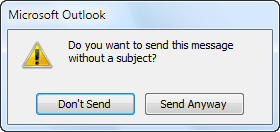
Outlook 2010 / 2013 does not currently offer an option to disable this prompt. It is possible to use VBA to disable it (see Links below) however I don't recommend it.
To add a warning in Outlook 2007, see Macro to Warn Before Sending a Message with a Blank Subject
While not using a subject might increase the spam score a little, this warning was not added as an anti-spam measure. Some people do filter on a blank subject field, figuring any message without a subject is spam, but a subject is no guarantee the message is not spam.
This warning dialog was added because many users requested it.
It's good netiquette to include a subject, even if its just FYI as many people are annoyed when they receive messages without subjects.
Why do recipients want a subject? Because a subject helps them decide whether to read the message now or later. A subject also makes it easier to find messages when looking for a specific message. For example, if I need to find a message from Mary, I search for all messages from Mary. Because she uses subjects which generally reflect the content of the message, I can easily find the message I need just by viewing the list of messages. On the other hand, Jim rarely enters a subject so I need to look at each one of his messages until I find the one I'm looking for.
In Outlook when you have the Conversation view enabled, a subject will help messages create their own conversation as all of the no subject messages will group together as one conversation.
Please note: This feature is not at all related to MailTips. Users on some forums recommend changing MailTips settings to disable the No Subject warning dialog - this will not disable the No subject prompt, plus MailTips is an Exchange Server feature.
More Information
Disable Outlook 2010 no-subject warning VBA solution by Peter Marchert

Charles says
Good "netiquette."
And yet people still don't spell check, or use all caps, or some other such form of typing that they look as though they never finished high school much less took a typing class.
Go figure.
Diane Poremsky says
All caps is annoying - and bad netiquette.
Dave says
Incredibly annoying feature which should be capable of being disabled. My friends and relatives and I constantly exchange emails without subject lines, because we're just chatting. None of us have any need to sort them, retain contextual threads, etc..
Obviously, subject lines are important in more formal exchanges, such as at work. But absolutely unnecessary for casual conversation. When you send a friend a letter, do you put a subject line on the envelope?
Regarding "a subject helps them decide whether to read the message now or later", I agree, and a blank subject means "later if you want". If I want someone to read my email right away, I put something like "read this message right away" (or perhaps, god forbid, "READ THIS MESSAGE RIGHT AWAY") in the subject line.
abboud888@hotmail.com says
**** everyone intentionally sending an email with no subject, merging several topics into one conversation when conversation view is used on the other side. Write at least a single **** meaningful word!
Donna Click says
Diane, you help me with my last question so I’m going to bother you again if you don’t mind. We have been setting up a new computer (which is why I emailed you before about the pop ups on the subject in an email). I used your advice and got past that one, but this one has been with me since I came to Windows 8 – ugh!
My contacts in Outlook came over here in a horrible mess. The look like this
Amy Muniz (amy@jesuscrew.net SMTP Amy Muniz (amy@jesuscrew.net))
Which of course means they will not send. They will not allow me to even make a correction to them.
Can you help me with getting rid of everything except the things in the parenthesis – that’s the true email address. Even the ones I use on a daily basis are a mess – I get bounced emails dozens of times a day.
It ought to be simple but we can’t figure it out. Thanks so much – someway it imported in the wrong format.
I appreciate it, Donna Click
theoneclick@sbcglobal.net
I can’t even email myself! Ha!
Donna Click says
Can you please help me with turning it off? I have Windows 8, Outlook 2013 and I do NOT want a subject on all emails. I don't find a way to be rid of it. Thanks so much,
Diane Poremsky says
You can't turn it off, you need to use a macro close the dialog. See https://www.slipstick.com/developer/vba-disable-outlook-2010-no-subject-warning/ for a solution (it should work in 2013)
Cindy Gardiner says
I recently upgraded my windows package. This pop-up is beyond annoying. Get us a fix quick! This should be optional.
keith chamblin says
This is a terrible option to add. I do not want a subject---or I would add one!
Gaby C says
Windows 7. I'm not too techie, I'm using a roadrunner account, pop server if that is what you're asking. Thank you for your help again!
Diane Poremsky says
It's working fine here on Windows 7/Outlook 2013 with a POP3 account. Tested it in both the click2run and "on premise" installs.
Gaby C says
I am using the same VBA solution in Outlook 2013 as was in 2010, I even re-added it to make sure. No error messages. What should my macro security settings be? Thanks again.
Diane Poremsky says
Test it on low macro security. Which suite are you using? What type of email account? I'll test the combination and see if I can repro.
Gaby C says
Like Ron S, I use Outlook to text. I used the VBA solution by Peter Marchert on Outlook 2010 and that solved the issue,
Since then I have updated to 2013 and the "No Subject" warning message is back. Is there an updated version of Marchert's solution? Thank you.
Diane Poremsky says
No, there is not an update - he's no longer offering the VBA (which is why i have it here). It should work with 2013 (and does here). Did you check the macro security setting? do you get any error messages?
Ron S says
If you are sending your email to an wireless phone's SMS email address, most don't support subjects. It just takes up delivery space that will never get displayed but will still cause the message to be broken down and sent as multiple messages. Some phones will not lace them back together into one message. I use my email to communicate via SMS with my wife, who is a nurse and has no access to email during the day. I learned long ago to leave off the subject line. The popup is annoying. Any feature they add to new releases because "a lot of people asked for it" should have the ability to be turned off. After all "a lot of other people" did NOT ask for it.
Mike says
This pop up box of "Send with no subject" IS F...............G ANNOYING
FINE IF YOU WANT TO HAVE IT THERE BUT JESUS CHRIST BUT OTHERS DON'T WANT IT. GET THAT OPTION BACK FOR US TO SAY WE DON`T WANT IT.
LISTEN to the people OUTLOOK
Jennifer Campbell says
PS - just went to disable it via the VBA solution by Peter Marchert on this page and its no longer available in an English version. Can someone let me know how to disable it?
Diane Poremsky says
Thanks for reminding me - he pulled his macros (I think he was tired of supporting them). I have a copy of the macro here and need to post it.
https://www.slipstick.com/files/outlook2010-no-subject-macro.txt
Jennifer Campbell says
There are many occasions where I want to send an email without a subject without getting that annoying prompt. Some people might have requested it but others find it annoying and want to be able to turn it off. If Microsoft introduce these new things, they should recognise that some people also may not want it and make it easy to be a turn on/off function.