There is a daylight saving time display "bug" that affects both Outlook for Windows and Outlook for Mac. It's not really a bug, but a limitation of the capabilities of the time scale and only affect people who start the week on Sunday. It's also more noticeable if you use Outlook for Windows and display two time zones and the default zone is west of the secondary zone, and to a lesser degree, when reverting to standard time. There are also display issues when the time zones switch to or from daylight saving time on different dates. Opening the appointment will show the correct time.
When you use a single time zone in Outlook and start the week on Sunday, the week the time changes, the scale will use the scale in effect at midnight Sunday.
When you use dual time zones in Outlook and the default zone is west of the secondary zone, an extra hour is added to the time scale offset for the Sunday DST goes into effect. If you view multiple dates and begin with that Sunday, the (incorrect) offset is used on the time scale so it appears Outlook has the times wrong.
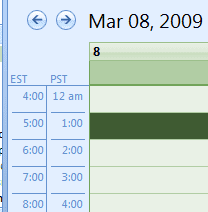
For example, if your default time zone is Pacific and Eastern is your secondary time, when Sunday rolls around, the time scale incorrectly displays a 4 hr time difference all day. If you use a multi-day view with Sunday as the first day, the Sunday time scale is used, so it appears there is a 4 hour time difference each day.
This view anomaly occurs because the default is a zone west of the secondary and Outlook takes into consideration that DST goes into effect in the earlier time zone and adjusts the times using the wrong offset. The entire 24 hour period uses the same offset and the first day in the view determines the offset. This issue also affects the view when the time 'falls back' to standard time, but only if the dual time zones are 3 or more hours apart.
Fortunately Outlook uses GMT and time zone offsets to calculate appointment times and reminders are based off the default time zone, not the secondary zone, so it's unlikely to cause missed appointments (if you use reminders). When you open the appointments they appear at the correct time.
"Time heals all wounds" and it will fix this display problem - until then, use the Work Week view or select one or more days, beginning with Monday.
DST Starts or Ends on different dates
When the two time zones start and/or end Daylight Saving time on different dates, the time scale will vary during the delta period. For example, Helsinki starts DST at the end of March while the US makes the change 2 weeks earlier, so during this 2 week period, the usual difference will be off by an hour, depending on which zone is set as primary. In the fall, there is a 1 week lag where the times will be off by an hour.
Video Tutorial
More Information
Outlook, Appointments and Time Zones
Meeting requests and appointments are off by one hour
Daylight Saving Time Updates

David Schlundt says
still an issue in 2023
Amelia says
still an issue in late 2022!!
Diane Poremsky says
...and is likely to still be a problem in 2025... 2030... it's been in outlook for 25 years already and the only wany to fix it is to rewrite the time scale.
Pieter Wiid says
This is clearly a BUG. Lotus Notes / IBM Notes / HCL Notes get it right, so why can't M$?
BTW -- I detest Notes. The calendar thing is about the only thing it does correctly
Sanjay Narang says
Diane, Thanks for explaining and resolving my misery of not knowing what's gone wrong!
Jared Kleinman says
Well here I am on Nov. 2, 2020 dealing with this very issue. I guess Microsoft only works to create bugs, not fix them?
Diane Poremsky says
:)
To be fair, its a difficult one to fix if you use a week view starting on Sunday - use the day or work week view this week.
Rob Leenheer says
TOTALLY appreciative of this post, the conclusion of many hours trying, Googling, tearing my hair out, drinking too much coffee.
Super thanks for the post and the comments.
And I can live with a week that starts Monday instead of Sunday.
I found posts about this Outlook problem dating back several years and Outlook versions.
Hello Microsoft.........!!!!!! Anybody home? ... and caring enough.....
The world can change completely in one hour (especially now).
We are PAYING customers of your product(s), so a dangerous(!) bug like this shouldn't linger around for years.
Chris Corder says
Years later, this post is still helping. This is my second time researching this issue and finally found your post. Changing the starting day of week to Monday fixed the issue I was having trying to display time zone in U.S. and Africa side by side.
Thank you!
Stephanie says
Thanks! Wasted some time looking for an answer until I found your post. Really appreciate it!
Colin says
Wow, I honestly hadn't expected to find a solution, but thanks to this page, I tried just changing the first day of week from Sunday to Monday and it fixed everything while still letting me show the whole week.
Specifically, in my case I wanted Eastern (-5) as my primary, and Arizona (-7, but no DST in summer, so 3 hours apart then) as my secondary, because I can never remember if they're 3 hours apart in summer and 2 in winter or the other way around. Outlook was showing them as 3 hours apart in winter (WRONG!!), just like shown in this article. I had reported this to MS via the Feedback Hub as a bug, but wasn't optimistic I'd find a fix. Sure enough, just changing the first day of week from Sunday to Monday, and boom, instantly fixed!!
Ken says
Wow! thanks Guys for saving the daylights for me :) noticed the bug today morning and since then had spent countless hours changing every setting in Windows and outlook to get the 2nd time zone display correct ... but to no avail. Came across this article, change my start week to monday and bingo, problem solved.
Ann B-E says
Very helpful, thank you! However I'm in Italy and now on DST, UTC +2, instead of +1. I also track Eastern Daylight Time on my calendar. Even though the US changed time zones two weeks ago, and Italy changed theirs last Sunday, the time zone difference still shows as 5 hours instead of 6. I have the work week beginning with Monday. Any ideas how to fix?
Diane Poremsky says
>>Italy changed theirs last Sunday
8 days ago? If 2 days ago, use the work week view so the calendar starts on Monday.
As long as the time zones are correct (such as changing the zone you use instead of enabling the DST option), the time scale should be correct *provided* you do not have that Sunday set as the first day in the view.
JR Nemesis says
Thanks so much for this! I installed some add-in from another site and that did not work. I'm sure this page gets the most visits around this time of year when the US goes into DST before Europe! Thanks again!
YYC says
Extremely helpful! Your tip to show weekdays only vs full week starting Sundays worked like magic. I've been searching high and low for how to fix this. Thank you.
Bill Davidson says
ANOTHER BIG THANKS! You saved a LOT of us a lot of time and headaches today with DST issues. Change start of week to Monday and all is fixed - both Mac and Windows Outlook. You are THE Exchange & Outlook authority as far as I'm concerned. You are the best!
Melanie says
Thank you so much! This has been driving me nuts for the last year or two -- relieved to have both an explanation of the cause and a solution :)
Wendall says
If I could kiss you I would. I just spent 3 hours scheduling calls for the wrong time.
Chris says
BINGO! Man, this threw me off for a while today ... until I found your article/explanation. Nice job!
AC d says
Thank you so much! This happened to me for the fall change and wasn't sure why Outlook was struggling with time zones all of the sudden. As long as I view 'work week' and not the full week, things display properly for this week. Glad to have an explanation of it!
Randy says
I have an issue where I am in the Eastern time zone (UTC-5) and set up a dual time zone for India, which is (UTC +5:30). Whether I swap the time zones or adjust the week's view, I still cannot get the :30 minutes to calculate correctly. It either shows a 9 or 10 hour difference but not the correct 9 1/2 hours.
Diane Poremsky says
That is likely due to the time scale being set to hours - I will check with support about it though.
VASSIL DIMOV says
Great article. Solved our "problem".
Thank you,
Vassil
Jeff says
I am displaying times for US Eastern and Paris. I had the dual time zone problem resulting in a +7 hour time difference instead of the correct +5 hour time difference for the next two weeks in March during DST in the East. In my attempt to fix it, I started changing to a an "incorrect" time zone with the time shift I thought would work just to make the time indicator for France appear correctly, but I could not get it to display the proper time difference. I went back to my original time zone in Outlook of +1:00 for Paris and it is now showing the proper +5 hr time diff!!!
So, try changing away from (click OK) and back to your original second time zone. See if it works.
Diane Poremsky says
Are you still starting the week on Sunday? The problems should go away if you start on monday, but it is possible that changing the TZ after DST kicks in will cause the scale to use the DST scale.
Stéphane says
Thanks for spotting this, Diane. I was wondering what was going on with my UK and Abu Dhabi timezone settings.
So there's a service pack solution for Office 2010, but nothing for Office 2013?
Diane Poremsky says
The only update is for the time swap problem (it turns off DST setting in windows) - is that happening in Outlook 2013?
The problem with dual zones and when the week starts on the day the time changes doesn't have a fix.
DMC says
I noticed this in the fall when viewing "Week". I have virtual meetings with New Zealand (UTC +12:00 ). Its Challenging because they are also a day ahead of CST (UTC -6:00) This has lead to some incorrect appointments when looking at the TimeZone display to enter them. I have adjusted work week, and first day of the Week to be monday and all "Views" show the correct offset. Simple!
Thanks!
P Johnston says
With the EDT (GMT-5) change this past weekend, just came back to say Thank You again...
Guy says
Just wasted the better part of an hour trying to figure this out after a meeting problem yesterday. The reverse is true in the Fall -- ET is only two hours ahead of PT.
cdube85 says
Fascinating. This was driving me nuts today. If you change the start of the week day to Monday, it reverts back to the correct display. I wish I'd learned that before screwing up a couple of meeting invitations.
Martha says
Thank you so much for posting this, Diane!! It was driving me crazy.
DD says
This article is another great example of why it is better to Google issues first, rather than rely on MS "help" searches. I wasted 45 mins on the MS site before my second Google search led me to this very helpful article. My issue is exactly what is described here - I didn't really isolate the issue until I noticed that the Outlook calendar view "Work Week" correctly showed a 3 hr difference between EDT and PDT, while the "Week" view (which starts on Sunday as described above) shows 4 hours. I guess I will use the Work Week view until next Sunday, when the anomoly will disappear. Thank you very much for posting!
Mike says
I ran into this also and it was driving me crazy until I saw this article. So thanks for that. In my case the left scale does not use DST at all, but it's really the same issue.
But after reading this, I realize it's not a bug. I think "anomaly" is the better term. Here's the thing. If you display starting Sunday, the very beginning of Sunday is actually NOT DST. Remember, you set your clocks ahead at 2:00 am. So Sunday at midnight, technically, you are still on Standard time.
The issue is, since you are displaying a grid that displays the week, and the time changes somewhere during that week (albeit very early in the week), then which scale do you display at the left side? One very logical answer is, "well, the scale in effect at the beginning of the week". Which is standard time. In fact, there is really no correct way to display this scale 100% correctly, because during the week, the time zones slide with respect to one another, so at least some portion of the week will be wrong.
That's why when you select Work Week, and show starting on Monday, it all works properly. Monday at midnight, we are on DST. The entire displayed week has the same relative time difference, and all is well.
Thanks again for sharing this info...it was truly driving me nuts.
Diane Poremsky says
Right, it's not really a bug. Not everyone agrees with me, but trying to account for the hour loss (or the hour gain in the fall) would be a major undertaking.
Philippe Jeanjean says
Thank you, Diane!
Yes, I am seeing that issue.
I travel a lot between Paris and Boston and I just missed a phone call because of the bug :-(
I just reported the bug thtough a Microsoft support feedback link.
But I have a feeling it won't go anywhere.
Anyway, thinks for confirming my suspicion.
Philippe
Diane Poremsky says
It's not going to go anywhere - it would be difficult to fix and the return is low: few people are affected (only people using dual zones), only for a short period. Reminders should be on the correct time.
If a lot of people were affected, Microsoft would do more about - maybe popup a warning when DST kicks into effect or during the delta period when the EU and US is out of sync and dual zones are used. This bug has been in Outlook since day 1, but I only "discovered" it in 2008 when someone mentioned it in a forum. I see maybe 1 complaint each march.