After you create a VBA macro in Outlook, how do you back it up, save a copy, or copy it to a new computer?
There are three ways to make a copy of your macros:
Method 1
Copy the contents of ThisOutlookSession (and any modules) and paste into notepad, saving the macro(s) as a text file.
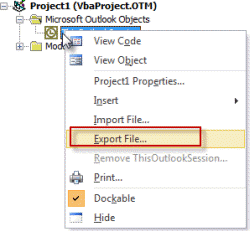
Method 2
Right click on ThisOutlookSession and choose Export File. You'll need to do for each module (if any) in your Project.
Method 3
Close Outlook and locate the VBAProject file. Copy it to make a backup.
In Windows 7, 8, or Vista, paste %appdata%\microsoft\outlook in the address bar of Windows Explorer and press Enter to jump to the C:\Users\username\AppData\Roaming\Microsoft\Outlook folder where VBAProject.OTM is. Copy it to make a backup.
In Windows XP, paste %USERPROFILE%\Application Data\Microsoft\Outlook in the address bar of Windows Explorer and press Enter. This will open Windows Explorer to C:\Documents and Settings\username\Application Data\Microsoft\Outlook. Copy the VBAProject.OTM file.
Which method is better? It really depends on your needs. Copying the VBAProject.OTM file insures you have everything in the project and can drop it in the Outlook folder to restore the macros. Copying the code to a text file may be easier to share with others or to copy some macros to another computer that has Outlook macros already in use.

Ragnar Moller says
Hi,
Outlook crashes on me when I do Developer / Visual Basic, so none of the methods are useable. I suppose the VbaProjet.OTM is the source of the crash.
How can I avoid this and save my code base ?
Diane Poremsky says
The OLM is corrupt and unfortunately there is no method to repair it. Close Outlook and rename the OLM file at
C:\Users\%username%\AppData\Roaming\Microsoft\Outlook to create a new one or, restore a backup if you have one.
How extensive are the macros? You won't be able to get more than the module names and little bits of code from the olm file (opened in notepad). When mine was corrupted, it had a bunch of php scripts added to it for some reason. (They were scripts I wrote for another application.)
I now try to remember to drag modules to a folder on my hard drive after editing - I sometimes forget but at least I will have something to work with if it gets corrupted again.
Ragnar Moller says
Hi Diane,
For me the file is not yet corrupt since Outlook reads it and partly executes the macro's
am I wrong ?
Maybe I just don't want to accept reality ...
All of my code is VBA basically, no PHP scripts
Diane Poremsky says
I think it is still corrupt. If you cant open the editor, there is no way to make a copy of the macros or edit it and there is no way to repair it.
Is the size of the OLM file on your hard drive about what you'd expect for the number of macros? Obviously hard to know for sure - but mine was around 3MB when it went bad. I had problems with it before and it seemed to happen when the file approached 3MB.
My current olm files is around 600 KB - 26 modules - some have macro just a few lines, other have 2 or 3 macros with 20 or 30 lines.
Close Outlook, make a copy of the olm and open it in notepad. Eyeball it and see if there appears to be any code in it that doesn't belong.
BobH says
Please disregard/delete last post - after explicitly saving the vbaproject.otm project on the source, the copy worked.
BobH says
I copied the vbaproject.otm file from one computer to another using the path you described. (for both source and destination). Windows File Explorer confirmed that it replaced what was there, but when I opened Outlook, none of the code changes in the source vbaproject.otm appeared. I know there are known problems with vbaproject.otm (such as time/date stamp never updating), but I have no clue on this one - will be forced to use module export/import.
Marek says
Hi, I hope it is possible to write a macro that will go through all modules of the project and save each of them in *.bas format in a selected folder. I do not seem I can get such a simple logic in VBA. Could you help?
Diane Poremsky says
Outlook's VB object model doesn't support exporting the modules using code. You can drag them to File Explorer (its faster than using File > Save) - but need to do it one at a time.
Michael Houle says
Based on this write up. We can transport the macro to another outlook instance. But the macro I wrote ends up with a button on the ribbon. Would that still need to be done manually?
I'm looking to push this out to all of our computers. We already know we can do an export/import. We are trying to push this out silently with little to no user involvement.
TheDavidSlight says
Looks like the copy OTM method finally dies - getting this new pop-up for the first time ever after all these years:
Office has identified a potential security concern Warning the digital signature has been tampered with.
Diane Poremsky says
Are you using signed macros? Was the otm you copied signed with the same digital signature as the one it replaced?
TheDavidSlight says
Yes to signed (with SelfCert). But the not the same cert as the destination was / is a new insider build. But this approach has always worked in the past -- I keep a copy of the OTM and move it into the folder on the new build and off we go.
Heather says
Thank you Diane.
What is the name of the xml file and where will I find it?
Heather
Diane Poremsky says
it's "Outlook Customizations (olkexplorer).exportedUI" - you can save it anywhere for easy access, default location should be in documents.
Heather says
I am having a similar problem in Outlook 2010, but in addition to the code I need to back up the icon assigned to the macro on my QAT. Anyone got ideas?
Diane Poremsky says
if you export the customizations, the icon you assigned to the button is included in the xml file that holds the customizations.
Louq says
I have the same Problem. I lost all the changes i did on the project every time i restart my system.
Is there any way to avoid this problem without having to back up and reload all the modules?
wolfgang says
I have made a tiny macro, what makes me sure to have all outlook vba code / macros saved. this save-macro I have defined as :
------------------------------------------------------------------------------
Private Sub Application_Quit()
Dim objFso As Object
Set objFso = CreateObject("Scripting.FileSystemObject")
Dim Quelldatei, Zieldatei
'locate the Directory where your VBAProject.otm file is located and write it to 'Quelldatei'
Quelldatei = "C:UsersusernameAppDataRoamingMicrosoftOutlook*.*"
'define the Destination where you want to have your macros saved and write it to 'Zieldatei'
Zieldatei = "C:__DatenOUTLOOKMakrosicherung" & Format(Now(), "YYYYMMDD hhmmss") & ""
objFso.createfolder (Zieldatei)
objFso.CopyFile Quelldatei, Zieldatei
End Sub
------------------------------------------------------------------------------
As result I have a Folder, containg all the necessary files für restoring my macros.
Instead of using the code in Application_Quit() you can also use it by 'manually' calling a macro of course.
Diane Poremsky says
Thanks!
Jan den Ouden says
You can trigger update of the modified date by changing a property through Windows Explorer. Right-click the file, select the third tabsheet (something like Change or modify, I am using dutch Windows where it is named "Aanpassen"). Add some dummy property, OK, and the file modified date is updated.
James Dawson says
Hi again.
That's right. The date does not change (immediately). Eventually it does change and, yes the macros are saved and have all the changes after closing and restarting Outlook.
I am checking the last modified date and also used the F5 key to refresh the display. I just checked this again and the time does not change. For some reason there seems to be a delay somewhere.
Diane Poremsky says
That is weird - I can understand it not changing while Outlook is open but the date should update when Outlook is closed. (It really should update when you hit Save in the VBA Editor, but Outlook can be weird when it has a lock on a file.)
James Dawson says
Hi. I have been making changes to my Outlook VBA project the last few days since Tues. Feb 26, 2013 but the VbaProject.OTM file show that it has not been changed since then. I save my changes and my project has all of the changes saved as viewed in the VBA editor in Outlook. Restarting Outlook and restarting my computer still shows the file as unchanged. I would like to make a backup copy of the project file but I am concerned if it's the correct file. Any comments or advice besides exporting all of the modules?
Regards Jim
Diane Poremsky says
So when you've restarted, the macros are still there but the file date and size on the OTM file at %appdata%\microsoft\outlook doesn't change? That is the correct path - make sure you are looking at the last modified date, not the created date.
Micromegas says
I'm experiencing the same as James Dawson. I searched my computer both with the Windows 10 search and with "dir *.otm /ah /s" and can not find any newer VbaProject.OTM file, so it's not in a different location or hidden. Can it be that Microsoft changed the file altogether that stores OL macros?
Diane Poremsky says
No, there are atill using the otm file type and it is in %appdata%\microsoft\outlook
Micromegas says
Thank you for reassuring me. I had copied the file there (from another computer), and when I asked the question, it still had the old "date modified". Since then, I quit Outlook, and the date got updated. Possibly it doesn't get actually saved when selecting File → Save VBAProject.OTM from the IDE.
Diane Poremsky says
possibly, or because it's locked while outlook is open, it doesn't get updated right off.