STATUS: FIXED This was fixed in build 16.0.8229.2073. To install the fix, go to File > Office Account > Update Options > Update Now.
Some users are discovering that Outlook sends winmail.dat files attached to messages when sending to contacts in their address book. Only Outlook on Windows desktop (all versions) is affected; messages sent from Outlook on the web or the Outlook app do not have the rogue winmail.dat file.
The problem: When sending email to any contacts from your address book in Outlook, some recipients receive a winmail.dat file attachment that shows up in some clients. Outlook should decode the winmail.dat file and correctly display any attachments, however, if not, the attachment icon may be displayed but no attachment is shown.
Gmail & Yahoo web mail should decode the winmail.dat file and show the attachment but HTML formatting will be lost. The Internet header will mention the winmail.dat file:
--_000_CY4PR12MB1750DB40ADDCB9EF8B1C7E1FCC5D0CY4PR12MB1750namp_
Content-Disposition: attachment; filename="winmail.dat"
Content-Transfer-Encoding: base64
Content-Type: application/ms-tnef; name="winmail.dat"
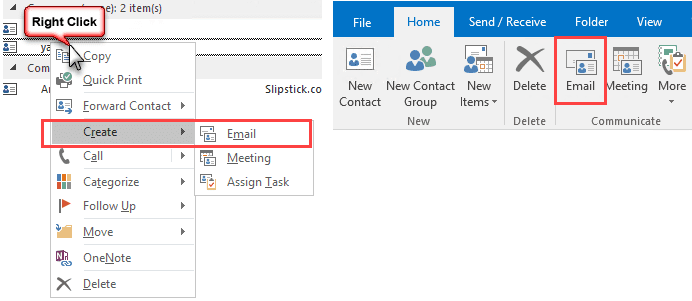
The keywords are "address book". If you select a contact and click the Email command on the ribbon or right-click and choose Create > Email from the context menu the message does not have the winmail.dat attachment.
As has always been the case, the winmail.dat file is more of a confusing nuisance than anything. The recipients receive an attachment and don't know what to do with it. (Correct answer: ignore it.) Note: Gmail and Yahoo recipients will lose HTML formatting but attachments will be accessible.
The usual fixes (listed at Outlook is Sending Winmail.dat Attachments) don't seem to work for most people or are only temporary and the problem returns. This is likely because the address book is the problem, not the contacts specifically.

CAROLYN ANN BERCOVICH says
HI Diane
I am still all this time later having the same issues and have tried everything - ensuring all settings are set to send and receive mail as HTML, clearing autocomplete lists, run updates, etc... what can be done it is a nightmare!
Diane Poremsky says
Is the message set to RTF in your sent folder?
Are you using an Exchange server? a misc0nfigured server could be converting it to RTF.
Chuck Davis says
It appears that this bug has reappeared. Have you gotten any other reports? I'm on Monthly Channel (Targeted), with the most current update.
Diane Poremsky says
No, you are the first. I'll see if i can repro with my account.
Craig says
Still having the same issue as well. Running updated Outlook 2016 against Outlook.com.
Diane Poremsky says
Do you know what build you have? You should have the updates if you have a subscription but may not if you have a retail perpetual version.
Matthias says
This here seems to help (sorry is translate from german with other named menupoints):
- Outlook
--- Options
---- Advanced
-----> Coding for outgoing messages: Change to "Unicode UTF-8"
The standard is (in germany) "Westeuropäisch (ISO)", that have sometimes problems.
Publius says
Thanks for this, Matthias. As of today I still have this winmail.dat problem when sending atttachments from my Outlook account to 3rd parties.
I have noticed that recipients are okay if they're reading the email from Outlook on a PC. If they're using an IOS device, the same email shows the winmail.dat error and the attachment can't be viewed.
I tried your suggestion of changing the coding for outgoing messages to UTF-8 (from Western European ISO).
It worked.Publius says
I spoke to soon. This isn't fixed. Please ignore my previous message.
Diane Poremsky says
>>> I have noticed that recipients are okay if they're reading the email from Outlook on a PC. If they're using an IOS device, the same email shows the winmail.dat error and the attachment can't be viewed.
Outlook is the only client that can decode the winmail.dat, although gmail and possibly yahoo now decodes them, although I'm not sure if it's only when reading in a browser.
I thought this was fixed in a recent update but have been on vacation and not watching all updates that came out, so i could be wrong (and mixing it up with other outlook.com bugs that were fixed.)
Chuck Davis says
Here is a weirdness that I discovered in my Outlook 2016 address book. You might want to report it to Microsoft since it could be related to the winmail.dat problem.
My contacts have Name (John Smith), Company (Contoso) and email address (JSmith@Contoso.com).
Previously the "Display As" field was configured as "John Smith (JSmith@Contoso.com)".
Recently some update to Outlook changed "Display As" on *all* my contacts to just "JSmith@Contoso.com".
If I call up the contact, blank the "Display As" field and hit TAB, the "Display As" field is changed to "John Smith - Contoso (JSmith@Contoso.com)". Note the "dash company" that is inserted.
If I save the contact, call the contact back up, blank the "Display As" field and hit TAB again, this time the "Display As" field is changed to "John Smith (JSmith@Contoso.com)".
It is exceedingly weird that it takes two updates/saves to change the "Display As" field back to its original format.
I did run a test, and changing the "Display As" field back to its original format did not fix the winmail.dat problem. (I didn't clear the auto-complete cache or stop/start Outlook, however.)
Hopefully Microsoft already has fix(es) for the winmail.dat issue and this issue. If so, do you have any information on when they might get pushed out?
Could you also ask Microsoft if they can restore the "Display As" field to its original format? If they can't, then the millions of users of Outlook will have to go in and edit every contact in their address books. That's a lot of wasted and unnecessary effort.
Thanks. (And thanks for this article. You saved me the hassle of rebuilding my profile and downloading two very large .OST files.)
Diane Poremsky says
>> If I call up the contact, blank the "Display As" field and hit TAB, the "Display As" field is changed to "John Smith - Contoso (JSmith@Contoso.com)". Note the "dash company" that is inserted.
Are you using more than one computer? If you edit the contact on a second computer, it shows up with the company name on the other computers. Editing it fixes it on that computer, but the company name version syncs to the others... it goes round and round. I hadn't noticed it blanking out though. Will see if i can repro.
At this time, i don't have any additional information on the status of a fix.
Chuck Davis says
Just using one computer. (Lenovo ThinkPad T440s, Win10 Pro)
Diane Poremsky says
Syncing with a smart phone or editing contacts in outlook on the web?
Chuck Davis says
Outlook 2016Outlook.comOutlook (Android)Android Contacts. All editing is done in Outlook 2016. (Contacts can't be edited in Outlook (Android), of course. Grumble, grumble.)
I also get a whole bunch of weird errors if I run Microsoft OffCAT against Outlook 2016. I can send you a screenshot if you like.
Diane Poremsky says
yeah, please on the screenshot. offcat should be erroring.
Chuck Davis says
Where is the upload link? (Or am I staring at it?)
The Commenting System mangled my sync'ed chain of address books/contacts. Key point was that all editing is done in Outlook 2016, with everything passing through Outlook.com to various Android devices.
Chuck Davis says
Where is the upload link? (Or am I staring at it?)
FYI - I am not getting notifications of replies, possibly because the Commenting System can't handle my unusual e-mail address.
Diane Poremsky says
You might be staring at it - or it's not visible due to caching or something out of your control.
It's just to the bottom right of this text field. If you don't see it, try using a different browser.
Chuck Davis says
Got it. Unfortunately I can't upload a PDF or an .offx (OffCAT export) file. Can you PM another method/address?
Diane Poremsky says
I temporarily turned PDF support on - i don't normally allow anything but images for security reasons.
Chuck Davis says
Sending the PDF. Unable to send the .offx. OK to pull up the drawbridge.
Still no notifications.
Diane Poremsky says
There are a lot of confirmations being sent - actually, it looks like maybe you are subscribing to a specific comment (but I could be misreading it). There were 9 confirmations and only one accepted - i accepted the others - so if you get 9 copies of replies, that is why. It's sent via exchange server - i ran a message trace and the confirmations were all delivered but no actual comments (that is why i think it is for a specific comment). Will check the trace on this...
Chuck Davis says
Could be operator error. I subscribed on the initial post, but each reply also has a "Notify of new replies to the comment" checkbox. I'm a belt and suspenders kind of technoid, so I've been checking that box and confirming the subscription after each reply. I won't do it for this reply to see what happens.
I did receive your test message.
Anything useful in the barrage of OffCAT errors? Any update from Microsoft about them fixing this anal trauma (and undoing the damage to the "Display As" field)? Patch Tuesday is only a week away.
Diane Poremsky says
They have not said how soon, so my money is not this week. i will check it in the next insider build (usually out on Thurs/Fri) - they are usually about 4 weeks ahead of general availability.
Chuck Davis says
I just noticed that Microsoft also screwed up the "File As" field in all my contacts. It was changed from "Smith, John (Contoso)" to "Smith, John(Contoso)"....with no space between John and the open parentheses. As a result, the name and company appear run together on one line in the Contacts instead of on two lines.
If you do have a communication channel with Microsoft, you might suggest that they do some research on such interesting topics as "Quality Assurance" and "Regression Testing."
Diane Poremsky says
I hadn't noticed that - will let them know. Thanks.
Chuck Davis says
Any update on the progress of Microsoft's rectal encephalectomy? I'm getting really tired of having to remember to flip over to Outlook.com if I need to send an attachment.
Diane Poremsky says
i haven't heard - will check the latest insider build to see if it fixed it. (Sending from the contact should work correctly.)
Chuck Davis says
Something else appears to be broken. I received a marketing e-mail from a local nursery with lots of pretty pictures and forwarded it to my wife from Outlook 2016. All she got was links. When I forwarded the same e-mail from Outlook.com it was fine. I confirmed this with a different forwarded e-mail with embedded pictures. The links to the pictures in the nursery marketing e-mail were to sendgrid.net. The links in the second test e-mail were to mailchimp.com.
Something else for Microsoft to fix .........maybe .......hopefully ........someday.
Diane Poremsky says
did she get a plain text copy? If so, that is "normal" when there is a winmail.dat file.
Chuck Davis says
Yes she did. I didn't realize that this new Microsoft feature would kill embedded links as well as attachments.
Diane Poremsky says
it's not a new feature, it's a bug, but that is a side effect of seeing the winmail.dat file.
Chuck Davis says
http://www.businessinsider.com/10-bugs-that-became-features-2012-11?op=1
Diane Poremsky says
it's definitely a bug because of the data loss (even though it not really lost, just hidden and difficult to access).
Chuck Davis says
This probably should be in a separate thread, but since the theme here is Microsoft's incompetence..........
It just keeps getting better and better. On a hunch I went into Outlook.com and looked at the Blocked Senders list. I discovered dozens of e-mail addresses that I never would have blocked and whose e-mails I want to receive. I have no idea when/how these addresses were blocked. This might be a consequence of Microsoft moving Outlook.com to an Exchange-based platform, in which case it could be of a piece with the winmail.dat debacle.
There were also a lot of mysterious e-mail addresses in the Safe Senders list, but at least this screw-up doesn't block e-mails.
Diane Poremsky says
they probably came over from the old server - the old server added addresses to the list, some of which were not valid (happened to me more than once - it was probably more that it made it easier to add them when deleting messages and I didn't pay attention). The only other way is is you accidently did it or an antivirus or security add-in did it. My oldest hotmail account has a very long list of blocked addresses and for about the last 15 years, I only use it for testing and let the built in filters deal with spam.
Chuck Davis says
Any update on when (or if) Microsoft is going to fix this bug?
Do you have a recommendation for another "ecosystem" that will sync e-mail/contacts/calendar between Win10 desktop, web and Android (including phonebook)?
Diane Poremsky says
eM client does a pretty good job with gmail and outlook.com calendar & contacts. It's what i'd use if i didn't use Outlook.
Chuck Davis says
I finally got around to rebuilding Outlook 2016 using a second Profile. No change on the Winmail.dat bug and OffCAT is still spewing errors.
Any update from Microsoft? Hope springs eternal.
Chuck Davis says
Any update yet on when (or if) Microsoft is going to fix this bug?
Are they getting even a little bit embarrassed?
Diane Poremsky says
I haven't heard yet - will ask about it again though.
Diane Poremsky says
Should be soon - both this bug and the 'outlook.com hogs the reply address' bug are in upcoming builds. If not in 8067 (coming out now to current channel), then 8216 (coming soon to insider fast). I have 8117 and will check it.
Chuck Davis says
Hallelujah! (Although I'm keeping my salt shaker handy.)
Do you know if they will be able to repair the damaged formatting in the Contact records?
Diane Poremsky says
I don't know about the formatting, but am guessing no. Syncing outlook to outlook.com shouldn't affect the formatting, but syncing with smartphone apps can and that is out of their control.
Chuck Davis says
I sync from Outlook.com to Outlook 2016 (which is bidirectional) and from Outlook.com to Outlook for Android (which is one-way, to the phone). I don't see any way the smartphone could have mangled the Contacts in Outlook 2016. The formatting problems I've encountered are described earlier in this thread.
I updated to 8067 last night but it didn't fix the winmail bug.
Diane Poremsky says
Then that fix will be in an upcoming build - others have confirmed the reply bug fix is in 8067.
Chuck Davis says
8201 didn't fix the winmail.dat bug.
Diane Poremsky says
It's coming. :)
Chuck Davis says
Microsoft's dismal Quality Assurance testing continues. A recent update introduced a new bug in Spell Check. The first error it finds comes up with the "Undo Edit" dialog box instead of the Ignore/Add/Change dialog. Subsequent errors behave normally.
Diane Poremsky says
I've had a couple of people mention that but i can't repro - the others didn't mention it comes up after the first misspelled word so i will try again. I don't know the status of this bug - it depends if they are having trouble reproing it too. :(
Diane Poremsky says
The spell check issue was a bug introduced by the Windows 10 Creators Update. The bug is apparently fixed in build 16.0.8201.2114, which should come out next Monday or Tuesday. It should be also be fixed in the next Insider Slow build coming out today (16.0.8229.2056). I'm using insider fast so i can't confirm.... but that is also why I couldn't repro.
Chuck Davis says
FYI. See June 13 post from Gabriel Bratton. https://answers.microsoft.com/en-us/msoffice/forum/msoffice_outlook-mso_win10/font-too-small-when-printing-calendar-outlook-2016/aa2e29e2-e277-4b72-bb23-dc72c559dffa
Diane Poremsky says
>> The winmail.dat issue is fixed in Insider Fast and will go to Current Channel in the next few days.
means it should be in the next update, not the june 13.
Chuck Davis says
Yet another bug to report to Microsoft. Starting a few days ago, "Mystery" contact records appeared in Outlook 2016 and Outlook.com. They contain nothing but a phone number. These appear to be fragments of valid contact records. I can't see any pattern of similarity among the full contact records. They were created at various times on Wednesday, 4/12 (The day after Patch Tuesday).
Diane Poremsky says
Do you sync with a smartphone?
When you create contacts, try adding something - even just a space to the address field. This seems to fix some issues, especially when you sync with a phone.
Diane Poremsky says
i don't think the smtp server is blocking .name extensions, but i will double check on it.
Diane Poremsky says
There are a lot of errors in the offcat - i would definitely disable the norton plugin. not sure if it is causing all of your problems, but it is not needed and can cause problems.
Some of these errors may be unique to outlook.com (due to features turned off for consumer accounts), but it also says you are delivering exchange mail to a pst - you should be using the mailbox cache.
If autoaccount setup doesn't work, you need to delete a value from the registry...
Chuck Davis says
The weirdness continues. I re-ran OffCAT, and along with the usual pile of errors it reported that Outlook 2016 was down-rev. I updated to Build 16.0.7870.2024, and then ran OffCAT again. It only reported one error, involving hyperlinks. Success! But with 45 years of IT scar tissue, I ran OffCAT again and the 23 errors were back.
The upgrade didn't fix the attachment issue.
I have one Outlook.com account linked to an .OST file, an Office 365 account also linked to an .OST file, an Archive.PST file and three .PST files with nothing but contacts in them and no e-mail links. In the OffCAT Configuration Details for the Office 365 account I can see the error about a .PST file being the default, but that is one line below where the .OST file is displayed. Account Settings for both the Outlook.com and Office 365 accounts show that mailbox cache is being used. Any idea what is bent, or suggestions on how to fix? Should I blow away and rebuild (once again) the Office 365 .OST file?
Diane Poremsky says
i would try a separate profile with just one of the accounts in it - run offcat on it and see what comes up. Definitely sounds like offcat is screwy, but I don't know if it's due to the accounts in the profile or if its just screwy.
Chuck Davis says
I did disable the Norton Anti-Spam plugin, both in Outlook 2016 and Norton.
Chuck Davis says
Microsoft's changeover to the Exchange platform for Outlook.com has been a total screw-up. They forced everybody to rebuild their .OST files, but it was impossible to do the rebuild with Two-Factor Authentication turned on. I had to disable 2FA, and I haven't been brave enough to turn it back on. I'm afraid it would break Outlook/Outlook.com again.
Diane Poremsky says
if you use 2-factor, you need to use the app password in outlook. At this time, Outlook won't pop up the second screen.
Chuck Davis says
I can't remember the details, but the app password wouldn't work either. I ended up having to disable 2FA.
Chuck Davis says
One more bit of information. I also have several .PST files with only contacts in them. The "Display As" field in those files was not changed.
Diane Poremsky says
Yes, only outlook.com account should be affected by this bug.
Kristin says
Thank you for the article. This has become a nightmare trying to figure out how to fix this. My boss is the only one who gets these wind dat files and he is getting very upset about it. I do not want to work out of Outlook.com all the time as I do not care for it.
I cannot seem to fix mine and was wondering if you could help me in further detail.
Diane Poremsky says
Microsoft is investigating it but I don't have an ETA for a fix. For new messages, don't use the To button or autocomplete - go into contacts, select his contact then click EMail button in ribbon. If the problem occurs on replies, try creating the new message from contacts then copy the address and paste into the To field of the reply.
John T says
Diane
Any more news about this bug being fixed. Your work-arounds have been a life saver but having to use the email button or sending the whole message as plain text is a real pain. I use Outlook 2010 and 2016 with an Outlook.com email address and if this is not resolved I think I will need to move to Gmail.
John
Diane Poremsky says
It's supposed to be fixed in 16.0.8229.2073. insider builds are into 83xx so if that's not the current build, it will be released very soon.
John T says
Thanks Diane that is good news.
JohnT says
I am still having problems send attachments to AOL and Yahoo accounts as they arrive as Winmail.dat even when sent as plain text emails from my outlook.com account. Ok if sent from my Google mail account.
Diane Poremsky says
what version of outlook do you have? The outlook.com bug was fixed in build 16.0.8229.2073. You may need to delete the names from the autocomplete list - when addressing the messages, delete the name from the address list and retype the address.