The following articles were included in our Exchange Messaging Outlook (EMO) newsletter published on May 12, 2022.
EMO is a weekly publication. To receive your own copy of EMO by email, subscribe here.
Support Exchange Messaging Outlook Sponsors
Increase Your Productivity!
ReliefJet Essentials for Outlook is a set of more than 160 tools for performing a wide range of tasks in Outlook: processing email messages, contacts, appointments, meetings, tasks and other Outlook items.
Today's Highlights
- Outlook Shortcuts Changing
- Using Boards in Outlook on the web
- Server drafts location is not valid error message
Outlook Shortcuts Changing
With the “new” Outlook for Windows, the vertical navigation bar that places the buttons for Outlook modules on the left side of the folder list, changes the well-known shortcuts for the modules to the visible buttons, in the order displayed (top to bottom).
In the “old” Outlook (all versions), Ctrl+ number from 1 to 8 switched the user to one of Outlook’s modules – Mail (Ctrl+1), Calendar (Ctrl+2), Contacts (Ctrl+3), Tasks (Ctrl+4), Notes (Ctrl+5), Folder list (Ctrl+6), Shortcuts (Ctrl+7), Journal (Ctrl+8).
The shortcuts still open modules – but only the modules whose buttons are visible on the vertical navigation bar, in the order they are listed. If you reorder the list, the shortcuts change. (If you have Office apps on the bar, the shortcuts will open the applications too.)
To open modules that are not visible on the vertical navigation bar, click on the expander at the bottom of the app buttons and choose the module. Note that Journal users will need to add the Journal button the ribbon or Quick Access Toolbar as it is not available in the navigation bar overflow.
If you use these shortcuts, I encourage you to vote for and comment on this suggestion. It’s the best chance we have of not losing the module shortcuts.
Retain CTRL+8 Switch to Journal shortcut in new Navigation bar
Using Boards in Outlook on the web
Outlook on the web has a feature called Boards. A board displays calendar, tasks and note by default, plus files splits the calendar view into three sections, with tasks and notes. You can add files and notes relating to the board topic to the board, or put your notes and files into Collections, which are groups of notes and files, and set Goals (tasks, but not in Tasks).
Use boards to hold notes and information for things like projects, vacations, or party planning. Boards is well suited for planning any event or project that uses multiple files, photos, tasks.
You can move and reposition the cards within a board, as well as resize them. Click on the three dots in the upper right corner of a card to see available options, including setting a due date or to change an item or collection’s background color.
To switch back to the normal calendar view or view a different board, click on the [board name] menu under your account icon and choose a different view. To switch back to a board, click on the [view name] button and select a board.
To change the calendar view while staying within the board, click on the three dots in the upper right corner of the calendar and
While you can’t delete the Default board, you can delete boards you created. Hover over the board name in the menu and click the trash can icon. If you are viewing a board and delete it, Outlook will display the default board. Choose another view
Server drafts location is not valid error message
This is a word bug but having seen a number of people ask about it the last couple of weeks, it’s worth mentioning the solution.

The error message "The server drafts location you entered for offline editing is not valid or you do not have permission to access that location. Specify a location on your local computer." Comes up because the "Server drafts location" field under "Offline editing options for Document Management Server files" in Word’s File > Options > Save dialog is blank.
Because the field is not editable with the dialog, users don’t know how to fix it.
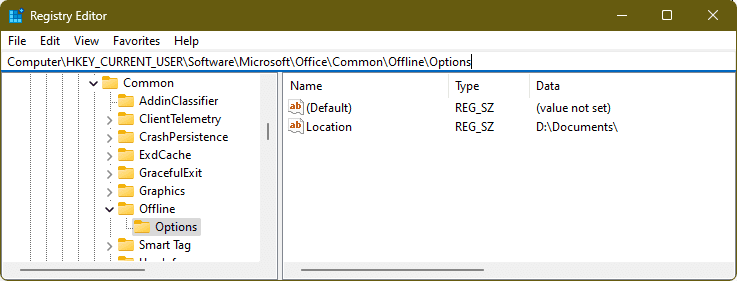
To fix it, you need to edit the registry:
- Right click on the start button, choose Run then type regedit to open the registry editor.
- Browse to
HKEY_CURRENT_USER\Software\Microsoft\Office\Common\Offline\Options - Right click and choose New > String and type Location as the name.
- Right click on Location, choose Modify and add the path to your documents folder. (You can put any path there; Word no longer uses that field.)

New & Updated Exchange Server Support Articles
Exchange Service Host service fails after installing March 2022 security update (KB5013118)
New Exchange Server Security Update and Hotfix Packaging (KB5011363)
Description of the security update for Microsoft Exchange Server 2013: May 10, 2022 (KB5014260)
Recoverable Items folder of on-premises mailbox becomes full
Fixes an issue in which the Recoverable Items folder in an on-premises mailbox becomes full because a retention policy is configured in Microsoft 365 to place a user object under a hold.
New & Updated Office 365 Support Articles
Make your content accessible to everyone
Find info about accessibility in the Office products and tools to make your content accessible for people with disabilities.
New & Updated Outlook Support Articles
Moving multiple items from Deleted Items creates confusing warning about creating new items
Fixes an issue in which you receive a warning message about creating new items when you move or copy multiple items from the Deleted Items folder.
Outlook 2019 sender email address missing on reply and forwards
When using Outlook 2019 to reply or forward an email, in the body of the email the sender email address may be blank, showing only < >.
Incorrect or no results when searching the Online Archive of Full Access mailbox
When a delegate performs a search in the Online Archive of a mailbox that is accessed with Full Access permissions, Outlook will show no results, or will show incorrect results.
Other Resources
Update GoDaddy Accounts for Office 365
GoDaddy is in the process of moving email accounts to Office 365 servers. After you account is moved, you'll need to update the account in Outlook to use the new server.
Manually add POP or IMAP accounts to Outlook
How to change Outlook account settings using manual setup when you add an email account to Outlook 365, 2021, 2019 or 2016.