While Microsoft Outlook supports mail merge, it does not support merging attachments with the message. You'll need to either use one of the mail merge tools on this page (most support including attachments in the merged message) or use VBA. You can use an ItemSend macro to add the attachment (and set field values) as the message is sent. Microsoft Word MVP Doug Robbins wrote the Mail Merge to E-mail with Attachments code sample using Word VBA to create a mail merge with attachments which he converted to MergeTools Word addin (template).
Mail Merge with Categories
The following tutorial shows how to do a mail merge using categories. This method works in Outlook 2003, 2007 or 2010.
From Outlook's Contacts folder:
- Switch to the By Category view
- Select the Category
- Go to Tools, Mail merge
- Click on Only Selected contacts (top left)

- Select the document type (lower left)
- Select Merge to format (lower left)
- Ok your way out of the dialog to send the merge to Word
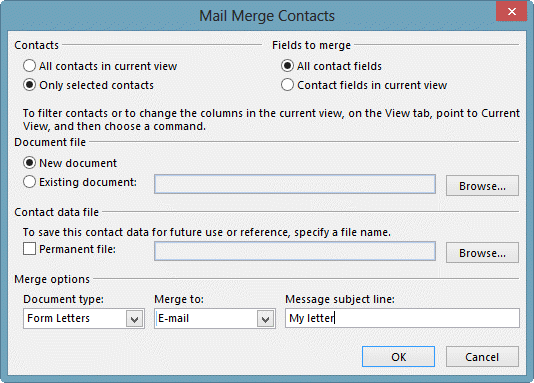
Mail merge to email:
When merging to a letter or email, type your letter, adding the merge fields where desired. Preview the results before clicking Finish & Merge.
Complete labels in Word:
- Click the Setup button
- Select the desired label format
- Insert the merge fields you need
- Click the Update Labels button to copy the fields to all labels.
- Preview the results
- Finish & Merge
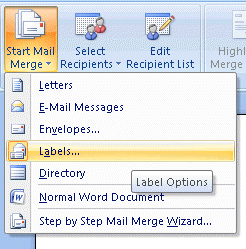
To show the mail merge wizard, click Start Mail merge and choose Step by Step Mail Merge Wizard (Outlook 2007/2010) to use the wizard pane. You can use change the document type from here and step forward or backward as needed. It's on Tools, Envelopes and Letters menu in older versions.
Tips
You can change the Document type or show the Mail merge wizard pane in Word. In Word 2007/2010, look on the Start Mail Merge menu. In Word 2003 and older, Mail Merge is on the Tools, Letters and Mailings menu.
Tools in the Spotlight
Mail merge tools Word add-in by Microsoft Word MVP Doug Robbins. Merge to e-mail messages either with or without attachments, with the documents created by the merge being sent as either Word or PDF attachments or as the body of the e-mail message. And more... |

Tools
Create distribution list and send bulk e-mail to recipients by pulling out them from selected Microsoft Outlook folders, e-mails, contacts, meetings, or tasks in one click. Plug-in integrated in Microsoft Outlook actions menu, shortcut menu, into toolbar, and right-click item menu. Add recipients to Distribution list that already exists. Add recipients to new e-mail "To", "CC", or "BCC" field in one click. Time-saving tool for routine tasks. Version 1.41 | |
ContactMonkey brings advanced email tracking and Salesforce integration to Outlook. Use Mail Merge to track email campaigns by bringing all the tools you need to track your emails directly to your Inbox. | |
Easy Mail Merge for Outlook gives you the power to fully personalize email messages and quickly deliver individual emails to your contacts list, being the perfect solution for your mail merge needs, such as personalizing email newsletters, business announcements, marketing emails or any other emails that need to be customized and individually sent to a large number of people. | |
Email Merge Personalized Individually Addressed Invitations, Greetings and Sales Letters at the click of a button. EmailMerge supports Office 365, Outlook 2021, 2019 & 2016. Version 5. | |
Envelopes for Outlook is an add-in that places a button on each MS Outlook contact toolbar for simple one click envelope printing. Outlook 2003 to Outlook 2016 are supported. POSTNET barcodes and logo printing supported. | |
Generate individual messages to Outlook contacts from documents designed in Word or Publisher, including messages in GIF format with image maps. Allows you to add attachments and generate a custom subject for each message using merged data. Does not trigger Outlook security prompts. | |
Mail merge to email with support for attachments, pictures, and HTML hyperlinks. Messages are stored for later reuse. Does not trigger Outlook email security prompts. | |
Outlook Mail Merge Attachment supplies the mail merge process in Microsoft Office Word and Outlook with the functionality to add an attachment. The script is tested on Microsoft Office 2003 and 2007. (Free) | |
QNewsLetter is a simple to use mail merge add-in for Outlook. With QNewsLetter you can send personalized emails. | |
The Sperry Software Send Individually Add-In for Outlook sends email newsletters and other marketing to each of your recipients with just their name in the To field, similar to mail merge. It allows attachments to be on the email and it supports sending from different From accounts. Now reads Excel files directly, including CSV files. It also allows for using a BCC function so you can work with 3rd party CRM systems and, you can specify a different file in each row of your Excel spreadsheet and the add-in will find that file and attach it to just that recipient's email. | |
Mass mail tool that expands Outlook distribution lists and sends an individual message to each member of the list. Can exclude certain names from the DL. Has some mail merge capability for inserting personalized text in the body of messages. Outlook 2000 or later. | |
Quickly send mass emails while retaining the individuality of each message. The specialized Outlook plugin button acts immediately to display only the individual receiver's name when they get their mail. | |
Bulk mail program that sends an individual message to each recipient. Can use Outlook data, as well as many other sources. Can attach up to 20 files, even to HTML-format messages, and use merge fields to build the message subject. Does not trigger the Outlook security prompts | |
Email and presentation tracking, email templates, and Salesforce integration for Outlook 2010, 2013, & 2016 on Windows. |
More Information
Set fields on mail merge messages and add attachments
Mail Merge to E-mail with Attachments -- Use Word VBA to create a mail merge with attachments. Includes code sample written by Word MVP Doug Robbins.
Use Outlook's Contacts with Mail Merge (Outlook-tips)
To start a Word letter from an Outlook contact

Tiarnan says
Hi,
I am using Doug's toolkit.
There is a lag in time between creating email merge with attachment and deliver.
Can be next morning before the message is in outbox or sent.
Is this normal or should the process be smoother/quicker?
Nikhil says
hi Diane,
I am curious to understand if there is a way I can merge two or more tasks into a single tasks. Something similar to how Evernote merges notes.
I create outlook tasks from emails and quite often related tasks get created. It will be very useful if I can merge those tasks.
Thanks in advance.
Diane Poremsky says
Outlook doesn't support a way to merge tasks - you'd need to merge them into one task yourself. I don't know how OneNote's task feature compared to Evernote in this area.