Use this method to create a new *.pst in your profile. While there are several ways to add a new *.pst file to your profile, you need to use...
As many users have discovered, Options, Calendar Options, Add Holidays only adds the holidays to the default Microsoft Outlook calendar. Many users wonder how they'll get the Holidays on...
Time and date entry is one area where Outlook is smart. Really smart. This video does not do justice to the power of date and time selections, especially the...
I’m not sure what is causing the problem, but we're seeing a rash of complaints with the following error: Cannot start Microsoft Office Outlook. Unable to open the Outlook...
To change how frequently Outlook does and automatic send and receive, you need to edit the Send and Receive settings. The easiest way to open the Send and Receive...
By default, Outlook is configured to mark a message read a few seconds after the message is selected. This can result in messages accidentally marked as read. To disable...
Changing the reminder time on a group of appointments or events is easy. Just use a group by view with the Remind Beforehand field visible and group by it....
How to make the font used in Outlook 2013's folder list a little larger.
Many users ask about editing the subject line of messages, usually because they plan to save the make the subject more better reflect the content of the message. This...
How to end a recurring appointment or cancel future events in a recurring meeting and keep any exceptions (including notes in individual occurrences or appointments/meetings moved to different dates).
Newer versions of Outlook let you start in any folder in your profile. You can use this method to open Outlook with a non-default folder – this is especially...
We often tell people to use switches but don’t always explain how they are used, leaving the user to find out on their own. Even when we do explain...
Configure and use IMAP accounts with Microsoft Outlook. Learn how to configure Sent items and Deleted items folders in Outlook 2007 and up.
There are two ways to give other users the ability to "send as" another user, mailbox, or public folder address when you use Microsoft Exchange server. The first is...
This tutorial shows you how to enable AutoArchive in Microsoft Outlook and change the AutoArchive settings on a folder.
How to open the More Settings dialog to configure Outgoing (SMTP) server settings, port numbers, and other settings.
We occasionally get complaints from people who are using a group by view on Contacts and they have two groups of "(none)", often when grouping by Company or Country...
If you have Contacts in Microsoft Outlook's Contacts folder but they are not accessible when you click on the To button, check these settings: Are you using the "wrong"...
Outlook doesn't offer a way to print a list of folder names – the best you can do is a screen print. If you use a full featured screen...
How to create a custom view in Microsoft Outlook that shows just the name and mailing address in the view so that you can copy it for use in other programs.
A user wanted to know how to mark messages they had responded to. One method is flagging the items complete. Another is to add a custom field to add...
How to create your own send to shortcut that uses your Outlook stationery and signature. Customize the shortcuts to include the email addresses and more.
Outlook doesn't have a way to print the reminders, but you can create a custom view and print it. Tasks uses the Reminder time field, Flagged messages use the...
How to create an Outlook distribution list or contact group from any list of email addresses, including a spreadsheet in Excel or a custom view in Outlook (with only the display name and email address visible.)
In older versions of Outlook, you could right click on a contact and choose “New Appointment with contact” to create an appointment linked to the contact. This command was...
How to create additional Contact folders and enable then as Outlook Address Books.
Create tasks from email as they arrive using a simple script and Rules Wizard. With a slight variation, you can create a task from the message you are reading in the reading pane. Complete instructions and ready-to-use code samples included.
It's easy to create an appointment from an email in Microsoft Outlook: just drag the email message to the calendar and drop it. You can drag an email to...
With previous versions of Microsoft Outlook you could select a contact, then choose Actions, New letter to contact to create a letter or envelope from a contact. For various...
How to convert contact groups to individual contacts using Import or a VBA macro.
Create an Outlook Contact Group from a list of addresses using only copy and paste. No need to create contacts for the addresses first.
How to create new color categories in Outlook 2007, 2010, and 2013.
Office 2007's ribbon interface doesn't allow you to create custom toolbars as older versions of Office did, however, you can use the Quick Access Toolbar (QAT) to bring your...
When reminders just won’t dismiss, there are several things you can try to get rid of it: Use the Cleanreminders switch. This works most of the time. When cleanreminders...
How to configure Microsoft Outlook 2010 to deliver POP3 accounts to a single personal folders data file (pst).
Outlook 2010 has a new Conversation view that groups messages together. Many users don't like it, fortunately its easy to disable, using one of two methods. Method 1: Right...
Protected view is a new security feature for all Office documents which arrive in email or are downloaded from Internet sources. This is a security sandbox used by Office...
Whether the Start times display in the calendar is wholly dependent on the size of the Calendar section. If the calendar is too narrow, the times are hidden.
Contact or Business Card images are displayed in the the Business Card view. Open the Contact, double click on the picture placeholder and select an image from your hard...
When you use Dual time zone display and the week starts on the Sunday DST starts, the time scale will have an incorrect offset if the more western zone is the default time zone.
Sponsored by While you can remove duplicates by hand, these tools make it easier when there are a lot of duplicates. The following pages are a collection of mail...
Solutions available! When attachments are opened from a message in Outlook 2010, they are read-only. Users cannot edit the attachment and save the changes back to the message, they need to save the attachment to the hard drive and reattach it.
It's simple to open a received message to edit or change the format of messages. Open the message. On the opened message’s ribbon or menus: In Outlook 2010: Go...
As many users know, you can edit the subject line in a message. This makes it easier to find messages especially when they don't include a subject. If you...
How to create a custom filter to show only Tasks in the To-Do Bar folder.
When you receive and error that Outlook can't find and add-in, the usual cause is that you uninstalled it but Outlook didn't delete the file it uses to keep...
When Contacts are automatically updated, you need to check the settings in Outlook's Social Connector, which has automatic updates of contacts enabled by default. A change log is added to notes so you know what was changed.
How to remove email accounts from an Outlook profile then recreate the correct account. Fix "The connection to Microsoft Exchange is unavailable" error.
If you don't care for Calibri font as the default for RSS feeds, you need to use a macro to change the font (on font size) as the font cannot be changed by the user. We have code samples for both Outlook 2010 and 2007.
You can change the name of any field in the view. Right click on the field name you wish to change. Select Format Columns from menu (in the Two...
We are often asked how to merge two folders. It’s easy – use a list view then drag the items to the other folder. Or use the Move to...
Outlook will compact the pst automatically when the amount of “white space” (space used by deleted items) exceeds 20% and it has some idle time. Outlook will work on...
Not every Outlook user wants an email account in Outlook, they just want to use Outlook for Calendar and Contacts. This is possible and in older versions of Outlook,...
How to create a new profile in Outlook 2007, 2010, 2013 and set it to use an existing pst file.
This frequent request comes from users looking for a way to send out meeting requests for training sessions or benefits meetings with HR, where each employee can pick the...
You can use custom views to display just the data you need. To make it easier to create a custom view, begin by applying a view that is similar...
How to create custom stationery in Outlook and where to save it so Outlook can find it.
It’s easy to add more folders to Outlook – right click on any folder and choose New Folder. You can change the folder type, if necessary, and change where...
A tutorial showing Microsoft Outlook users how to to create or change custom views.
You can create Tasks from email messages by dragging the message to the task button the Navigation pane. If you want the message attached, right click and drag. When...
You can easily change the Private flag (and many other fields) either by editing inline or dragging the item to a new group. First, if you are not using...
Occasionally you'll need to export data from Microsoft Outlook. Export is appropriate for moving calendar or contacts to another computer or backing up your calendar and contacts apart from...
How to forward an Outlook Contact Group (distribution list). When you forward the list in Internet Format, a text file containing a list of members. T he recipient can copy the member list from the text file and create their won contact group.
You can insert text or HTML files in messages in Outlook (any version.) Use this to insert "boilerplate text" or HTML created in an HTML editor. To Insert text...
How to move the pst file used by an IMAP account in Outlook. Instructions include the steps needed to move the pst or use the ForcePSTPath registry key instead.
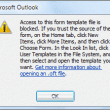
How to create a toolbar button in Outlook 2007 or Outlook 2010 to open templates and files and disable the security warning dialog that displays before the template or files opens.
Many thanks to Hernan Cibello for this tip, originally used with Exchange 5.5 and Outlook 2000. With later versions of Exchange and Outlook, you need to add the distribution...
Microsoft Outlook comes with a file named Outlook.hol (Outlook.txt in Outlook 2000 and older) that includes lists of holidays that you can import into your personal Calendar folder using...
Not everyone likes RSS support in Outlook, fortunately you can disable the RSS capability using group policy or a registry tweak. You can also remove the RSS folders from your profile. I'll show you how.
Restoring a search folder you accidentally deleted is very easy. Scroll down to the end of the folder list to the "Search Folders" folder. Right click on Search Folders...
Do you want most of your new appointments to use Free (or Tentative or Out of Office) as the default for the "Show as time" instead of Busy? Outlook...
How to show the sender’s e-mail address and other fields in a column in message list view. Many Extended MAPI properties are added to messages when they are committed to Outlook message store or the Exchange mailbox but Outlook doesn't have a built in way to expose the value. You can view them using a custom configuration form that exposes the value in a custom field.
How to uninstall Outlook without uninstalling other Office applications.
After upgrading to Outlook 2013, 2010, or 2007, users need to convert categories to color categories to add their categories to the master category list.
Basic instructions on using Outlook's VBA editor: how to open it, where to put the code, how to sign your code.
Although Outlook does not include a yearly calendar, you can view a yearly calendar using the navigation calendars in Outlook or by using VBA to create an HTML calendar.
The steps you'll use to view Outlook's Internet Header depends on your version of Outlook. With the exception of Outlook 2003, Outlook displays only the headers, not the full message source.
It’s easy to share the default folders in your Microsoft Exchange mailbox: just give your co-worker permission to the folder. They can view the contents using the File, Open,...
A frequent equest is “How do I see who organized these meetings?” Easy: use a custom view that includes the organizer field. If you need to see the organizer...
Many users have contact data stored in Excel workbooks or created calendar events in Excel to take advantage of formulas and fill features when creating a large number of...
The Exchange administrator can mail-enable public folders. You can then use it as a generic company address (such as sales@ or help@ ). If you mail-enable a Calendar folder,...
We are often asked how to merge two folders. This can mean one of two things: keep the calendars separate but view them as one using calendar overlay or...
Step-by-step instructions for moving Microsoft Outlook from one computer to another.
When you use an IMAP account in Outlook 2013, appointments and contacts are stored in the IMAP data file. Create a local pst file and move the appointments and contacts to the local data file.
How to configure email accounts in Outlook, including Gmail, Hotmail, Godaddy, and Yahoo email. We have a list utilities that work with some web-based email services.
We often tell users to right click on the “root folder” but where exactly is that? Outlook’s root folder is the top folder in your data file, where Outlook...
A bug in Outlook allows a malformed "web bug" url to bypass the blocked external content setting. As a result, content that would normally be blocked by the Block External Content may be downloaded.
Earlier versions of Outlook had a group calendar window that was separate from Outlook so you could keep a group schedule visible while working in outlook and other applications....
How to configure Outlook 2013 IMAP accounts to get the full flag follow-up options (tomorrow, next week, etc.) and use a custom quick-step that saves email as task with text.
We're seeing a lot of questions (and complaints) about the new iCloud service and Outlook integration. Users with POP3 accounts seem to have the most problems (but could benefit the most from iCloud), since the data is local to one computer and iCloud moves it all into the cloud. We have solutions to many of the problems.
This page sums up a few things I've learned about Outlook categories and color categories, with suggestions for using and managing categories along with troubleshooting tips. Outlook has always supported categories; through Outlook 2003, they were simply Categories. Outlook 2007 introduced Color Categories by merging the short-lived colored flags with categories.
Categories and flags are not available in all of my folders in Microsoft Outlook. I can use categories and flags on mail in my POP3 account but categories are...
Microsoft Outlook stores Contact and Address book options in three different locations. These settings control which Contacts folders Outlook uses as address books, the order Outlook searches for addresses, and which address book is used as the default when you click the To button.
We’re seeing users complain about an error message popping up on the computer screen. The error dialog doesn’t contain much information about the program or the cause. Others receive...
Since the first release of Outlook, Microsoft has released many updates and service packs. The following list is an overview of the available public Microsoft Outlook builds. The list...
We’re seeing a lot of complaints about News Feed folders reproducing like rabbits in Outlook’s folder list. This folder is used by the social connector to display feeds in...
In the People section of Outlook.com, I linked my Gmail, Twitter and LinkedIn contacts. I do not store any Outlook-only Contacts there, they are all linked. I'm syncing to Outlook but none of these linked People are syncing across.
OWA 2007 doesn't include a Print button. If you want to print from OWA, you'll need to use your browser's print functionality. Unfortunately, the results from the default settings...
This bug is fixed in Outlook 2010 SP1. When you create a quick step that contains an address and use only POP3, IMAP, or Outlook Hotmail Connector accounts, Outlook...
There are two types of users: those who want reminders from every folder and data file in their profile and those who don't. Outlook 2007 and Outlook 2010 support...
Not surprisingly, there are more than a few users who don't Outlook to add birthdays to their calendar. Generally speaking, the best way to prevent this is by not...
When you create a meeting request in a secondary calendar, you'll get a message that responses to the meeting request won't tally because the meeting is not in your...
Enabling Compatibility mode in Windows 7 will cause problems in Outlook, including operation error messages and problems creating accounts or new data files. Tutorial shows how to check compatibility settings.
How to customize Outlook Contacts so that the Home address is the default address for all new contacts.
The no-export way to use Outlook data in other applications, such as Excel or Notepad.
When you need to access a non-default calendar in another user's mailbox, you need to add their mailbox to your profile. You can use this method with all versions...
How to configure a Microsoft Outlook POP3 email account to leave email on the server. Outlook 2010 and 2013 leave mail on the server for 14 days by default.
How to password-protect Microsoft Outlook data files so other people can't read your email or view your calendar or contacts.
The most annoying problem with multiple Exchange accounts in an Outlook 2010 profile is the ridiculous number of calendar and contact folders cluttering up the navigation pane. There are ways to deal with the extra folders.
We get two types of questions about font handling in Outlook: How do I change the default fonts? Why is Outlook using [some font] instead of the one I...
Outlook stores recently used email addresses in a nickname or autocomplete cache. This article helps you understand how the nickname autocomplete cache works and explains remove names from this autocomplete list and where to find the list.
Use Conditional formatting rules to highlight messages in different colors.
To use categories to create a dynamic distribution list, switch to the By Category view then select the category group you want to send a message to. You can...
Some users are confused by the behavior of Ctrl+F in Outlook 2007 – sometimes it brings up the Find dialog, other times it Forwards the message. When the cursor...
When you start a mail merge in Outlook, you can use categories or Outlook's filters to select the contacts you want to include in the merge.
Outlook 2003, Outlook 2007, and Outlook 2010 offer an option to make New Groups (in the Navigation Pane) and quite a few users aren’t quite sure what they should do...
Outlook 2010 introduced a new feature when you hover over the address fields in email. The contact card looks like screenshot below. With the basic contact card, you'll see...
You can select 2 or 3 weeks in the navigation calendars and view those weeks in a monthly-style grid. This trick works on all versions of Outlook. To change...
This tutorial shows you how to view two (or more) calendars side by side and overlay them in Outlook 2007 (and Outlook 2010/2013). Outlook 2003 supports side-by-side calendars but...
Outlook 2010 builds on a number of features in Outlook 2007 and adds several popular requests, including the ability to open Exchange mailboxes on two different Exchange servers. Would...
By default, Windows hides a lot of files and folders including many of the support files Outlook uses. In order to find it using Search, you need to use...
Previous versions of Outlook each offered an Organize pane which allowed users to quickly apply colors to messages from specific users. This is Outlook 2007's Organize pane: The Organize...
When you have multiple accounts setup in Outlook and all delivered to the same Inbox, you may need to check to see which account downloaded a message. This information...