It's easy to create an appointment from an email in Microsoft Outlook: just drag the email message to the calendar and drop it.
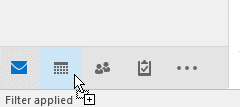
You can drag an email to one of the buttons on the navigation bar then drop it to create an appointment with the contents of the message in your default Calendar or you can hover over the button to expand the navigation pane, then drop it on another Calendar.
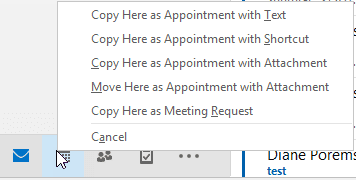
Right-click (or hold Ctrl) and drag to see the menu with additional options.
If you prefer not to drag the message or it's open in a new window, you can use the Move to (or Copy to) Folder command to create a new appointment.
This works with any Outlook folder and in all versions of Outlook (desktop versions).
Outlook 2016 and insert as a Shortcut
A change in Outlook 2016 to support HTML in appointment bodies affected the ability to create appointments with shortcuts, as the shortcut is inserted an linked object, which is not supported by HTML formatting.
The user can either change the appointment format to Rich Text to show the shortcut or change the default to Rich Text. If you want to change the default to RTF, see this article for the necessary registry key:
Video Tutorial
More Information
"Create an Outlook Appointment from a Message" (uses entire message body)
"Create Task or Appointment and Insert Selected Text" (pasts selected text into appointment or task body)

Matthew Mohr says
We recently switched to microsoft 365 and now the hover to select another calendar option doesn't work. Is there a setting somewhere to enable this feature?
Diane Poremsky says
Ah, you're right, its broken. It's not a setting but i will report it as a bug.Diane Poremsky says
Never mind, its working now - I didn't right click and drag. (Need more coffee this morning. :))
If it's not working on a right click, Which version and build of Outlook are you using? See File, Office Account for the information.
Freda Hudson says
I monitor the mailboxes/calendars of 3 other people. When I perform this step, the appointment is always created on my calendar. How do I create the appointment on another person's calendar. I have Editor rights. Thanks.
Diane Poremsky says
You would need to open the calendar module in another window and drag the mail to the desired calendar.
Kreera says
Actually, I just found the confirmation and a workaround here: https://answers.microsoft.com/en-us/office/forum/office_2016-outlook/outlook-2016-create-appointment-with-shortcut-from/5b16e835-a56d-4027-aadb-8b4855b71277?auth=1
Kreera says
The option "copy here as appointment with shortcut" doesn't work for us on Outlook 2016 (Win) in O365. It creates a new blank appointment with only the subject filled it to match the email's subject. Does it work for you?
Diane Poremsky says
That's because the body format as HTML doesn't support OLE shortcuts. Force the change back to RTF and it should work again.
The workaround doesn't actually work, does it? It adds the icon (3 in my test :)) but the icon isn't clickable - because HTML doesn't support OLE. (Oops, User error :) The links work after the appt is saved.)Setting the registry key at https://www.slipstick.com/outlook/calendar/change-format-notes-appointments/ to force RTF will fix it.