You can insert text or HTML files in messages in Outlook (any version.) Use this to insert "boilerplate text" or HTML created in an HTML editor.
In Outlook 2016, you need to customize the Quick Access Toolbar or Ribbon to add the Insert File command to the ribbon - the default Attach File command on the Insert menu won't offer the opportunity to insert a file as text. The old Attach File command, which has the Insert as Text option is available in the customize dialog.
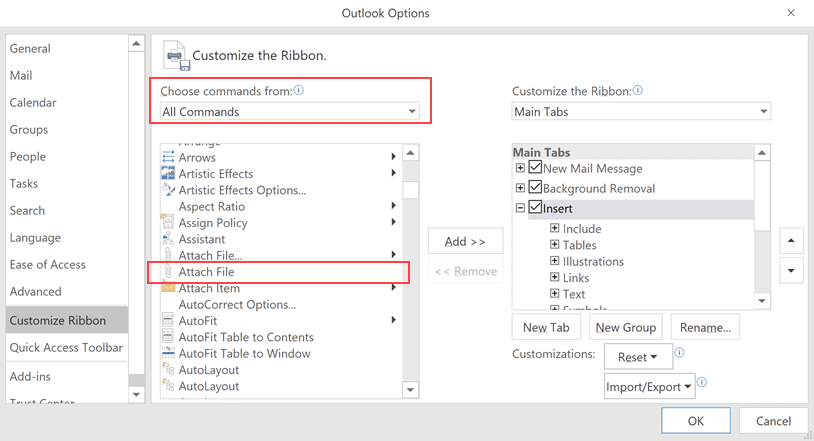
Tip: Make sure you choose the second Attach File command, the one that does not expand.
When you click this Attach file dialog, you'll have the older options to insert the file as text.
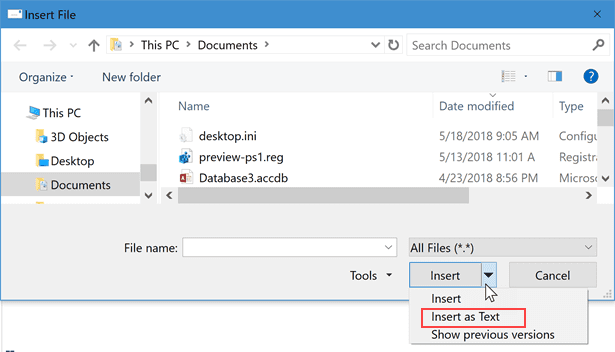
To Insert text or HTML files into a message:
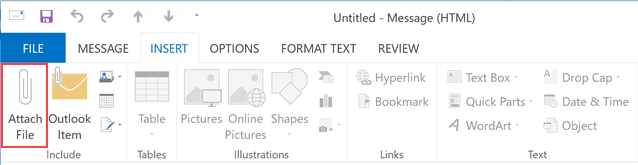
- Click the Attach File icon in Outlook 2007, 2010, and 2013

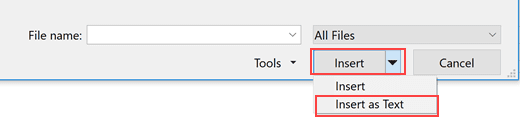
- Select the file and expand the Insert button.
- Select Insert as text. If the file contains HTML tags, it will render in the message as HTML.
More Information
You can use VBA to insert HTML stationery or text files as the message body. See "Create a New Message using an HTML File or Stationery" for the code.

Hi Diane. Is there a way to replicate this through VBA? I would like to attach a webpage to an email as text, but am having a hard time figuring out this final step. The (very simple) code I've written, which is included below, will attach the webpage, but as a file:
Public Sub WeeklyHayReport()
Dim FarmAccount As Outlook.Account
Dim ObjMsg As MailItem
For Each FarmAccount In Application.Session.Accounts
If FarmAccount = "Farm" Then
Set ObjMsg = Application.CreateItem(olMailItem)
With ObjMsg
.SendUsingAccount = FarmAccount
.To = "Email Address"
.CC = "Other Email Address"
.Subject = "Idaho Weekly Hay Report"
.Attachments.Add ("https://www.ams.usda.gov/mnreports/ml_gr312.txt")
.Display
End With
End If
Next
End Sub
>> webpage to an email as text,
insert it as an attachment or embed it as the message body? (Yes to either.)
See https://www.slipstick.com/outlook/email/create-new-message-using-html-file-stationery/#insert for inserting files as the body.
When I do this in Outlook 2010 the html file appears as an attachment. I have validated that I am in HTML mode. Is this an issue with the source HTML file itself?
If you choose Insert > Insert as Text, it should insert it into the message body as an HTML message.
Office 365 does not appear to have the dropdown to expand the Insert Button ? Is there a way to do this in Office 365 ?
The attach file quick menu needs to be the one without the ellipsis. Also your html file needs the HTML BODY codes for Outlook to realize what you're trying to accomplish.